
Configuration file support for webviz

Project description

Democratizing Python web applications








Writing a Dash web application gives a lot of flexibility, however, it also requires :snake: Python knowledge from the person setting it up.
Webviz is a MIT-licensed configuration layer on top of Dash, which encourages making reusable components and dashboards, which can then be added/removed when creating an application using a short yaml configuration file.
This Python package, webviz-config, is the core plugin framework. For a real example repository using this plugin system, see e.g. webviz-subsurface.
These are the main user groups targeted by Webviz:
- You do not know Python, and only want to add different predefined dashboards or visualizations/components in a certain order and/or on different pages in the application. Optionally with some text and mathematical equations (that you provide) inbetween the dashboards, explaining what the user is looking at.
- You know Python, and want to create generic or specialized dashboards you or other users can reuse by simply asking for it in the Webviz configuration file. This can be done without knowing JavaScript (see also Dash for more information).
- You know React, and want to create highly specialized visualization which Python or pure config-file users can reuse.
Webviz will create web applications with very :lock: strict security headers and CSP settings, giving an rating of A+ on e.g. Mozilla observatory. It also facilitates a :whale: Docker setup, where the Python code can be ran completely unpriviliged in a sandbox (both with respect to file system access and network communication).
Example configuration file and information about the standard plugins can be seen in the documentation.
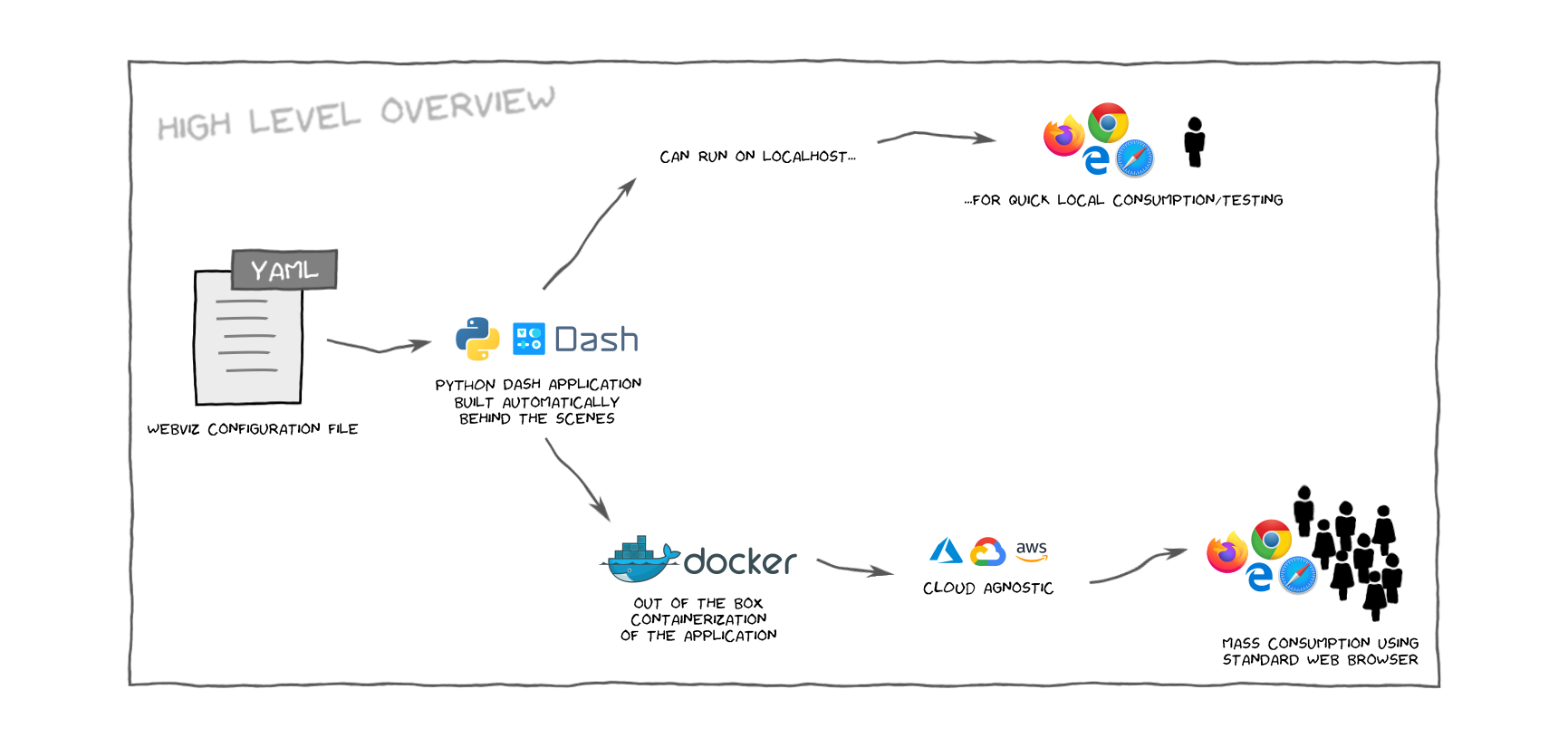
The workflow can be summarized as this:
- The user provides a :book: configuration file following the yaml standard.
- Webviz reads the configuration file and automatically writes the corresponding :snake: Python code.
- The created application can be viewed locally, or deployed using :whale: Docker to a cloud provider. Both out of the box.
Installation
The recommended and simplest way of installing webviz-config is to run
pip install webviz-config
If you want to develop webviz-config and install the latest source code manually you
can do something along the lines of:
can run
git clone git@github.com:equinor/webviz-config.git
cd ./webviz-config
npm ci --ignore-scripts && npm run postinstall
pip install -e .
After installation, there is a console script named webviz available. You can test the installation by using the provided test
configuration file,
webviz build ./examples/basic_example.yaml
Without any additional arguments, this will
- create a temporary folder
- write the Python application code to that folder
- start a localhost server
When stopping the server (press CTRL+C at any time), the temporary folder is deleted.
The optional arguments can be seen when running
webviz --help
Usage
See the introduction page for information on how you
create a webviz configuration file and use it.
Creating new plugins
If you are interested in creating new plugins which can be configured through the configuration file, take a look at the contribution guide.
To quickly get started, we recommend using the corresponding cookiecutter template.
License
webviz-config is, with a few exceptions listed below, MIT licensed.
- The webviz logo is CC BY-NC-ND 4.0
Release history Release notifications | RSS feed


Download files
Download the file for your platform. If you're not sure which to choose, learn more about installing packages.
Source Distribution
Built Distribution
Filter files by name, interpreter, ABI, and platform.
If you're not sure about the file name format, learn more about wheel file names.
Copy a direct link to the current filters
File details
Details for the file webviz-config-0.1.0.tar.gz.
File metadata
- Download URL: webviz-config-0.1.0.tar.gz
- Upload date:
- Size: 1.1 MB
- Tags: Source
- Uploaded using Trusted Publishing? No
- Uploaded via: twine/3.2.0 pkginfo/1.5.0.1 requests/2.21.0 setuptools/49.6.0 requests-toolbelt/0.9.1 tqdm/4.48.2 CPython/3.6.11
File hashes
| Algorithm | Hash digest | |
|---|---|---|
| SHA256 |
c73a804eab212369b77538a060e2a078d0cb56e7e6205bd3f4fb23b8748e814f
|
|
| MD5 |
792e6e2ea771866d1940344c464bc074
|
|
| BLAKE2b-256 |
8498dda7fa9a9d1183b394aa79285ef0b655e86328ac97b56c32052da4a2560f
|
File details
Details for the file webviz_config-0.1.0-py3-none-any.whl.
File metadata
- Download URL: webviz_config-0.1.0-py3-none-any.whl
- Upload date:
- Size: 531.9 kB
- Tags: Python 3
- Uploaded using Trusted Publishing? No
- Uploaded via: twine/3.2.0 pkginfo/1.5.0.1 requests/2.21.0 setuptools/49.6.0 requests-toolbelt/0.9.1 tqdm/4.48.2 CPython/3.6.11
File hashes
| Algorithm | Hash digest | |
|---|---|---|
| SHA256 |
0782a6e0af0bcfb477a866fd0f8643d5e406a65873a061cbca96d173bea29fbd
|
|
| MD5 |
760f0706af163487e80870378a54a0e6
|
|
| BLAKE2b-256 |
41c56bd826221946b0b180eefebfb320b9a6e40110730b01a8ff83647b244e10
|







