
Weir
Leak tests for AI agents.
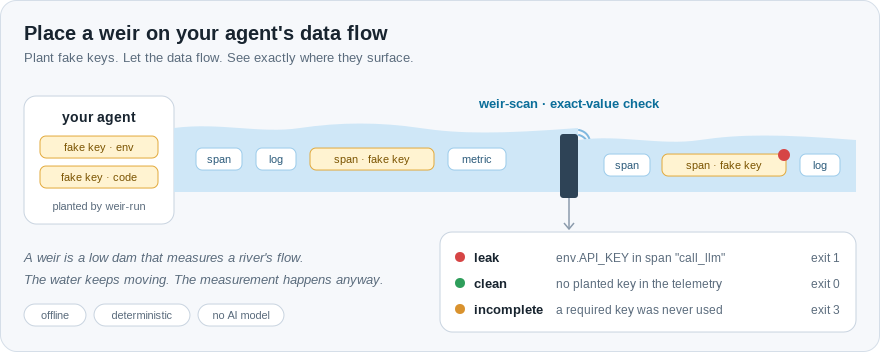
Plant fake credentials where your real ones live, run your agent, and find every place it exposed them: its telemetry, the model it calls, or any other service.
pip install weir-scan
weir canary judge --sample



How it works
Weir is two packages that work together, in CI or on your laptop:
- weir-run is the test rig. It plants a unique fake credential wherever a real one would live and runs your agent's own flows against a local mock on 127.0.0.1: a fake model that speaks the OpenAI-compatible APIs and the Anthropic Messages API, OAuth endpoints, a telemetry receiver and stand-ins for your own APIs. It captures everything the agent sends out: its telemetry, its console output, and every request the mock receives, refused ones included. On Linux, where it can make an unprivileged network namespace, the flows run in one whose only network is loopback, so a client that ignores the proxy settings reaches nothing, and the attempt is reported.
- weir-scan is the inspector.
weir canary judgesearches that capture for every planted value and gives the verdict: leak, clean or incomplete. Each placement names its own provider: a key in a credential field of a request to its own provider is the key being used, and the same key anywhere else is a leak that names where it went, such assink="model"for a key in a prompt. weir-scan also works on its own, on traces you already have.
pip install weir-scan weir-run
Who it's for
- Teams building agents: run it in CI on every dependency update. A framework or tracing upgrade that starts writing keys into telemetry fails the build, like a regression test for leaks.
- Framework and tracing maintainers: run it before each release, so the next advisory isn't about you.
Why it's different
- It doesn't guess. It looks for the exact values it planted, so a hit is a real leak, and a key is found even when it doesn't look like a key, in any of seven forms, raw or encoded.
- It checks every way out. Spans, logs and metrics, the agent's console output, the prompts and messages it sends the model, the requests it makes to your other APIs, and requests to any other host, which the mock refuses and records.
- Offline and deterministic. No AI model decides anything. The judge opens no sockets and starts no processes, and CI enforces that. The rig's mock listens on 127.0.0.1 only and forwards nothing.
- No false all-clear. If a run didn't exercise something you marked required, or a flow crashed, or, where the network is isolated, a flow tried to connect around the mock, Weir says "incomplete", not "clean", and shows exactly what it checked. Exit codes: 0 clean, 1 leak, 2 unusable input, 3 incomplete.
Proof
Found with Weir: GHSA-j7qq-vr8c-xvw3, an MLflow advisory, fixed in MLflow 3.17.0.
Try it on your own agent
The sample is a bundled fake ledger and capture with one planted value in a span attribute, so the check exits 1 and prints its leak report. It names the placement and the span, never the value:

LEAK env.SAMPLE_SERVICE_KEY file=canary-sample/otlp.jsonl:1 signal=traces span="call_service" at=attributes.app.client.config form=raw
coverage: 2 placements (1 leaked, 1 exercised, 0 not exercised, 1 required), 1 flows (1 ok), 1 files, 3 spans, 0 log records, 0 metric data points, 29 strings, 1347 bytes swept
network not isolated: direct connections were not observed
result: leak
On your own agent:
weir-run run --config canary.toml
The config names where your credentials live, the provider each one belongs to, and which flows to run:
[[placement]]
id = "env.OPENAI_API_KEY"
kind = "env"
shape = "openai"
required = true
provider = "model"   # its own provider: the mock's model API

[[flow]]
id = "quickstart"
command = ["{python}", "examples/quickstart.py"]
The weir-run README covers the config, the fake model, a canary_check pytest fixture and a demo. The judge's contract, including every encoding it matches, is docs/canary.md.
Also included: the flow scan and weir inventory (experimental)
The flow scan
weir scan reads the OpenTelemetry traces your agent already emits and fails the build when sensitive data travels to a place it should never reach, for example a bank account number from untrusted tool output that ends up in an outgoing email. It rebuilds the session step by step from the trace, follows the data, and prints the source, the destination and every step in between.
weir gauge your-export.jsonl   # or: weir gauge --sample
weir scan your-export.jsonl
Most exports cannot support this yet, because content capture ships off by default almost everywhere. weir gauge measures how much of your trace the scan can actually see, and names the exact setting to switch on, read from the instrumentation in your own trace. The scan also reports any provider key pattern it finds sitting in a span, with no flow needed.
Each check is a rule, and a rule is a short JSON file naming a source, a destination and a match mode (bundled rules). Rewording prompts or adding a step does not change the result. When the trace evidence is too weak to prove a flow, the finding stays in the report, marked as not proven and saying why, instead of quietly disappearing.
weir scan exits 0 when nothing fails, 1 on a finding and 2 on unusable input.
weir inventory (experimental)
weir inventory --home DIR lists the credentials an agent could reach: standard credential files, project files (with imported gitleaks or trufflehog results), the launch environment and shell startup files, and the approved map .weir/reach.yml. It reports them by name, source and location only. It never prints, logs or stores a value; what it can store is a keyed fingerprint plus offsets (contract). Its output and JSON schema may change without notice.
Why you can trust it
- It searches for what it planted. A hit is a planted value found in the capture, never a pattern guess, and the judge's output depends only on where values appear, never on what they are.
- Nothing phoning home: a test, not a promise. The analysis path opens no sockets. The whole test suite runs with socket creation blocked (tests/_harness/g3.py), and packages/weir/tests/test_canary_judge.py fails if the judge opens a socket or starts a process.
- Nothing Weir prints is a credential. The judge names placements and locations, never a value or a fragment of one. No rendered weir output (text, gauge, HTML, ledger) contains a credential-shaped value; that is a test over every fixture in the corpus.
- It reads real traces, not only ones we wrote. The suite pins a frozen capture that no weir code ever touched (provenance). Malformed input is reported under one of a fixed list of named cases; it never guesses (contract).
- Attacker text cannot fake a flow. The flow scan fails the build only on links between steps that the instrumentation itself records. A flow that rests on a link inferred from matching text is reported, but never fails the build. Getting past that is a security bug (SECURITY.md).
- Claims about other people's software are sourced and dated (REMEDIATION_SOURCES.md).
FAQ
Why not just use SecretStr or redact in the collector? Redaction is worth doing. Weir checks whether it worked: it searches the exported output for the exact planted values, whatever path they took to get there.
How is this different from gitleaks or trufflehog? They find strings that look like secrets in code and files. Weir proves whether a value you planted reached your telemetry, console output or a request to anything but its own provider, in any of the encodings docs/canary.md lists. It does not replace them.
Does it need my real keys? No. It uses fake values by design, and a real key should never be in a run.
Does it send anything anywhere?
No. The analysis opens no sockets, and a test enforces it. The rig's mock listens on 127.0.0.1 only and refuses every proxied request to another host, and on Linux, where it can make an unprivileged network namespace, the flows have no route out.
Which frameworks? Any that can export OpenTelemetry spans to a file.
Honest limits
A clean result is evidence about the flows that ran and the credentials planted, not a statement that the program is safe.
- It finds whole values only. A truncated, split or partly masked value, a hashed, encrypted or compressed one, and encodings beyond those docs/canary.md lists (URL-encoded base64, UTF-16, line-wrapped base64) are not matched.
- It sees only what reached the capture: telemetry, each flow's output, and the requests the rig's mock received. A refused HTTPS
CONNECThas no visible content, because the mock refuses the tunnel before any byte goes through it: it is listed as a blocked connection, never judged a leak. - A placement with neither a
providernor aprovider_hostbelongs in no request, so any request that holds it counts as a leak, its own auth header included. weir-run warns about each one before any flow runs. - When placements that belong to different endpoints (or one with no provider) share one
provider_host, their credential fields are merged for refused requests to that host, so one placement's value in the other's declared field counts as evidence, not a leak. - This release plants environment variables, values passed in code, and OAuth tokens. Model APIs must be OpenAI-compatible or Anthropic Messages API.
- The rig isolates the network only on Linux, where it can make an unprivileged network namespace. Elsewhere, or where unprivileged user namespaces are disabled or restricted, the run goes ahead, a client that ignores the proxy settings and has a hard-coded host can reach that host directly, and the report says
network not isolated: direct connections were not observed.--require-isolationmakes such a run incomplete. Even isolated, some paths are not observed, such as a name lookup through a host resolver socket (network isolation). - The flow scan needs content capture switched on in your instrumentation;
weir gaugetells you whether it is.
License
Apache-2.0, all of it, permanently. Nothing held back, nothing gated, nothing phoning home.
Install weir-scan; the import and the command are both weir.
Why "weir"

A weir is a low dam built across a river to regulate and measure its
flow - the water keeps moving; the measurement happens anyway.
Damhead Weir, Water of Leith. Photo by 501ghost, Wikimedia Commons, CC0.
1 maintainer

Metadata
1 maintainer
Release files for weir-scan 0.6.0
For a detailed explanation of source distributions (sdists) and built distributions (wheels), please see the package formats documentation.
Source distribution (sdist)
| File | Size | Uploaded | Provenance | Actions |
|---|---|---|---|---|
| weir_scan-0.6.0.tar.gz | 257.5 kB | With provenance | Details for weir_scan-0.6.0.tar.gz |
Built distribution (wheel)
| File | Interpreter | ABI | Platform | Actions Reset |
|---|---|---|---|---|
| weir_scan-0.6.0-py3-none-any.whl | Python 3 | none | any | Details for weir_scan-0.6.0-py3-none-any.whl |
Total release size: 428.9 kB
Release files / weir_scan-0.6.0.tar.gz
| Download URL | weir_scan-0.6.0.tar.gz |
|---|---|
| Size | 257.5 kB |
| Tags | Source |
|
SHA-256 checksum How to use checksums |
2531675dc5a079856c4cea2baead8d685d2ff03725e47044ee02615c729c0417
|
|
BLAKE2b-256 checksum How to use checksums |
f6e8e95b0f9c45ab171d7c5958cf0770f4a03891ab1bf6d9d0e314cb10c8e149
|
| Upload date | |
|
Uploaded using Trusted Publishing? What is trusted publishing? |
Yes |
| Uploaded via |
twine/7.0.0 CPython/3.13.16
|
Provenance
Provenance describes where a file came from. On PyPI, provenance is shared via attestations, which provide a verifiable record of the build or publishing details. View details, limitations and caveats.


PyPI Publish Attestation
PyPI verified that this artifact, at this checksum, originated from the publisher listed below.
Signed by GitHub Actions, verified by PyPI on Oct 22, 2026.
Transparency logRelease files / weir_scan-0.6.0-py3-none-any.whl
| Download URL | weir_scan-0.6.0-py3-none-any.whl |
|---|---|
| Size | 171.4 kB |
| Tags | Python 3 |
|
SHA-256 checksum How to use checksums |
59c3b0559c56b74b00222a5ec356e33c405135bcdfa91e67cf17c7f5524092fd
|
|
BLAKE2b-256 checksum How to use checksums |
8e49200a0fb001b1724409dc1b750397880b684991c454f6cdae66bd5534ee6b
|
| Upload date | |
|
Uploaded using Trusted Publishing? What is trusted publishing? |
Yes |
| Uploaded via |
twine/7.0.0 CPython/3.13.16
|
Provenance
Provenance describes where a file came from. On PyPI, provenance is shared via attestations, which provide a verifiable record of the build or publishing details. View details, limitations and caveats.
PyPI Publish Attestation
PyPI verified that this artifact, at this checksum, originated from the publisher listed below.
Signed by GitHub Actions, verified by PyPI on Oct 22, 2026.
Transparency logSecurity for weir-scan 0.6.0
Provenance
Provenance describes where a file came from. On PyPI, provenance is shared via attestations, which provide a verifiable record of the build or publishing details. View details, limitations and caveats.
Full provenance
Both files in this release have been uploaded with provenance metadata.
Attestation for weir_scan-0.6.0.tar.gz
PyPI Publish Attestation
PyPI verified that this artifact, at this checksum, originated from the publisher listed below.
Signed by GitHub Actions, verified by PyPI on Oct 22, 2026.
Transparency logA note on package security
PyPI is a repository for distributing packages, not a service for auditing them. While third-party security researchers and our staff do their best to detect and remove malicious packages, PyPI cannot guarantee the quality, security or suitability of any given package.
To learn more about protecting yourself from malicious actors, visit our package security documentation.














