
Weir
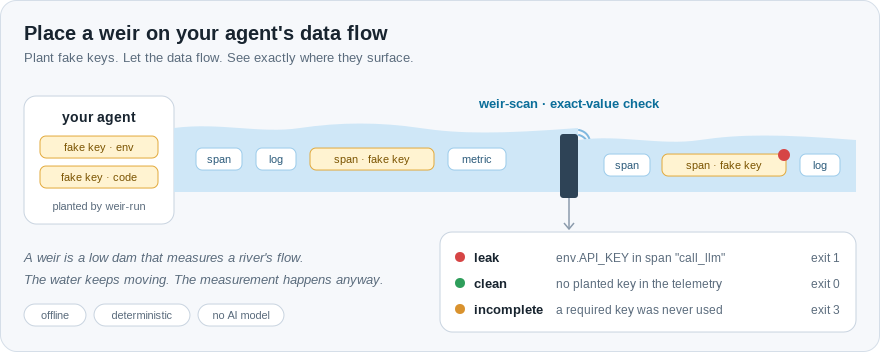
Leak tests for AI agents. Plant fake credentials where your real ones live, run your agent, and find every place it exposed them: its telemetry, the model it calls, or any other service.



Try it in 10 seconds
pip install weir-scan
weir canary judge --sample

Two ways to use it
1. Test your agent, in CI or on your laptop
weir-run plants a unique fake key wherever a real one would live, runs your agent's own flows against a local fake model, and captures everything the agent sends out. weir canary judge then searches all of it for those exact values.
pip install weir-scan weir-run
weir-run run --config canary.toml
[[placement]]
id = "env.OPENAI_API_KEY"
kind = "env"
shape = "openai"
required = true
provider = "model"     # where this key is allowed to go

[[flow]]
id = "quickstart"
command = ["{python}", "examples/quickstart.py"]
In a pull request, one step runs it and posts the verdict as a comment:
- uses: IdoGol24/weir@<ref>
Config, pytest fixture and the full workflow: weir-run README · action README.
2. Watch your own Claude Code sessions
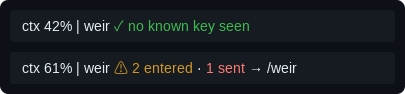
A status-line segment counts how many of your real credentials entered the session's context, and how many were sent out in a tool call. /weir explains each one: where it came from, the turn that moved it, where it sits now, and what to do. It never shows a value.
uv tool install weir-scan     # or: pipx install weir-scan
weir statusline setup         # shows the change, applies it only when you type yes
weir statusline undo removes it. Linux and macOS. Details: docs/statusline.md.
Why it's different
- It doesn't guess. It looks for the exact values it planted, raw or encoded, so a hit is a real leak.
- It checks every way out: spans, logs, metrics, console output, prompts sent to the model, and requests to any other service. On Linux, where unprivileged user namespaces are allowed, the agent runs with no outside network, so a direct connection is caught too.
- No false all-clear in the test rig. In a
weir-runtest, if something you marked required wasn't exercised, the result is "incomplete", never "clean". Exit codes: 0 clean, 1 leak, 2 unusable input, 3 incomplete. - Offline and deterministic. No AI model decides anything, and Weir itself sends nothing anywhere. Tests enforce both.
Found with Weir: GHSA-j7qq-vr8c-xvw3, an MLflow advisory, fixed in 3.17.0.
Limits
- It finds whole values only, not hashed, split or truncated ones.
- It sees only what the agent sends while the test runs.
- Network isolation is Linux-only and needs unprivileged user namespaces. Elsewhere the report says the network wasn't isolated.
- The fake model speaks the OpenAI-compatible and Anthropic Messages APIs.
- The status line knows only the keys in your inventory, as whole values. A key that leaves inside a file or by its variable name isn't seen.
- The inventory covers one project at a time.
The full lists are in docs/canary.md and docs/statusline.md.
Also in the box
weir scan: follows sensitive data through traces you already have, for example from untrusted tool output to an outgoing email.weir inventory: lists the credentials an agent could reach, by name only.weir audit: checks your real credentials against saved agent sessions, offline.
FAQ
Does it need my real keys? No. Tests use fake values only. For the status line, Weir stores only keyed fingerprints of your real keys, never the keys themselves.
How is it different from gitleaks or trufflehog? They find strings that look like secrets in your code. Weir proves whether a specific value actually left through your agent. Use both.
Does it send anything anywhere? No. The fake model listens on 127.0.0.1 only and forwards nothing, and the scanner opens no network connections. Tests enforce both.
License
Apache-2.0, all of it, permanently. Nothing held back, nothing gated, nothing phoning home.
Why "weir"

A weir is a low dam that measures a river's flow. The water keeps moving; the measurement happens anyway.
Damhead Weir, Water of Leith. Photo by 501ghost, Wikimedia Commons, CC0.
1 maintainer

Metadata
1 maintainer
Release files for weir-scan 0.7.0
For a detailed explanation of source distributions (sdists) and built distributions (wheels), please see the package formats documentation.
Source distribution (sdist)
| File | Size | Uploaded | Provenance | Actions |
|---|---|---|---|---|
| weir_scan-0.7.0.tar.gz | 364.8 kB | With provenance | Details for weir_scan-0.7.0.tar.gz |
Built distribution (wheel)
| File | Interpreter | ABI | Platform | Actions Reset |
|---|---|---|---|---|
| weir_scan-0.7.0-py3-none-any.whl | Python 3 | none | any | Details for weir_scan-0.7.0-py3-none-any.whl |
Total release size: 584.5 kB
Release files / weir_scan-0.7.0.tar.gz
| Download URL | weir_scan-0.7.0.tar.gz |
|---|---|
| Size | 364.8 kB |
| Tags | Source |
|
SHA-256 checksum How to use checksums |
45e9f7472bca14b1f5e2f1c90e8e72cb5b65249a01ef9afab4201695e631f426
|
|
BLAKE2b-256 checksum How to use checksums |
fe1849004cc9a4f89147d8c5df4bdd06ecf2b3fcebfe014eb88a258803ec072a
|
| Upload date | |
|
Uploaded using Trusted Publishing? What is trusted publishing? |
Yes |
| Uploaded via |
twine/7.0.0 CPython/3.13.16
|
Provenance
Provenance describes where a file came from. On PyPI, provenance is shared via attestations, which provide a verifiable record of the build or publishing details. View details, limitations and caveats.


PyPI Publish Attestation
PyPI verified that this artifact, at this checksum, originated from the publisher listed below.
Signed by GitHub Actions, verified by PyPI on Oct 26, 2026.
Transparency logRelease files / weir_scan-0.7.0-py3-none-any.whl
| Download URL | weir_scan-0.7.0-py3-none-any.whl |
|---|---|
| Size | 219.7 kB |
| Tags | Python 3 |
|
SHA-256 checksum How to use checksums |
3198fe758eddcf62dd764c910584aa9903674029edc1fca8d24ea49aeca7e03b
|
|
BLAKE2b-256 checksum How to use checksums |
075fd08d6b111ac09b563d0a0476cc6b5c6374c0d078efda01623b517995d994
|
| Upload date | |
|
Uploaded using Trusted Publishing? What is trusted publishing? |
Yes |
| Uploaded via |
twine/7.0.0 CPython/3.13.16
|
Provenance
Provenance describes where a file came from. On PyPI, provenance is shared via attestations, which provide a verifiable record of the build or publishing details. View details, limitations and caveats.
PyPI Publish Attestation
PyPI verified that this artifact, at this checksum, originated from the publisher listed below.
Signed by GitHub Actions, verified by PyPI on Oct 26, 2026.
Transparency logSecurity for weir-scan 0.7.0
Provenance
Provenance describes where a file came from. On PyPI, provenance is shared via attestations, which provide a verifiable record of the build or publishing details. View details, limitations and caveats.
Full provenance
Both files in this release have been uploaded with provenance metadata.
Attestation for weir_scan-0.7.0.tar.gz
PyPI Publish Attestation
PyPI verified that this artifact, at this checksum, originated from the publisher listed below.
Signed by GitHub Actions, verified by PyPI on Oct 26, 2026.
Transparency logA note on package security
PyPI is a repository for distributing packages, not a service for auditing them. While third-party security researchers and our staff do their best to detect and remove malicious packages, PyPI cannot guarantee the quality, security or suitability of any given package.
To learn more about protecting yourself from malicious actors, visit our package security documentation.














