





Wendao (问道, wèn dào, "asking the way") is an AI learning companion. It turns your course materials into two things for students:
- an interactive knowledge graph of the course's chapters and concepts, and
- an AI learning agent that answers questions using only the course materials, with a link to the page each answer came from.
It was built for the NUS course MLE4217/5219 Materials Informatics, and this repository uses that course as its example. Nothing in the code is tied to that course, so you can run it on any course written as Markdown pages and Jupyter notebooks.
Try the live demo: the knowledge graph of the example course, in your browser (no install; the AI chat needs a Wendao server, so it is off in the demo).
Guides: teacher guide · server setup · developer notes · plans and ideas
Demo

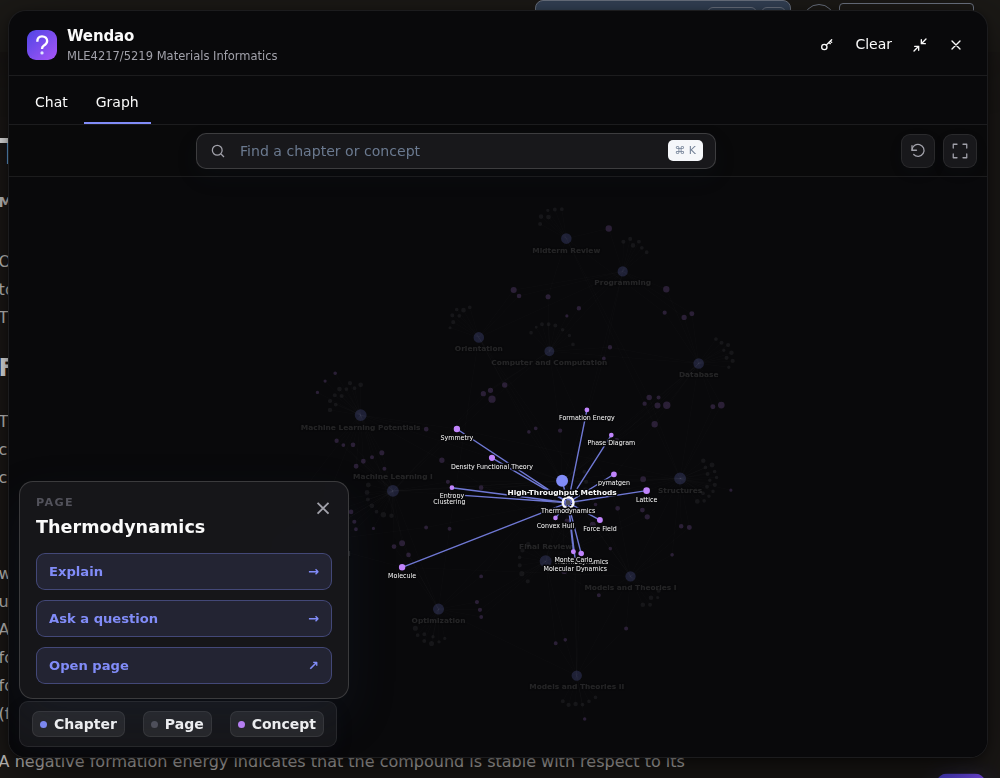
Knowledge graph
Chapters, pages, and concepts, linked where the course connects them. Drag, zoom, and search; click a concept to read a short introduction from the notes and jump to the course page.
Full video: knowledge_graph_demo.mp4
Guided path
New to the course? The guided path walks through it chapter by chapter: each chapter's overview and learning objectives from the course pages, then the key concepts it introduces, with where to read about them. Students can stop and continue later. Try it.
Full video: guided_path_demo.mp4
AI learning agent
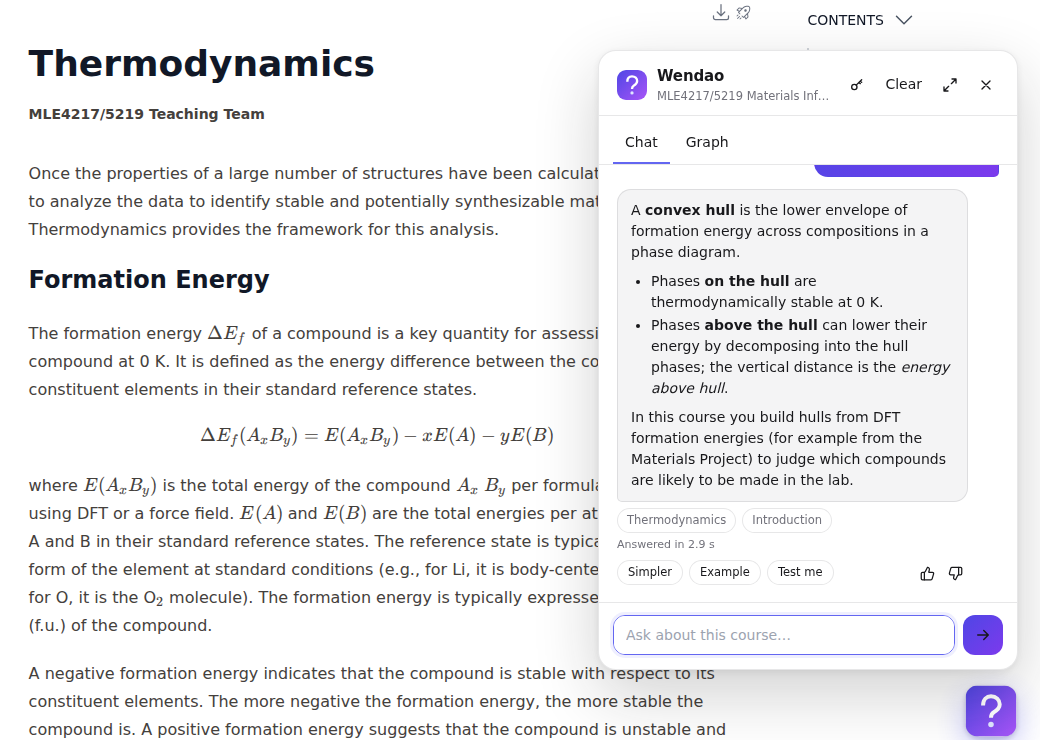
Select a node and press Explain, or ask your own question. Answers come only from the course and link to the pages they used. If the course doesn't cover a question, the agent says so.
Full video: ai_learning_agent_demo.mp4
Chat widget on your course website
Install
You need Python 3.11 or newer.
pip install wendao
Students don't install anything: they use your website, the chat widget on your course pages, or one HTML file.
Quick start
wendao init my-course        # a new workspace with a notes/ folder
# copy your notes (Markdown, notebooks, PDF, slides, Word, LaTeX) into my-course/notes/
cd my-course
# choose a model under [model] in wendao.toml, and put its API key in .env
wendao build                 # graph, concepts, and search index
wendao doctor                # checks everything and says how to fix problems
wendao serve                 # opens the course website at http://127.0.0.1:5057/
No model yet? Everything except the AI answers still works, and wendao ask --search-only "..." shows what search
finds. To try the example course: git clone https://github.com/deng-group/wendao.git, then
cd wendao/examples/mle4217_5219 and run wendao serve --no-check (it is already built; for AI answers, set your own
model under [model] in its wendao.toml).
The teacher guide explains each step and setting.
Share it with students
| Way | How | AI answers |
|---|---|---|
| One HTML file | wendao export, then share build/<course>.html; it opens by double-click |
needs a server |
| Website | put Wendao on a server (server setup) and share the link | yes |
| Chat widget | wendao widget install _build/html --api https://... on your built course website |
yes |
You decide how the AI answers: write your own instructions in AGENTS.md, and with assignment_help = "hints" it
helps with graded work without solving it. You decide who pays for AI answers: your key (with a daily limit per student and optional sign-in), each student's
own key, or either. See How students use AI.
Commands
| Command | What it does |
|---|---|
wendao init my-course |
Create a new workspace with starter files |
wendao build |
Read your notes; build the knowledge graph, concepts, and search index (only what changed) |
wendao doctor |
Check settings, notes, build, test questions, and model, and say how to fix problems |
wendao ask "question" |
Ask a question (--search-only: see what search finds, without a model) |
wendao serve |
Run the course website (--widget: the API for the chat widget) |
wendao export |
Put the knowledge graph in one HTML file |
wendao widget install _build/html |
Add the chat widget to every page of a built course website |
wendao insights |
See what students ask about, and which questions your notes couldn't answer |
wendao feedback |
See which answers students marked as not helpful, and why |
wendao students |
See your class list and how many questions each student asked |
Run any command with --help to see its options.
How it works
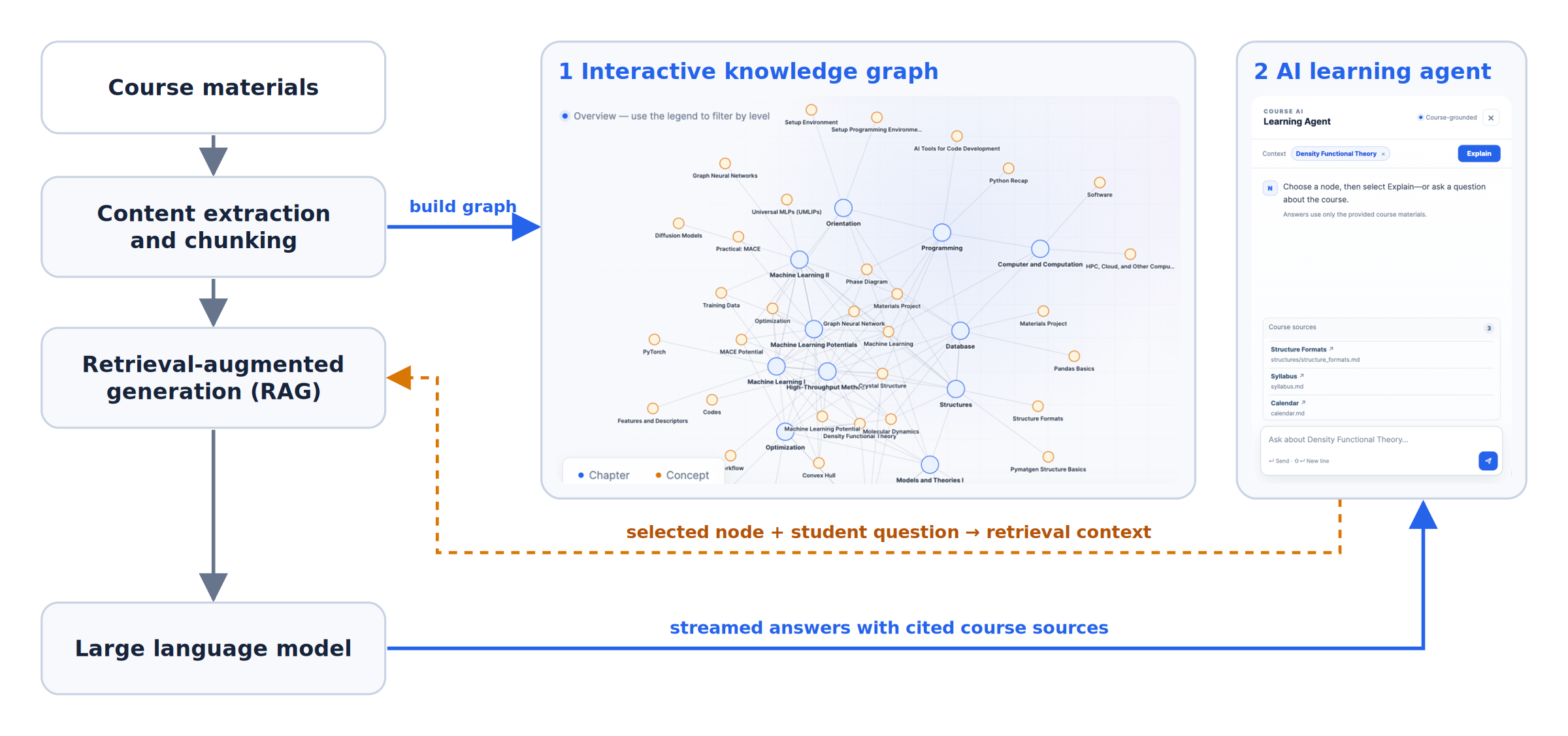
Wendao splits your notes into small pieces, links chapters and concepts that appear together, and, for each question, finds the most relevant pieces with keyword and meaning-based search. If they don't really answer the question, it says so instead of guessing. Otherwise a language model (Claude, GPT, Gemini, DeepSeek, or a local model) writes the answer from them. No training or GPU is needed.
Citation
Wendao is developed by the Deng group in the Department of Materials Science and Engineering at the National University of Singapore, for MLE4217/5219 Materials Informatics. If you use Wendao or adapt it for your own course, please cite this repository:
@software{wendao2026,
  author = {Deng, Yanhao and Deng, Zeyu},
  title  = {Wendao: an AI learning companion with an interactive course knowledge graph},
  year   = {2026},
  url    = {https://github.com/deng-group/wendao}
}
License
Wendao is free software under the GNU General Public License v3.0 or later. You can use, study, change, and share it. If you share a changed version, you must share its source code under the same license.
1 maintainer

Metadata
1 maintainer
Release files for wendao 0.3.4
For a detailed explanation of source distributions (sdists) and built distributions (wheels), please see the package formats documentation.
Source distribution (sdist)
| File | Size | Uploaded | |
|---|---|---|---|
| wendao-0.3.4.tar.gz | 189.8 kB | Details |
Built distribution (wheel)
| File | Interpreter | ABI | Platform | Reset |
|---|---|---|---|---|
| wendao-0.3.4-py3-none-any.whl | Python 3 | none | any | Details |
Total release size: 363.4 kB
Release files / wendao-0.3.4.tar.gz
| Download URL | wendao-0.3.4.tar.gz |
|---|---|
| Size | 189.8 kB |
| Tags | Source |
|
SHA-256 checksum How to use checksums |
bca8358f15a875027f2180296b52dc38d84164ad3288164acdc33ff5ed20bbcf
|
|
BLAKE2b-256 checksum How to use checksums |
b4cec625e3be129d1fa2f581ff3a7476511bb545564ac0e34ebe9caf75afc015
|
| Upload date | |
|
Uploaded using Trusted Publishing? What is trusted publishing? |
Yes |
| Uploaded via |
twine/7.0.0 CPython/3.13.14
|
Provenance
Provenance describes where a file came from. On PyPI, provenance is shared via attestations, which provide a verifiable record of the build or publishing details. View details, limitations and caveats.


PyPI Publish Attestation
PyPI verified that this artifact, at this checksum, originated from the publisher listed below.
Signed by GitHub Actions, verified by PyPI on Oct 14, 2026.
Transparency logRelease files / wendao-0.3.4-py3-none-any.whl
| Download URL | wendao-0.3.4-py3-none-any.whl |
|---|---|
| Size | 173.6 kB |
| Tags | Python 3 |
|
SHA-256 checksum How to use checksums |
9972693ed0833211013261e4c1f023617a1e732e226b8b094ef1a6b7ad86c2e8
|
|
BLAKE2b-256 checksum How to use checksums |
5611f6b53ee42312e98b5f22db98e2d6a49d9808cd7fac66e6e1cd681d33e08c
|
| Upload date | |
|
Uploaded using Trusted Publishing? What is trusted publishing? |
Yes |
| Uploaded via |
twine/7.0.0 CPython/3.13.14
|
Provenance
Provenance describes where a file came from. On PyPI, provenance is shared via attestations, which provide a verifiable record of the build or publishing details. View details, limitations and caveats.
PyPI Publish Attestation
PyPI verified that this artifact, at this checksum, originated from the publisher listed below.
Signed by GitHub Actions, verified by PyPI on Oct 14, 2026.
Transparency log













