
Text Normalization & Inverse Text Normalization
0. Brief Introduction
- **Must Read Doc** (In Chinese): https://mp.weixin.qq.com/s/q_11lck78qcjylHCi6wVsQ
WeTextProcessing: Production First & Production Ready Text Processing Toolkit
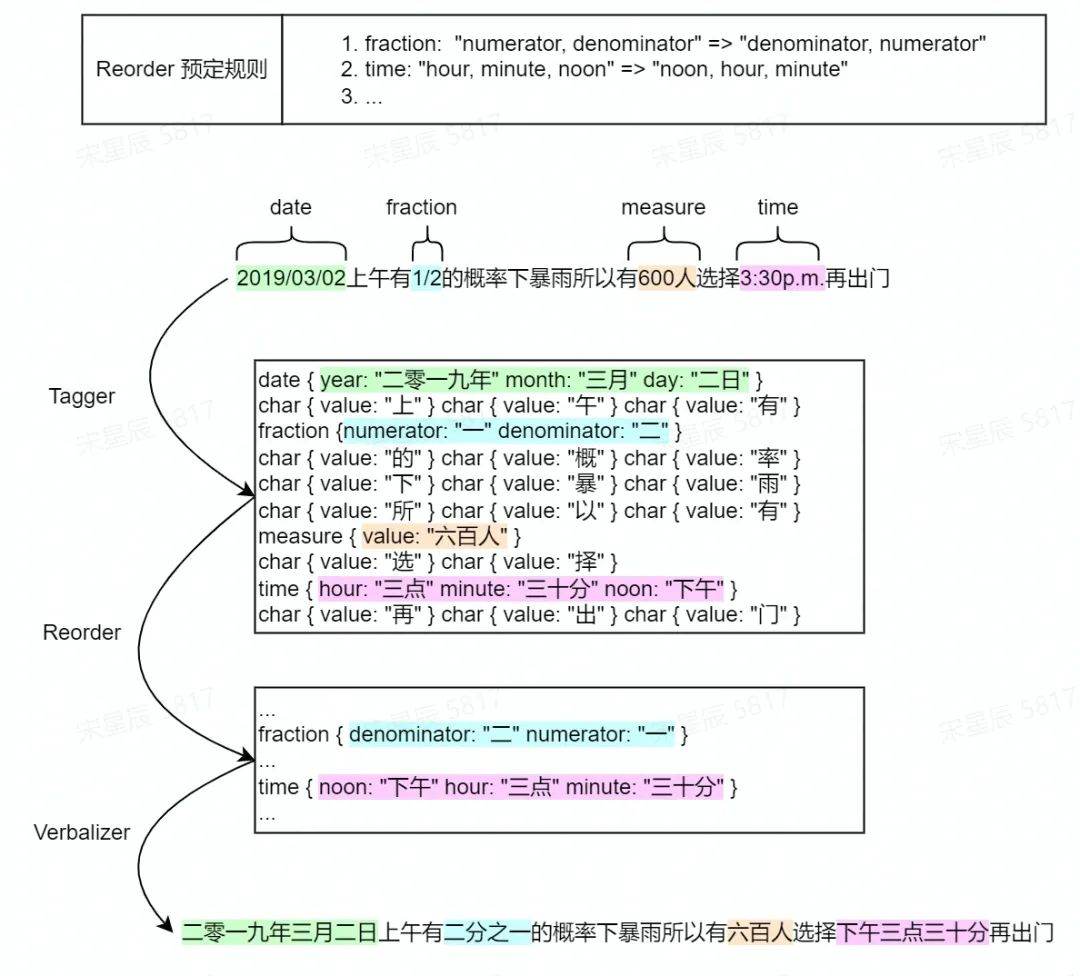
0.1 Text Normalization
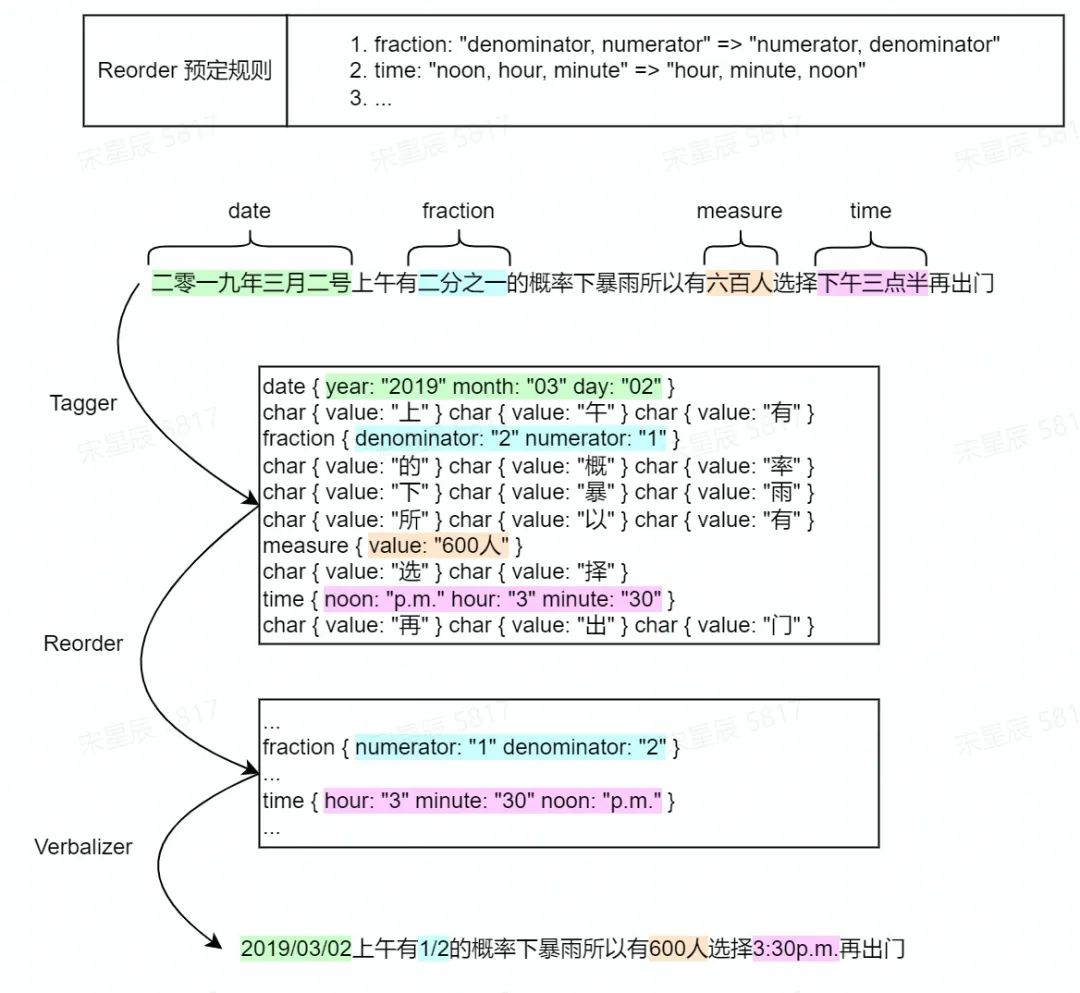
0.2 Inverse Text Normalization
1. How To Use
1.1 Quick Start:
# install
pip install WeTextProcessing
Command-usage:
wetn --text "2.5平方电线"
weitn --text "二点五平方电线"
Python usage:
from itn.chinese.inverse_normalizer import InverseNormalizer
from tn.chinese.normalizer import Normalizer as ZhNormalizer
from tn.english.normalizer import Normalizer as EnNormalizer

# NOTE(xcsong): 和默认参数不一致时,必须重新构图,要重新构图请务必指定 `overwrite_cache=True`
#               When the parameters differ from the defaults, it is mandatory to re-compose. To re-compose, please ensure you specify `overwrite_cache=True`.

zh_tn_text = "你好 WeTextProcessing 1.0,船新版本儿,船新体验儿,简直666,9和10"
zh_itn_text = "你好 WeTextProcessing 一点零,船新版本儿,船新体验儿,简直六六六,九和六"
en_tn_text = "Hello WeTextProcessing 1.0, life is short, just use wetext, 666, 9 and 10"
zh_tn_model = ZhNormalizer(remove_erhua=True, overwrite_cache=True)
zh_itn_model = InverseNormalizer(enable_0_to_9=False, overwrite_cache=True)
en_tn_model = EnNormalizer(overwrite_cache=True)
print("中文 TN (去除儿化音,重新在线构图):\n\t{} => {}".format(zh_tn_text, zh_tn_model.normalize(zh_tn_text)))
print("中文ITN (小于10的单独数字不转换,重新在线构图):\n\t{} => {}".format(zh_itn_text, zh_itn_model.normalize(zh_itn_text)))
print("英文 TN (暂时还没有可控的选项,后面会加...):\n\t{} => {}\n".format(en_tn_text, en_tn_model.normalize(en_tn_text)))

zh_tn_model = ZhNormalizer(overwrite_cache=False)
zh_itn_model = InverseNormalizer(overwrite_cache=False)
en_tn_model = EnNormalizer(overwrite_cache=False)
print("中文 TN (复用之前编译好的图):\n\t{} => {}".format(zh_tn_text, zh_tn_model.normalize(zh_tn_text)))
print("中文ITN (复用之前编译好的图):\n\t{} => {}".format(zh_itn_text, zh_itn_model.normalize(zh_itn_text)))
print("英文 TN (复用之前编译好的图):\n\t{} => {}\n".format(en_tn_text, en_tn_model.normalize(en_tn_text)))

zh_tn_model = ZhNormalizer(remove_erhua=False, overwrite_cache=True)
zh_itn_model = InverseNormalizer(enable_0_to_9=True, overwrite_cache=True)
print("中文 TN (不去除儿化音,重新在线构图):\n\t{} => {}".format(zh_tn_text, zh_tn_model.normalize(zh_tn_text)))
print("中文ITN (小于10的单独数字也进行转换,重新在线构图):\n\t{} => {}\n".format(zh_itn_text, zh_itn_model.normalize(zh_itn_text)))
1.2 Advanced Usage:
DIY your own rules && Deploy WeTextProcessing with cpp runtime !!
For users who want modifications and adapt tn/itn rules to fix badcase, please try:
git clone https://github.com/wenet-e2e/WeTextProcessing.git
cd WeTextProcessing
pip install -r requirements.txt
pre-commit install # for clean and tidy code
# `overwrite_cache` will rebuild all rules according to
#   your modifications on tn/chinese/rules/xx.py (itn/chinese/rules/xx.py).
#   After rebuild, you can find new far files at `$PWD/tn` and `$PWD/itn`.
python -m tn --text "2.5平方电线" --overwrite_cache
python -m itn --text "二点五平方电线" --overwrite_cache
Once you successfully rebuild your rules, you can deploy them either with your installed pypi packages:
# tn usage
>>> from tn.chinese.normalizer import Normalizer
>>> normalizer = Normalizer(cache_dir="PATH_TO_GIT_CLONED_WETEXTPROCESSING/tn")
>>> normalizer.normalize("2.5平方电线")
# itn usage
>>> from itn.chinese.inverse_normalizer import InverseNormalizer
>>> invnormalizer = InverseNormalizer(cache_dir="PATH_TO_GIT_CLONED_WETEXTPROCESSING/itn")
>>> invnormalizer.normalize("二点五平方电线")
Or with cpp runtime:
cmake -B build -S runtime -DCMAKE_BUILD_TYPE=Release
cmake --build build
# tn usage
cache_dir=PATH_TO_GIT_CLONED_WETEXTPROCESSING/tn
./build/processor_main --tagger $cache_dir/zh_tn_tagger.fst --verbalizer $cache_dir/zh_tn_verbalizer.fst --text "2.5平方电线"
# itn usage
cache_dir=PATH_TO_GIT_CLONED_WETEXTPROCESSING/itn
./build/processor_main --tagger $cache_dir/zh_itn_tagger.fst --verbalizer $cache_dir/zh_itn_verbalizer.fst --text "二点五平方电线"
2. TN Pipeline
Please refer to TN.README
3. ITN Pipeline
Please refer to ITN.README
Discussion & Communication
For Chinese users, you can aslo scan the QR code on the left to follow our offical account of WeNet. We created a WeChat group for better discussion and quicker response. Please scan the personal QR code on the right, and the guy is responsible for inviting you to the chat group.
 |
 |
|---|
Or you can directly discuss on Github Issues.
Acknowledge
- Thank the authors of foundational libraries like OpenFst & Pynini.
- Thank NeMo team & NeMo open-source community.
- Thank Zhenxiang Ma, Jiayu Du, and SpeechColab organization.
- Referred Pynini for reading the FAR, and printing the shortest path of a lattice in the C++ runtime.
- Referred TN of NeMo for the data to build the tagger graph.
- Referred ITN of chinese_text_normalization for the data to build the tagger graph.


Release files for WeTextProcessing 1.2.0
For a detailed explanation of source distributions (sdists) and built distributions (wheels), please see the package formats documentation.
Source distribution (sdist)
| File | Size | Uploaded | |
|---|---|---|---|
| wetextprocessing-1.2.0.tar.gz | 2.0 MB | Details |
Built distribution (wheel)
| File | Interpreter | ABI | Platform | Reset |
|---|---|---|---|---|
| wetextprocessing-1.2.0-py3-none-any.whl | Python 3 | none | any | Details |
Total release size: 4.0 MB
Release files / wetextprocessing-1.2.0.tar.gz
| Download URL | wetextprocessing-1.2.0.tar.gz |
|---|---|
| Size | 2.0 MB |
| Tags | Source |
|
SHA-256 checksum How to use checksums |
8f00a446920b198a4b698a44e14fa7c011d19d1197465cf2383e990c92c355d5
|
|
BLAKE2b-256 checksum How to use checksums |
ec865af15ef13257f8fc223c392c3b4bfa0232e26bd52031c17ddd94661f5042
|
| Upload date | |
|
Uploaded using Trusted Publishing? What is trusted publishing? |
No |
| Uploaded via |
twine/6.2.0 CPython/3.9.25
|
Release files / wetextprocessing-1.2.0-py3-none-any.whl
| Download URL | wetextprocessing-1.2.0-py3-none-any.whl |
|---|---|
| Size | 2.0 MB |
| Tags | Python 3 |
|
SHA-256 checksum How to use checksums |
2c7c1e048ede69b67e8a0921093c08a591bc9d7566ad70f5343686196f97aea9
|
|
BLAKE2b-256 checksum How to use checksums |
d981351722ec61dbdf96cca59edac14ce620be273fa98a9fab9e1a2aa524c3e1
|
| Upload date | |
|
Uploaded using Trusted Publishing? What is trusted publishing? |
No |
| Uploaded via |
twine/6.2.0 CPython/3.9.25
|














