
WHAXON
A scope-controlled penetration-testing workflow that brings security tools, findings, evidence, and reporting into one place.
WHAXON is a Python security platform for authorized assessments. It orchestrates supported command-line tools, normalizes their output into findings, correlates related results, stores engagement data locally, and produces reports. It offers a command-line interface, terminal UI, desktop UI, and browser UI, with an optional AI planning layer.
Its design emphasizes explicit target scope and controlled execution. AI suggestions are not a substitute for operator authorization, and tool availability depends on what is installed and configured on your system.
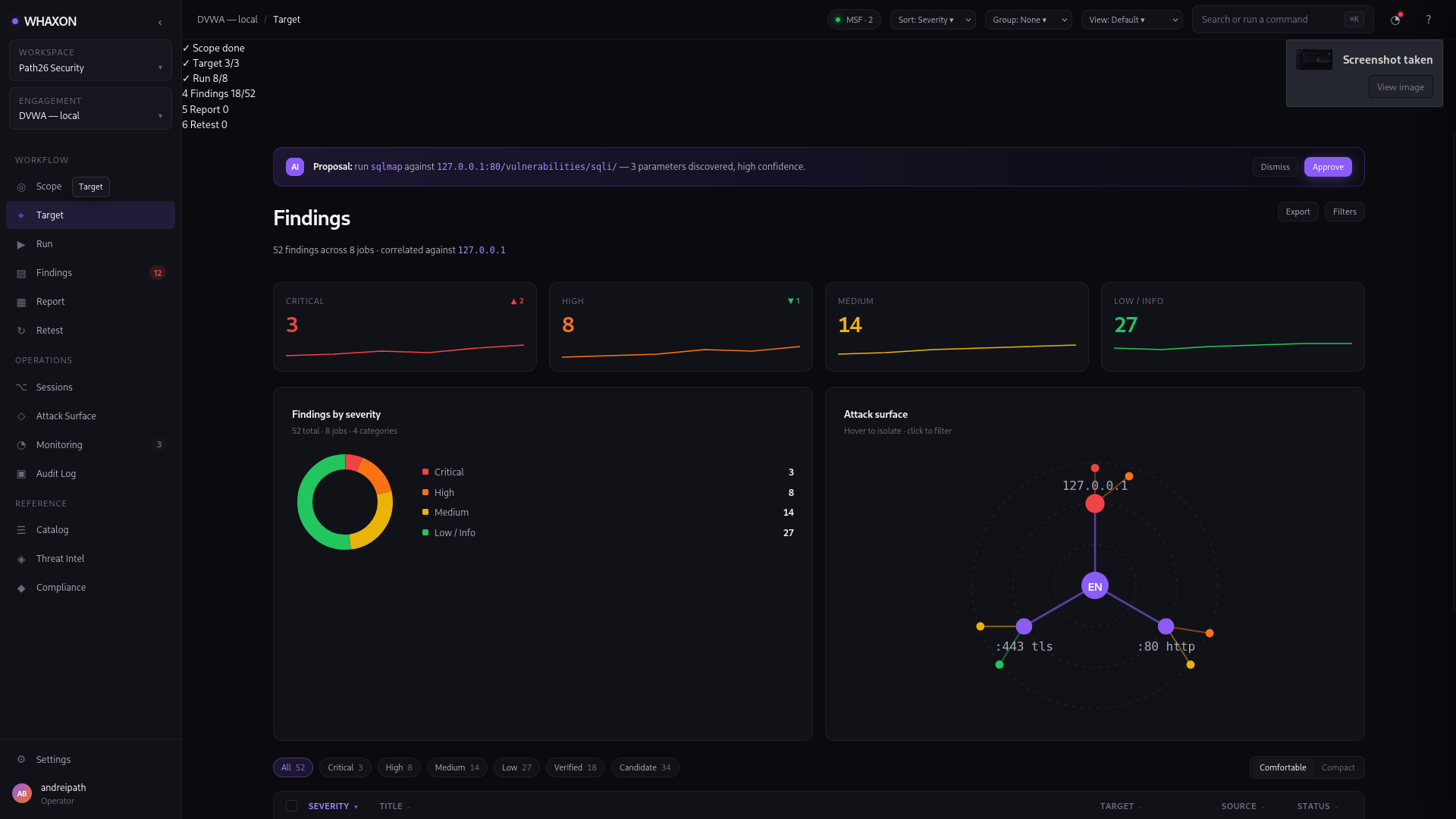
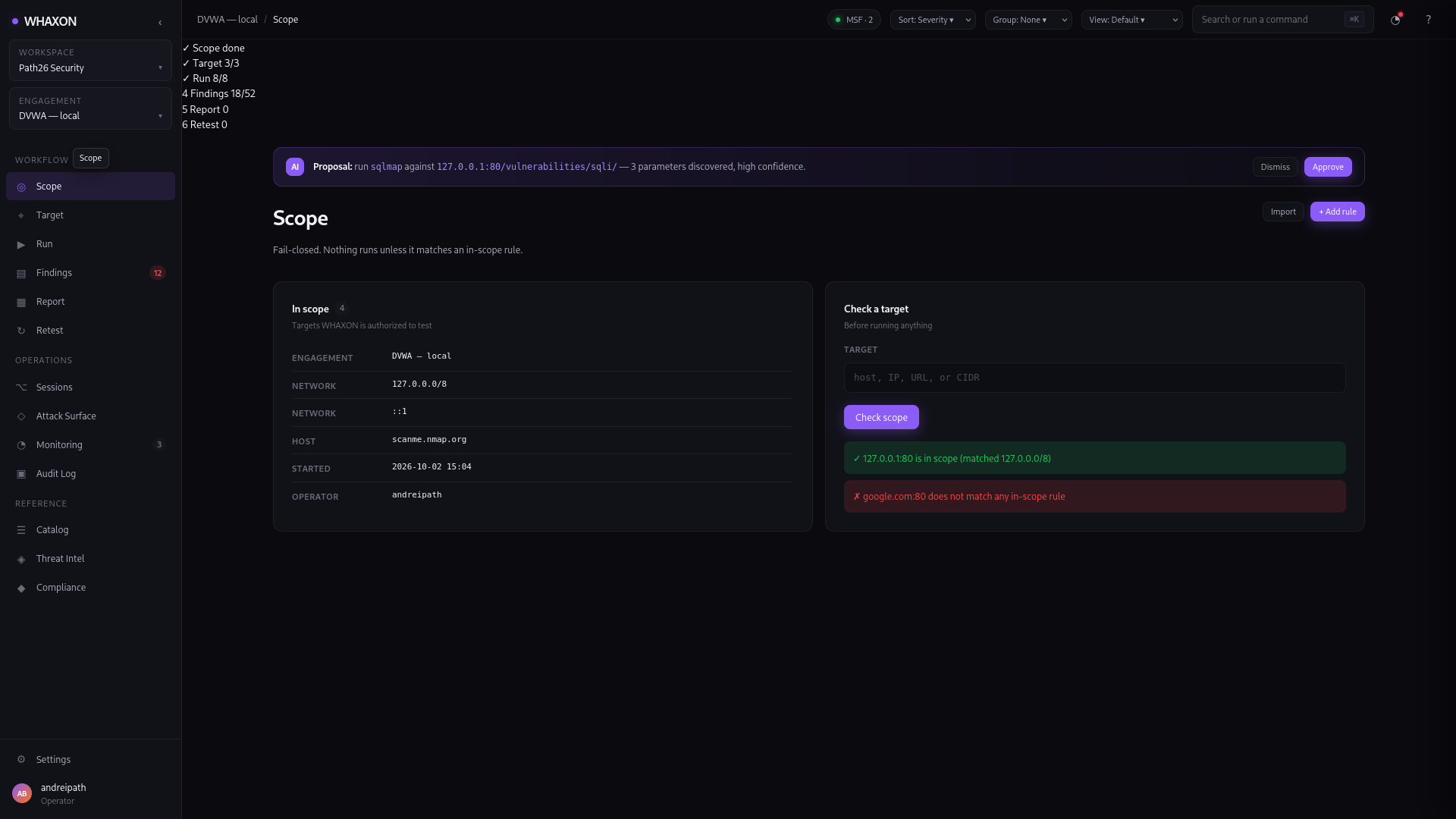
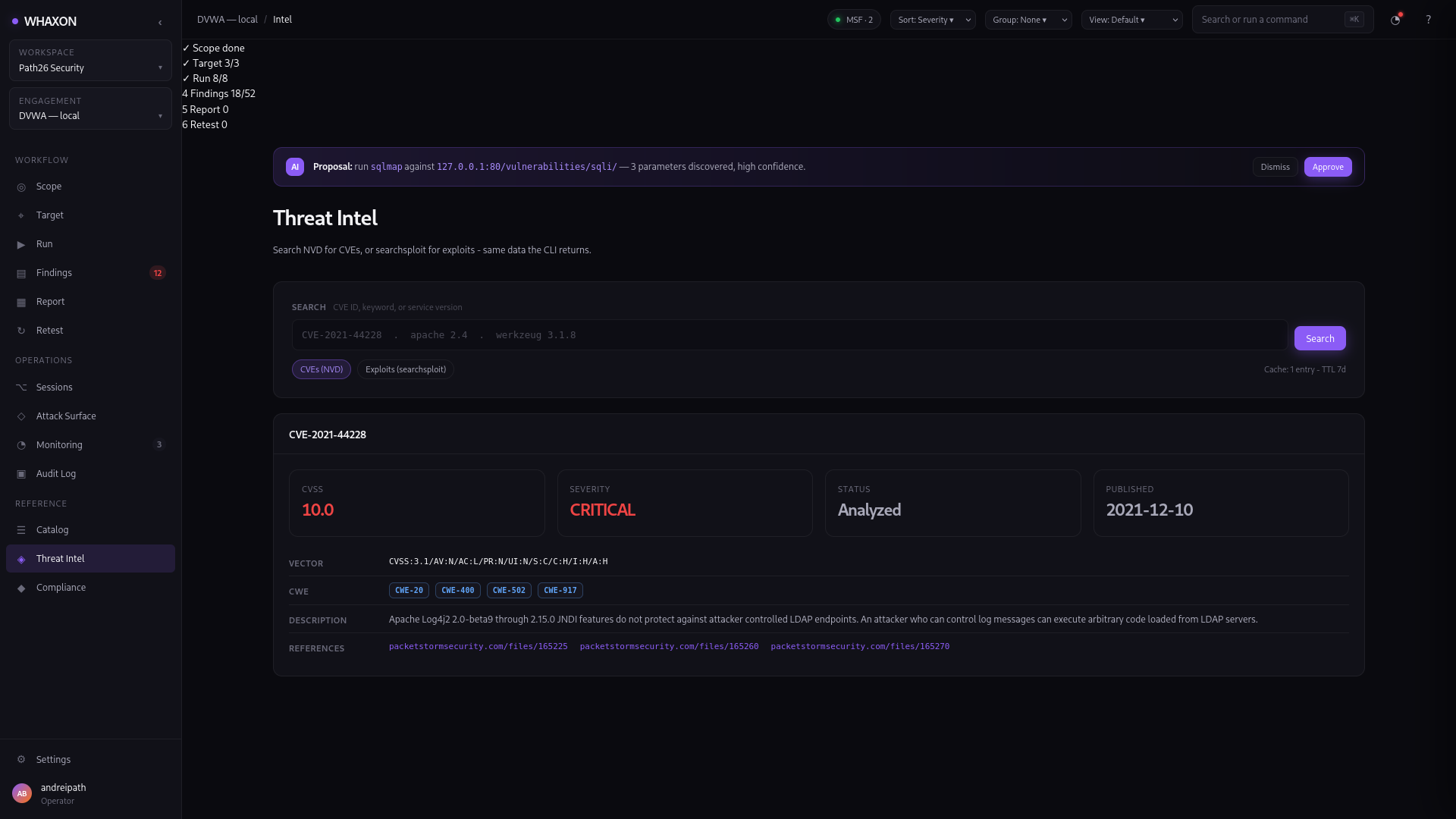
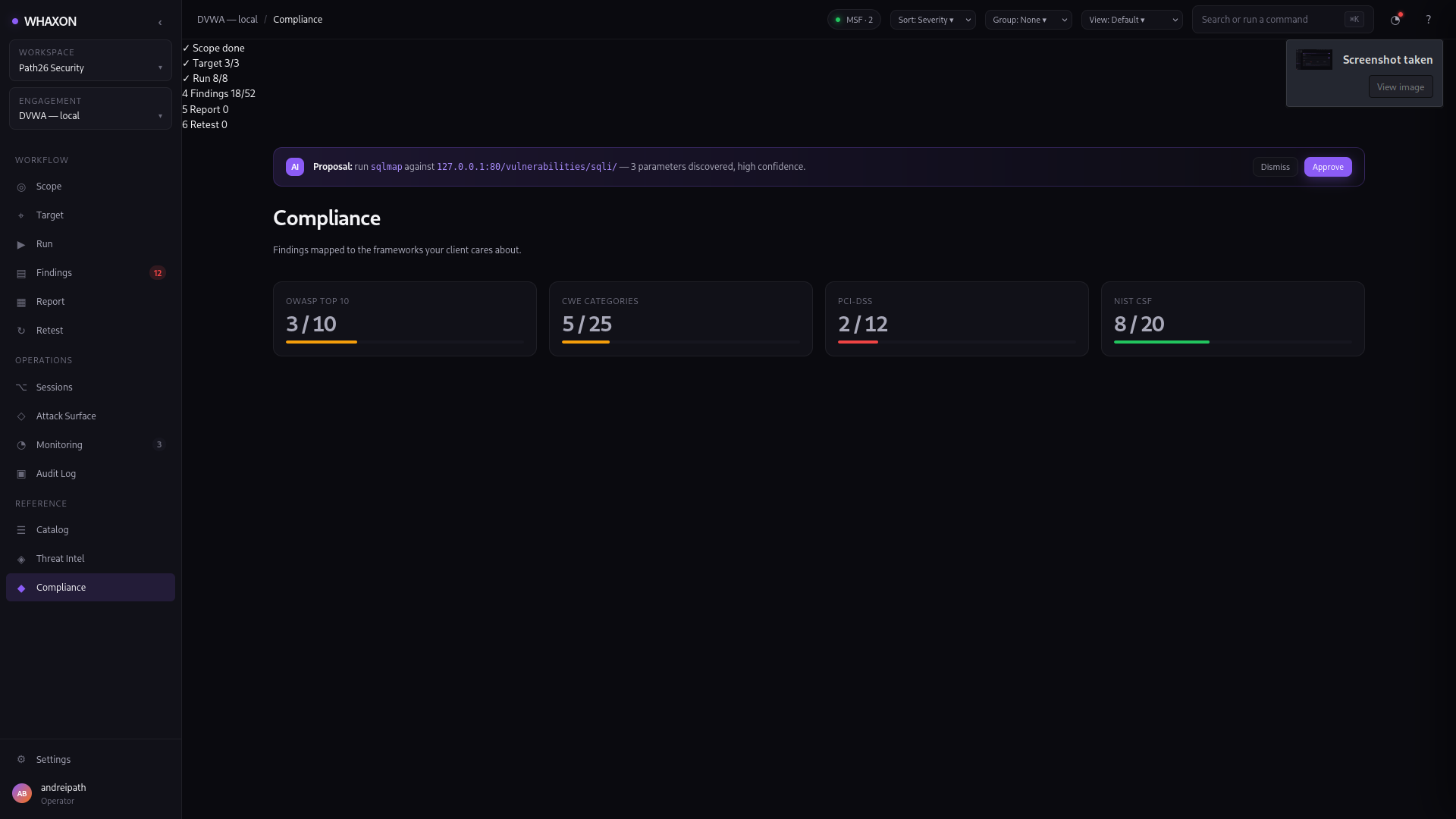




Project maturity: Alpha. Interfaces and integrations are under active development. Review the current limitations and verify your own environment before relying on WHAXON for client work or production operations.
What it does
- Tool orchestration: run supported security tools through a common catalog and runner.
- Normalized findings: adapter modules parse supported tool output into a shared finding model.
- Correlation: relate findings from different tools to help analysts prioritize investigation.
- Scope controls: the documented default scope is restrictive and designed to deny targets that are not explicitly allowed. Review Scope before running assessments.
- Evidence and reports: persist engagement data and generate Markdown, HTML, and PDF reports.
- Multiple interfaces: CLI, terminal UI (Textual), desktop UI (PySide6), and web UI (Flask/SSE).
- Optional AI planning: configurable providers can propose next steps. Keep the operator in control and review the AI boundary and limitations before enabling automation.
- Extensibility: adapter and plugin documentation explains how to add support for tools.
WHAXON does not replace manual validation, professional judgment, or a defined authorization agreement. Results depend on the tools installed, their versions, target conditions, configuration, and the quality of their output.
Quick start
WHAXON requires Python 3.11 or newer. The core package is installable from PyPI; individual interfaces and integrations use optional extras.
1. Install
python -m pip install --upgrade pip
python -m pip install "whaxon[tui,web]"
For a desktop interface:
python -m pip install "whaxon[gui]"
Optional extras documented by the package include tui, gui, web, metasploit, and dev. External security tools such as Nmap are separate system dependencies and must be installed independently.
2. Initialize local data and scope
whaxon init
whaxon scope --show
Read docs/scope.md before running any scan. Confirm the target is yours or that you have explicit written authorization. Do not disable scope enforcement on systems you do not control.
3. Explore the interfaces
whaxon --help
whaxon tui
Other entry points include:
whaxon gui
whaxon web
whaxon serve --help
The desktop interface requires the GUI extra. The web interface requires the web extra. For a first run, use a lab or local test environment and confirm the active scope before launching tools.
Scope and safety
Scope enforcement is a core safety boundary, but it is not a substitute for operator oversight or network-level controls.
- Review and configure scope before each engagement.
- Treat scope configuration changes as security-sensitive.
- Do not expose a web instance to an untrusted network without reviewing authentication, host binding, reverse-proxy/TLS, and deployment settings.
- Change default web authentication credentials before exposing the service.
- Use only systems you own or have explicit permission to test.
- Keep third-party tools patched and understand the effects of the modules you enable.
See Scope documentation, AI documentation, and the Security Policy.
Interfaces
| Interface | Entry point | Notes |
|---|---|---|
| CLI | whaxon --help |
Commands for initialization, scope, runs, findings, reports, and other workflows |
| Terminal UI | whaxon tui |
Textual-based interface; install the tui extra |
| Desktop UI | whaxon gui |
PySide6-based desktop interface; install the gui extra |
| Web UI | whaxon web |
Foreground web interface for development |
| Web service | whaxon serve |
Service-oriented launch path; review deployment guidance before network exposure |
See docs/interfaces.md for command and interface details.
Tools and adapters
WHAXON includes adapters for a range of security tools. Adapter support means WHAXON can parse supported output; it does not mean every tool is bundled, installed, or tested against every platform.
The current README/catalog describes adapters for tools including Nmap, Nikto, Nuclei, sqlmap, WhatWeb, Gobuster, ffuf, WPScan, Burp exports, and other reconnaissance or assessment utilities. Consult the source catalog and adapter documentation for the authoritative list and supported input formats.
Catalog entries without a dedicated adapter may still run, but their output may not be normalized into enriched findings.
Findings, evidence, and reports
793 tests passing.
Examples:
whaxon findings --help
whaxon report --help
whaxon validate --help
Validation maturity note: the repository documents a validation command and a finding-verification workflow, while the roadmap also identifies parts of the end-to-end re-execution and retest lifecycle as work in progress. Until that discrepancy is resolved and the complete workflow is demonstrated by tests, treat validation/retest functionality as evolving—not as a guarantee that every reported finding has been independently confirmed.
Reports are decision-support artifacts, not proof that an assessment was exhaustive. Review the evidence and limitations before delivering them to a client.
Configuration
Configuration is controlled through environment variables and local files. Common web settings include:
| Variable | Documented default | Purpose |
|---|---|---|
WHAXON_HOST |
127.0.0.1 |
Web bind address |
WHAXON_PORT |
5001 |
Web port |
WHAXON_DATA |
data |
Local data directory |
WHAXON_AUTH_USER |
whaxon |
Web authentication username |
WHAXON_AUTH_PASS |
whaxon |
Web authentication password |
WHAXON_AUTH_PASS_HASH |
unset | Pre-hashed password; takes priority over the plaintext setting |
Defaults can change between versions. Verify the configuration reference and current code before deploying. Never use default credentials on an exposed service.
Optional AI settings include provider/model selection, step budgets, confidence thresholds, and gates for unattended operation. AI is opt-in; inspect the current AI documentation and do not enable unattended execution until the target scope, allowed phases, and approval behavior have been tested in a controlled lab.
Development and tests
Clone the repository and install development dependencies:
git clone https://github.com/andreipath26/WHAXON.git
cd WHAXON
python -m pip install -e ".[tui,web,dev]"
python -m pytest tests/ -q
The CI workflow is configured for Python 3.11, 3.12, and 3.13 and runs boundary tests, Ruff, mypy, and pytest. The README intentionally does not publish a fixed passing-test count: test totals can change and should be taken from a specific successful CI run, not copied between sections.
To check code style locally:
ruff check src tests
mypy src
See CONTRIBUTING.md before submitting changes.
Documentation
- Scope and authorization controls
- Architecture and agent design
- AI behavior and configuration
- Adapters
- Plugins
- Interfaces
- Reports
- Deployment
- Security policy
- Changelog
Roadmap
The Trust Layer is shipped: findings enter as candidate and become verified or refuted through deterministic payload replay, blind-timing detection, and manual human review via the Approvals page. Coverage gaps (what was skipped, and why) are recorded and rendered in the report. Retest flips verified findings to fixed or still_vulnerable.
The remaining roadmap includes team and role-based workflows, MCP integration, persistent knowledge features, and enterprise deployment options. These should be considered planned or in progress unless the relevant implementation and tests are present in the current release.
Additional pages (Audit Log, Settings, Compliance, Threat Intel, Workspaces, Notifications) are hidden in the UI until their backends are implemented. A full interaction audit of every control lives at docs/WEB_UI_INTERACTION_AUDIT.md. Additional pages (Audit Log, Settings, Compliance, Threat Intel, Workspaces, Notifications) are hidden in the UI until their backends are implemented.
WHAXON is part of a broader set of independent projects:
- KILN — local LLM runtime.
- Aletheia Framework — local-first AI framework with governance and provenance.
Each project is intended to stand alone. Integration between them should not be assumed unless it is documented and demonstrated in the current code.
Responsible use
Use WHAXON only for systems you own or have explicit authorization to assess. You are responsible for obtaining permission, defining scope, complying with applicable law, and reviewing the impact of each tool and action.
License
WHAXON is licensed under AGPL-3.0-or-later. Review the repository's licensing documents and obtain independent legal advice if you need to determine whether your intended use requires a separate commercial agreement.
1 maintainer

Metadata
1 maintainer
Release files for whaxon 0.11.8
For a detailed explanation of source distributions (sdists) and built distributions (wheels), please see the package formats documentation.
Source distribution (sdist)
| File | Size | Uploaded | Provenance | |
|---|---|---|---|---|
| whaxon-0.11.8.tar.gz | 273.0 kB | Without provenance | Details |
Built distribution (wheel)
| File | Interpreter | ABI | Platform | Reset |
|---|---|---|---|---|
| whaxon-0.11.8-py3-none-any.whl | Python 3 | none | any | Details |
Total release size: 559.9 kB
Release files / whaxon-0.11.8.tar.gz
| Download URL | whaxon-0.11.8.tar.gz |
|---|---|
| Size | 273.0 kB |
| Tags | Source |
|
SHA-256 checksum How to use checksums |
9a1d9568e34afeeb84400883f564fd956e5ff2762403f007b22f4a708d9263c7
|
|
BLAKE2b-256 checksum How to use checksums |
f6689001efab8614e33e6f6251bf5f37c37bb60744143fe62d7c7e8a51096a1c
|
| Upload date | |
|
Uploaded using Trusted Publishing? What is trusted publishing? |
No |
| Uploaded via |
twine/7.0.0 CPython/3.13.16
|
Release files / whaxon-0.11.8-py3-none-any.whl
| Download URL | whaxon-0.11.8-py3-none-any.whl |
|---|---|
| Size | 286.9 kB |
| Tags | Python 3 |
|
SHA-256 checksum How to use checksums |
321326b7d478d6e067eef1818d4e5b0b25560879f53dfdbd3941254abb6427d9
|
|
BLAKE2b-256 checksum How to use checksums |
bc06e82c7e03ef6edfe46f21e2fb7a248d8f0fedc85a0364843a0b8a1cb1dfaf
|
| Upload date | |
|
Uploaded using Trusted Publishing? What is trusted publishing? |
No |
| Uploaded via |
twine/7.0.0 CPython/3.13.16
|
Security for whaxon 0.11.8
Provenance
Provenance describes where a file came from. On PyPI, provenance is shared via attestations, which provide a verifiable record of the build or publishing details. View details, limitations and caveats.
No provenance found
None of the files in this release were uploaded with provenance metadata.
A note on package security
PyPI is a repository for distributing packages, not a service for auditing them. While third-party security researchers and our staff do their best to detect and remove malicious packages, PyPI cannot guarantee the quality, security or suitability of any given package.














