


Introduction
Whisper command line client compatible with original OpenAI client based on CTranslate2.
It uses CTranslate2 and Faster-whisper Whisper implementation that is up to 4 times faster than openai/whisper for the same accuracy while using less memory.
Goals of the project:
- Provide an easy way to use the CTranslate2 Whisper implementation
- Ease the migration for people using OpenAI Whisper CLI
Installation
To install the latest stable version, just type:
pip install -U whisper-ctranslate2
Alternatively, if you are interested in the latest development (non-stable) version from this repository, just type:
pip install git+https://github.com/Softcatala/whisper-ctranslate2
CPU and GPU support
GPU and CPU support are provided by CTranslate2.
It has compatibility with x86-64 and AArch64/ARM64 CPU and integrates multiple backends that are optimized for these platforms: Intel MKL, oneDNN, OpenBLAS, Ruy, and Apple Accelerate.
GPU execution requires the NVIDIA libraries cuBLAS 11.x and cuDNN 8.x to be installed on the system. Please refer to the CTranslate2 documentation
Install on ubuntu: sudo apt install nvidia-cudnn
By default the best hardware available is selected for inference. You can use the options --device and --device_index to control manually the selection.
Usage
Same command line as OpenAI Whisper.
To transcribe:
whisper-ctranslate2 inaguracio2011.mp3 --model medium
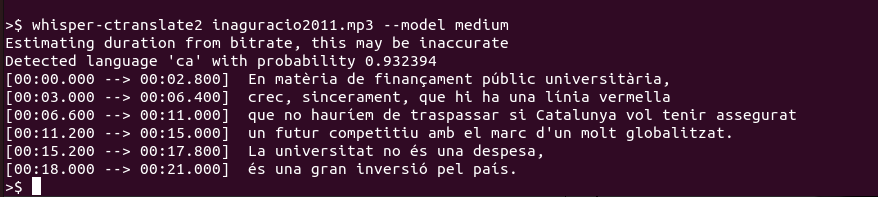
To translate:
whisper-ctranslate2 inaguracio2011.mp3 --model medium --task translate

Whisper translate task translates the transcription from the source language to English (the only target language supported).
Additionally using:
whisper-ctranslate2 --help
All the supported options with their help are shown.
CTranslate2 specific options
On top of the OpenAI Whisper command line options, there are some specific options provided by CTranslate2 or whiper-ctranslate2.
Quantization
--compute_type option which accepts default,auto,int8,int8_float16,int16,float16,float32 values indicates the type of quantization to use. On CPU int8 will give the best performance:
whisper-ctranslate2 myfile.mp3 --compute_type int8
Loading the model from a directory
--model_directory option allows to specify the directory from which you want to load a CTranslate2 Whisper model. For example, if you want to load your own quantified Whisper model version or using your own Whisper fine-tunned version. The model must be in CTranslate2 format.
Using Voice Activity Detection (VAD) filter
--vad_filter option enables the voice activity detection (VAD) to filter out parts of the audio without speech. This step uses the Silero VAD model:
whisper-ctranslate2 myfile.mp3 --vad_filter True
The VAD filter accepts multiple additional options to determine the filter behavior:
--vad_threshold VALUE (float)
Probabilities above this value are considered as speech.
--vad_min_speech_duration_ms (int)
Final speech chunks shorter min_speech_duration_ms are thrown out.
--vad_max_speech_duration_s VALUE (int)
Maximum duration of speech chunks in seconds. Longer will be split at the timestamp of the last silence.
Print colors
--print_colors True options prints the transcribed text using an experimental color coding strategy based on whisper.cpp to highlight words with high or low confidence:
whisper-ctranslate2 myfile.mp3 --print_colors True

Live transcribe from your microphone
--live_transcribe True option activates the live transcription mode from your microphone:
whisper-ctranslate2 --live_transcribe True --language en
https://user-images.githubusercontent.com/309265/231533784-e58c4b92-e9fb-4256-b4cd-12f1864131d9.mov
Requirements for "pip install pyaudio": sudo apt-get install python3.10-dev libasound-dev portaudio19-dev libportaudio2 libportaudiocpp0
sudo apt-get install python3-pyaudio 610 pip install pyaudio 611 sudo apt-get purge python3-pyaudio 612 pip install pyaudio 613 sudo apt-get install python3.10-dev 614 pip install pyaudio 615 sudo apt-get install libasound-dev 616 pip install pyaudio 617 sudo apt-get purge libasound-dev 618 sudo apt autoremove 619 sudo apt-get install libasound-dev 620 pip install pyaudio 621 sudo apt-get install python-pyaudio 622 sudo apt-get install python3-pyaudio 623 pip install pyaudio 624 pip install portaudio 625 sudo apt-get install portaudio 626 sudo apt-get install libasound-dev portaudio19-dev libportaudio2 libportaudiocpp0 627 pip install pyaudio 628 python list_input_sounddevice.py
Diarization (speaker identification)
There is experimental diarization support using pyannote.audio to identify speakers. At the moment, the support is a segment level.
To enable diarization you need to follow these steps:
- Install
pyannote.audiowithpip install pyannote.audio - Accept
pyannote/segmentation-3.0user conditions - Accept
pyannote/speaker-diarization-3.1user conditions - Create access token at
hf.co/settings/tokens.
And then execute passing the HuggingFace API token as parameter to enable diarization:
whisper-ctranslate2 --hf_token YOUR_HF_TOKEN
and then the name of the speaker is added in the output files (e.g. JSON, VTT and STR files):
[SPEAKER_00]: There is a lot of people in this room
The option --speaker_name SPEAKER_NAME allows to use your own string to identify the speaker.
Need help?
Check our frequently asked questions for common questions.
Contact
Jordi Mas jmas@softcatala.org
1 maintainer

Metadata
1 maintainer
Release files for whisper-ctranslate2-remote-api 0.4.5
For a detailed explanation of source distributions (sdists) and built distributions (wheels), please see the package formats documentation.
Source distribution (sdist)
| File | Size | Uploaded | Provenance | |
|---|---|---|---|---|
| whisper-ctranslate2-remote-api-0.4.5.tar.gz | 21.5 kB | Without provenance | Details |
Built distribution (wheel)
| File | Interpreter | ABI | Platform | Reset |
|---|---|---|---|---|
| whisper_ctranslate2_remote_api-0.4.5-py3-none-any.whl | Python 3 | none | any | Details |
Total release size: 43.1 kB
Release files / whisper-ctranslate2-remote-api-0.4.5.tar.gz
| Download URL | whisper-ctranslate2-remote-api-0.4.5.tar.gz |
|---|---|
| Size | 21.5 kB |
| Tags | Source |
|
SHA-256 checksum How to use checksums |
818ac5a444bba37ded49baab857fb5d5e9b05e62ffae8d8bbd89b3b8a01ff397
|
|
BLAKE2b-256 checksum How to use checksums |
f7766fb5a850d3da1d8df436e3572c2bab0adba458c588aee3bc99edb1648b55
|
| Upload date | |
|
Uploaded using Trusted Publishing? What is trusted publishing? |
No |
| Uploaded via |
twine/5.1.1 CPython/3.11.0rc1
|
Release files / whisper_ctranslate2_remote_api-0.4.5-py3-none-any.whl
| Download URL | whisper_ctranslate2_remote_api-0.4.5-py3-none-any.whl |
|---|---|
| Size | 21.7 kB |
| Tags | Python 3 |
|
SHA-256 checksum How to use checksums |
7056ae5fd823fcf7b241078ee6fa51ce3561d5889ac54bfd9766e4ef0571af63
|
|
BLAKE2b-256 checksum How to use checksums |
01a937467d817743767b2a29813749c6ae4bda32f7d34f52d9deeae6e5bae040
|
| Upload date | |
|
Uploaded using Trusted Publishing? What is trusted publishing? |
No |
| Uploaded via |
twine/5.1.1 CPython/3.11.0rc1
|
Security for whisper-ctranslate2-remote-api 0.4.5
Provenance
Provenance describes where a file came from. On PyPI, provenance is shared via attestations, which provide a verifiable record of the build or publishing details. View details, limitations and caveats.
No provenance found
None of the files in this release were uploaded with provenance metadata.
A note on package security
PyPI is a repository for distributing packages, not a service for auditing them. While third-party security researchers and our staff do their best to detect and remove malicious packages, PyPI cannot guarantee the quality, security or suitability of any given package.
To learn more about protecting yourself from malicious actors, visit our package security documentation.













