
Walk any codebase and produce a technology-agnostic markdown wiki of its intent

Project description
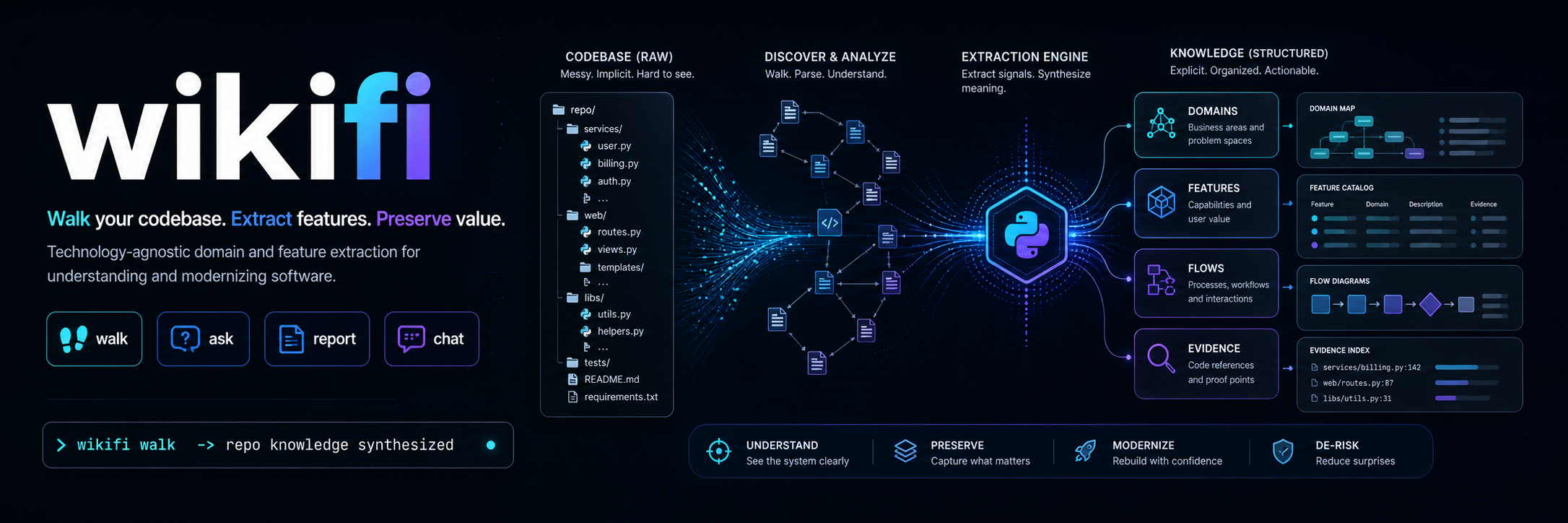
wikifi
wikifi walks a legacy codebase and writes a technology-agnostic wiki of what the system does — domains, entities, flows, integrations, and cross-cutting concerns — extracted from the source with citations back to the lines that prove it.
The output is what a migration team needs to re-implement the system on a fresh stack from the wiki alone, without recreating the legacy structure in a new language.
For the full rationale and content contract, see VISION.md. To see the output, browse .wikifi/ — wikifi run against its own source.
Quickstart
# 1. Install in the target project
uv add wikifi

# 2. Scaffold .wikifi/ and config
uv run wikifi init

# 3. Walk the codebase
uv run wikifi walk
LLM Config
.wikifi/config.toml
provider = "anthropic" # openai | local(default)
model = "claude-sonnet-4-6"
# ollama_host = "http://localhost:11434"
By default wikifi runs against a local Ollama server (Qwen 3 27B at the highest reasoning level the model exposes) — no cloud dependency, no API key, no data leaving the machine. Hosted Anthropic and OpenAI backends are opt-in.
What you get
A .wikifi/ directory in the target repo containing the synthesized wiki. The on-disk layout is at the implementor's discretion; the content contract is fixed and lives in VISION.md:
- Primary capture (extracted from source) — domains & subdomains, intent, capabilities, entities, integrations, external dependencies, cross-cutting concerns, hard specifications, and inline schematics.
- Derivative capture (synthesized from the aggregate) — personas, user stories, and 10,000-foot diagrams produced after primary content is complete.
Every claim in the wiki carries a numbered citation back to a SourceRef (file + line range + content fingerprint). Conflicting evidence across files is preserved in a "Conflicts in source" block rather than silently resolved.
CLI
| Command | Purpose |
|---|---|
wikifi init |
One-time setup. Scaffolds .wikifi/ and local config. |
wikifi walk |
Walks the target codebase and produces the wiki. |
wikifi report |
Coverage + quality report (per-section file counts, findings, body sizes). |
wikifi chat |
Interactive REPL for iterative exploration of the wiki and the source. |
walk flags:
--no-cache— force a clean re-walk; drops the on-disk extraction + aggregation caches.--review— run the critic + reviser loop on derivative sections (personas, user stories, diagrams).--provider {ollama|anthropic|openai}— override the configured provider for this walk.
report --score runs the critic on every populated section for a 0–10 quality score.
Providers
The LLM backend is reached through a provider abstraction; swapping it never touches the rest of the system.
OllamaProvider— default. Local server, no cloud dependency.AnthropicProvider—WIKIFI_PROVIDER=anthropic. Uses prompt caching withcache_control: ephemeralon the system prompt so the multi-KB extraction prompt is paid for once across hundreds of per-file calls.OpenAIProvider—WIKIFI_PROVIDER=openai. Relies on OpenAI's automatic prefix caching and routes thethinkknob toreasoning_effortono*/gpt-5reasoning models.
How the walk works
The walk has four responsibilities, in order:
- Introspect — review the target's root structure (manifests, top-level layout, gitignore signals) and decide which paths carry production source worth analyzing. The walk that follows is deterministic; the agent does not re-pick scope mid-walk.
- Filter — recognize and skip unstructured or near-empty files (stub
__init__, empty fixtures, generated lockfiles) before they reach the agent. Empty input must never stall the walk. - Extract — for each in-scope file, extract structured findings against the primary capture sections in VISION.md. Each finding carries a
SourceReffor downstream citation. - Synthesize — primary sections are aggregated from the per-file findings into an
EvidenceBundle(body + claims + contradictions). Derivative sections (personas, user stories, diagrams) are produced after primary content is complete, never inferred from a single file.
Supporting machinery:
- Repo graph (
wikifi/repograph.py) — regex-driven static analysis builds an import / reference graph and classifies each file'sFileKind(application code, SQL, OpenAPI, Protobuf, GraphQL, migration, other). Each file's neighborhood is injected into the extraction prompt so per-file findings can describe cross-file flows. - Specialized extractors (
wikifi/specialized/) — schema files (SQL, OpenAPI, Protobuf, GraphQL, migrations) bypass the LLM and run through deterministic parsers. Structured findings reach the same notes store, so the rest of the pipeline is unchanged. - Content-addressed cache (
wikifi/cache.py) — extraction findings are keyed by(rel_path, sha256(file_bytes)); aggregation bodies are keyed by a hash of the section's notes payload. Re-walks skip every file whose fingerprint hasn't changed; resumability after a crash is a free property of the same cache. - Critic + reviser (
wikifi/critic.py) — opt-in viawalk --review. Scores derivative sections against their brief and upstream evidence, identifies unsupported claims, and re-synthesizes when the score is below threshold. Only accepts a revision if it scores at least as well as the original. - Coverage + quality report (
wikifi/report.py) —wikifi reportproduces a per-section view of files contributing, finding count, body size, and (with--score) critic-derived quality scores.
Configuration
wikifi reads configuration from environment variables. At minimum:
- the LLM provider id and model identifier
- the local Ollama endpoint (when using the default provider)
- bounds on file size and stripped-content size, so unstructured or oversized files never reach the agent
- the agent's thinking / reasoning level — defaults to the highest the chosen model supports
A .env.example will land once the surface is finalized.
Tech stack
- Python 3.12+, packaged with
uv - Local LLM via Ollama as the default runtime; thinking-capable model at the highest available reasoning level
- Provider abstraction — Ollama default; hosted Anthropic and OpenAI slot in without touching the rest of the system
ruffas the single tool for lint and formatpytest+pytest-covfor tests (≥85% coverage gate)- GitHub Actions for CI
Development
make hooks       # one-time: enables .githooks/ pre-commit + pre-push
uv sync          # install dependencies
make test        # run the test suite
See CLAUDE.md for the full development process — commands, code rules, agent workflow, and debug escalation.
Distribution
wikifi ships as a Python library (PyPI / private index) and operates as a CLI invoked from a target project rather than as a server.
License
MIT.
Release history Release notifications | RSS feed

Download files
Download the file for your platform. If you're not sure which to choose, learn more about installing packages.
Source Distribution
Built Distribution
Filter files by name, interpreter, ABI, and platform.
If you're not sure about the file name format, learn more about wheel file names.
Copy a direct link to the current filters
File details
Details for the file wikifi-0.1.0.tar.gz.
File metadata
- Download URL: wikifi-0.1.0.tar.gz
- Upload date:
- Size: 154.9 kB
- Tags: Source
- Uploaded using Trusted Publishing? No
- Uploaded via: uv/0.8.23
File hashes
| Algorithm | Hash digest | |
|---|---|---|
| SHA256 |
8fc2cf54dce64a6a756f701f1c6c3f374921e90008997b541f668f94d5e6b97b
|
|
| MD5 |
58df45cdb36a7dd844a783297586502b
|
|
| BLAKE2b-256 |
1c2fadda3b8c64ea2f77a3d66d19c9a53bc159be4fb57df0662cb78c5647809f
|
File details
Details for the file wikifi-0.1.0-py3-none-any.whl.
File metadata
- Download URL: wikifi-0.1.0-py3-none-any.whl
- Upload date:
- Size: 100.5 kB
- Tags: Python 3
- Uploaded using Trusted Publishing? No
- Uploaded via: uv/0.8.23
File hashes
| Algorithm | Hash digest | |
|---|---|---|
| SHA256 |
230d579e4136e335ca56158e6487aa3631435ee76b7973620050eadec2a77245
|
|
| MD5 |
0c4f30cc98d90a2b12727642bafddf48
|
|
| BLAKE2b-256 |
2228853e0cbddb97afea4c5e511353d56913fc9a992a89ff67064e8b15ffadac
|






