
A powerful, .exe Desktop and Web Application Python GUI framework built on top of PySide6.

Project description






Image Examples
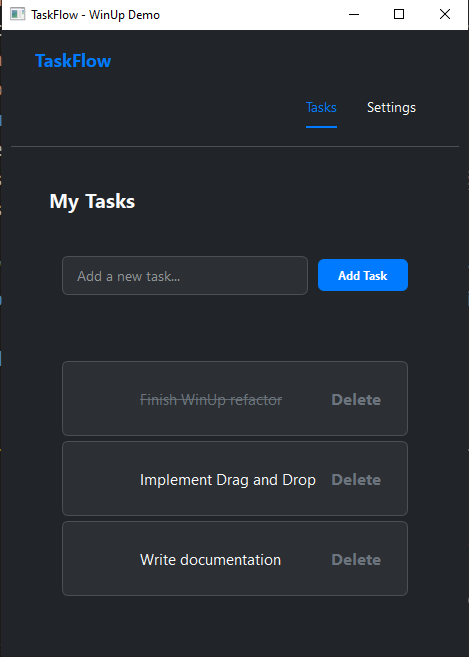
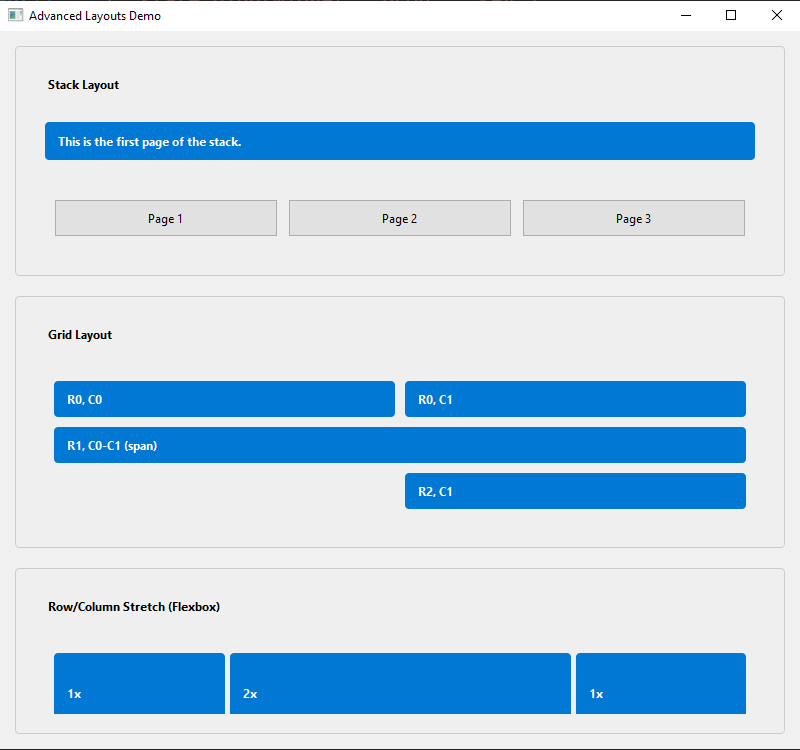
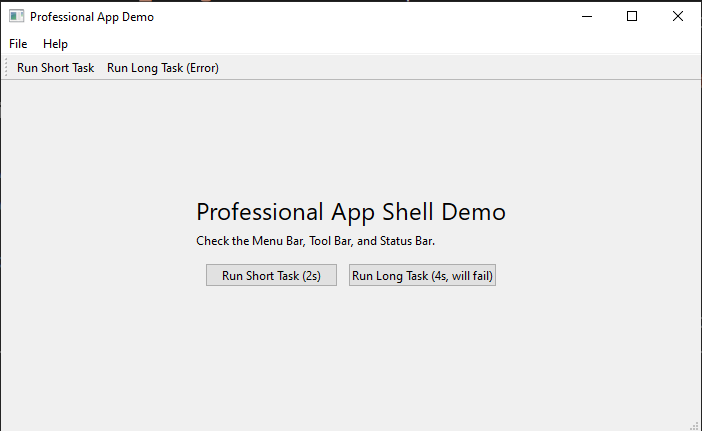
WinUp 🚀
Make sure to download the Latest Stable Release (LSR) and not the latest/LFR! Current LSR: 2.5.3
pip install winup==2.5.3
A ridiculously Pythonic and powerful framework for building beautiful desktop applications.
WinUp is a modern UI framework for Python that wraps the power of PySide6 (Qt) in a simple, declarative, and developer-friendly API. It's designed to let you build applications faster, write cleaner code, and enjoy the development process.
✨ Now with Web Support!
WinUp now also supports building fully interactive, stateful web applications using the same Python-centric, component-based approach. The web module uses FastAPI and WebSockets under the hood to bring the simplicity of WinUp to the browser.
Disclaimer: Web support is an optional feature. To use it, you must install the web dependencies:
pip install winup[web]
Contributing Changelog License
Why WinUp? (Instead of raw PySide6 or Tkinter)
Desktop development in Python can feel clunky. WinUp was built to fix that.
| Feature | WinUp Way ✨ | Raw PySide6 / Tkinter Way 😟 |
|---|---|---|
| Layouts | ui.Column(children=[...]), ui.Row(children=[...]) |
QVBoxLayout(), QHBoxLayout(), layout.addWidget(), pack(), grid() |
| Styling | props={"background-color": "blue", "font-size": "16px"} |
Manual QSS strings, widget.setStyleSheet(...), complex style objects. |
| State Management | state.bind(widget, "prop", "key") |
Manual callback functions, getters/setters, StringVar(), boilerplate everywhere. |
| Two-Way Binding | state.bind_two_way(input_widget, "key") |
Non-existent. Requires manual on_change handlers to update state and UI. |
| Developer Tools | Built-in Hot Reloading, code profiler, and window tools out of the box. | Non-existent. Restart the entire app for every single UI change. |
| Code Structure | Reusable, self-contained components with @component. |
Often leads to large, monolithic classes or procedural scripts. |
In short, WinUp provides the "killer features" of modern web frameworks (like React or Vue) for the desktop, saving you time and letting you focus on what matters: your application's logic.
🧊 WinUp vs 🧱 PyEdifice (Reddit User Request)
| Feature | WinUp | PyEdifice |
|---|---|---|
| 🧱 Architecture | React-style + state | React-style + state |
| 🌐 Built-in Routing | ✅ Yes (Router(routes={...})) |
❌ No built-in routing |
| ♻️ Lifecycle Hooks | ✅ on_mount, on_unmount, etc. |
⚠️ Limited (did_mount, etc.) |
| 🎨 Theming / Styling System | ✅ Global & Scoped themes | ❌ Manual CSS injection |
| 🔲 Layout Options | ✅ Row, Column, Grid, Stack, Flexbox | ⚠️ Mostly Box & HBox/VBox |
| 🎞️ Animations | ✅ Built-in (fade, scale, etc.) | ❌ None built-in |
| 🔁 Hot Reloading (LHR) | ✅ Stable + fast (loadup dev) |
⚠️ Experimental, limited support |
| 📦 Packaging | ✅ With LoadUp (PyInstaller-based) | ❌ Must integrate PyInstaller manually |
| 🧩 Component Reusability | ✅ High, declarative | ✅ High |
| 🛠 Developer Tooling | ✅ DevTools planned, Inspector soon | ❌ None yet |
| 📱 Mobile Support | ❌ Not yet | ❌ Not supported |
| 🧠 Learning Curve | ✅ Easy for Python+React users | ✅ Easy but less tooling |
✅ = Built-in or robust
⚠️ = Partial or limited
❌ = Missing entirely
Core Features
- Declarative & Pythonic UI: Build complex layouts with simple
RowandColumnobjects instead of clunky box layouts. - Component-Based Architecture: Use the
@componentdecorator to create modular and reusable UI widgets from simple functions. - Powerful Styling System: Style your widgets with simple Python dictionaries using
props. Create global "CSS-like" classes withstyle.add_style_dict. - Full Application Shell: Build professional applications with a declarative API for
MenuBar,ToolBar,StatusBar, andSystemTrayIcon. - Asynchronous Task Runner: Run long-running operations in the background without freezing your UI using the simple
@tasks.rundecorator. - Performance by Default: Includes an opt-in
@memodecorator to cache component renders and prevent needless re-computation. - Advanced Extensibility:
- Widget Factory: Replace any default widget with your own custom implementation (e.g., C++ based) using
ui.register_widget(). - Multiple Windows: Create and manage multiple independent windows for complex applications like tool palettes or music players.
- Widget Factory: Replace any default widget with your own custom implementation (e.g., C++ based) using
- Reactive State Management:
- One-Way Binding: Automatically update your UI when your data changes with
state.bind(). - Two-Way Binding: Effortlessly sync input widgets with your state using
state.bind_two_way(). - Subscriptions: Trigger any function in response to state changes with
state.subscribe().
- One-Way Binding: Automatically update your UI when your data changes with
- Developer-Friendly Tooling:
- Hot Reloading: See your UI changes instantly without restarting your app.
- Profiler: Easily measure the performance of any function with the
@profiler.measure()decorator. - Window Tools: Center, flash, or manage your application window with ease.
- Built-in Routing: Easily create multi-page applications with an intuitive, state-driven router.
- Flexible Data Layer: Includes simple, consistent connectors for SQLite, PostgreSQL, MySQL, MongoDB, and Firebase.
Documentation
Dive deeper into the features of WinUp:
Core Concepts
Developer Tools
UI Components
Contributing
WinUp is an open-source project. Contributions are welcome!
License
This project is licensed under the MIT License. See LICENSE for more information.
Release history Release notifications | RSS feed


Download files
Download the file for your platform. If you're not sure which to choose, learn more about installing packages.
Source Distribution
Built Distribution
Filter files by name, interpreter, ABI, and platform.
If you're not sure about the file name format, learn more about wheel file names.
Copy a direct link to the current filters
File details
Details for the file winup-2.5.4.tar.gz.
File metadata
- Download URL: winup-2.5.4.tar.gz
- Upload date:
- Size: 78.2 kB
- Tags: Source
- Uploaded using Trusted Publishing? No
- Uploaded via: twine/6.1.0 CPython/3.13.5
File hashes
| Algorithm | Hash digest | |
|---|---|---|
| SHA256 |
312de814c6ba084d1dd6b5f07a81687fe843f234b933bcab186876fd4da0be06
|
|
| MD5 |
b7af51386c2c6ec3f7bc2207e3981b0c
|
|
| BLAKE2b-256 |
a925211f062fc0aed556535242942394f48be8b07a341e28205892874ed9bf8c
|
File details
Details for the file winup-2.5.4-py3-none-any.whl.
File metadata
- Download URL: winup-2.5.4-py3-none-any.whl
- Upload date:
- Size: 106.8 kB
- Tags: Python 3
- Uploaded using Trusted Publishing? No
- Uploaded via: twine/6.1.0 CPython/3.13.5
File hashes
| Algorithm | Hash digest | |
|---|---|---|
| SHA256 |
66aab188c9fbd25d08f0cdd5638074df40584f809c06bc992cb0f42a3dca7bb3
|
|
| MD5 |
28b9d2e04277f754d58529c88d7a1614
|
|
| BLAKE2b-256 |
a8d588e278184a852069e18cff3494021663f53d9cbbb0c9b01e198a78f0ef47
|






