
Python SDK for recording agent flows into the WizardFlow / AgentTrace file format.

Reason this release was yanked:
Superseded by the JSONL format — use >=0.2
Project description
WizardFlow Python SDK
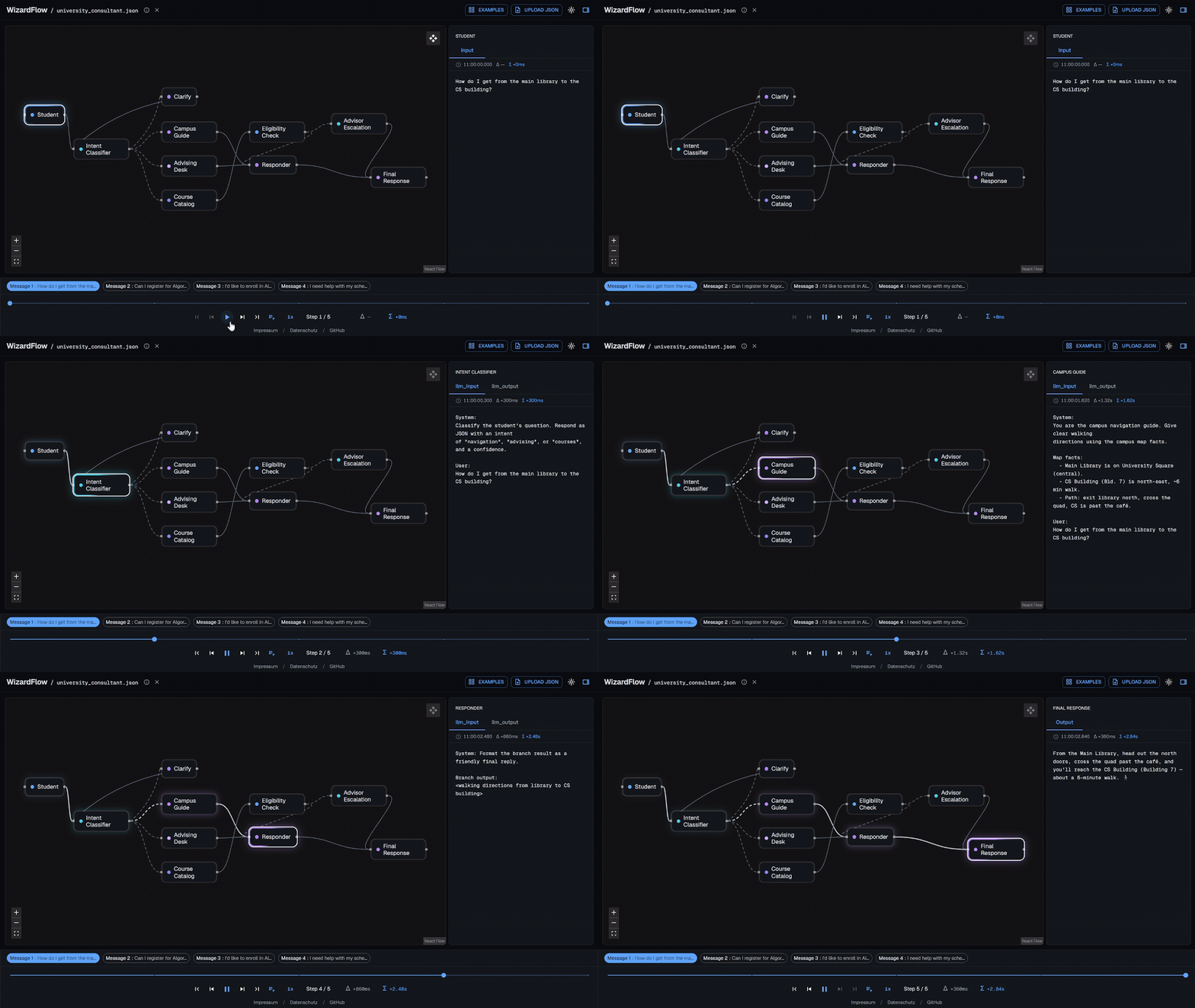
A lightweight tracer for Python agents. Drop three calls into your code —
init, log, end_message — and turn a messy multi-agent run into a portable
trace you can replay as an interactive graph or export to Markdown/HTML. Because
the trace is just a JSON file, anyone can replay it: hand it to a teammate or PM
and they drop it into getwizardflow.com in the
browser — no Python, no install. Lightweight by design: pure Python, zero
runtime dependencies, no daemon, no setup.
The JSON it produces is a small, documented schema: a graph { nodes, edges }
plus messages[] → steps[] → payloads[] { label, value }.
Install
pip install wizardflow
No runtime dependencies. Developing the SDK itself? See CONTRIBUTING.md.
Quickstart
import wizardflow

wizardflow.init(
    output_dir="traces",                # where trace files are written
    file_prefix="run",                  # optional; defaults to "wizardflow"
    description="A small router-based agent run.",
    nodes=["user_input", "router", "planner", "tool_node", "final_response"],
    edges=[("user_input", "router"), ("router", "planner")],
)

# Every log names its message in the first argument.
wizardflow.log("msg-1", "router", "llm_input", prompt)    # same node, two payloads ->
wizardflow.log("msg-1", "router", "llm_output", output)   #   folded into one step
wizardflow.log("msg-1", "tool_node")                       # visited, no payloads
wizardflow.end_message("msg-1")                            # -> writes the trace
There is no save() and no autosave: log() only accumulates in memory,
and end_message(id) is the one call that writes the trace. Writes happen at
message boundaries — one write per finished message, however many log() calls
it contains. init() returns a client and also stashes it as the module
default, so the bare wizardflow.log(...) form above works.
Concurrency-safe. Multi-agent setups end messages from many threads/tasks at once; an internal lock serializes the mutation-and-write so the shared part file is never corrupted and no message is lost or duplicated. Each write is atomic, so the file on disk is always a complete, valid trace.
Targeting a message
The first argument to log is the message id, so overlapping messages never
collide — interleave them freely (as concurrent agents do) and each step routes
to the right message:
wizardflow.log("msg-1", "classifier", "input", text_a)
wizardflow.log("msg-2", "classifier", "input", text_b)   # a different message
wizardflow.log("msg-1", "generator", "output", answer_a)
wizardflow.end_message("msg-1")          # writes msg-1
wizardflow.end_message("msg-2")          # writes msg-2
Pass the string id, never a handle object — safe to hand to a callback or
across threads. A message is created on first reference and finalized by
end_message; end_message(id, title="...") optionally gives it a human title.
LangGraph: automatic topology
Instead of listing nodes/edges by hand, read them straight from a compiled
LangGraph app:
app = workflow.compile(checkpointer=memory)

wizardflow.init_from_langgraph(app, output_dir="traces", file_prefix="trace")

wizardflow.log("msg-1", "planner", "Input", state)   # runtime logging unchanged
wizardflow.end_message("msg-1")
You can keep the extracted LangGraph topology and still choose node accent colors for important nodes:
wizardflow.init_from_langgraph(
    app,
    output_dir="traces",
    file_prefix="trace",
    node_colors={
        "router": "#A78BFA",
        "retriever": "#22D3EE",
        "generator": "#60A5FA",
    },
)
By default, a color key that does not match an extracted node id raises a
WizardFlowError so typos fail fast. With silent=True, unknown color keys are
ignored.
It extracts node ids (keeping __start__ / __end__) and directed edges, and
marks runtime branches with "conditional": true (deterministic and parallel
fan-out edges stay plain):
{
  "edges": [
    { "source": "__start__", "target": "router" },
    { "source": "router", "target": "planner", "conditional": true },
    { "source": "planner", "target": "final_response" }
  ]
}
LangGraph is not a dependency — extraction is duck-typed on app.get_graph().
A non-LangGraph object raises LangGraphExtractionError; missing conditional
metadata never fails extraction (the edge is just emitted plain). Call it
after compile(), when the topology actually exists.
API (v0.1)
init(output_dir=, file_prefix="wizardflow", name=, description=, nodes=, edges=, meta=, silent=False, max_bytes=256_000) -> Clientdescriptionlands inmeta.description(matches the schema field).nodes=enables fast-fail:log()to an undeclared node raisesUnknownNodeErrorimmediately (unless silenced).output_diris optional; omitted, traces are written in cwd.file_prefixis optional; omitted, filenames start withwizardflow.max_bytescaps each part file before rotation (see below).
init_from_langgraph(app, output_dir=, file_prefix="wizardflow", name=, description=, meta=, node_colors=, silent=False, max_bytes=...) -> Client- same as
init, butnodes/edgescome fromapp.get_graph(). node_colorsmaps extracted node ids to CSS colors such as"#A78BFA".
- same as
log(id, node, label=None, content=None)— the first positional is the message id, the second is the node. Withlabel/contentit records a payload; barelog(id, "node")records a visit with no payloads. The message is created on first reference; this only accumulates in memory.end_message(id, title=None)— finalize a message and write the trace; returns the current trace path. The only call that touches disk. Optionaltitlesets the message's human title. Idempotent.Client.current_path— the trace file currently being written.to_dict()/to_json()— inspect the active part (completed messages).
How saving works
end_message triggers an atomic write: write to <part>.tmp, then
os.replace over the part file. The file is always a complete, loadable
AgentTraceFile. Only completed messages are written; an in-progress
message lives in memory until it ends.
Rotation (no single huge file)
There's no natural "end" to a chatbot trace, so the SDK caps file size instead. Each run writes a timestamped entry file whose name carries the run-start time:
wizardflow__2026-06-08T16-29-09-123Z.json
The name's wizardflow is the file_prefix; the timestamp is captured when
init() creates the client. If the active part would exceed max_bytes (~256
KB by default), it's sealed and the next message starts a fresh part:
wizardflow__2026-06-08T16-29-09-123Z.json
wizardflow__2026-06-08T16-29-09-123Z__part2.json
wizardflow__2026-06-08T16-29-09-123Z__part3.json
Rotation only ever happens at a message boundary, never mid-message (a lone
message larger than the cap gets its own oversized part). A smaller cap keeps
each rewrite — and the write lock held across it — short, which matters when
many agents end messages concurrently; raise it for fewer files at the cost of
heavier rewrites. max_bytes is clamped to a hard ceiling (1 MB) so an
accidental huge value can't stall concurrent writers. Each part is a
self-contained, valid trace (full graph + its slice of messages), chained
via meta:
"meta": { "part": 2, "prevPart": "...Z.json", "nextPart": "...__part3.json" }
A single-part trace stays clean (no part metadata). There's no partCount —
the total is genuinely unknown while a continuous run is still logging; follow
nextPart to walk to the end. Since names are timestamped, read the real file
back from the client's current_path (also the path end_message returns).
Logging
Rotation emits an INFO notice on the wizardflow logger. Following library
convention, the SDK attaches a NullHandler and configures nothing — you see
nothing unless you opt in:
import logging
logging.getLogger("wizardflow").setLevel(logging.INFO)
This is separate from silent= (which governs raise-vs-swallow for errors).
Step folding
Consecutive log() calls to the same node within a message fold into a
single step with multiple payloads (e.g. a router step carrying both
llm_input and llm_output). A log() to a different node starts a new step.
Examples
Fuller runnable examples live in
examples/:
quickstart.py— a small linear agent; two messages, the second finalized with anend_message(..., title=...)title.multibranch.py—routerfans out into a planner/tool path and a retriever path that rejoin atgenerator. Two messages take different branches, so each logs only the nodes it actually visited.
CLI
The wizardflow command has three subcommands: ui, md, and html. Every
one takes the trace file as a positional argument or via --path (pass one,
not both):
wizardflow ui   run.json
wizardflow md   run.json
wizardflow html run.json
# --path is equivalent everywhere:
wizardflow ui --path run.json
wizardflow ui — local viewer
wizardflow ui run.json [--host 127.0.0.1] [--port 0] [--no-open]
Binds a stdlib HTTP server, serves the static WizardFlow UI bundled in the SDK package, and opens the selected trace in your browser.
| flag | default | meaning |
|---|---|---|
--host |
127.0.0.1 |
interface to bind |
--port |
0 |
port to bind; 0 asks the OS for a free port |
--no-open |
off | print the local URL instead of launching a browser |
wizardflow md — export to Markdown
wizardflow md run.json                 # -> stdout
wizardflow md run.json -o run.md       # -> file
wizardflow md run.json --no-mermaid    # omit the graph diagram
Renders the full trace as Markdown: a metadata table, a Mermaid flowchart of
the graph, then each message's steps and payloads (scalars inline; multi-line
strings and dict/list values in fenced code blocks; conditional edges drawn
dashed).
| flag | default | meaning |
|---|---|---|
-o, --output |
— | write to this file instead of stdout |
--mermaid |
on | include the Mermaid graph diagram |
--no-mermaid |
— | omit the Mermaid graph diagram |
wizardflow html — export to HTML
wizardflow html run.json               # -> stdout
wizardflow html run.json -o run.html   # -> file
Emits a single self-contained document — inline CSS, no JavaScript, no
external assets — that opens offline in any browser and follows your OS
light/dark mode. Messages-only by design: no graph/Mermaid (use md for that).
| flag | default | meaning |
|---|---|---|
-o, --output |
— | write to this file instead of stdout |
Rendered samples (*.md, *.html) live in the repo's
examples/.
Status / not yet
- Timestamps are wall-clock at log time — fine for slow/live runs, wrong if steps fire faster than ms resolution or you import after the fact. (Open design item: explicit per-step timestamps.)
Release history Release notifications | RSS feed


Download files
Download the file for your platform. If you're not sure which to choose, learn more about installing packages.
Source Distribution
Built Distribution
Filter files by name, interpreter, ABI, and platform.
If you're not sure about the file name format, learn more about wheel file names.
Copy a direct link to the current filters
File details
Details for the file wizardflow-0.1.0.tar.gz.
File metadata
- Download URL: wizardflow-0.1.0.tar.gz
- Upload date:
- Size: 1.1 MB
- Tags: Source
- Uploaded using Trusted Publishing? Yes
- Uploaded via: twine/6.1.0 CPython/3.13.12
File hashes
| Algorithm | Hash digest | |
|---|---|---|
| SHA256 |
ab38663da05afbe47209556d770108b6c3a0ecdb4e981207563fa99b28520f34
|
|
| MD5 |
1deffb8065c9fd6fc09baa9833bea8da
|
|
| BLAKE2b-256 |
97fe0095d84cce46e14294b12c64c3ed8f871a3c164700c1048037d37097cd49
|
Provenance
The following attestation bundles were made for wizardflow-0.1.0.tar.gz:
Publisher:
publish.yml on lkleonk/wizardflow
-
Statement:
-
Statement type:
https://in-toto.io/Statement/v1 -
Predicate type:
https://docs.pypi.org/attestations/publish/v1 -
Subject name:
wizardflow-0.1.0.tar.gz -
Subject digest:
ab38663da05afbe47209556d770108b6c3a0ecdb4e981207563fa99b28520f34 - Sigstore transparency entry: 1803830588
- Sigstore integration time:
-
Permalink:
lkleonk/wizardflow@298846b42a91cb555790e0901a692655a19dae84 -
Branch / Tag:
refs/tags/v0.1.0 - Owner: https://github.com/lkleonk
-
Access:
public
-
Token Issuer:
https://token.actions.githubusercontent.com -
Runner Environment:
github-hosted -
Publication workflow:
publish.yml@298846b42a91cb555790e0901a692655a19dae84 -
Trigger Event:
push
-
Statement type:
File details
Details for the file wizardflow-0.1.0-py3-none-any.whl.
File metadata
- Download URL: wizardflow-0.1.0-py3-none-any.whl
- Upload date:
- Size: 648.4 kB
- Tags: Python 3
- Uploaded using Trusted Publishing? Yes
- Uploaded via: twine/6.1.0 CPython/3.13.12
File hashes
| Algorithm | Hash digest | |
|---|---|---|
| SHA256 |
38b336500d0ef84a820cfaa79cc124c7d12b8ab9c15fb3b47146796c0e3633f9
|
|
| MD5 |
fa1422085bd936fedcafd6db27463dd3
|
|
| BLAKE2b-256 |
c88f2c45d3614a14e072536091ef0a6f509f61c8841a1bae334de9cb5b335ea6
|
Provenance
The following attestation bundles were made for wizardflow-0.1.0-py3-none-any.whl:
Publisher:
publish.yml on lkleonk/wizardflow
-
Statement:
-
Statement type:
https://in-toto.io/Statement/v1 -
Predicate type:
https://docs.pypi.org/attestations/publish/v1 -
Subject name:
wizardflow-0.1.0-py3-none-any.whl -
Subject digest:
38b336500d0ef84a820cfaa79cc124c7d12b8ab9c15fb3b47146796c0e3633f9 - Sigstore transparency entry: 1803830607
- Sigstore integration time:
-
Permalink:
lkleonk/wizardflow@298846b42a91cb555790e0901a692655a19dae84 -
Branch / Tag:
refs/tags/v0.1.0 - Owner: https://github.com/lkleonk
-
Access:
public
-
Token Issuer:
https://token.actions.githubusercontent.com -
Runner Environment:
github-hosted -
Publication workflow:
publish.yml@298846b42a91cb555790e0901a692655a19dae84 -
Trigger Event:
push
-
Statement type:






