
A tiny GUI to configure screen layouts on wayland

Project description
Wlr layout UI
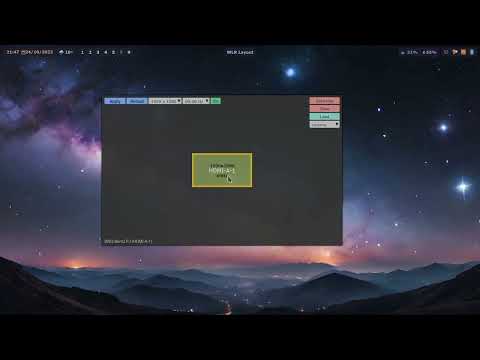
An simple GUI to setup the screens layout. Works best on Hyprland but should support most systems in a slightly degraded way (Wayland and Xorg are supported via 3rd party applications)
Features
- Load and save profiles
- No grid snapping, but anchors in a smart way on overlap
- Set the screen settings
- Layout: position, rotation, scale and flipping
- Resolution
- Refresh rate
- Makes clean, easy to understand layouts, with no negative values of random offsets
</monk>
[!note] Non Hyprland should work without screen rotation or scaling support
Video / Demo
A bit outdated, but still relevant.
Requires
- Python
- pyglet
- tomli
- tomli-w
- One of:
- Hyprland >= 0.37
- wlr-randr (for other wayland systems)
- xrandr (for X11 / Xorg)
Installation
Check your distro for the package:
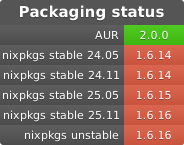
or install with pip in a virtual environment:
python -m venv myenv
./myenv/bin/pip install wlr-layout-ui
This will create a "myenv" folder with the app installed. You will need to run the app with the full path to it (/path/to/myenv/bin/wlrlui).
Usage
Start the GUI
wlrlui
Note that a .desktop file is provided in the files folder for an easy integration to your environment.
List available profiles (CLI)
wlrlui -l
Load a profile
To load the profile called "cinema":
wlrlui cinema
Magic layout
added in 1.6.11
Applies the first profile (in alphabetical order) matching the set of monitors which are currently active:
wlrlui -m
GUI shortcuts
ENTER: apply the current settingsESC: close the appTAB: switch between profiles
Release history Release notifications | RSS feed


Download files
Download the file for your platform. If you're not sure which to choose, learn more about installing packages.
Source Distribution
Built Distribution
Filter files by name, interpreter, ABI, and platform.
If you're not sure about the file name format, learn more about wheel file names.
Copy a direct link to the current filters
File details
Details for the file wlr_layout_ui-1.6.16.tar.gz.
File metadata
- Download URL: wlr_layout_ui-1.6.16.tar.gz
- Upload date:
- Size: 18.3 kB
- Tags: Source
- Uploaded using Trusted Publishing? No
- Uploaded via: poetry/2.1.1 CPython/3.13.2 Linux/6.13.3-arch1-1
File hashes
| Algorithm | Hash digest | |
|---|---|---|
| SHA256 |
fbc437f9dd2283c483d908187e3fa37a158de994106880c9a094d1034956b778
|
|
| MD5 |
308c18f4297f3698332ac085bde82bc0
|
|
| BLAKE2b-256 |
efa2736e458f982796540239859639d77da0cb554a5146abb40632aec83ce4fb
|
File details
Details for the file wlr_layout_ui-1.6.16-py3-none-any.whl.
File metadata
- Download URL: wlr_layout_ui-1.6.16-py3-none-any.whl
- Upload date:
- Size: 20.9 kB
- Tags: Python 3
- Uploaded using Trusted Publishing? No
- Uploaded via: poetry/2.1.1 CPython/3.13.2 Linux/6.13.3-arch1-1
File hashes
| Algorithm | Hash digest | |
|---|---|---|
| SHA256 |
e04fb5da290ab24e836deed4f6499b53ce79e2fe89703eea2c7d6e3ecab8abc7
|
|
| MD5 |
4a496799cf8f47c37269e9d02c6f95db
|
|
| BLAKE2b-256 |
8145c0811767b37060211fee8ff172c162abda332113cdc3cd9756db4bbd424a
|






