
Wlr layout UI
An simple GUI to setup the screens layout. Works best on Hyprland but should support most systems in a slightly degraded way (Wayland and Xorg are supported via 3rd party applications)
Features
- Load and save profiles
- No grid snapping, but anchors in a smart way on overlap
- Set the screen settings
- Layout: position, rotation, scale and flipping
- Resolution
- Refresh rate
- Makes clean, easy to understand layouts, with no negative values of random offsets
</monk>
[!note] Non Hyprland should work without screen rotation or scaling support
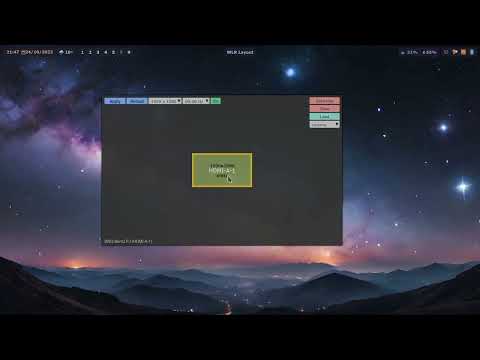
Video / Demo
A bit outdated, but still relevant.
Requires
- Python
- pyglet
- tomli
- tomli-w
- One of:
- Hyprland >= 0.37
- wlr-randr (for other wayland systems)
- xrandr (for X11 / Xorg)
Installation
Check your distro for the package:
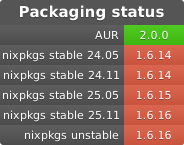
or install with pip in a virtual environment:
python -m venv myenv
./myenv/bin/pip install wlr-layout-ui
This will create a "myenv" folder with the app installed. You will need to run the app with the full path to it (/path/to/myenv/bin/wlrlui).
Usage
Start the GUI
wlrlui
Note that a .desktop file is provided in the files folder for an easy integration to your environment.
List available profiles (CLI)
wlrlui -l
Load a profile
To load the profile called "cinema":
wlrlui cinema
Magic layout
added in 1.6.11
Applies the first profile (in alphabetical order) matching the set of monitors which are currently active:
wlrlui -m
GUI shortcuts
ENTER: apply the current settingsESC: close the appTAB: switch between profiles
1 maintainer

Metadata
1 maintainer
Release files for wlr-layout-ui 2.1.0
For a detailed explanation of source distributions (sdists) and built distributions (wheels), please see the package formats documentation.
Source distribution (sdist)
| File | Size | Uploaded | |
|---|---|---|---|
| wlr_layout_ui-2.1.0.tar.gz | 56.7 kB | Details |
Built distribution (wheel)
| File | Interpreter | ABI | Platform | Reset |
|---|---|---|---|---|
| wlr_layout_ui-2.1.0-py3-none-any.whl | Python 3 | none | any | Details |
Total release size: 121.4 kB
Release files / wlr_layout_ui-2.1.0.tar.gz
| Download URL | wlr_layout_ui-2.1.0.tar.gz |
|---|---|
| Size | 56.7 kB |
| Tags | Source |
|
SHA-256 checksum How to use checksums |
dcb3da5cbcc30a75eddd78a65df85cb43d507f48a8baa736c81ec1cfa9dc3b97
|
|
BLAKE2b-256 checksum How to use checksums |
4acb5e23c133ea383a4310315a551d2a597bb52bba04cec6aa84bcf31251e2a5
|
| Upload date | |
|
Uploaded using Trusted Publishing? What is trusted publishing? |
No |
| Uploaded via |
uv/0.12.0 {"installer":{"name":"uv","version":"0.12.0","subcommand":["publish"]},"python":null,"implementation":{"name":null,"version":null},"distro":{"name":"Arch Linux","version":null,"id":null,"libc":null},"system":{"name":null,"release":null},"cpu":null,"openssl_version":null,"setuptools_version":null,"rustc_version":null,"ci":null}
|
Release files / wlr_layout_ui-2.1.0-py3-none-any.whl
| Download URL | wlr_layout_ui-2.1.0-py3-none-any.whl |
|---|---|
| Size | 64.6 kB |
| Tags | Python 3 |
|
SHA-256 checksum How to use checksums |
b68f490782aabbc953b4f050fefaa748a1fe63049b074b25970a141b28eea634
|
|
BLAKE2b-256 checksum How to use checksums |
a15bd87536249f3f305d84476d4c1aa3f4258d8c9db9e1ec9e22a651db82fa24
|
| Upload date | |
|
Uploaded using Trusted Publishing? What is trusted publishing? |
No |
| Uploaded via |
uv/0.12.0 {"installer":{"name":"uv","version":"0.12.0","subcommand":["publish"]},"python":null,"implementation":{"name":null,"version":null},"distro":{"name":"Arch Linux","version":null,"id":null,"libc":null},"system":{"name":null,"release":null},"cpu":null,"openssl_version":null,"setuptools_version":null,"rustc_version":null,"ci":null}
|














