
Wlr layout UI
An simple GUI to setup the screens layout. Works best on Hyprland but should support most systems in a slightly degraded way (Wayland and Xorg are supported via 3rd party applications)
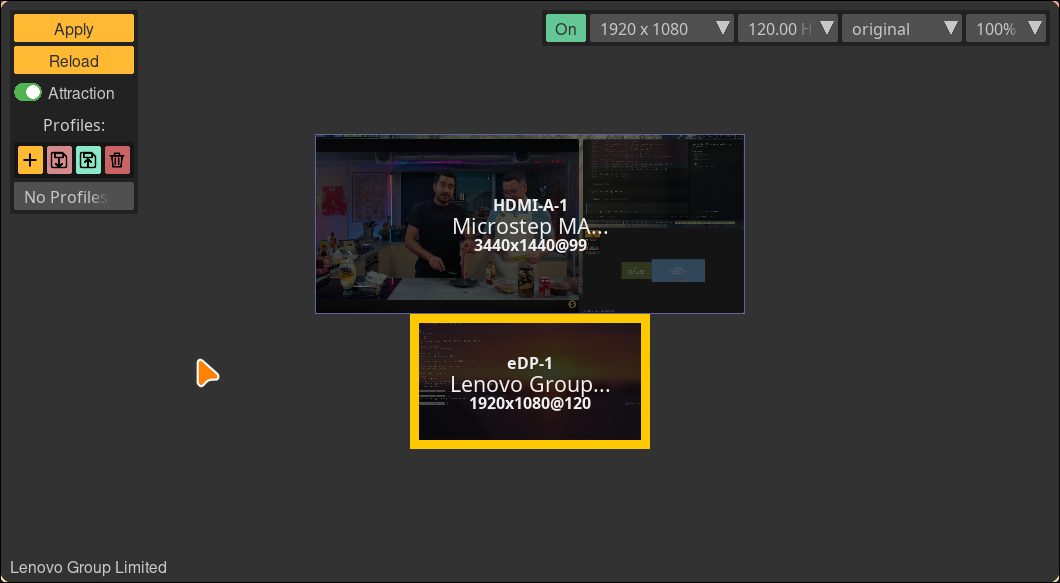
Improved, lighter version available at https://github.com/fdev31/hyprlayout
Features
- Load and save profiles
- No grid snapping, but anchors in a smart way on overlap
- Set the screen settings
- Layout: position, rotation, scale and flipping
- Resolution
- Refresh rate
- Makes clean, easy to understand layouts, with no negative values of random offsets
</monk>
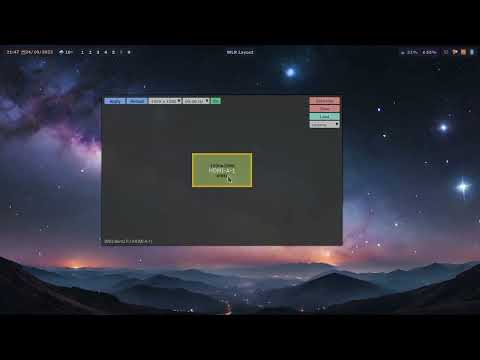
Video / Demo
A bit outdated, but still relevant.
Requires
- Python
- pyglet
- tomli
- tomli-w
- One of:
- Hyprland >= 0.37
- wlr-randr (for other wayland systems)
- xrandr (for X11 / Xorg)
Installation
Check your distro for the package:

or install with pip in a virtual environment:
python -m venv myenv
./myenv/bin/pip install wlr-layout-ui
This will create a "myenv" folder with the app installed. You will need to run the app with the full path to it (/path/to/myenv/bin/wlrlui).
Usage
Start the GUI
wlrlui
Note that a .desktop file is provided in the files folder for an easy integration to your environment.
List available profiles (CLI)
wlrlui -l
Load a profile
To load the profile called "cinema":
wlrlui cinema
Magic layout
added in 1.6.11
Applies the first profile (in alphabetical order) matching the set of monitors which are currently active:
wlrlui -m
GUI shortcuts
ENTER: apply the current settingsESC: close the appTAB: switch between profiles
1 maintainer

Metadata
1 maintainer
Release files for wlr-layout-ui 2.2.0
For a detailed explanation of source distributions (sdists) and built distributions (wheels), please see the package formats documentation.
Source distribution (sdist)
| File | Size | Uploaded | Provenance | Actions |
|---|---|---|---|---|
| wlr_layout_ui-2.2.0.tar.gz | 60.3 kB | Without provenance | Details for wlr_layout_ui-2.2.0.tar.gz |
Built distribution (wheel)
| File | Interpreter | ABI | Platform | Actions Reset |
|---|---|---|---|---|
| wlr_layout_ui-2.2.0-py3-none-any.whl | Python 3 | none | any | Details for wlr_layout_ui-2.2.0-py3-none-any.whl |
Total release size: 129.2 kB
Release files / wlr_layout_ui-2.2.0.tar.gz
| Download URL | wlr_layout_ui-2.2.0.tar.gz |
|---|---|
| Size | 60.3 kB |
| Tags | Source |
|
SHA-256 checksum How to use checksums |
f2898b19131012c6dc93e1fdcd99ee23fed95c1c4283337f853b3fe3f0e1e5d2
|
|
BLAKE2b-256 checksum How to use checksums |
c3b56aff471900add3e9e174f0562bd2c65d0e84c60970e093594059017b122a
|
| Upload date | |
|
Uploaded using Trusted Publishing? What is trusted publishing? |
No |
| Uploaded via |
uv/0.13.6 {"installer":{"name":"uv","version":"0.13.6","subcommand":["publish"]},"python":null,"implementation":{"name":null,"version":null},"distro":{"name":"Arch Linux","version":null,"id":null,"libc":null},"system":{"name":null,"release":null},"cpu":null,"openssl_version":null,"setuptools_version":null,"rustc_version":null,"ci":null}
|
Release files / wlr_layout_ui-2.2.0-py3-none-any.whl
| Download URL | wlr_layout_ui-2.2.0-py3-none-any.whl |
|---|---|
| Size | 68.8 kB |
| Tags | Python 3 |
|
SHA-256 checksum How to use checksums |
e2601c69c0dc05b2c93198d454eacc89f16110f6fdbd9b1922c6210bf8a46674
|
|
BLAKE2b-256 checksum How to use checksums |
7e2ec9851c4137a4d57031952ba90b6ae30fc12f6b230ec8278235448ce8fc47
|
| Upload date | |
|
Uploaded using Trusted Publishing? What is trusted publishing? |
No |
| Uploaded via |
uv/0.13.6 {"installer":{"name":"uv","version":"0.13.6","subcommand":["publish"]},"python":null,"implementation":{"name":null,"version":null},"distro":{"name":"Arch Linux","version":null,"id":null,"libc":null},"system":{"name":null,"release":null},"cpu":null,"openssl_version":null,"setuptools_version":null,"rustc_version":null,"ci":null}
|
Security for wlr-layout-ui 2.2.0
Provenance
Provenance describes where a file came from. On PyPI, provenance is shared via attestations, which provide a verifiable record of the build or publishing details. View details, limitations and caveats.
No provenance found
None of the files in this release were uploaded with provenance metadata.
A note on package security
PyPI is a repository for distributing packages, not a service for auditing them. While third-party security researchers and our staff do their best to detect and remove malicious packages, PyPI cannot guarantee the quality, security or suitability of any given package.
To learn more about protecting yourself from malicious actors, visit our package security documentation.














