
Create and Manage AWS EC2 AMI cloud images

Project description
Wolkenbrot
bakes and manages your cloud images (AWS, OpenStack, libvirt/KVM)
wolkenbrot is named after a German children's title called Wolkenbrot by the Korean authors Baek Hee Na Kim Hyang Soo. The translation to English is cloud's bread.
Wolken brot is inspired by packer1 and kujenga2, removing fabric as a dependency. It also aims to be more tested and documented.
In case you wonder, yes it's similar to packer by Hashicorp. But here are some reasons that you might like it better than packer:
- It's written in Python.
- It's not written in Go.
- It can use private AMI as a starting point for your build.
- It's smaller and easier to hack on.
- It has a cooler name.
- It has a better license, MIT sounds way better then MPL-2. Especially because it means "with" in German.
how is it different from Packer or kujenga?
- It is Python3 only.
- It does not depend on fabric.
- It replaces boto with boto3
- It's name is not Swahili, but rather German.
- It adds the ability to list your images
- It adds the ability to get detailed information about an image from the CLI.
- It adds the ability to de-register images from the CLI.
AWS Usage (default)
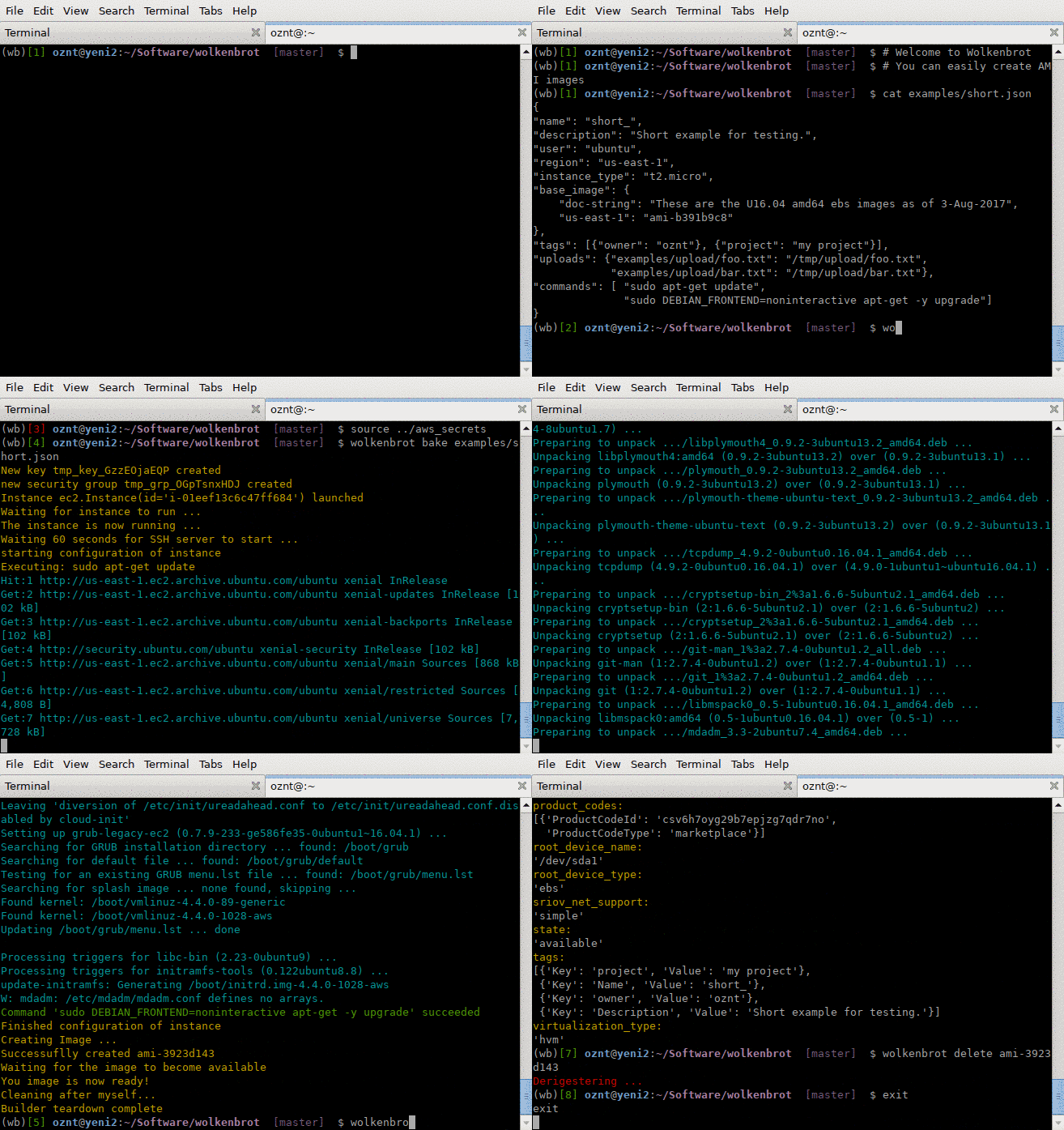
You can run the following command to build an image:
$ wolkenbrot bake <image.json>
See the documentation for the JSON format.
You can run the following command to list your existing images:
$ wolkenbrot list
You can view the information about and image:
$ wolkenbrot info ami-72192e
You can remove the image with:
$ wolkenbrot delete ami-72192e
Wolkenbrot follows boto3 configuration principles, so if you wonder how to pass AWS configuration parameters, take a look in Boto3's own documentation
OpenStack Usage
Use the --openstack flag or set "provider": "openstack" in your JSON config:
$ wolkenbrot --openstack bake <image.json>
$ wolkenbrot --openstack list
$ wolkenbrot --openstack info <image-id>
$ wolkenbrot --openstack delete <image-id>
Libvirt/KVM Usage
Use the --libvirt flag or set "provider": "libvirt" in your JSON config:
$ wolkenbrot --libvirt bake <image.json>
$ wolkenbrot --libvirt list
$ wolkenbrot --libvirt info <image-name.qcow2>
$ wolkenbrot --libvirt delete <image-name.qcow2>
Libvirt-specific options
--uri- Libvirt connection URI (default:qemu:///system)--image-dir- Directory for libvirt images (default:/var/lib/libvirt/images)
Examples:
# List images in a custom directory
$ wolkenbrot --libvirt --image-dir /custom/path list

# Connect to a remote libvirt host
$ wolkenbrot --libvirt --uri qemu+ssh://user@host/system list
Libvirt JSON configuration
Example libvirt.json:
{
  "provider": "libvirt",
  "name": "my-image",
  "description": "My custom image",
  "base_image": {
    "path": "/var/lib/libvirt/images/ubuntu-cloud.img"
  },
  "output_path": "./my-image.qcow2",
  "user": "ubuntu",
  "memory": 4096,
  "vcpus": 2,
  "disk_size": "20G",
  "network": "default",
  "uploads": {
    "./local-file": "/remote/path"
  },
  "commands": [
    "sudo apt-get update",
    "sudo apt-get install -y nginx"
  ]
}
Libvirt-specific configuration options:
region- Libvirt connection URI (default:qemu:///system)base_image.path- Path to the base cloud image (qcow2 format)output_path- Where to save the final imageinstance_type- Predefined instance type (see table below)memory- VM memory in MB (default: 2048, overrides instance_type)vcpus- Number of virtual CPUs (default: 2, overrides instance_type)disk_size- Disk size (default: "20G", overrides instance_type)network- Libvirt network name (default: "default")
Instance Types
| Type | vCPUs | Memory | Disk |
|---|---|---|---|
| small | 1 | 1 GB | 10G |
| medium | 2 | 4 GB | 20G |
| large | 4 | 8 GB | 40G |
| xlarge | 8 | 16 GB | 80G |
You can use instance_type instead of specifying memory, vcpus, and disk_size individually:
{
  "provider": "libvirt",
  "name": "my-image",
  "base_image": {"path": "/var/lib/libvirt/images/ubuntu.img"},
  "instance_type": "medium"
}
Individual settings (memory, vcpus, disk_size) override the instance type defaults if both are specified.
Remote Libvirt Hosts
Use region in the config (or --uri CLI option) to connect to remote libvirt hosts:
{
  "provider": "libvirt",
  "name": "my-image",
  "region": "qemu+ssh://user@remote-host/system",
  "base_image": {"path": "/var/lib/libvirt/images/ubuntu.img"},
  "instance_type": "large"
}
Common URI formats:
qemu:///system- Local system (default, requires root or libvirt group)qemu:///session- Local user session (unprivileged)qemu+ssh://user@host/system- Remote host via SSH
FAQ
-
Do you support Windows or Mac OS X?
The author of this software strongly despises working on Windows or Mac OS X. Hence, this software is not tested for these platforms. If you can run Python on your OS, it might run.
-
Do you support provisioning machines with Saltstack\Chef\Puppet\Ansible\XYZ?
Yes, just install them via shell first, then call the right binary with the correct playbook\state\formula..
Testing and Installing the test requirements
Simply issue:
$ pip install -e ".[dev]"
$ make test


Download files
Download the file for your platform. If you're not sure which to choose, learn more about installing packages.
Source Distribution
File details
Details for the file wolkenbrot-0.5.1.tar.gz.
File metadata
- Download URL: wolkenbrot-0.5.1.tar.gz
- Upload date:
- Size: 6.5 MB
- Tags: Source
- Uploaded using Trusted Publishing? No
- Uploaded via: twine/6.2.0 CPython/3.12.12
File hashes
| Algorithm | Hash digest | |
|---|---|---|
| SHA256 |
4da0d3ad20e7e244ea3acfa056fe009deda68048f75fd8fa756d1b682a41b8e6
|
|
| MD5 |
7422f275d955e9f76ce048865c199b22
|
|
| BLAKE2b-256 |
54134bab7c3ff3fbfaa3a45db9e7a7d064b9d5ec675e83ecb9d2d806a9a913fb
|






