
This release is a pre-release and may not be stable for production use.
Workflow Canvas



An AI-native, visual dry-lab notebook for reproducible analysis.
Workflow Canvas (wfc) turns your analysis into a pipeline you can see, and
guarantees every result in it can be reproduced: its Python backend records the
exact code, data, settings and software behind each result, so anyone can rerun it
and check that it matches.
Your AI agent can build the pipeline from your existing scripts and notebooks; you can write it yourself, or mix the two. Either way, every result is reproducible.
For researchers, scientists and PhD students who want their analysis organized, reproducible, and easy to pass on to others.
Build it with an AI agent
The wfc plugin teaches Claude Code and Codex how Workflow Canvas works. Ask in
plain words to set up a project, turn one of your scripts into a pipeline step, run
it, or explain why a run failed. The agent tries each step on your data as a draft,
shows you every change it made, and registers nothing until you agree. What it
builds appears in the Canvas, with each step's settings and the results of every run.
In Claude Code (run each line in a terminal):
claude plugin marketplace add ddpoe/workflow-canvas
claude plugin install wfc@workflow-canvas
In Codex:
codex plugin marketplace add ddpoe/workflow-canvas
codex plugin add wfc@workflow-canvas
The plugin has three skills:
using-wfc: working with wfc, from setting up a project to reading a failed run.creating-a-wfc-method: bringing one script in as a method.converting-an-analysis-to-a-wfc-pipeline: handing over a whole analysis, a folder of notebooks and scripts, and getting back a pipeline you approved step by step, with a record of every change.
Each is a plain folder under plugins/wfc/skills/, with a SKILL.md, that you can
copy into either tool's skills folder. For chats on claude.ai or ChatGPT, the desktop app and other
agents, see
Work with an AI Agent.
Key Features
| Feature | What it does |
|---|---|
| AI agent plugin | Skills for Claude Code and Codex that set up a project, turn your scripts or a whole analysis into pipeline steps, run them and explain failures. Nothing is registered until you agree. |
| Drafts | Run a step on your data as often as you like before registering it. Nothing a draft does is recorded. |
| Rerun bundles | Export any result, with its samples and every step that led to it, as one zip that reruns on another computer with Python and Docker and checks each output against yours. |
| Core pipeline | Register modules, methods, and samples; build a pipeline in the Canvas; generate and execute a Snakefile (wfc run-pipeline). |
| Contracts | Two-tier validation (module + method) declared in method.yaml — wiring errors and missing outputs are caught before a run starts. |
| Caching | A clean-git run gate plus a SHA-256 cache key over code, inputs, parameters, and the resolved container image — unchanged steps are skipped automatically; changing one method re-runs only what it touched. |
| Lineage | Every run is recorded in SQLite; trace any output back through its full DAG ancestry (cache hits appear as audit rows). |
| Environments | Methods run in containers built from a pixi, conda, or bring-your-own (byo) backend via wfc register-env; image digests are pinned in .wfc/envs.json. |
| Parameter sweeps & fan-out | Sweep parameters, fan out across variants and per-sample overrides, and reuse values with pipeline variables. |
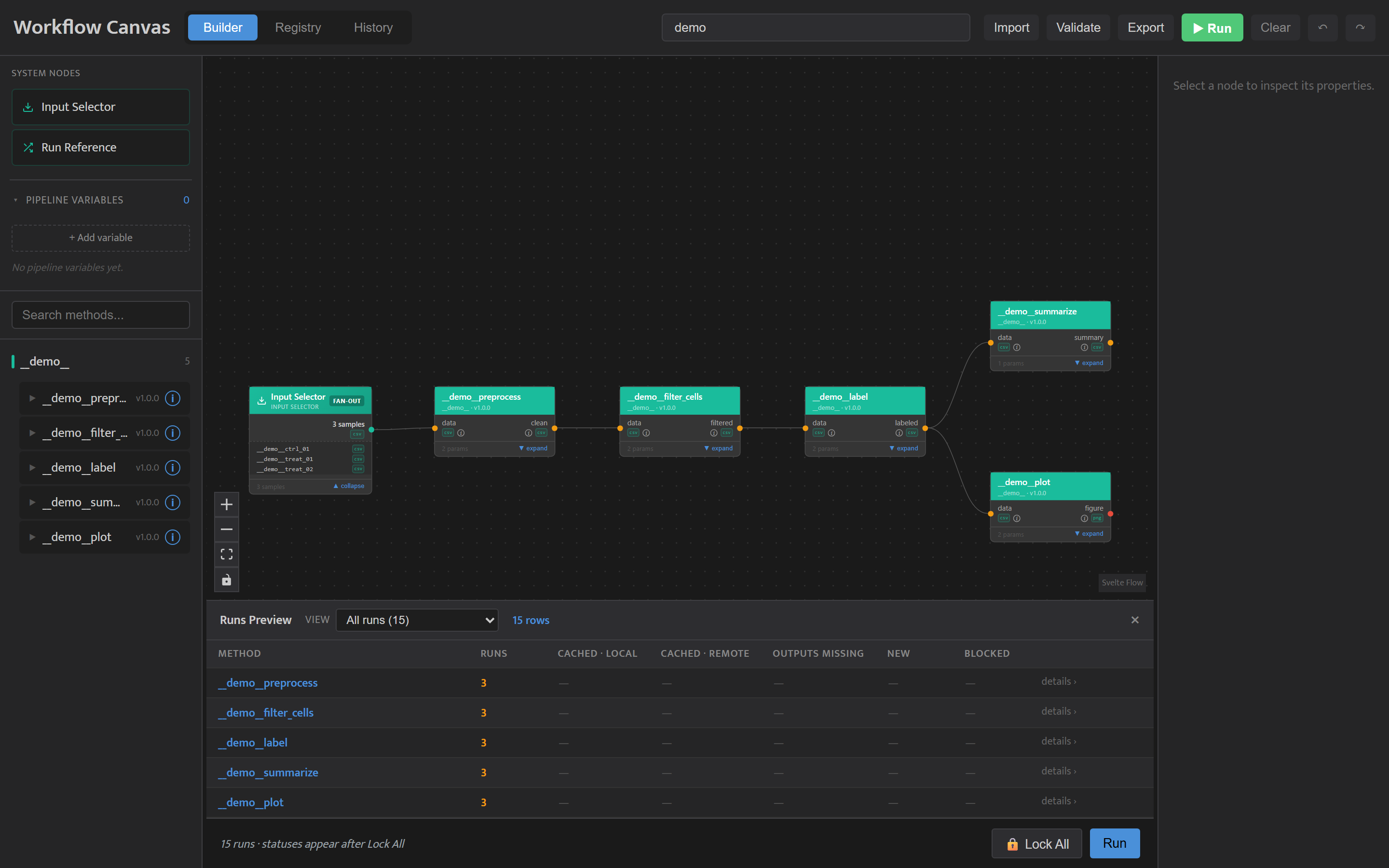
| Canvas | A browser-based UI (wfc canvas) with three views: a drag-and-drop Builder, a run-History viewer with lineage and artifacts, and a Registry browser. |
Under the hood
Workflow Canvas tracks your methods, their input/output contracts, run lineage, and content-addressed caching in a local SQLite database, then compiles pipelines to Snakemake Snakefiles so Snakemake handles execution, parallelism, and dependency resolution. Every method runs inside a container, and every output is stored in a content-addressed archive (DVC), so results are reproducible and re-running an unchanged pipeline does no duplicate work.
Requirements
- Python 3.12 — required (the config parser uses stdlib
tomllib). - Docker — required. Methods always run inside a container; nothing runs without a working Docker installation.
wfc initpre-flights it andwfc doctorchecks it. - Git — required, but local only. wfc records a commit per run and refuses to run on uncommitted code. No GitHub account, login, or network is involved; wfc never pushes.
DVC and Snakemake ship with Workflow Canvas — you do not install them separately.
Installation
# Installs the wfc CLI, plus bundled DVC and Snakemake
pip install workflow-canvas

# Verify
wfc --help
Quick Start
New to Workflow Canvas? Start with the Your First Pipeline tutorial in the documentation.
For the fastest first look, wfc demo populates a freshly initialized project
with a complete runnable example pipeline and opens it in the Canvas
(wfc demo --remove takes it back out):
wfc init --dir ./demo_project && cd demo_project && wfc demo
To have an agent do the setup instead, add the plugin
(Build it with an AI agent) and ask it:
Set up a wfc project here.
The steps below show the same setup done manually with your own code and data:
# 1. Initialize a project (guided wizard: scaffolds dirs, configures an output
#    archive, sets up a local git repo, and pre-flights Docker)
wfc init --dir ./my_project
cd my_project

# Optional: check that the project is ready to run (git, archive, Docker)
wfc doctor

# 2. Build and register the container environment your methods will run in.
#    Docs → "Registering an Environment"
wfc register-env analysis conda:analysis

# 3. Register a module (from a module.yaml, recommended).
#    Docs → "Registration"
wfc register-module --name cell_analysis --module-dir modules/cell_analysis

# 4. Register a method (AST-scans the script for its inputs, outputs, and params).
#    Docs → "Authoring a Method Script" and "Writing Contracts"
wfc register-method modules/cell_analysis/preprocess --module cell_analysis

# 5. Register input data (content-hashed into the DVC store).
wfc register-sample --name CFPAC_ERKi --source /data/raw/cfpac_erki.csv

# 6. Build a pipeline in the Canvas, then run it.
#    Docs → "Running & Inspecting Results"
wfc run-pipeline --cores 4
Visual Canvas
wfc canvas # serves the UI at http://127.0.0.1:8500 by default
Use the Builder to assemble pipelines by dragging and wiring method nodes, the History view to browse past runs (lineage chains, params, metrics, artifacts), and the Registry to inspect everything registered in the project. See the Use the Canvas how-to in the documentation for a walkthrough.
Project Structure
my_project/
  .wfc/
    wf-canvas.toml        # Project config (DB path, env root, DVC archive URL)
    wfc.db                # SQLite database — single source of truth (not in git)
    envs.json             # Registered container environments (tracked in git)
    registry/methods/     # wfc's registered copy of each method, <module>/<method>/ (tracked in git)
    workspace/samples/    # Ephemeral workspace; samples restored lazily at run time
    runs/
      sentinels/          # Zero-byte Snakemake DAG-wiring sentinels
      {run_id}/           # Transient staging; bytes are moved to the DVC archive
  .dvc/cache/             # Local content-addressed cache
  .gitignore
Your own module and method source lives wherever you keep it (for example src/).
Output bytes are not kept in .wfc/runs/; they live in the content-addressed DVC
archive (default ~/.wfc/archives/<project>, outside the repo), indexed by
.wfc/wfc.db. Back up both .wfc/ and the archive folder to keep results recoverable.
Documentation
Full user documentation is published at workflow-canvas.readthedocs.io and covers:
- Tutorials — Your First Pipeline, A Tour of the Demo, Work with an AI Agent
- How-to — Build Your Own Pipeline, Write a Method, Draft a Method, Wire a Pipeline, Run and Inspect Your Pipelines, Share Runs as a Bundle Anyone Can Rerun
- Reference — CLI Reference, Python API (
wfc-client),method.yamlschema,wf-canvas.toml - Explanation — How a Run Executes, Caching & Reproducibility, Project Anatomy, Storage & Provenance
Contributing
Bug reports, questions and pull requests are welcome. See CONTRIBUTING.md for how to set up a development environment, run the tests and build the docs, and the Code of Conduct for how we work together.
License
See LICENSE.
1 maintainer

Metadata
1 maintainer
Release files for workflow-canvas 0.8.0b3
For a detailed explanation of source distributions (sdists) and built distributions (wheels), please see the package formats documentation.
Source distribution (sdist)
| File | Size | Uploaded | Provenance | Actions |
|---|---|---|---|---|
| workflow_canvas-0.8.0b3.tar.gz | 2.9 MB | Without provenance | Details for workflow_canvas-0.8.0b3.tar.gz |
Built distribution (wheel)
| File | Interpreter | ABI | Platform | Actions Reset |
|---|---|---|---|---|
| workflow_canvas-0.8.0b3-py3-none-any.whl | Python 3 | none | any | Details for workflow_canvas-0.8.0b3-py3-none-any.whl |
Total release size: 6.1 MB
Release files / workflow_canvas-0.8.0b3.tar.gz
| Download URL | workflow_canvas-0.8.0b3.tar.gz |
|---|---|
| Size | 2.9 MB |
| Tags | Source |
|
SHA-256 checksum How to use checksums |
62a584084f13a497716fed4cc1fd75ae07ac4c58b258403f98a65facb1442907
|
|
BLAKE2b-256 checksum How to use checksums |
8683503c9fe679f96e457b15953c9e65d270d4d9d52f1864f2f4b95717b7b7fa
|
| Upload date | |
|
Uploaded using Trusted Publishing? What is trusted publishing? |
No |
| Uploaded via |
poetry/1.8.2 CPython/3.10.9 Windows/10
|
Release files / workflow_canvas-0.8.0b3-py3-none-any.whl
| Download URL | workflow_canvas-0.8.0b3-py3-none-any.whl |
|---|---|
| Size | 3.2 MB |
| Tags | Python 3 |
|
SHA-256 checksum How to use checksums |
f6c4243bcb3f98c5e77fc0e8c93da08c73dc027b259eb529200335ac6a56d9a7
|
|
BLAKE2b-256 checksum How to use checksums |
3204bdd3375d9c74a43c5cceca8d0f36d32786539dc015e3caacb07953d71f93
|
| Upload date | |
|
Uploaded using Trusted Publishing? What is trusted publishing? |
No |
| Uploaded via |
poetry/1.8.2 CPython/3.10.9 Windows/10
|
Security for workflow-canvas 0.8.0b3
Provenance
Provenance describes where a file came from. On PyPI, provenance is shared via attestations, which provide a verifiable record of the build or publishing details. View details, limitations and caveats.
No provenance found
None of the files in this release were uploaded with provenance metadata.
A note on package security
PyPI is a repository for distributing packages, not a service for auditing them. While third-party security researchers and our staff do their best to detect and remove malicious packages, PyPI cannot guarantee the quality, security or suitability of any given package.
To learn more about protecting yourself from malicious actors, visit our package security documentation.














