
Worklog for Claude Code
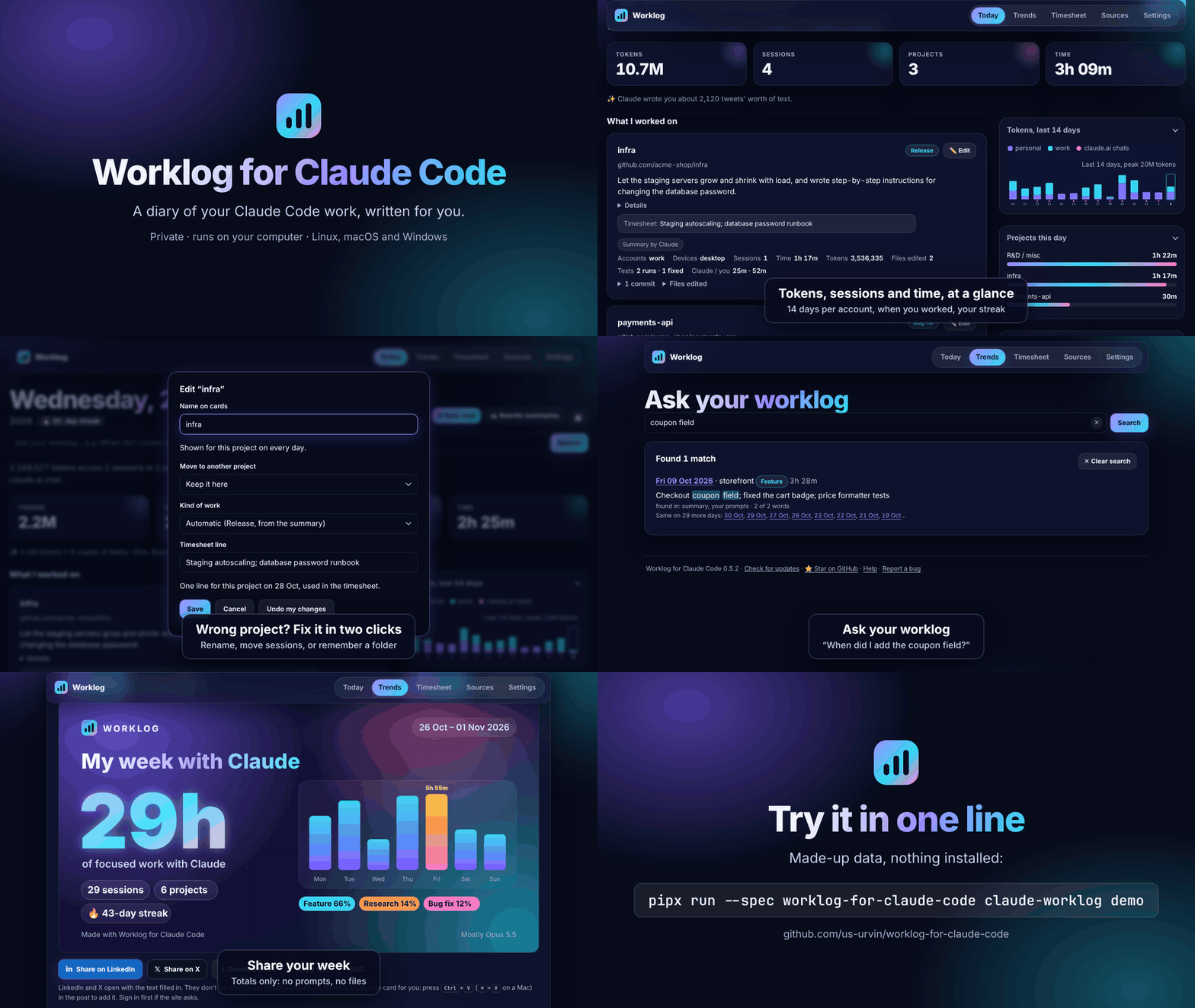
A diary of your Claude Code work, written for you. See what you did each day and how many tokens it used.




What it does
- ✅ Writes down what you worked on, project by project, every day, in plain words. Claude writes the summary.
- 🧾 Makes your timesheet: hours per project with a plain-language line, to Excel or CSV in one click.
- 📊 Shows how many tokens you used, per day, account and model.
- 👥 Handles several Claude accounts and computers, even if you switch accounts with a one-click app.
- 🔒 Stays private: everything lives on your computer (and your own private git repo, if you want).
- 💻 Runs on Linux, macOS and Windows, quietly in the background.
Try it (nothing is installed)
pipx run --spec worklog-for-claude-code claude-worklog demo
Open http://localhost:8766 to see it with made-up data. Press Ctrl+C to stop.
Install in 3 steps
You need Python 3.10+, git and Claude Code. No pipx yet? See the beginner guide.
1. Install
pipx install worklog-for-claude-code
2. Create a folder for your log and start Worklog
git init ~/claude-worklog-data          # Windows PowerShell: git init "$HOME\claude-worklog-data"
claude-worklog install-service
3. Open http://worklog.localhost:8765 (or http://localhost:8765) and fill in the short form.
A checklist then shows anything still missing, with the exact command for your computer. When everything is ticked, it disappears. That's it: use Claude Code as usual.
A closer look
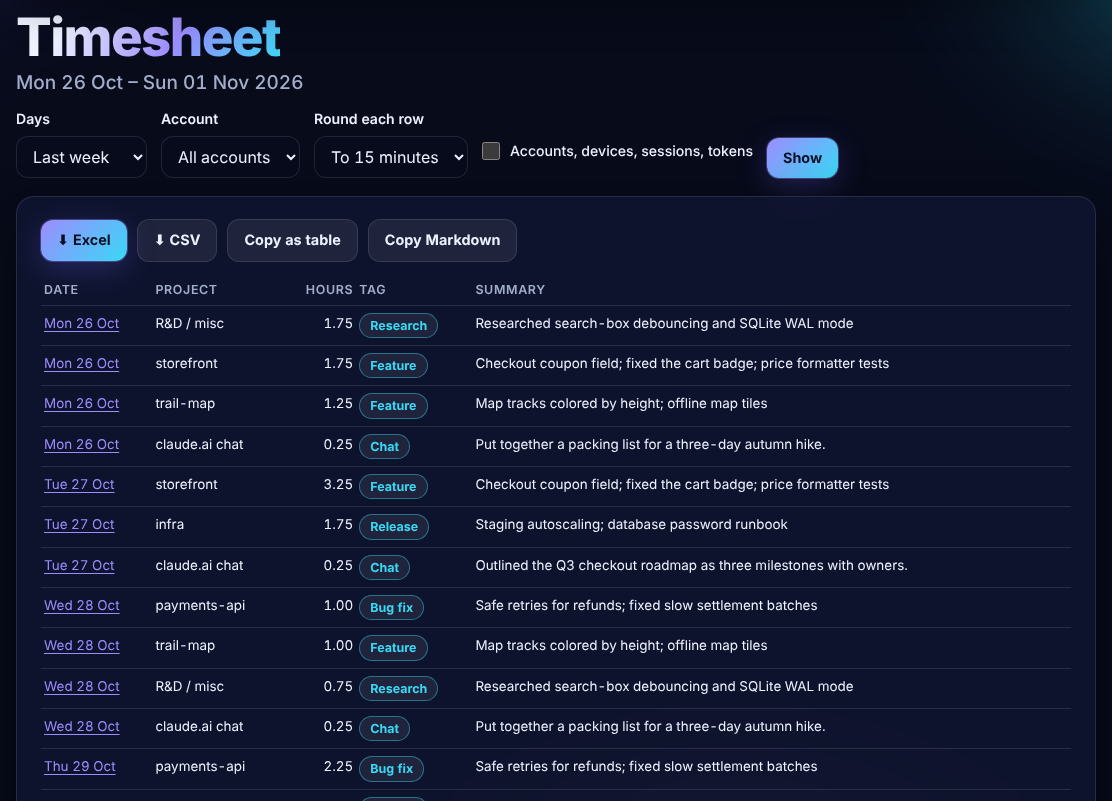 A timesheet, ready for Excel. |
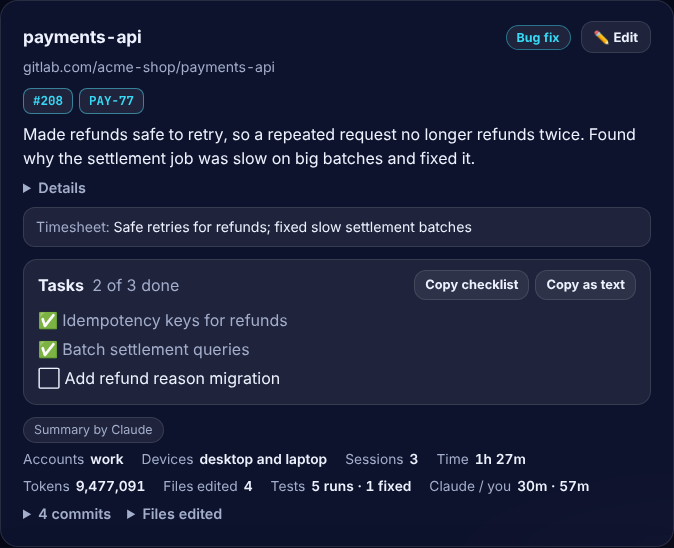 Plain-language summaries, tags and Claude's tasks. |
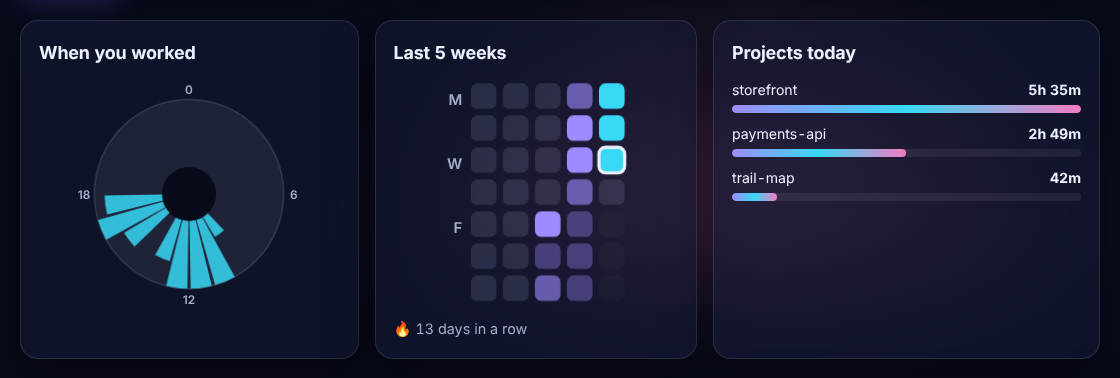 When you worked, your streak, and where the time went. |
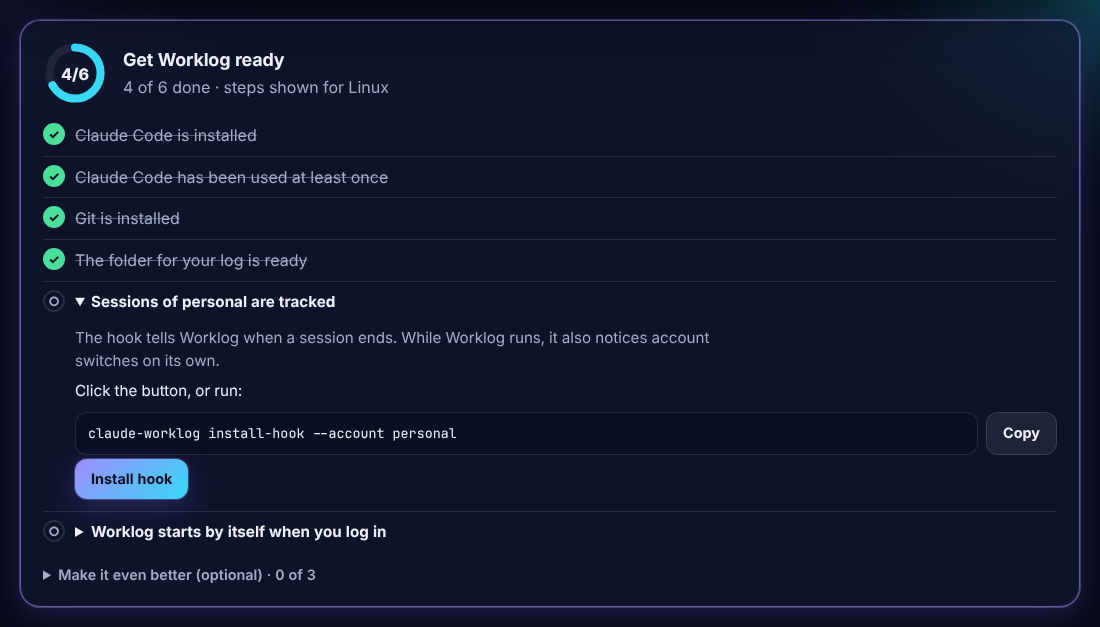 A setup checklist with steps for your system. |
 New accounts are noticed for you. |
 Updates in one click. |
Privacy
- Only short notes are saved: the first 300 characters of your prompts, token counts, file names and commit messages. Never your files or Claude's replies.
- Common secrets (API keys, passwords, e-mails) are blanked out before saving. This is best effort, so keep your data repo private.
- Summaries are written by your own Claude account. Turn them off in Settings to stay fully offline.
- The only other request: once a day, Worklog asks pypi.org whether a new version is out. Nothing about you is sent, and you can turn it off.
Questions
It says Sonnet, but I use Opus? The "By model" list shows what Claude Code really used. To get better summaries, pick Opus in Settings → Summaries.
Several accounts or computers? Settings walks you through it. For several computers, see Full setup.
Using several GitHub accounts? GitHub knows you by your SSH key. In Settings → Private data repo, click Test connection to see which account signs in, and open Several GitHub accounts on this computer? for the steps. More →
Uploads to my data repo fail? Click Test connection in Settings: it says what's wrong in plain words. See Troubleshooting.
Wrong project on a card? Click ✏️ Edit to rename it or move the sessions. Worklog can remember the folder you always start in.
How do I update? Click Update now when the dashboard says a new version is out, or run pipx upgrade --pip-args=--no-cache-dir worklog-for-claude-code and click Restart now on the page. Still the old version? Restart it once.
Something isn't working? Run claude-worklog doctor, or see Troubleshooting.
How do I remove it? claude-worklog uninstall-service, then pipx uninstall worklog-for-claude-code. Your log stays.
Like it? ⭐
If Worklog saves you time, please star it on GitHub. It helps others find it.
📘 Beginner guide · 📖 Full guide · 🐛 Report a bug · 📝 Changelog
MIT © 2026 Urvin · Not affiliated with or endorsed by Anthropic.
1 maintainer

Metadata
1 maintainer
Release files for worklog-for-claude-code 0.4.1
For a detailed explanation of source distributions (sdists) and built distributions (wheels), please see the package formats documentation.
Source distribution (sdist)
| File | Size | Uploaded | Provenance | Actions |
|---|---|---|---|---|
| worklog_for_claude_code-0.4.1.tar.gz | 179.0 kB | With provenance | Details for worklog_for_claude_code-0.4.1.tar.gz |
Built distribution (wheel)
| File | Interpreter | ABI | Platform | Actions Reset |
|---|---|---|---|---|
| worklog_for_claude_code-0.4.1-py3-none-any.whl | Python 3 | none | any | Details for worklog_for_claude_code-0.4.1-py3-none-any.whl |
Total release size: 327.4 kB
Release files / worklog_for_claude_code-0.4.1.tar.gz
| Download URL | worklog_for_claude_code-0.4.1.tar.gz |
|---|---|
| Size | 179.0 kB |
| Tags | Source |
|
SHA-256 checksum How to use checksums |
c78c3eca08e5b8ecf1dfde4fdd02aa6d38dcc75a376cafb755b80b925868a34c
|
|
BLAKE2b-256 checksum How to use checksums |
ba25ca86d6727ce6cdf866c4cc174490981d96ad7d1072933f5657af160818bd
|
| Upload date | |
|
Uploaded using Trusted Publishing? What is trusted publishing? |
Yes |
| Uploaded via |
twine/7.0.0 CPython/3.13.16
|
Provenance
Provenance describes where a file came from. On PyPI, provenance is shared via attestations, which provide a verifiable record of the build or publishing details. View details, limitations and caveats.


PyPI Publish Attestation
PyPI verified that this artifact, at this checksum, originated from the publisher listed below.
Signed by GitHub Actions, verified by PyPI on Nov 2, 2026.
Transparency logRelease files / worklog_for_claude_code-0.4.1-py3-none-any.whl
| Download URL | worklog_for_claude_code-0.4.1-py3-none-any.whl |
|---|---|
| Size | 148.4 kB |
| Tags | Python 3 |
|
SHA-256 checksum How to use checksums |
af5c3d1cf1d671652ff6470dfa547409132e1fcfd078c7fad887a01f32418e88
|
|
BLAKE2b-256 checksum How to use checksums |
bc63bd59e538b5faadf272ec998ca9a9ea76083b87cb8696295d79b125b8969b
|
| Upload date | |
|
Uploaded using Trusted Publishing? What is trusted publishing? |
Yes |
| Uploaded via |
twine/7.0.0 CPython/3.13.16
|
Provenance
Provenance describes where a file came from. On PyPI, provenance is shared via attestations, which provide a verifiable record of the build or publishing details. View details, limitations and caveats.
PyPI Publish Attestation
PyPI verified that this artifact, at this checksum, originated from the publisher listed below.
Signed by GitHub Actions, verified by PyPI on Nov 2, 2026.
Transparency logSecurity for worklog-for-claude-code 0.4.1
Provenance
Provenance describes where a file came from. On PyPI, provenance is shared via attestations, which provide a verifiable record of the build or publishing details. View details, limitations and caveats.
Full provenance
All 2 files in this release have been uploaded with provenance metadata.
Attestation for worklog_for_claude_code-0.4.1.tar.gz
PyPI Publish Attestation
PyPI verified that this artifact, at this checksum, originated from the publisher listed below.
Signed by GitHub Actions, verified by PyPI on Nov 2, 2026.
Transparency logA note on package security
PyPI is a repository for distributing packages, not a service for auditing them. While third-party security researchers and our staff do their best to detect and remove malicious packages, PyPI cannot guarantee the quality, security or suitability of any given package.
To learn more about protecting yourself from malicious actors, visit our package security documentation.














