
A terminal-based world clock that displays multiple timezones in real-time.
Verified details
These details have been verified by PyPIProject links
GitHub Statistics
Maintainers

Project description
worldclock-tty





A terminal-based world clock that displays multiple timezones in real-time.
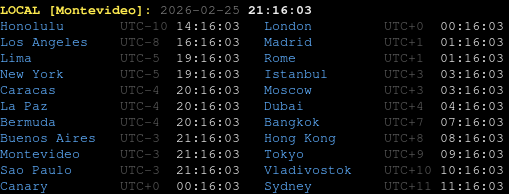
This program is a heavy refactor of a timezone clock I made in 2016.
Installation
uv tool install worldclock-tty
Usage
Run the clock:
worldclock-tty
Press Ctrl+C to exit.
The display shows your local time at the top, followed by all configured timezones in two columns, updated every second.
Options
| Flag | Default | Description |
|---|---|---|
--sort / --no-sort |
on | Sort timezones by UTC offset (lowest first). |
--offset / --no-offset |
on | Show the UTC offset (e.g. UTC-3) next to each time. |
--12h / --24h |
--24h |
Use a 12-hour clock with AM/PM instead of 24-hour. |
--military / --no-military |
off | Show NATO/military zone letters (Z, N, P, …) instead of UTC±N. Alias: --zulu. |
--utc |
off | With --military, also show the numeric offset next to the letter. |
--full-military / --no-full-military |
off | Show a full military Date-Time Group (e.g. 041430Z JUL 26). Alias: --dtg. |
--theme |
saved or default |
Color theme for this run: default, mono, matrix, amber, ocean. |
--color |
(none) | Per-element color override, e.g. --color city=green (repeatable). |
worldclock-tty --no-sort          # keep the order from config
worldclock-tty --no-offset        # hide UTC offset labels
worldclock-tty --12h              # 12-hour clock with AM/PM
worldclock-tty --military         # Zulu/November letters instead of UTC±N
worldclock-tty --military --utc   # letters and the numeric offset (e.g. P UTC-3)
worldclock-tty --full-military    # DTG format: 041430Z JUL 26
worldclock-tty --theme matrix     # use a color theme for this run
worldclock-tty --color time=green --color city=45   # tweak individual colors
worldclock-tty --no-sort --no-offset
Military zone letters map each whole-hour UTC offset to a letter: Z is UTC+0,
A…M run east (skipping J, reserved for local time), and N…Y run west.
Offsets with no official designator (half-hour zones like India at UTC+5:30,
or anything beyond ±12h) fall back to the numeric UTC±N.
--full-military (--dtg) replaces each time with a Date-Time Group:
DDHHMM + zone letter + MON YY, e.g. 041430Z JUL 26 (day 04, 14:30, Zulu,
July 2026). It is minute-precision and always 24-hour, so it overrides the
offset and --12h flags. Zones with no official letter use *.
The LOCAL header always ends in J (Juliet). In the military system Juliet is
local time itself, not a fixed UTC offset, so the header stays J whatever your
offset happens to be. This is expected even when your own zone also appears in the
list with its offset letter: at UTC-3 the header reads ...J while the matching
row reads ...P (Papa). The two are consistent: J labels "your local time",
P labels "the -3 offset".
Colors and themes
Every element on screen is colorable: city, offset, time (the world-clock
rows) and label, date, local-time (the LOCAL header). Colors are given
as a name (e.g. green, cornflower_blue) or a 256-color code (0–255).
Pick a built-in theme for a run, or override individual elements with
--color (repeatable). Precedence, lowest to highest: default, the saved
theme, --theme, then --color.
worldclock-tty --theme ocean
worldclock-tty --theme matrix --color time=196     # theme, then tweak one element
worldclock-tty --color label=cyan --color city=45  # override on the default theme
Save a theme as your default. That is the only thing persisted in the config;
per-run --color tweaks are never saved:
worldclock-tty theme set matrix    # persist as the default
worldclock-tty theme list          # list themes; the saved one is marked
worldclock-tty theme reset         # back to the built-in default
Built-in themes: default, mono, matrix, amber, ocean.
Managing timezones
Timezones are stored in $XDG_CONFIG_HOME/worldclock-tty/config.json (defaults to ~/.config/worldclock-tty/config.json). Use IANA timezone names (e.g. America/Chicago, Europe/Paris).
worldclock-tty add America/Chicago       # add a timezone
worldclock-tty remove America/Chicago    # remove a timezone
worldclock-tty list                      # show configured timezones
worldclock-tty reset                     # restore built-in defaults
Default timezones
America/Buenos_Aires, America/Caracas, America/La_Paz, America/Lima, America/Los_Angeles, America/Montevideo, America/New_York, America/Sao_Paulo, Asia/Bangkok, Asia/Dubai, Asia/Hong_Kong, Asia/Istanbul, Asia/Tokyo, Asia/Vladivostok, Atlantic/Bermuda, Atlantic/Canary, Australia/Sydney, Europe/London, Europe/Madrid, Europe/Moscow, Europe/Rome, Pacific/Honolulu.
Requirements
Python 3.10+
License
MIT
Project details
Verified details
These details have been verified by PyPIProject links
GitHub Statistics
Maintainers
Release history Release notifications | RSS feed


Download files
Download the file for your platform. If you're not sure which to choose, learn more about installing packages.
Source Distribution
Built Distribution
Filter files by name, interpreter, ABI, and platform.
If you're not sure about the file name format, learn more about wheel file names.
Copy a direct link to the current filters
File details
Details for the file worldclock_tty-0.6.4.tar.gz.
File metadata
- Download URL: worldclock_tty-0.6.4.tar.gz
- Upload date:
- Size: 17.6 kB
- Tags: Source
- Uploaded using Trusted Publishing? Yes
- Uploaded via: twine/6.1.0 CPython/3.13.12
File hashes
| Algorithm | Hash digest | |
|---|---|---|
| SHA256 |
2cfee22c491e8826f657abdee1dc6db838155835d43a5506d0301b6331dc7b06
|
|
| MD5 |
1b7836a4c08db1c7042bbfae94c265fa
|
|
| BLAKE2b-256 |
7cd423409251d3186c8f3af3d3373051a98cd197dba83c80fdcba06ab7a211de
|
Provenance
The following attestation bundles were made for worldclock_tty-0.6.4.tar.gz:
Publisher:
publish.yml on carlosplanchon/worldclock-tty
-
Statement:
-
Statement type:
https://in-toto.io/Statement/v1 -
Predicate type:
https://docs.pypi.org/attestations/publish/v1 -
Subject name:
worldclock_tty-0.6.4.tar.gz -
Subject digest:
2cfee22c491e8826f657abdee1dc6db838155835d43a5506d0301b6331dc7b06 - Sigstore transparency entry: 2090282569
- Sigstore integration time:
-
Permalink:
carlosplanchon/worldclock-tty@59b539a99a4fab8b6497da60f734a76ee027b32a -
Branch / Tag:
refs/tags/v0.6.4 - Owner: https://github.com/carlosplanchon
-
Access:
public
-
Token Issuer:
https://token.actions.githubusercontent.com -
Runner Environment:
github-hosted -
Publication workflow:
publish.yml@59b539a99a4fab8b6497da60f734a76ee027b32a -
Trigger Event:
push
-
Statement type:
File details
Details for the file worldclock_tty-0.6.4-py3-none-any.whl.
File metadata
- Download URL: worldclock_tty-0.6.4-py3-none-any.whl
- Upload date:
- Size: 11.4 kB
- Tags: Python 3
- Uploaded using Trusted Publishing? Yes
- Uploaded via: twine/6.1.0 CPython/3.13.12
File hashes
| Algorithm | Hash digest | |
|---|---|---|
| SHA256 |
c27b0dabab2cb605955c2941a43bf6128a2fc476daa53c42c8de48a992ad9982
|
|
| MD5 |
7882bba22fed0538e466fd4a771d7297
|
|
| BLAKE2b-256 |
86d25388159dc2c187de9b7c976417db6f7ce4f1d1f3fa50083945f6a88d21ac
|
Provenance
The following attestation bundles were made for worldclock_tty-0.6.4-py3-none-any.whl:
Publisher:
publish.yml on carlosplanchon/worldclock-tty
-
Statement:
-
Statement type:
https://in-toto.io/Statement/v1 -
Predicate type:
https://docs.pypi.org/attestations/publish/v1 -
Subject name:
worldclock_tty-0.6.4-py3-none-any.whl -
Subject digest:
c27b0dabab2cb605955c2941a43bf6128a2fc476daa53c42c8de48a992ad9982 - Sigstore transparency entry: 2090282871
- Sigstore integration time:
-
Permalink:
carlosplanchon/worldclock-tty@59b539a99a4fab8b6497da60f734a76ee027b32a -
Branch / Tag:
refs/tags/v0.6.4 - Owner: https://github.com/carlosplanchon
-
Access:
public
-
Token Issuer:
https://token.actions.githubusercontent.com -
Runner Environment:
github-hosted -
Publication workflow:
publish.yml@59b539a99a4fab8b6497da60f734a76ee027b32a -
Trigger Event:
push
-
Statement type:






