
x-use — MCP server for X (Twitter)
Connect your AI client to X research, inbox reads, and reviewed publishing.
x-use is an open-source Python Model Context Protocol (MCP) server and CLI for X (Twitter). Connect Claude, Codex, Cursor or another local MCP client to profile research, inbox management and reviewed publishing. It uses your authenticated browser session, supports multiple accounts and runs locally without official X API credentials.




Quickstart · Documentation · Tool reference · Discussions · Contribute
What can you do with x-use?
- Research before replying: search X, inspect a profile, read posts and bounded thread context, and prepare a relevant reply.
- Work through your inbox: inspect visible conversations, unread messages, requests and notifications; prepare individual messages and supported conversation actions for review.
- Publish with context: stage posts or multi-post threads, inspect the exact text, and approve the draft when it is ready.
- Organize outreach locally: maintain leads, opt-outs and campaign drafts with per-account limits and delivery tracking.
Your AI client supplies the reasoning and text. An optional OpenAI-compatible LLM configuration supports server-side generation; ordinary explicit-text MCP workflows do not need that extra key.
Quickstart
Requires Python 3.10+ and Chromium. The CI matrix covers Python 3.10–3.14 on Windows, macOS and Linux.
Version 3.1.0 provides 82 tools for research, inbox management, reviewed publishing and account operations. Upgrade the package and restart your MCP client to load the current tools.
1. Install the server and browser
python -m pip install --upgrade x-use-mcp
python -m patchright install chromium
2. Choose a private data directory and initialize
Windows PowerShell:
$env:X_USE_HOME = "$env:LOCALAPPDATA\x-use"
x-use init
x-use doctor
macOS / Linux:
export X_USE_HOME="$HOME/.local/share/x-use"
x-use init
x-use doctor
The wizard configures your account and imports your own X session cookies from a local JSON export. Keep cookies and inbox PINs private. Use the same absolute data directory in your client configuration below; shell environment settings alone do not configure a desktop client.
3. Connect your MCP client
Use this stdio configuration in clients that accept an mcpServers object, such as Claude Desktop:
{
  "mcpServers": {
    "x-use": {
      "command": "/absolute/path/to/x-use",
      "args": ["mcp"],
      "env": {
        "X_USE_HOME": "/absolute/path/to/x-use-data"
      }
    }
  }
}
Replace both paths. On Windows, use the installed x-use.exe path and forward slashes in JSON, for example C:/Users/you/AppData/Local/x-use for the data directory. Locate the executable with Get-Command x-use in PowerShell or command -v x-use on macOS/Linux.
Claude Code, Codex, Cursor and Windsurf have their own registration locations or commands. Follow the client setup instructions, then reload the client if required. Ask it to call list_accounts before starting browser work.
4. Try a first workflow
With draft mode enabled, ask your client:
Check my account health, research the profile I specify, and summarize its recent visible posts. Prepare one relevant reply draft and show me its ID and exact text. Wait for my approval before publishing.
The flow is get_account_health → get_profile_context → prepare_reply → reply_to_tweet → get_draft. The reply tool stages a draft under the default policy; prepare_reply supplies context. Use approve_draft only when authorized.
More workflow examples cover inbox triage, outreach and threads.
Install from source or let your agent handle setup
git clone https://github.com/ihuzaifashoukat/x-use.git
cd x-use
python scripts/setup_uv.py --dev
On Windows you can use py -3 scripts/setup_uv.py --dev; on macOS/Linux use python3 if needed. Setup installs uv when missing, synchronizes locked dependencies into .venv, installs matching Chromium, creates missing sample configuration and runs diagnostics. Activate the environment or use its executable directly. Then initialize your account.
For assisted installation, use the setup prompt or install the root setup skill:
npx skills add ihuzaifashoukat/x-use
The Claude Code plugin includes the bundled skills and MCP configuration guidance.
Capabilities
| Workflow | Representative tools | Details |
|---|---|---|
| Profile and post research | get_profile_context, search_profile, search_tweets, get_tweet, get_thread |
Visible profile, post, media and bounded thread evidence |
| Inbox and notifications | get_inbox, search_conversations, get_conversation, get_notifications |
Inbox/request folders, read-state evidence and partial message history |
| Publishing and inbox controls (3.1.0) | get_bookmarks, edit_tweet, delete_tweet, unfollow_profile, manage_conversation |
Reviewed changes; supported controls and limitations |
| Reviewed publishing | post_tweet, reply_to_tweet, prepare_thread, approve_draft |
Persistent drafts and resumable thread progress |
| Individual outreach | prepare_outreach, send_message, follow_profile |
Message and follow drafts require individual approval |
| Leads and campaigns | upsert_lead, create_campaign, prepare_campaign_messages, opt_out_lead |
Local records, suppression and bounded batches |
| Account readiness (3.1.0) | get_account_health, get_session_status, test_proxy |
Operational score, evidence and recovery advice, plus explicit proxy connectivity checks |
| Scheduling and recovery | queue_post, process_queue, get_account_health, resolve_action_outcome |
Durable budgets, explicit recovery and uncertain-outcome tracking |
Version 3.1.0 includes 82 tools, seven prompts, four resource patterns and seven bundled skills. It adds runtime diagnostics, campaign previews, bookmarks, reviewed post edits/deletions, engagement reversal and inbox controls to the 70 tools in 3.0.0. See publishing and inbox controls for supported layouts and testing limits.
The MCP guide documents every tool, prompt and resource. Validation evidence separates local protocol checks, synthetic browser fixtures and authorized live-account checks.
For a uvx client, use uvx x-use-mcp or pin the release with
uvx x-use-mcp==3.1.0. The x-use-mcp executable starts MCP without arguments;
the existing x-use mcp command remains supported. Clients pinned to 3.0.0
must use uvx --from x-use-mcp==3.0.0 x-use mcp.
How execution works
The current MCP runtime uses async Patchright Chromium with separate account contexts. Your configuration, cookies, drafts, queue and action journals live under X_USE_HOME. AI-client and optional model-provider data handling depends on the client and provider you choose.
The protocol implementation uses the maintained MCP Python SDK v1 line (mcp>=1.30,<2).
Draft mode is enabled by default for ordinary publishing. Messages, follows and thread starts require draft approval. Direct publishing mode, explicit queue processing, opt-in auto-drain and the legacy batch runner have separate execution paths. Review the configuration reference before changing these settings.
The development checkout allows one MCP server process per X_USE_HOME, preventing concurrent servers from using stale draft and queue state. Close the existing connection before opening the same data directory in another client.
Limits to understand
- Browser reads are bounded by visible X content. Followers, inboxes and threads are not complete exports; unavailable evidence remains unknown.
- Opening conversations or notifications can change their native read state.
- Encrypted inboxes may need the account owner's PIN again after a browser-context restart.
- Analytics currently reports availability and the observed Premium gate; it does not provide a complete analytics dashboard.
- X layout changes, expired sessions, account challenges and platform limits can interrupt work. Local controls do not guarantee protection from account restrictions.
- The legacy Selenium batch engine (
x-use run/run_cycle) executes separately from MCP draft review. Community posting is not currently verified in the async runtime.
See browser behavior and recovery and responsible-use guidance.
Frequently asked questions
Does x-use require an X API key?
No. It operates visible X pages through a browser authenticated with your session cookies. It does not require official X API credentials. Optional server-side text generation may require an LLM provider key.
Which MCP clients can use x-use?
Clients that launch local stdio MCP servers can use x-use. Setup examples cover Claude Desktop, Claude Code, Codex, Cursor and Windsurf. Client-specific discovery and reload behavior varies.
Does x-use automatically send every drafted message?
No. Message drafts require individual approval. Other write behavior depends on draft mode, queue execution and the legacy runner; check the configured policy before requesting actions.
Can I manage multiple X accounts?
Yes. Accounts have separate cookies, browser contexts and policy settings, with optional proxy routes. Browser capacity is bounded and depends on your host and configuration.
Can I edit posts or manage my X inbox?
Version 3.1.0 adds reviewed edits and deletion of your own posts, bookmarks, unfollowing, and supported conversation request, mute/unmute and deletion actions. X determines edit eligibility. Inbox history is partial, and per-message editing/deletion, attachment sending and group administration are not implemented. See the controls guide for exact arguments and limits.
Is x-use free and open source?
The project is MIT licensed with no project license fee. AI-client subscriptions, optional model providers, proxies and hosting may have their own costs.
Is x-use affiliated with X?
No. x-use is an independent community project. X and Twitter are names used to identify the platform it works with.
Was this project called twitter-automation-ai?
Yes. The project was renamed to x-use during the v2 relaunch. See the changelog for its history.
Documentation and community
Start with the documentation index. It links setup, workflows, tools, configuration, presets, architecture and troubleshooting. X-Use is maintained by Huzaifa Shoukat and welcomes community contributions.
Found a reproducible problem? Report a bug. Have a workflow to share? Start a discussion. Useful first contributions include clearer setup instructions, fictional browser fixtures, platform fixes and example presets.
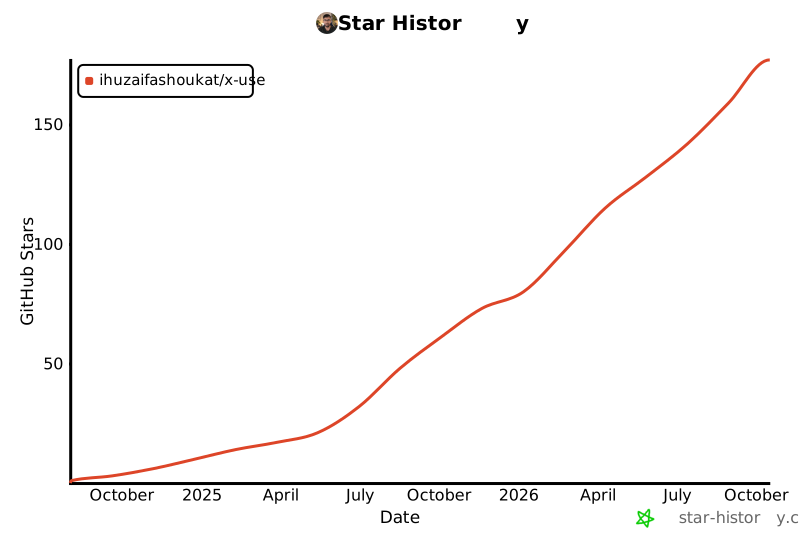
See CONTRIBUTING, the Code of Conduct and security policy. If x-use helps your work, a GitHub star helps other developers discover it.
Star history
License
MIT.
1 maintainer

Metadata
1 maintainer
Release files for x-use-mcp 3.1.0
For a detailed explanation of source distributions (sdists) and built distributions (wheels), please see the package formats documentation.
Source distribution (sdist)
| File | Size | Uploaded | |
|---|---|---|---|
| x_use_mcp-3.1.0.tar.gz | 365.7 kB | Details |
Built distribution (wheel)
| File | Interpreter | ABI | Platform | Reset |
|---|---|---|---|---|
| x_use_mcp-3.1.0-py3-none-any.whl | Python 3 | none | any | Details |
Total release size: 709.9 kB
Release files / x_use_mcp-3.1.0.tar.gz
| Download URL | x_use_mcp-3.1.0.tar.gz |
|---|---|
| Size | 365.7 kB |
| Tags | Source |
|
SHA-256 checksum How to use checksums |
73dff05a835f3590965f8db8f6e11dcf6603ecc9469ec1f8bdab5a6be3bf72d0
|
|
BLAKE2b-256 checksum How to use checksums |
8e07b3b2e6a83537651781bbafad6035829bc04d78c7aff337d6528801f2a915
|
| Upload date | |
|
Uploaded using Trusted Publishing? What is trusted publishing? |
Yes |
| Uploaded via |
twine/7.0.0 CPython/3.13.14
|
Provenance
Provenance describes where a file came from. On PyPI, provenance is shared via attestations, which provide a verifiable record of the build or publishing details. View details, limitations and caveats.


PyPI Publish Attestation
PyPI verified that this artifact, at this checksum, originated from the publisher listed below.
Signed by GitHub Actions, verified by PyPI on Oct 12, 2026.
Transparency logRelease files / x_use_mcp-3.1.0-py3-none-any.whl
| Download URL | x_use_mcp-3.1.0-py3-none-any.whl |
|---|---|
| Size | 344.2 kB |
| Tags | Python 3 |
|
SHA-256 checksum How to use checksums |
2e2ebc40bba6aae5041174defca95d51802c43b517f3db1622104abeaf95d840
|
|
BLAKE2b-256 checksum How to use checksums |
5f224d33f24db4f36fb15e6c566950397dd87bf92789c2ded2716b6eea822d6a
|
| Upload date | |
|
Uploaded using Trusted Publishing? What is trusted publishing? |
Yes |
| Uploaded via |
twine/7.0.0 CPython/3.13.14
|
Provenance
Provenance describes where a file came from. On PyPI, provenance is shared via attestations, which provide a verifiable record of the build or publishing details. View details, limitations and caveats.
PyPI Publish Attestation
PyPI verified that this artifact, at this checksum, originated from the publisher listed below.
Signed by GitHub Actions, verified by PyPI on Oct 12, 2026.
Transparency log













