
x11PyGrid
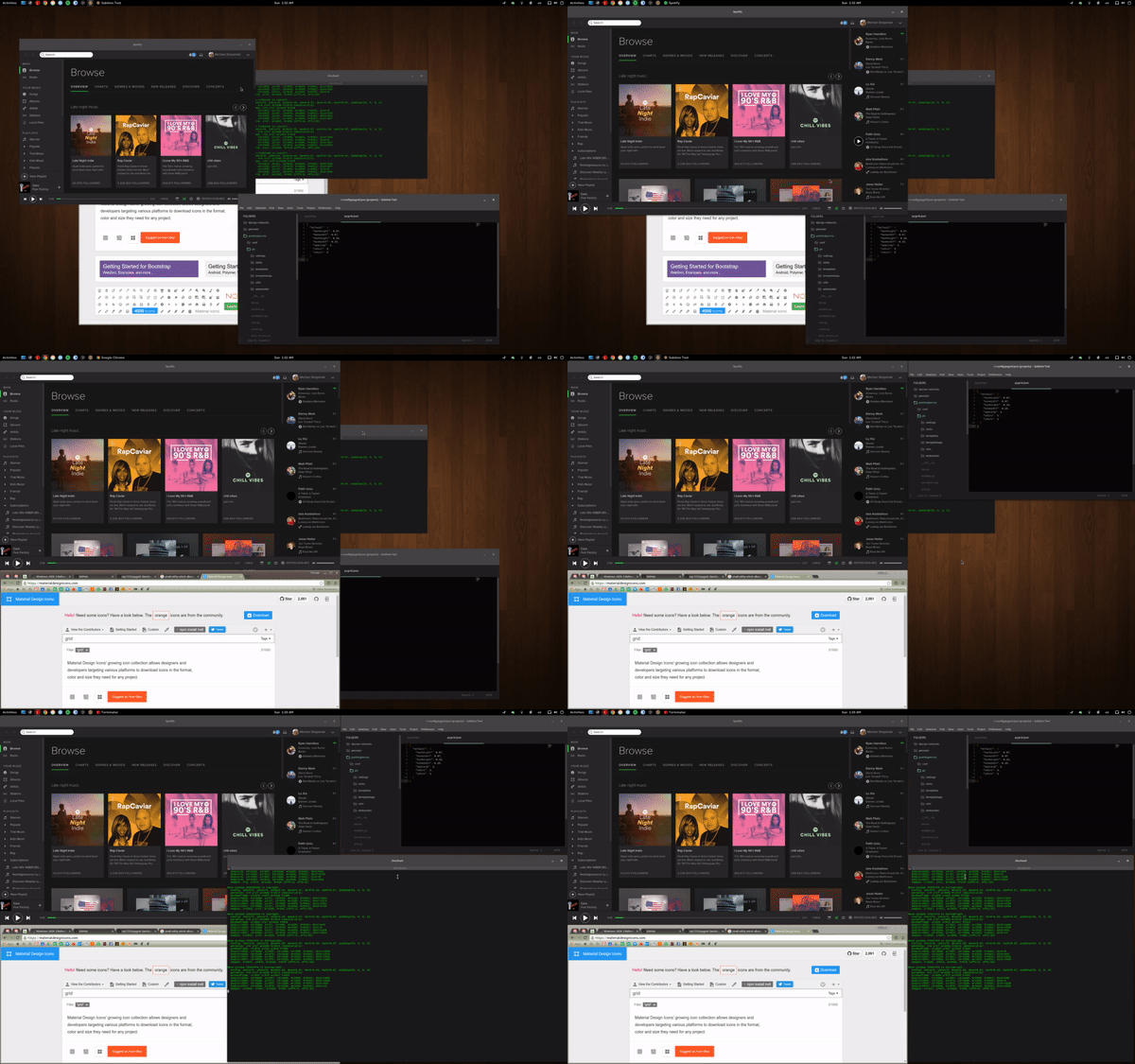 x11pygrid is a small utility which allows you to easily organize your open windows
by tiling, resizing and positioning them to make the best use of your desktop
real estate. It's easy to configure and supports multiple monitors.
x11pygrid is a small utility which allows you to easily organize your open windows
by tiling, resizing and positioning them to make the best use of your desktop
real estate. It's easy to configure and supports multiple monitors.
Notice that, package is renamed from pygrid to x11pygrid. Previous name was too similar to the other package in PyPi.
Requirements
- Python3
- X11-based desktop
- python3-gi
- python3-xlib
- single_process
Default Shortcuts
ALT+CTRL+NUMPAD-1- Move window to bottom left.ALT+CTRL+NUMPAD-2- Move window to bottom.ALT+CTRL+NUMPAD-3- Move window to bottom right.ALT+CTRL+NUMPAD-4- Move window to left.ALT+CTRL+NUMPAD-5- Move window to center.ALT+CTRL+NUMPAD-6- Move window to right.ALT+CTRL+NUMPAD-7- Move window to top left.ALT+CTRL+NUMPAD-8- Move window to top.ALT+CTRL+NUMPAD-9- Move window to top right.ALT+CTRL+NUMPAD-0- Maximize window.ALT+CTRL+NUMPAD-ENTER- Cycle window between monitors.
Repeatedly press one of the defined keybindings to cycle through window sizes available at the desired location on the screen.
Configuration
Configuration is done via a JSON file located at ~/.config/x11pygrid.json,
which will be created with default options if not found when starting up.
If you have old, customized configuration file, named by old package name
(i.e. in ~/.config/pygrid.json instead of ~/.config/x11pygrid.json),
you can just mv ~/.config/pygrid.json ~/.config/x11pygrid.json.
The default configuration is below. If you introduce top level sections 'monitor0': {...}
or 'monitor1': {...} to provide different options for each monitor on your
system. Any settings not defined will fall back to user-defined defaults, then
global defaults. NOTE: Updating configuration in this JSON file does not
require you to restart PyGrid.
{
  'default': {
    'xdivs': 3,                       // number of x divisions for the screen.
    'ydivs': 2,                       // number of y divisions for the screen.
    'padding': [0, 0, 0, 0],          // additional top, right, bottom, left padding in pixels.
    'spacing': 4,                     // spacing between windows in pixels.
    'minwidth': 0.25,                 // min percent width of window.
    'maxwidth': 0.67,                 // max percent width of window.
    'minheight': 0.33,                // min percent height of window.
    'maxheight': 0.67,                // max percent height of window.
    'snaptocursor': false,            // window will be moved to cursor's monitor
  },
  'monitor0': { ... },                // Repeat any settings above specific for monitor 0.
  'monitor1': { ... },                // Repeat any settings above specific for monitor 1.
  'monitor<NUM>': { ... },            // Repeat any settings above specific for monitor <NUM>.
  'keys': {
    'accelerator': '<Ctrl><Mod1><Mod2>',
    'commands': {
      'KP_1': 'bottomleft',           // Set KP-1 to cycle bottom left window sizes.
      'KP_2': 'bottom',               // Set KP-2 to cycle bottom window sizes.
      'KP_3': 'bottomright',          // Set KP-3 to cycle bottom right window sizes.
      'KP_4': 'left',                 // Set KP-4 to cycle left window sizes.
      'KP_5': 'middle',               // Set KP-5 to cycle centered window sizes.
      'KP_6': 'right',                // Set KP-6 to cycle right window sizes.
      'KP_7': 'topleft',              // Set KP-7 to cycle top left window sizes.
      'KP_8': 'top',                  // Set KP-8 to cycle top window sizes.
      'KP_9': 'topright'              // Set KP-9 to cycle top right window sizes.
      'KP_0': 'maximize',             // Set KP-0 to maximize the window.
      'KP_Enter': 'cycle-monitor',    // Set KP-ENTER to cycle window between monitors.
    }
  }
}
Available Commands
bottomleft- cycle window sizes which touch both bottom and left screen edges.bottom- cycle window sizes which touch the bottom screen edge and are centered horizontally.bottomright- cycle window sizes which touch both bottom and right screen edges.left- cycle window sizes which touch the left screen edge and are centered vertically.middle- cycle window sizes which are centered both horizontally and vertically.right- cycle window sizes which touch the right screen edge and are centered vertically.topleft- cycle window sizes which touch both top and left screen edges.top- cycle window sizes which touch the top screen edge and are centered horizontally.topright- cycle window sizes which touch both top and right screen edges.noclampleft- cycle window sizes on the left of the screen with the same vertical size.noclampright- cycle window sizes on the right of the screen with the same vertical size.noclamptop- cycle window sizes at the top of the screen with the same horizontal size.noclampbottom- cycle window sizes at the bottom of the screen with the same horizontal size.
Installation
pip
The simpliest method, just oneliner:
pip install --user x11pygrid
pipx
Isolated environments maintained by pipx are great, but not always totally free.
According to the Pycairo's documentation, before installing pycairo, you need to provide few
packages (dependencies): pkg-config and cairo with it's headers. (Indeed, it's a bit paradoxical.)
Obviously, you also need python3-pip, python3-venv and pipx itself. Unfortunately(?), they are not marked as dependencies of pipx, so you may need to install it first. More about that in the pipx's documentation. Now let's assume you have already installed fully operational pipx.
So, before you execute universal:
pipx install x11pygrid
you need to install dependencies. Obviously – with corresponding to your distro packages manager.
-
Ubuntu / Debian
sudo apt install libcairo2-dev pkg-config python3-dev
pipx install x11pygrid
-
Arch Linux
sudo pacman -S cairo pkgconf
pipx install x11pygrid
-
Fedora
sudo dnf install cairo-devel pkg-config python3-devel
pipx install x11pygrid
-
openSUSE
sudo zypper install cairo-devel pkg-config python3-devel
pipx install x11pygrid
-
FreeBSD
sudo pkg install -y devel/pkgconf
pipx install x11pygrid
you can also install pkgconf from ports:
cd /usr/ports/devel/pkgconf/
sudo make install clean
pipx install x11pygrid
From source
The only file you really need to install is x11pygrid.py, which you can place anywhere you want.
For example:
mkdir -p ~/.local/bin/
cd ~/.local/bin/
wget https://raw.githubusercontent.com/pkkid/x11pygrid/master/src/x11pygrid/x11pygrid.py
mv x11pygrid.py x11pygrid
chmod +x x11pygrid
Also you should check if choosen directory is in echo $PATH and install dependencies by hand.
Because of that and many other reasons, the best solution is pipx or at least pip.
Autostart
It is propably the most natural to just add x11pygrid to the Startup Applications aka Autostart.
Depending on distro and window manager, it can be done in many ways.
It is not recomended to do it by cron, because it's X11-dependent.
Credit & License
PyGrid was originally a fork of QuickTile by ssokolow, but rewritten to allow a much easier configuration as well as updated code to run on Python3 & GTK3. Code released under GPLv2 License.
1 maintainer

Metadata
1 maintainer
Release files for x11pygrid 1.0.2
For a detailed explanation of source distributions (sdists) and built distributions (wheels), please see the package formats documentation.
Source distribution (sdist)
| File | Size | Uploaded | Provenance | Actions |
|---|---|---|---|---|
| x11pygrid-1.0.2.tar.gz | 11.5 kB | Without provenance | Details for x11pygrid-1.0.2.tar.gz |
Built distribution (wheel)
| File | Interpreter | ABI | Platform | Actions Reset |
|---|---|---|---|---|
| x11pygrid-1.0.2-py3-none-any.whl | Python 3 | none | any | Details for x11pygrid-1.0.2-py3-none-any.whl |
Total release size: 20.4 kB
Release files / x11pygrid-1.0.2.tar.gz
| Download URL | x11pygrid-1.0.2.tar.gz |
|---|---|
| Size | 11.5 kB |
| Tags | Source |
|
SHA-256 checksum How to use checksums |
bb46811fd5109ff21feaf132ad368321548f0a48e399862445f6f37203766dea
|
|
BLAKE2b-256 checksum How to use checksums |
f4fac9404c2416d584a285d53417dfc0841657158224647a57400b20018763f5
|
| Upload date | |
|
Uploaded using Trusted Publishing? What is trusted publishing? |
No |
| Uploaded via |
twine/4.0.1 CPython/3.9.13
|
Release files / x11pygrid-1.0.2-py3-none-any.whl
| Download URL | x11pygrid-1.0.2-py3-none-any.whl |
|---|---|
| Size | 8.9 kB |
| Tags | Python 3 |
|
SHA-256 checksum How to use checksums |
3a68f4e7421893d5ce3a825c8ca657bd7f40907c72f74e1f4bb39da25ef40db4
|
|
BLAKE2b-256 checksum How to use checksums |
9ca2054eb1957c8d1b7e83e89b8e103c48c57805a1de095de664f2477c2f1b06
|
| Upload date | |
|
Uploaded using Trusted Publishing? What is trusted publishing? |
No |
| Uploaded via |
twine/4.0.1 CPython/3.9.13
|
Security for x11pygrid 1.0.2
Provenance
Provenance describes where a file came from. On PyPI, provenance is shared via attestations, which provide a verifiable record of the build or publishing details. View details, limitations and caveats.
No provenance found
None of the files in this release were uploaded with provenance metadata.
A note on package security
PyPI is a repository for distributing packages, not a service for auditing them. While third-party security researchers and our staff do their best to detect and remove malicious packages, PyPI cannot guarantee the quality, security or suitability of any given package.
To learn more about protecting yourself from malicious actors, visit our package security documentation.














