
Easily organize your open windows by tiling, resizing and positioning them. It supports multiple monitors!

Project description
PyGrid
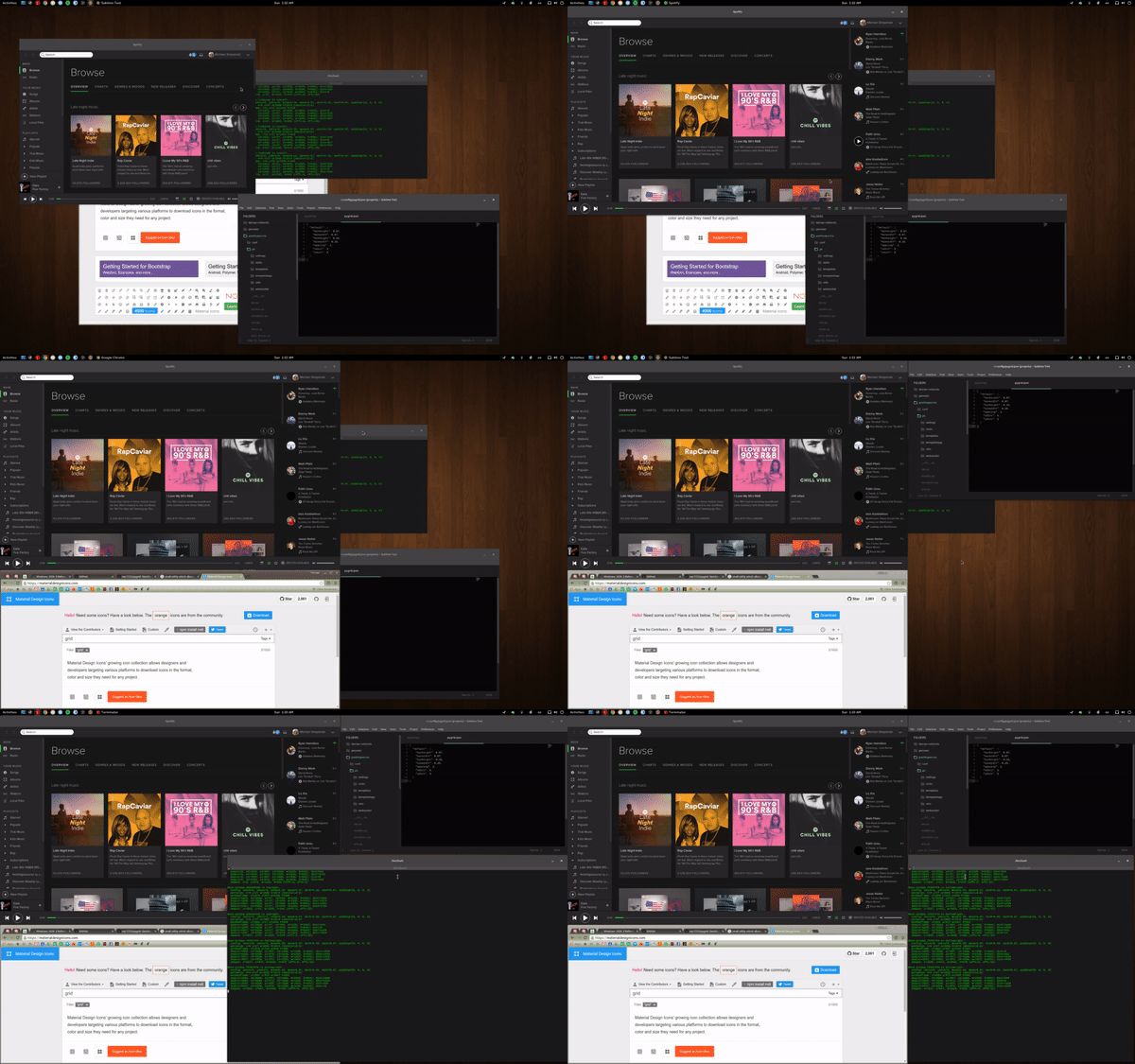 PyGrid is a small utility which allows you to easily organize your open windows
by tiling, resizing and positioning them to make the best use of your desktop
real estate. It's easy to configure and supports multiple monitors.
PyGrid is a small utility which allows you to easily organize your open windows
by tiling, resizing and positioning them to make the best use of your desktop
real estate. It's easy to configure and supports multiple monitors.
Requirements
- Python3
- X11-based desktop
- python3-gi
- python3-xlib
- single_process
Default Shortcuts
ALT+CTRL+NUMPAD-1- Move window to bottom left.ALT+CTRL+NUMPAD-2- Move window to bottom.ALT+CTRL+NUMPAD-3- Move window to bottom right.ALT+CTRL+NUMPAD-4- Move window to left.ALT+CTRL+NUMPAD-5- Move window to center.ALT+CTRL+NUMPAD-6- Move window to right.ALT+CTRL+NUMPAD-7- Move window to top left.ALT+CTRL+NUMPAD-8- Move window to top.ALT+CTRL+NUMPAD-9- Move window to top right.ALT+CTRL+NUMPAD-0- Maximize window.ALT+CTRL+NUMPAD-ENTER- Cycle window between monitors.
Repeatedly press one of the defined keybindings to cycle through window sizes available at the desired location on the screen.
Configuration
Configuration is done via a JSON file located at ~/.config/pygrid.json which
will be created with default options if not found when starting up. The default
configuration is below. If you introduce top level sections 'monitor0': {...}
or 'monitor1': {...} to provide different options for each monitor on your
system. Any settings not defined will fall back to user-defined defaults, then
global defaults. NOTE: Updating configuration in this JSON file does not
require you to restart PyGrid.
{
  'default': {
    'xdivs': 3,                       // number of x divisions for the screen.
    'ydivs': 2,                       // number of y divisions for the screen.
    'padding': [0, 0, 0, 0],          // additional top, right, bottom, left padding in pixels.
    'spacing': 4,                     // spacing between windows in pixels.
    'minwidth': 0.25,                 // min percent width of window.
    'maxwidth': 0.67,                 // max percent width of window.
    'minheight': 0.33,                // min percent height of window.
    'maxheight': 0.67,                // max percent height of window.
    'snaptocursor': false,            // window will be moved to cursor's monitor
  },
  'monitor0': { ... },                // Repeat any settings above specific for monitor 0.
  'monitor1': { ... },                // Repeat any settings above specific for monitor 1.
  'monitor<NUM>': { ... },            // Repeat any settings above specific for monitor <NUM>.
  'keys': {
    'accelerator': '<Ctrl><Mod1><Mod2>',
    'commands': {
      'KP_1': 'bottomleft',           // Set KP-1 to cycle bottom left window sizes.
      'KP_2': 'bottom',               // Set KP-2 to cycle bottom window sizes.
      'KP_3': 'bottomright',          // Set KP-3 to cycle bottom right window sizes.
      'KP_4': 'left',                 // Set KP-4 to cycle left window sizes.
      'KP_5': 'middle',               // Set KP-5 to cycle centered window sizes.
      'KP_6': 'right',                // Set KP-6 to cycle right window sizes.
      'KP_7': 'topleft',              // Set KP-7 to cycle top left window sizes.
      'KP_8': 'top',                  // Set KP-8 to cycle top window sizes.
      'KP_9': 'topright'              // Set KP-9 to cycle top right window sizes.
      'KP_0': 'maximize',             // Set KP-0 to maximize the window.
      'KP_Enter': 'cycle-monitor',    // Set KP-ENTER to cycle window between monitors.
    }
  }
}
Available Commands
bottomleft- cycle window sizes which touch both bottom and left screen edges.bottom- cycle window sizes which touch the bottom screen edge and are centered horizontally.bottomright- cycle window sizes which touch both bottom and right screen edges.left- cycle window sizes which touch the left screen edge and are centered vertically.middle- cycle window sizes which are centered both horizontally and vertically.right- cycle window sizes which touch the right screen edge and are centered vertically.topleft- cycle window sizes which touch both top and left screen edges.top- cycle window sizes which touch the top screen edge and are centered horizontally.topright- cycle window sizes which touch both top and right screen edges.noclampleft- cycle window sizes on the left of the screen with the same vertical size.noclampright- cycle window sizes on the right of the screen with the same vertical size.noclamptop- cycle window sizes at the top of the screen with the same horizontal size.noclampbottom- cycle window sizes at the bottom of the screen with the same horizontal size.
Installation on Ubuntu
$ sudo apt-get install git python3-gi python3-xlib
$ cd <place-you-want-to-store-pygrid>
$ git clone https://github.com/mjs7231/pygrid.git
$ cd pygrid && ./pygrid.py
To start at boot I simply added the following line to Startup Applications.
/usr/bin/python3 <full-path>/pygrid/pygrid.py
Credit & License
PyGrid was originally a fork of QuickTile by ssokolow, but rewritten to allow a much easier configuration as well as updated code to run on Python3 & GTK3. Code released under GPLv2 License.
Release history Release notifications | RSS feed


Download files
Download the file for your platform. If you're not sure which to choose, learn more about installing packages.
Source Distribution
Built Distribution
Filter files by name, interpreter, ABI, and platform.
If you're not sure about the file name format, learn more about wheel file names.
Copy a direct link to the current filters
File details
Details for the file x11pygrid-1.0.1.tar.gz.
File metadata
- Download URL: x11pygrid-1.0.1.tar.gz
- Upload date:
- Size: 9.5 kB
- Tags: Source
- Uploaded using Trusted Publishing? No
- Uploaded via: twine/4.0.1 CPython/3.9.13
File hashes
| Algorithm | Hash digest | |
|---|---|---|
| SHA256 |
bbb1667644d40c0def5f10e6afd6b60593ee284ad90496a8b13fd33c017ea011
|
|
| MD5 |
6a4da24fe0264f3dddd067be3453856a
|
|
| BLAKE2b-256 |
9b63f9135161e4142084c3cf555fbd01adc68339ee04dba276e18e9b0543b6b8
|
File details
Details for the file x11pygrid-1.0.1-py3-none-any.whl.
File metadata
- Download URL: x11pygrid-1.0.1-py3-none-any.whl
- Upload date:
- Size: 8.0 kB
- Tags: Python 3
- Uploaded using Trusted Publishing? No
- Uploaded via: twine/4.0.1 CPython/3.9.13
File hashes
| Algorithm | Hash digest | |
|---|---|---|
| SHA256 |
e0fbe7cdbc68b525cebd409cfce0f576f2ec28a4f26af656be4922ff025b71c7
|
|
| MD5 |
540937dcaa9e9959eece908191149f21
|
|
| BLAKE2b-256 |
f34b10aa5fdfc2f8c0c7403bdbe2efc5e232cb3f07cc84be01615123a1dee5a4
|






