
XHTML2PDF
Write the document in HTML and CSS. Get a PDF. Pure Python on top of ReportLab, with no browser to install or keep running.







xhtml2pdf turns HTML5 and CSS into PDF on top of the ReportLab toolkit. Anyone who can build a web page can build an invoice, a report, a ticket or a book with it, from a Django or Flask template or from a plain string, and render it anywhere Python runs.
Made with xhtml2pdf
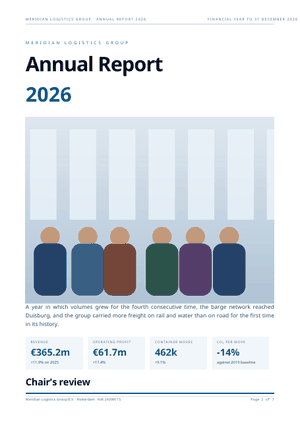
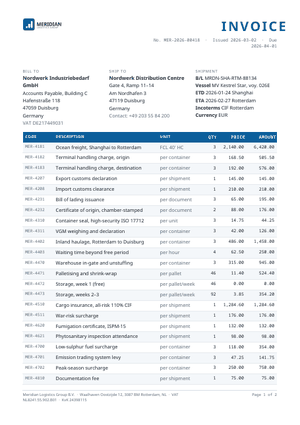
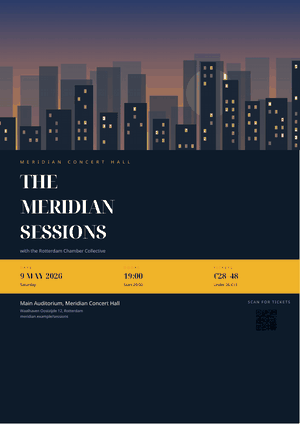
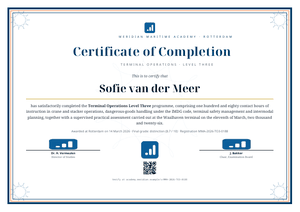
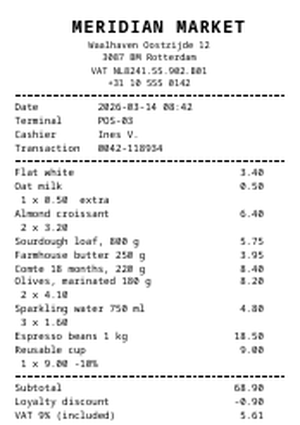
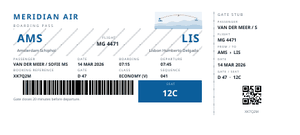
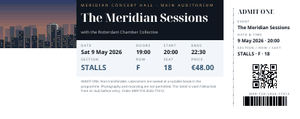
Every page below is an HTML document converted by xhtml2pdf, fonts, charts, barcodes and all.

Quick start
pip install xhtml2pdffrom xhtml2pdf import pisa
html = """
<style>
@page { size: a4; margin: 2cm;
@frame footer { -pdf-frame-content: footer; bottom: 1cm;
margin-left: 2cm; margin-right: 2cm; height: 1cm } }
h1 { color: #204a87 }
</style>
<h1>Hello, PDF</h1>
<p>Written in HTML, laid out by CSS.</p>
<div id="footer">Page <pdf:pagenumber /> of <pdf:pagecount /></div>
"""
with open("hello.pdf", "wb") as output:
result = pisa.CreatePDF(html, dest=output)
print("errors:", result.err)Or from the command line:
xhtml2pdf report.html report.pdfWhat it can do
Layout
Flexbox (display: flex), including containers that break across pages, and display: inline-block.
position: relative, absolute and fixed, with z-index.
Block boxes with padding, borders and backgrounds around everything they hold, border-radius on blocks, tables, cells, images and inline boxes, and dashed, dotted and double borders.
Tables with header rows repeated on every page, colspan and rowspan, auto margins and widths, and rows taller than a page cut between pages.
Word breaking with overflow-wrap, page-break-before/after, page-break-inside: avoid and keeping a heading with what follows.
CSS
Selectors up to Level 4: :not(), :is(), :where(), :has(), :nth-child() and attribute selectors.
Custom properties with var(), em/rem/percent units, and colours with an alpha channel.
@font-face with TrueType and OpenType fonts, matched per character, so a paragraph that mixes scripts finds a font for each of them.
Pages
@page sizes and margins, named page templates and left/right pages, background images, and frames for headers, footers and columns.
Page numbers and page counts, watermarks and backgrounds from an image or another PDF.
Navigation
Tables of contents with dot leaders, more than one per document, clickable entries and a PDF outline (bookmarks).
Links to any element by id, to other files and to the web.
International text
Right-to-left documents in Arabic, Hebrew, Persian and Urdu, laid out with a pure-Python implementation of the Unicode Bidirectional Algorithm that passes the whole of the Unicode conformance suites.
Chinese, Japanese and Korean, Cyrillic and Greek, with the document’s language written to the PDF.
Graphics and PDF features
SVG images, bar, line and pie charts, and barcodes and QR codes.
Fillable form fields, encryption with passwords and permissions, and digital signatures (simple and PAdES) through pyHanko.
Safe by default
A document cannot read local files outside its directory or reach internal network addresses, and ResourceAccessPolicy.server() adds limits on size, nesting and time for HTML from untrusted sources. See Security.
Documentation
The documentation is on Read the Docs, and what changed in each version is in the Release Notes. Help improving it is welcome; a good place to start is docs/source/quickstart.rst.
Installation
pip install xhtml2pdfPython 3.10 and newer is tested and supported. Every mandatory requirement is listed in pyproject.toml and installed with xhtml2pdf.
ReportLab needs a rendering backend to turn vector graphics into bitmaps (for charts and SVG rasterised into the page). The supported one is cairo, installed system-wide, for example through the OS package manager, together with the pycairo extra:
pip install xhtml2pdf[pycairo]The renderpm extra is a deprecated alias for pycairo: ReportLab 5 removed the C RenderPM backend. See the ReportLab installation notes.
Development environment
make devsetup creates .venv, installs xhtml2pdf in editable mode with the test, docs and release extras and installs the pre-commit hooks:
make devsetup
source .venv/bin/activate
Or by hand:
python -m venv .venv
source .venv/bin/activate
pip install -e .[test,docs,release]
Running tests
make test               # unit tests
make test-ref           # reference renders for testrender
make test-render        # compare the renders against the reference
make test-browser       # compare against a headless browser's rendering
make test-all           # every supported Python and ReportLab, with tox
testrender/ renders a set of documents and compares the pages; the browser comparison scores xhtml2pdf against Chrome on the same markup, so a change that moves a layout away from a browser’s shows up as a regression. tools/perf measures time and memory.
Contributing
This project is community-led. Ideas, bug reports with a small HTML that shows the problem, and pull requests are welcome on GitHub. If xhtml2pdf is useful to you, look at the test coverage for parts that are not yet tested.
You can also support the project on Patreon or with Bitcoin: bc1qmr0skzwx5scyvh2ql28f7gfh6l65ua250qv227.
Big thanks to everyone who has worked on this project so far and to those who help maintain it.
Alternatives
WeasyPrint covers much of the same ground with a different design and set of features.
History
These are the major milestones and the maintainers of the project:
2000-2007 Dirk Holtwick (commercial project of spirito.de)
2007-2010 Dirk Holtwick (project named “pisa”, project released as GPL)
2010-2012 Dirk Holtwick (project named “xhtml2pdf”, changed license to Apache)
2012-2015 Chris Glass (@chrisglass)
2015-2016 Benjamin Bach (@benjaoming)
2016-2018 Sam Spencer (@LegoStormtroopr)
2018-Current Luis Zarate (@luisza)
For more history, see the Release Notes.
License
Copyright 2010 Dirk Holtwick, holtwick.it
Licensed under the Apache License, Version 2.0 (the “License”); you may not use this file except in compliance with the License. You may obtain a copy of the License at: http://www.apache.org/licenses/LICENSE-2.0
Unless required by applicable law or agreed to in writing, software distributed under the License is distributed on an “AS IS” BASIS, WITHOUT WARRANTIES OR CONDITIONS OF ANY KIND, either express or implied. See the License for the specific language governing permissions and limitations under the License.
6 maintainers


Metadata
6 maintainers
Release files for xhtml2pdf 0.2.24
For a detailed explanation of source distributions (sdists) and built distributions (wheels), please see the package formats documentation.
Source distribution (sdist)
| File | Size | Uploaded | |
|---|---|---|---|
| xhtml2pdf-0.2.24.tar.gz | 467.6 kB | Details |
Built distribution (wheel)
| File | Interpreter | ABI | Platform | Reset |
|---|---|---|---|---|
| xhtml2pdf-0.2.24-py3-none-any.whl | Python 3 | none | any | Details |
Total release size: 772.5 kB
Release files / xhtml2pdf-0.2.24.tar.gz
| Download URL | xhtml2pdf-0.2.24.tar.gz |
|---|---|
| Size | 467.6 kB |
| Tags | Source |
|
SHA-256 checksum How to use checksums |
9b667de8f150cdc72566eb1de8968e5fa109bdea70232e6a41460a98d720afb2
|
|
BLAKE2b-256 checksum How to use checksums |
b203d0e2384d67ceb50c792983b26099b786386fe09816f1842ccb15a35870a1
|
| Upload date | |
|
Uploaded using Trusted Publishing? What is trusted publishing? |
No |
| Uploaded via |
twine/7.0.0 CPython/3.13.5
|
Release files / xhtml2pdf-0.2.24-py3-none-any.whl
| Download URL | xhtml2pdf-0.2.24-py3-none-any.whl |
|---|---|
| Size | 304.8 kB |
| Tags | Python 3 |
|
SHA-256 checksum How to use checksums |
13930e5ceedf8c62c35b158041b679b2ba190de5c361e015c0174eb4907418a3
|
|
BLAKE2b-256 checksum How to use checksums |
f59cb55e35926f623e053e2cf008c55b95aa97434279cea4c6320a291fe736cb
|
| Upload date | |
|
Uploaded using Trusted Publishing? What is trusted publishing? |
No |
| Uploaded via |
twine/7.0.0 CPython/3.13.5
|














