
xk library

Project description
lb: xk media library
A wise philosopher once told me, "The future is autotainment".
Manage large media libraries. Similar to Plex but more minimalist. Primary usage is local filesystem but also supports some virtual constructs like tracking video playlists (eg. YouTube subscriptions) or daily browser tabs.
Required: ffmpeg
Recommended: mpv, fish, firefox
Install
Linux recommended but Windows setup instructions available.
pip install xklb

$ library
xk media library [lb]

local media subcommands:
  fsadd [extract, xr]          Create a local media database; Add folders
  subtitle [sub]               Find subtitles for local media
  listen [lt]                  Listen to local media
  watch [wt]                   Watch local media
  read [books, docs]           Read books
  view [see, look]             View images
  filesystem [fs]              Browse files
  bigdirs [largefolders]       Discover folders which take up much room
  dedupe                       Deduplicate audio files
  christen                     Cleanse files by giving them a new name

online media subcommands:
  tubeadd [ta, xt]             Create a tube database; Add playlists
  tubeupdate [tu]              Add new videos from saved playlists
  tubelist [playlists]         List added playlists
  tubewatch [tw, entries]      Watch the tube
  tubelisten [tl]              Listen to the tube

download subcommands (largely untested, under construction):
  dladd [da]                   Create a download database; Add URLs
  dlupdate [du]                Add new videos from saved playlists
  download [dl]                Download media
  block                        Prevent downloading from specific channels

playback subcommands:
  now                          Print what is currently playing
  next                         Play next file
  stop                         Stop all playback
  pause                        Pause all playback

browser tab subcommands:
  tabsadd                      Create a tabs database; Add URLs
  tabs [tabswatch, tb]         Open your tabs for the day
Quick Start -- watch online media on your PC
wget https://github.com/chapmanjacobd/lb/raw/main/examples/mealtime.tw.db
library tubewatch mealtime.tw.db
Quick Start -- listen to online media on a chromecast group
wget https://github.com/chapmanjacobd/lb/raw/main/examples/music.tl.db
library tubelisten music.tl.db -ct "House speakers"
Start -- local media
1. Extract Metadata
For thirty terabytes of video the initial scan takes about four hours to complete.
After that, subsequent scans of the path (or any subpaths) are much quicker--only
new files will be read by ffprobe.
library fsadd tv.db ./video/folder/

2. Watch / Listen from local files
library wt tv.db                          # the default post-action is to do nothing
library wt tv.db --post-action delete     # delete file after playing
library lt finalists.db --post-action=ask # ask whether to delete after playing
To stop playing press Ctrl+C in either the terminal or mpv
Start -- online media
1. Download Metadata
Download playlist and channel metadata. Break free of the YouTube algo~
library tubeadd educational.db https://www.youtube.com/c/BranchEducation/videos

And you can always add more later--even from different websites.
library tubeadd maker.db https://vimeo.com/terburg
To prevent mistakes the default configuration is to download metadata for only the most recent 20,000 videos per playlist/channel.
library tubeadd maker.db --dl-config playlistend=1000
Be aware that there are some YouTube Channels which have many items--for example the TEDx channel has about 180,000 videos. Some channels even have upwards of two million videos. More than you could likely watch in one sitting--maybe even one lifetime. On a high-speed connection (>500 Mbps), it can take up to five hours to download the metadata for 180,000 videos.
1a. Get new videos for saved playlists
Tubeupdate will go through the list of added playlists and fetch metadata for any videos not previously seen.
library tubeupdate
2. Watch / Listen from websites
library tubewatch maker.db
To stop playing press Ctrl+C in either the terminal or mpv
Start -- tabs (visit websites on a schedule)
tabs is a way to organize your visits to URLs that you want to visit every once in a while.
If you want to track changes to websites over time there are better tools out there, like
huginn, urlwatch, or changedetection.io.
The use-case of tabs are websites that you know are going to change: subreddits, games, or tools that you want to use for a few minutes daily, weekly, monthly, quarterly, or yearly.
1. Add your websites
library tabsadd --frequency monthly --category fun \
    https://old.reddit.com/r/Showerthoughts/top/?sort=top&t=month \
    https://old.reddit.com/r/RedditDayOf/top/?sort=top&t=month
2. Add library tabs to cron
library tabs is meant to run once per day. Here is how you would configure it with crontab:
45 9 * * * DISPLAY=:0 library tabs /home/my/tabs.db
Or with systemd:
tee ~/.config/systemd/user/tabs.service
[Unit]
Description=xklb daily browser tabs

[Service]
Type=simple
RemainAfterExit=no
Environment="DISPLAY=:0"
ExecStart="/usr/bin/fish" "-c" "lb tabs /home/xk/lb/tabs.db"

tee ~/.config/systemd/user/tabs.timer
[Unit]
Description=xklb daily browser tabs timer

[Timer]
Persistent=yes
OnCalendar=*-*-* 9:58

[Install]
WantedBy=timers.target

systemctl --user daemon-reload
systemctl --user enable --now tabs.service
You can also invoke tabs manually:
library tabs -L 1 # open one tab
Things to know.db
When the database file path is not specified, video.db will be created / used.
library fsadd ./tv/
The same for audio: audio.db will be created / used.
library fsadd --audio ./music/
Likewise, fs.db from:
library fsadd --filesystem /any/path/
If you want to specify more than one directory you need to mention the db file explicitly.
library fsadd --filesystem one/
library fsadd --filesystem fs.db one/ two/
Organize via separate databases.
library fsadd --audio both.db ./audiobooks/ ./podcasts/
library fsadd --audio audiobooks.db ./audiobooks/
library fsadd --audio podcasts.db ./podcasts/ ./another/more/secret/podcasts_folder/
Usage
$ library watch -h
usage: library watch [database] [optional args]

Control playback:
    To stop playback press Ctrl-C in either the terminal or mpv

    Create global shortcuts in your desktop environment by sending commands to mpv_socket:
    echo 'playlist-next force' | socat - /tmp/mpv_socket

If not specified, watch will try to read video.db in the working directory:
    library watch
    library watch ./my/other/database/is-a/db.db

Override the default player (mpv):
    library does a lot of things to try to automatically use your preferred media player
    but if it doesn't guess right you can make it explicit:
    library watch --player "vlc --vlc-opts"

Cast to chromecast groups:
    library watch --cast --cast-to "Office pair"
    library watch -ct "Office pair"  # equivalent
    If you don't know the exact name of your chromecast group run `catt scan`

Print instead of play:
    library watch --print --limit 10  # print the next 10 files
    library watch -p -L 10  # print the next 10 files
    library watch -p  # this will print _all_ the media. be cautious about `-p` on an unfiltered set

    Printing modes
    library watch -p    # print in a table
    library watch -p p  # equivalent
    library watch -p a  # print an aggregate report
    library watch -p f  # print fields -- useful for piping paths to utilities like xargs or GNU Parallel

    Check if you have downloaded something before
    library watch -u duration -p -s 'title'

    Print an aggregate report of deleted media
    library watch -w is_deleted=1 -p=a
    ╒═══════════╤══════════════╤═════════╤═════════╕
    │ path      │ duration     │ size    │   count │
    ╞═══════════╪══════════════╪═════════╪═════════╡
    │ Aggregate │ 14 days, 23  │ 50.6 GB │   29058 │
    │           │ hours and 42 │         │         │
    │           │ minutes      │         │         │
    ╘═══════════╧══════════════╧═════════╧═════════╛
    Total duration: 14 days, 23 hours and 42 minutes

    Print an aggregate report of media that has no duration information (likely corrupt media)
    library watch -w 'duration is null' -p=a

    Print a list of filenames which have below 1280px resolution
    library wt -w 'width<1280' -p=f

    Print media you have partially viewed with mpv
    library watch -p=v

    View how much time you have watched
    library watch -w play_count'>'0 -p=a

    See how much video you have
    library wt video.db -p=a
    ╒═══════════╤═════════╤═════════╤═════════╕
    │ path      │   hours │ size    │   count │
    ╞═══════════╪═════════╪═════════╪═════════╡
    │ Aggregate │  145769 │ 37.6 TB │  439939 │
    ╘═══════════╧═════════╧═════════╧═════════╛
    Total duration: 16 years, 7 months, 19 days, 17 hours and 25 minutes

    View all the columns
    library watch -p -L 1 --cols '*'

    Open ipython with all of your media
    library watch -vv -p --cols '*'
    ipdb> len(db_resp)
    462219

Set the play queue size:
    By default the play queue is 120--long enough that you likely have not noticed
    but short enough that the program is snappy.

    If you want everything in your play queue you can use the aid of infinity.
    Pick your poison (these all do effectively the same thing):
    library watch -L inf
    library watch -l inf
    library watch --queue inf
    library watch -L 99999999999999999999999

    You may also want to restrict the play queue.
    For example, when you only want 1000 random files:
    library watch -u random -L 1000

Offset the play queue:
    You can also offset the queue. For example if you want to skip one or ten media:
    library watch -S 10  # offset ten from the top of an ordered query

Repeat
    library watch                  # listen to 120 random songs (DEFAULT_PLAY_QUEUE)
    library watch --limit 5        # listen to FIVE songs
    library watch -l inf -u random # listen to random songs indefinitely
    library watch -s infinite      # listen to songs from the band infinite

Constrain media by search:
    Audio files have many tags to readily search through so metadata like artist,
    album, and even mood are included in search.
    Video files have less consistent metadata and so only paths are included in search.
    library watch --include happy  # only matches will be included
    library watch -s happy         # equivalent
    library watch --exclude sad    # matches will be excluded
    library watch -E sad           # equivalent

    Search only the path column
    library watch -O -s 'path : mad max'
    library watch -O -s 'path : "mad max"' # add "quotes" to be more strict

    Double spaces are parsed as one space
    -s '  ost'        # will match OST and not ghost
    -s toy story      # will match '/folder/toy/something/story.mp3'
    -s 'toy  story'   # will match more strictly '/folder/toy story.mp3'

Constrain media by arbitrary SQL expressions:
    library watch --where audio_count = 2  # media which have two audio tracks
    library watch -w "language = 'eng'"    # media which have an English language tag
                                                (this could be audio _or_ subtitle)
    library watch -w subtitle_count=0      # media that doesn't have subtitles

Constrain media to duration (in minutes):
    library watch --duration 20
    library watch -d 6  # 6 mins ±10 percent (ie. between 5 and 7 mins)
    library watch -d-6  # less than 6 mins
    library watch -d+6  # more than 6 mins

    Duration can be specified multiple times:
    library watch -d+5 -d-7  # should be similar to -d 6

    If you want exact time use `where`
    library watch --where 'duration=6*60'

Constrain media to file size (in megabytes):
    library watch --size 20
    library watch -z 6  # 6 MB ±10 percent (ie. between 5 and 7 MB)
    library watch -z-6  # less than 6 MB
    library watch -z+6  # more than 6 MB

Constrain media by throughput:
    Bitrate information is not explicitly saved.
    You can use file size and duration as a proxy for throughput:
    library watch -w 'size/duration<50000'

Constrain media to portrait orientation video:
    library watch --portrait
    library watch -w 'width<height' # equivalent

Specify media play order:
    library watch --sort duration   # play shortest media first
    library watch -u duration desc  # play longest media first
    You can use multiple SQL ORDER BY expressions
    library watch -u subtitle_count > 0 desc # play media that has at least one subtitle first

Play media in order (similarly named episodes):
    library watch --play-in-order
    There are multiple strictness levels of --play-in-order.
    If things aren't playing in order try adding more `O`s:
    library watch -O    # fast
    library watch -OO   # slow, more complex algorithm
    library watch -OOO  # slow, ignores most filters

Post-actions -- choose what to do after playing:
    library watch --post-action delete  # delete file after playing
    library watch -k ask  # ask after each whether to keep or delete

    library watch -k askkeep  # ask after each whether to move to a keep folder or delete
    The default location of the keep folder is ./keep/ (relative to the played media file)
    You can change this by explicitly setting an *absolute* `keep-dir` path:
    library watch -k askkeep --keep-dir /home/my/music/keep/

Experimental options:
    Duration to play (in seconds) while changing the channel
    library watch --interdimensional-cable 40
    library watch -4dtv 40

    Playback multiple files at once
    library watch --multiple-playback    # one per display; or two if only one display detected
    library watch --multiple-playback 4  # play four media at once, divide by available screens
    library watch -m 4 --screen-name eDP # play four media at once on specific screen
    library watch -m 4 --loop --crop     # play four cropped videos on a loop
    library watch -m 4 --hstack          # use hstack style
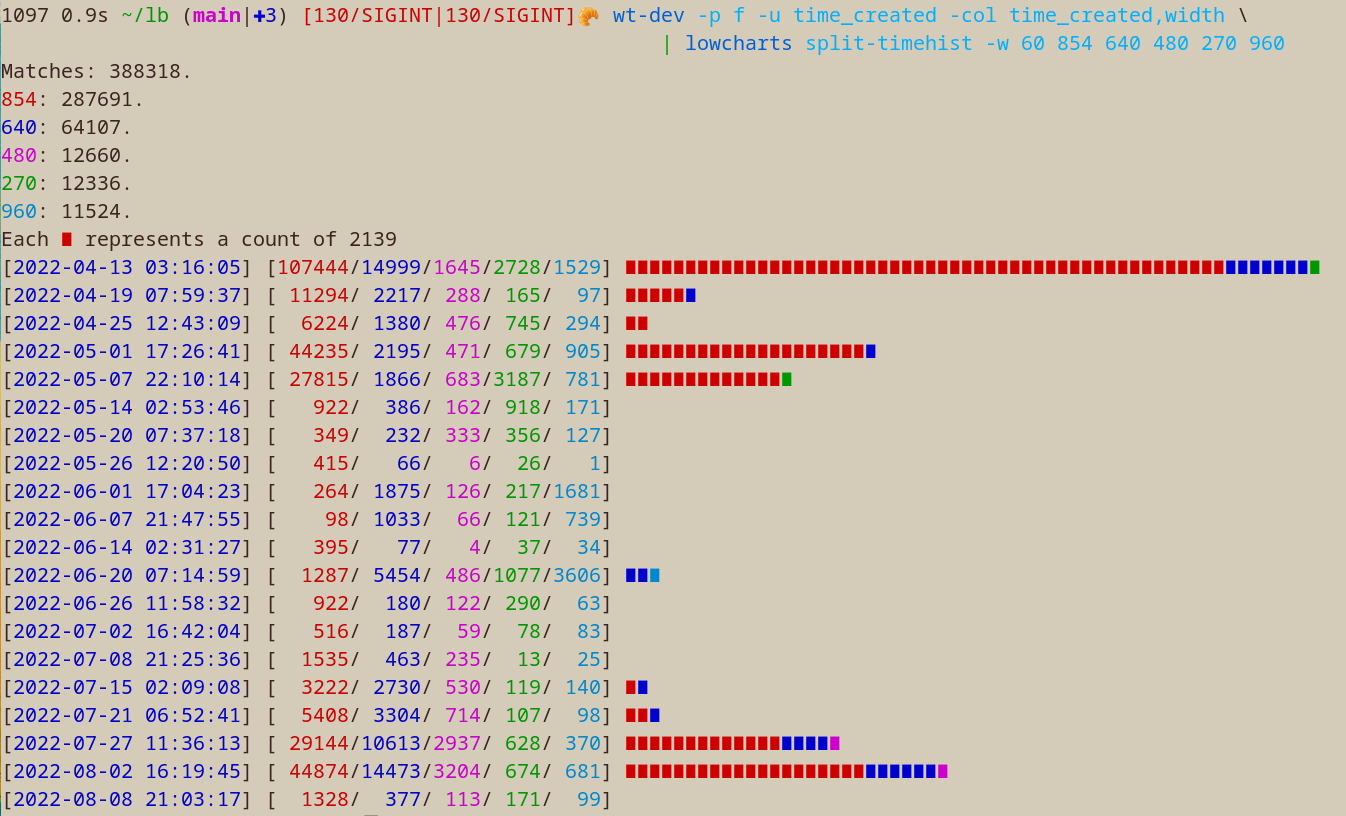
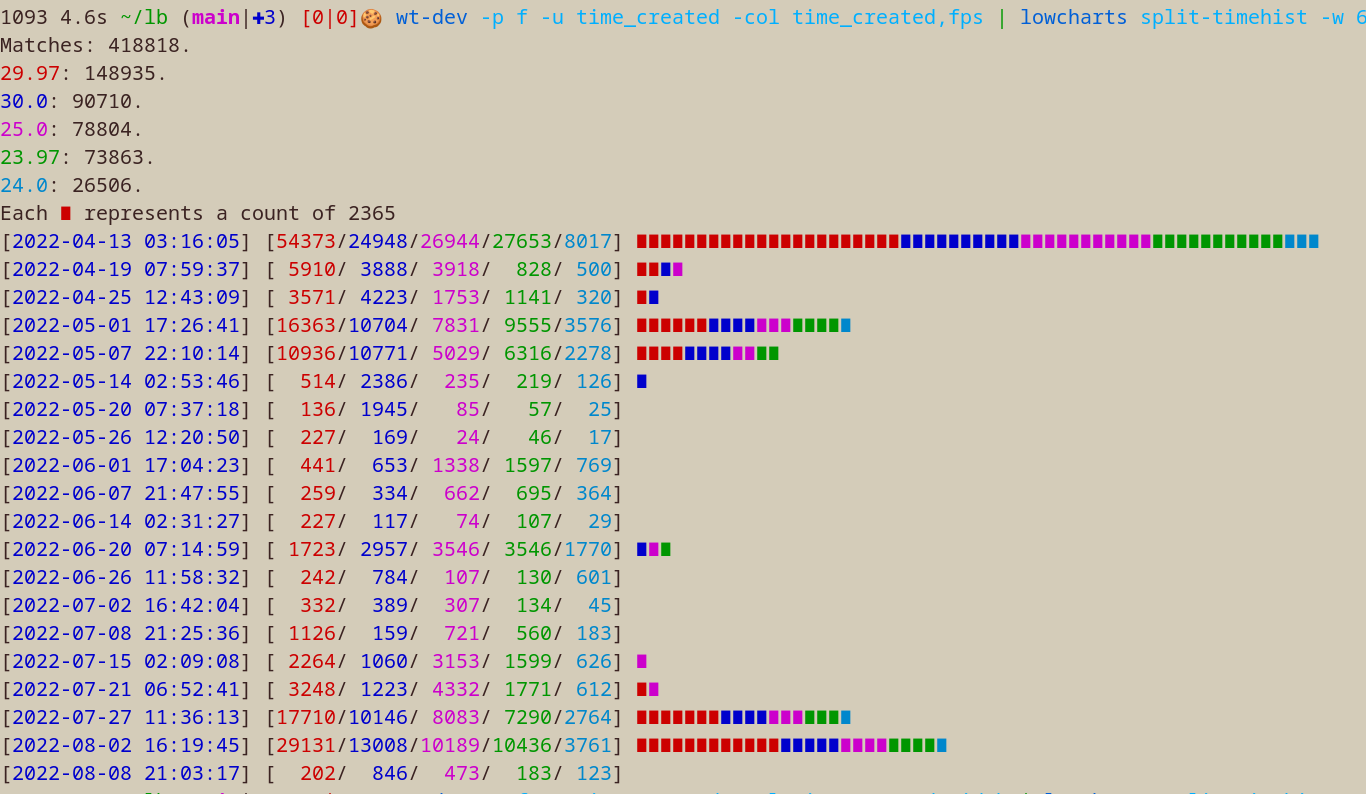
You can pipe stuff
lowcharts
$ wt-dev -p f -col time_created | lowcharts timehist -w 80
Matches: 445183.
Each ∎ represents a count of 1896
[2022-04-13 03:16:05] [151689] ∎∎∎∎∎∎∎∎∎∎∎∎∎∎∎∎∎∎∎∎∎∎∎∎∎∎∎∎∎∎∎∎∎∎∎∎∎∎∎∎∎∎∎∎∎∎∎∎∎∎∎∎∎∎∎∎∎∎∎∎∎∎∎∎∎∎∎∎∎∎∎∎∎∎∎∎∎∎∎∎
[2022-04-19 07:59:37] [ 16093] ∎∎∎∎∎∎∎∎
[2022-04-25 12:43:09] [ 12019] ∎∎∎∎∎∎
[2022-05-01 17:26:41] [ 48817] ∎∎∎∎∎∎∎∎∎∎∎∎∎∎∎∎∎∎∎∎∎∎∎∎∎
[2022-05-07 22:10:14] [ 36259] ∎∎∎∎∎∎∎∎∎∎∎∎∎∎∎∎∎∎∎
[2022-05-14 02:53:46] [  3942] ∎∎
[2022-05-20 07:37:18] [  2371] ∎
[2022-05-26 12:20:50] [   517]
[2022-06-01 17:04:23] [  4845] ∎∎
[2022-06-07 21:47:55] [  2340] ∎
[2022-06-14 02:31:27] [   563]
[2022-06-20 07:14:59] [ 13836] ∎∎∎∎∎∎∎
[2022-06-26 11:58:32] [  1905] ∎
[2022-07-02 16:42:04] [  1269]
[2022-07-08 21:25:36] [  3062] ∎
[2022-07-15 02:09:08] [  9192] ∎∎∎∎
[2022-07-21 06:52:41] [ 11955] ∎∎∎∎∎∎
[2022-07-27 11:36:13] [ 50938] ∎∎∎∎∎∎∎∎∎∎∎∎∎∎∎∎∎∎∎∎∎∎∎∎∎∎
[2022-08-02 16:19:45] [ 70973] ∎∎∎∎∎∎∎∎∎∎∎∎∎∎∎∎∎∎∎∎∎∎∎∎∎∎∎∎∎∎∎∎∎∎∎∎∎
[2022-08-08 21:03:17] [  2598] ∎
rsync
I use rsync to move files instead of copy-on-write duplication because I want deletions to stick. When I press the next button in the car I delete the song from my curated universe.
function mrmusic
    rsync -a --remove-source-files --files-from=(
        library lt ~/lb/audio.db -s /mnt/d/80_Now_Listening/ -p f \
        --moved /mnt/d/80_Now_Listening/ /mnt/d/ | psub
    ) /mnt/d/80_Now_Listening/ /mnt/d/

    rsync -a --remove-source-files --files-from=(
        library lt ~/lb/audio.db -w play_count=0 -u random -L 1200 -p f \
        --moved /mnt/d/ /mnt/d/80_Now_Listening/ | psub
    ) /mnt/d/ /mnt/d/80_Now_Listening/
end
Datasette
Explore library databases in your browser
pip install datasette
datasette tv.db
TODOs (PRs welcome)
- multiple-playback: mpv switch to absolute positioning (instead of percent)
- stats: lb stats, lb show/print
- more test coverage -- https://hypothesis.readthedocs.io/en/latest/quickstart.html
Release history Release notifications | RSS feed


Download files
Download the file for your platform. If you're not sure which to choose, learn more about installing packages.
Source Distribution
Built Distribution
Filter files by name, interpreter, ABI, and platform.
If you're not sure about the file name format, learn more about wheel file names.
Copy a direct link to the current filters
File details
Details for the file xklb-1.16.37.tar.gz.
File metadata
- Download URL: xklb-1.16.37.tar.gz
- Upload date:
- Size: 77.0 kB
- Tags: Source
- Uploaded using Trusted Publishing? No
- Uploaded via: poetry/1.2.1 CPython/3.10.7 Linux/5.15.0-1020-azure
File hashes
| Algorithm | Hash digest | |
|---|---|---|
| SHA256 |
7bf2a8f457b616930fefd2dca932c2b2d9e4276071b08f7cbcb9eb24e877654d
|
|
| MD5 |
275f84217ad3de9fa68c0f519bf2b6b9
|
|
| BLAKE2b-256 |
44ea8d72e0f31521204d284b088d9e8b32a5c7127c9861abcb7ce125bb5a7ee7
|
File details
Details for the file xklb-1.16.37-py3-none-any.whl.
File metadata
- Download URL: xklb-1.16.37-py3-none-any.whl
- Upload date:
- Size: 79.0 kB
- Tags: Python 3
- Uploaded using Trusted Publishing? No
- Uploaded via: poetry/1.2.1 CPython/3.10.7 Linux/5.15.0-1020-azure
File hashes
| Algorithm | Hash digest | |
|---|---|---|
| SHA256 |
5a9c4ae480cc6a2c4294dd06b322c2ce0a6bd605c2438ab22a05834a77127b77
|
|
| MD5 |
9cdd56ddad37b940f63823ce5b3a1fff
|
|
| BLAKE2b-256 |
1dc09247d49be64cd1c24f85db64f8a3f178b7fc709b370c569104dbdd648c74
|






