
LLM-powered Excel parser — define a Pydantic schema, get structured data from any Excel file
Verified details
These details have been verified by PyPIProject links
GitHub Statistics
Maintainers

Project description
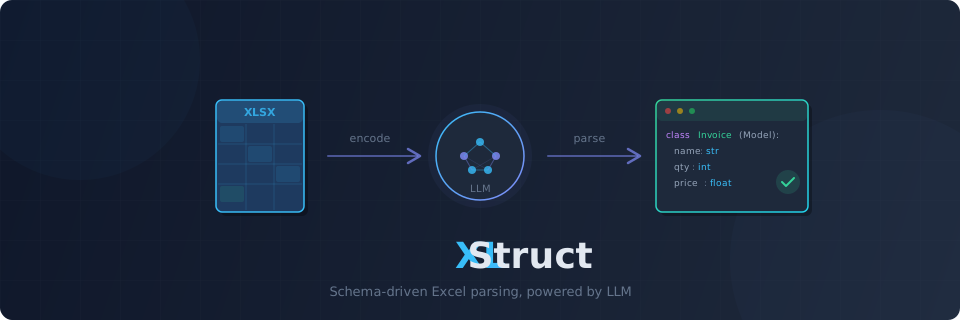
XLStruct




LLM-powered Excel/CSV parser — Define a Pydantic schema, get structured data from any spreadsheet.
Excel File + Pydantic Schema → LLM → Validated Structured Data
Features
- Schema-driven extraction — Define a Pydantic model, get validated instances from any spreadsheet. No parsing code needed.
- Excel + CSV —
.xlsx,.xlsm,.xltx,.xltm,.xls, and.csvsupported out of the box - Any Excel layout — Flat tables, merged cells, multi-level headers, form+table hybrids — handled by a single API
- Two extraction modes — Direct LLM extraction for small sheets; code generation for large ones. Auto-routed by sheet size, or choose manually.
- Reusable scripts — Codegen mode produces a standalone Python script. Run it without LLM calls — pay for generation once, use forever.
- Script caching — Generated scripts are cached by sheet structure signature. Same layout = instant reuse, no LLM call. Public cache API for listing, clearing, and removing entries.
- Progress tracking —
on_progresscallback forextract_batch()andextract_workbook(). Integrates with tqdm or custom UIs. - Error codes — Every exception carries a machine-readable
ErrorCodefor programmatic error handling (STORAGE_NOT_FOUND,CODEGEN_MAX_RETRIES, etc.) - Schema suggestion —
suggest_schema()analyzes a spreadsheet and generates a Pydantic model for you - Extraction report — Every extraction returns an
ExtractionReportwith mode used, token usage, and optional row provenance - Row provenance — Track which Excel row each record came from. Enable with
track_provenance=True. - DataFrame export —
result.to_dataframe()converts results to pandas DataFrame (optional dependency) - Multi-sheet extraction —
extract_workbook()extracts different schemas from different sheets in parallel - Batch extraction —
extract_batch()processes multiple files in parallel with configurable concurrency - Fast hybrid reader — calamine (Rust) for speed + openpyxl for formula extraction. Both passes in one call.
- Token-aware encoding — Compressed markdown encoding with head+tail sampling. Auto-chunks large sheets to fit within token budget.
- Prompt caching — Anthropic cache_control markers applied automatically; OpenAI cached_tokens tracked
- Sandboxed execution — Untrusted, generated scripts run in an OS-level Docker sandbox by default (non-root, no network, dropped capabilities, read-only rootfs). Without Docker, codegen fails closed; the non-isolating subprocess backend is an explicit trusted/dev-only opt-in.
- Multi-provider LLM — OpenAI, Anthropic, Gemini via Instructor
- Cloud storage — Read from S3, Azure Blob, GCS via fsspec
- Async-first — Async API with sync convenience wrappers. Jupyter-compatible via nest_asyncio.
Installation
pip install xlstruct
Extras
# LLM providers
pip install "xlstruct[openai]"
pip install "xlstruct[anthropic]"
pip install "xlstruct[gemini]"

# Cloud storage
pip install "xlstruct[s3]"        # AWS S3
pip install "xlstruct[azure]"     # Azure Blob Storage
pip install "xlstruct[gcs]"       # Google Cloud Storage

# DataFrame support
pip install "xlstruct[pandas]"

# Docker sandbox
pip install "xlstruct[docker]"

# Everything
pip install "xlstruct[all]"
Quick Start
1. Define a Pydantic schema
from pydantic import BaseModel, Field

class InvoiceItem(BaseModel):
    description: str = Field(description="Item description")
    quantity: int
    unit_price: float
    total: float
2. Extract data
from xlstruct import Extractor

extractor = Extractor(provider="openai/gpt-4o")
results = extractor.extract_sync("invoice.xlsx", schema=InvoiceItem)

for item in results:
    print(item.model_dump())
Async usage
import asyncio
from xlstruct import Extractor

async def main():
    extractor = Extractor(provider="anthropic/claude-sonnet-4-6")
    results = await extractor.extract("invoice.xlsx", schema=InvoiceItem)
    for item in results:
        print(item.model_dump())

asyncio.run(main())
Fine-grained control with ExtractionConfig
from xlstruct import ExtractionConfig, ExtractionMode

config = ExtractionConfig(
    output_schema=InvoiceItem,
    mode=ExtractionMode.DIRECT,
    sheet="Sheet1",
    header_rows=[1],
    instructions="Parse dates as YYYY-MM-DD. Skip empty rows.",
    track_provenance=True,
)

results = extractor.extract_sync("invoice.xlsx", extraction_config=config)
Extraction Report
Every extraction returns an ExtractionReport via result.report:
results = extractor.extract_sync("invoice.xlsx", schema=InvoiceItem)

print(results.report)
# ExtractionReport
# ----------------------------------------
# Mode:      direct
# Tokens:    1,780 (input: 1,509 / output: 271)

print(results.report.mode)          # ExtractionMode.DIRECT
print(results.report.usage)         # TokenUsage(llm_calls=1, ...)
Row Provenance
Track which Excel row each record was extracted from:
config = ExtractionConfig(
    output_schema=InvoiceItem,
    header_rows=[1],
    track_provenance=True,
)

results = extractor.extract_sync("invoice.xlsx", extraction_config=config)

for item, rows in zip(results, results.report.source_rows):
    print(f"{item.description} ← Excel row {rows}")
# Widget Alpha ← Excel row [2]
# Widget Beta  ← Excel row [3]
DataFrame Export
pip install "xlstruct[pandas]"
results = extractor.extract_sync("invoice.xlsx", schema=InvoiceItem)
df = results.to_dataframe()
print(df)
Schema Suggestion
Don't know the spreadsheet structure? Let the LLM suggest a schema:
Schema = extractor.suggest_schema_sync("unknown_data.xlsx")

# Inspect the generated model
print(Schema.model_json_schema())

# Use it directly with extract
results = extractor.extract_sync("unknown_data.xlsx", schema=Schema)
# With hints
Schema = extractor.suggest_schema_sync(
    "report.xlsx",
    sheet="Q1 Sales",
    instructions="Focus on financial columns only",
)
Multi-Sheet Extraction
Extract different schemas from different sheets in a single workbook:
results = extractor.extract_workbook_sync(
    "report.xlsx",
    sheet_schemas={
        "Products": ProductSchema,
        "Orders": OrderSchema,
    },
)

for sheet_name, sheet_result in results:
    print(f"{sheet_name}: {len(sheet_result.records)} records")
Batch Extraction
Process multiple files in parallel:
results = extractor.extract_batch_sync(
    ["file1.xlsx", "file2.xlsx", "file3.xlsx"],
    schema=InvoiceItem,
    concurrency=5,
)

for file_result in results:
    print(f"{file_result.source}: {len(file_result.records)} records")
Progress Tracking
Monitor batch or workbook extraction with the on_progress callback:
from xlstruct import ProgressEvent

def on_progress(event: ProgressEvent):
    print(f"[{event.completed}/{event.total}] {event.source}: {event.status}")

results = extractor.extract_batch_sync(
    files, schema=InvoiceItem, on_progress=on_progress,
)
Works with tqdm:
from tqdm import tqdm

bar = tqdm(total=len(files))
results = extractor.extract_batch_sync(
    files, schema=InvoiceItem,
    on_progress=lambda e: bar.update(1) if e.status != "started" else None,
)
CSV Support
CSV files work with the same API — no extra configuration needed:
results = extractor.extract_sync("data.csv", schema=MyModel)
Extraction Modes
XLStruct auto-routes based on data row count:
| Mode | Trigger | How it works |
|---|---|---|
| Direct | ≤ 20 data rows | Sheet encoded as markdown → LLM → Pydantic models |
| Codegen | > 20 data rows | LLM generates a standalone Python parsing script → runs in sandbox |
You can force a specific mode:
from xlstruct import ExtractionConfig, ExtractionMode

config = ExtractionConfig(
    mode=ExtractionMode.CODEGEN,    # Force code generation
    output_schema=MySchema,
    header_rows=[1],
)
Code Generation Pipeline
- Header Detection — Auto-detect header rows via lightweight LLM call
- Phase 0 (Analyzer) — LLM analyzes spreadsheet structure →
MappingPlan - Phase 1 (Parser Agent) — LLM generates openpyxl-based parsing script → validated by executing it in the sandbox (Docker by default)
Each phase includes self-correction — errors are fed back to the LLM (up to max_codegen_retries).
Generate Standalone Scripts
script = extractor.generate_script_sync("report.xlsx", config)
print(script.code)          # Reusable Python script
print(script.explanation)   # How it works
Cache Management
Inspect and manage the codegen script cache:
extractor = Extractor(provider="openai/gpt-4o", cache_enabled=True)

# List cached scripts
for entry in extractor.cache.list_entries():
    print(f"{entry.schema_name} | {entry.sheet_name} | {entry.created_at}")

# Clear all cached scripts
extractor.cache.clear()

# Remove a specific entry by signature
extractor.cache.remove("a1b2c3d4e5f6g7h8")
Cloud Storage
# AWS S3
results = await extractor.extract(
    "s3://my-bucket/data/report.xlsx",
    schema=MySchema,
    key="AWS_KEY", secret="AWS_SECRET",
)

# Azure Blob Storage
results = await extractor.extract(
    "az://my-container/report.xlsx",
    schema=MySchema,
    account_name="...", account_key="...",
)

# Google Cloud Storage
results = await extractor.extract(
    "gs://my-bucket/report.xlsx",
    schema=MySchema,
    token="/path/to/credentials.json",
)
CLI
# Suggest a Pydantic schema from an Excel file
xlstruct suggest invoice.xlsx

# Save to file
xlstruct suggest report.xlsx --output schema.py

# With options
xlstruct suggest report.xlsx \
  --provider anthropic/claude-sonnet-4-6 \
  --sheet "Q1 Sales" \
  --instructions "Focus on financial columns"
Configuration
ExtractorConfig
Instance-level configuration for the Extractor:
| Parameter | Default | Description |
|---|---|---|
provider |
"anthropic/claude-sonnet-4-6" |
LLM provider (openai/gpt-4o, anthropic/claude-sonnet-4-6, etc.) |
api_key |
None |
API key (falls back to environment variables) |
max_retries |
3 |
LLM API retry count |
token_budget |
100_000 |
Max tokens per sheet |
temperature |
0.0 |
LLM temperature |
max_tokens |
8192 |
Max tokens for LLM generation |
thinking |
False |
Enable Anthropic extended thinking mode (forces temperature=1) |
max_codegen_retries |
3 |
Self-correction attempts for code generation |
codegen_timeout |
60 |
Script execution timeout in seconds |
export_dir |
None |
Directory to auto-save generated codegen scripts |
cache_enabled |
True |
Enable script caching for codegen mode |
cache_dir |
None |
Directory for script cache (default: ~/.xlstruct/cache/) |
provider_options |
{} |
Provider-specific kwargs passed to instructor.from_provider() |
storage_options |
{} |
Storage backend options (S3 credentials, Azure keys, etc.) |
ExtractionConfig
Per-extraction configuration:
| Parameter | Default | Description |
|---|---|---|
output_schema |
(required) | Pydantic model class defining the target structure |
mode |
"auto" |
Extraction mode: auto, direct, codegen |
header_rows |
None |
1-indexed header row numbers (e.g. [1, 2]). None = auto-detect. |
sheet |
None |
Target sheet name. None = first sheet. |
instructions |
None |
Natural-language hints for the LLM |
track_provenance |
False |
When True, tracks source Excel row numbers per record |
from xlstruct import ExtractorConfig

config = ExtractorConfig(
    provider="openai/gpt-4o",
    temperature=0.0,
    token_budget=200_000,
    cache_enabled=True,
)
extractor = Extractor(config=config)
Codegen Execution Sandbox
Codegen executes untrusted, LLM-generated Python. The execution backend is chosen by
ExtractorConfig.codegen_sandbox:
codegen_sandbox |
Behavior |
|---|---|
"auto" (default) |
Use Docker when xlstruct[docker] is installed; otherwise fail closed with CodegenSecurityError |
"docker" |
Always use Docker (errors at run time if the daemon/package is missing) |
"subprocess" |
Use the non-isolating subprocess backend — NOT a security boundary; trusted/dev only |
An explicit execution_backend always overrides codegen_sandbox.
pip install "xlstruct[docker]"
from xlstruct import Extractor
from xlstruct.codegen.backends.docker import DockerBackend, DockerConfig

# Customize the Docker sandbox (gVisor runtime, custom seccomp, image, limits)
extractor = Extractor(
    execution_backend=DockerBackend(
        config=DockerConfig(image="python:3.12-slim", mem_limit="1g", runtime="runsc"),
    ),
)
If you cannot run Docker and accept the risk in a trusted environment, opt into the subprocess backend explicitly:
from xlstruct import Extractor, ExtractorConfig

# Either via config…
extractor = Extractor(config=ExtractorConfig(codegen_sandbox="subprocess"))

# …or by injecting the backend directly (acknowledging it is not a boundary)
from xlstruct.codegen.backends.subprocess import SubprocessBackend
extractor = Extractor(execution_backend=SubprocessBackend(trusted=True))
Architecture
Direct:  Storage (fsspec) → Reader → CompressedEncoder → ExtractionEngine (Instructor) → ExtractionResult[T]
Codegen: Storage (fsspec) → Reader → CodegenOrchestrator → [Header Detection → Analyzer → Parser] → GeneratedScript
Module layout
src/xlstruct/
├── extractor.py          # Public API — Extractor class, ExtractionResult
├── config.py             # ExtractorConfig, ExtractionConfig, ExtractionMode
├── storage.py            # fsspec-based file reading (local, s3://, az://, gs://)
├── exceptions.py         # Exception hierarchy
├── cli.py                # Typer CLI (xlstruct extract ...)
├── _tokens.py            # tiktoken token counting
├── reader/
│   ├── base.py           # SheetReader protocol
│   ├── hybrid_reader.py  # HybridReader (calamine + openpyxl)
│   └── csv_reader.py     # CsvReader (stdlib csv)
├── encoder/
│   ├── base.py           # SheetEncoder protocol
│   ├── compressed.py     # CompressedEncoder (sample-based)
│   └── _formatting.py    # Shared formatting helpers
├── extraction/
│   ├── engine.py         # ExtractionEngine (instructor.from_provider wrapper)
│   └── chunking.py       # ChunkSplitter for large sheets
├── codegen/
│   ├── orchestrator.py   # CodegenOrchestrator (multi-phase pipeline)
│   ├── engine.py         # CodegenEngine (LLM calls for codegen)
│   ├── executor.py       # Security scanning (AST-based import/builtin checks)
│   ├── validation.py     # ScriptValidator
│   ├── cache.py          # ScriptCache (structure-signature-based caching)
│   ├── schema_utils.py   # Pydantic schema → source code utilities
│   └── backends/
│       ├── base.py       # ExecutionBackend protocol
│       ├── resolver.py   # Backend resolution (sandbox-by-default, fail-closed)
│       ├── subprocess.py # SubprocessBackend (trusted/dev-only — NOT a boundary)
│       └── docker.py     # DockerBackend (OS-level isolation — default sandbox)
├── schemas/
│   ├── core.py           # SheetData, WorkbookData, CellData
│   ├── codegen.py        # GeneratedScript, MappingPlan, CodegenAttempt
│   ├── report.py         # ExtractionReport
│   ├── usage.py          # TokenUsage, UsageTracker
│   ├── batch.py          # BatchResult, FileResult
│   ├── workbook.py       # WorkbookResult, SheetResult
│   ├── progress.py       # ProgressEvent, ProgressStatus
│   └── suggest.py        # SuggestedFields (for suggest_schema)
└── prompts/
    ├── system.py         # Shared system prompts
    ├── extraction.py     # Direct extraction prompts
    └── codegen.py        # Codegen phase prompts (analyzer, parser)
Reader
Excel — HybridReader uses a 2-pass approach:
- Pass 1 (calamine, Rust) — values, merged cells, data types, dimensions
- Pass 2 (openpyxl, read-only) — formula strings (
.xlsx/.xlsmonly)
CSV — CsvReader uses Python stdlib csv module. No extra dependencies.
Encoder
CompressedEncoder converts sheet data to markdown tables with structural metadata:
- Column types, formula patterns, merged regions
- Optional head+tail sampling for large sheets (20 rows by default)
Sandboxed Execution
Codegen runs untrusted, LLM-generated Python, so the real boundary is an OS-level
sandbox. By default (codegen_sandbox="auto") scripts run in DockerBackend when
xlstruct[docker] is installed; otherwise codegen fails closed.
DockerBackend (default sandbox) — full OS-level isolation:
- Non-root — runs as
65534:65534(nobody) - No capabilities —
CapDrop=["ALL"]+no-new-privileges - Read-only root filesystem — with a small writable
/tmptmpfs - No network —
NetworkDisabled - Resource limits — memory, CPU, and
PidsLimit - seccomp — Docker's default profile (or a custom one); optional gVisor (
runsc) runtime
SubprocessBackend (trusted/dev-only — NOT a security boundary) — defense-in-depth only:
- Allowlist imports / blocked builtins — best-effort AST scan (has known bypasses)
- Stripped credentials — API keys and cloud credentials removed from the environment
- Isolated interpreter —
python -Iwith a reduced builtins namespace - Resource limits — CPU/process/file-descriptor/file-size limits; process-group kill on timeout
The pre-execution AST scan applies in both backends but is a filter, not a boundary — do not rely on it alone for untrusted output.
Exceptions
Every exception carries an optional code attribute (ErrorCode enum) for programmatic handling:
from xlstruct import ErrorCode, StorageError

try:
    results = extractor.extract_sync("missing.xlsx", schema=MyModel)
except StorageError as e:
    if e.code == ErrorCode.STORAGE_NOT_FOUND:
        print("File not found")
XLStructError (base)                    code
├── StorageError                        STORAGE_NOT_FOUND, STORAGE_PERMISSION_DENIED, STORAGE_READ_FAILED
├── ReaderError                         READER_UNSUPPORTED_FORMAT, READER_PARSE_FAILED
├── ExtractionError                     EXTRACTION_LLM_FAILED, EXTRACTION_HEADER_DETECTION_FAILED,
│                                       EXTRACTION_OUTPUT_PARSE_FAILED
└── CodegenValidationError              CODEGEN_MAX_RETRIES, CODEGEN_SYNTAX_ERROR, CODEGEN_EXECUTION_FAILED
Development
uv sync                            # Install dependencies
uv run pytest tests/ -v            # Run all tests
uv run ruff check src/ tests/      # Lint
uv run pyright src/xlstruct/          # Type check
License
MIT
Project details
Verified details
These details have been verified by PyPIProject links
GitHub Statistics
Maintainers


Download files
Download the file for your platform. If you're not sure which to choose, learn more about installing packages.
Source Distribution
Built Distribution
Filter files by name, interpreter, ABI, and platform.
If you're not sure about the file name format, learn more about wheel file names.
Copy a direct link to the current filters
File details
Details for the file xlstruct-0.7.0.tar.gz.
File metadata
- Download URL: xlstruct-0.7.0.tar.gz
- Upload date:
- Size: 372.6 kB
- Tags: Source
- Uploaded using Trusted Publishing? Yes
- Uploaded via: twine/6.1.0 CPython/3.13.12
File hashes
| Algorithm | Hash digest | |
|---|---|---|
| SHA256 |
a3a9162beb114ca78c62208840010f7716dc1d242756ccfb73c76f3ed08f99d6
|
|
| MD5 |
0076dfde87ebf6dfc0d1c0457a8e96d2
|
|
| BLAKE2b-256 |
5579e562a46ec6406bb79360d80a5ee67eb00db16885f119edc714dd3e067b53
|
Provenance
The following attestation bundles were made for xlstruct-0.7.0.tar.gz:
Publisher:
publish.yml on DanMeon/xlstruct
-
Statement:
-
Statement type:
https://in-toto.io/Statement/v1 -
Predicate type:
https://docs.pypi.org/attestations/publish/v1 -
Subject name:
xlstruct-0.7.0.tar.gz -
Subject digest:
a3a9162beb114ca78c62208840010f7716dc1d242756ccfb73c76f3ed08f99d6 - Sigstore transparency entry: 1702496935
- Sigstore integration time:
-
Permalink:
DanMeon/xlstruct@ad0eaee1c9e6575d7b8de101c6ff025fe91e16e6 -
Branch / Tag:
refs/tags/v0.7.0 - Owner: https://github.com/DanMeon
-
Access:
public
-
Token Issuer:
https://token.actions.githubusercontent.com -
Runner Environment:
github-hosted -
Publication workflow:
publish.yml@ad0eaee1c9e6575d7b8de101c6ff025fe91e16e6 -
Trigger Event:
release
-
Statement type:
File details
Details for the file xlstruct-0.7.0-py3-none-any.whl.
File metadata
- Download URL: xlstruct-0.7.0-py3-none-any.whl
- Upload date:
- Size: 109.5 kB
- Tags: Python 3
- Uploaded using Trusted Publishing? Yes
- Uploaded via: twine/6.1.0 CPython/3.13.12
File hashes
| Algorithm | Hash digest | |
|---|---|---|
| SHA256 |
a03b4cb85dfd30b2b29a6613e2aefc05321397a048757389423285fb091f7d25
|
|
| MD5 |
f4fd19a5b457c42ac0c600fdcbb517df
|
|
| BLAKE2b-256 |
7dbb5b304ce6e511a662b05773db7b8a902fdab8c9ef668aab6f3c2ebdeeb496
|
Provenance
The following attestation bundles were made for xlstruct-0.7.0-py3-none-any.whl:
Publisher:
publish.yml on DanMeon/xlstruct
-
Statement:
-
Statement type:
https://in-toto.io/Statement/v1 -
Predicate type:
https://docs.pypi.org/attestations/publish/v1 -
Subject name:
xlstruct-0.7.0-py3-none-any.whl -
Subject digest:
a03b4cb85dfd30b2b29a6613e2aefc05321397a048757389423285fb091f7d25 - Sigstore transparency entry: 1702496961
- Sigstore integration time:
-
Permalink:
DanMeon/xlstruct@ad0eaee1c9e6575d7b8de101c6ff025fe91e16e6 -
Branch / Tag:
refs/tags/v0.7.0 - Owner: https://github.com/DanMeon
-
Access:
public
-
Token Issuer:
https://token.actions.githubusercontent.com -
Runner Environment:
github-hosted -
Publication workflow:
publish.yml@ad0eaee1c9e6575d7b8de101c6ff025fe91e16e6 -
Trigger Event:
release
-
Statement type:






