
XlsxWriter
XlsxWriter is a Python module for writing files in the Excel 2007+ XLSX file format.
XlsxWriter can be used to write text, numbers, formulas and hyperlinks to multiple worksheets and it supports features such as formatting and many more, including:
100% compatible Excel XLSX files.
Support for writing all basic Excel data types.
Full cell formatting support.
Formula support, including new Excel 365 dynamic functions.
Charts.
Hyperlink support.
Page/Printing Setup support.
Merged ranges.
Conditional formatting.
Data validation and drop down lists.
Cell comments.
Textboxes.
Checkboxes.
Sparklines.
Worksheet PNG/JPEG/GIF/BMP/WMF/EMF images.
Workbook themes.
Rich multi-format strings.
Outline groupings.
Defined names.
Autofilters.
Worksheet tables.
Pivot tables.
Integration with Pandas and Polars.
Support for macros.
Custom UI/Ribbon elements.
Memory optimization mode for writing large files.
It supports Python 3.8+ and PyPy3 and uses standard libraries only.
Here is a simple example:
import xlsxwriter

# Create an new Excel file and add a worksheet.
workbook = xlsxwriter.Workbook("demo.xlsx")
worksheet = workbook.add_worksheet()

# Widen the first column to make the text clearer.
worksheet.set_column("A:A", 20)

# Add a bold format to use to highlight cells.
bold = workbook.add_format({"bold": True})

# Write some simple text.
worksheet.write("A1", "Hello")

# Text with formatting.
worksheet.write("A2", "World", bold)

# Write some numbers, with row/column notation.
worksheet.write(2, 0, 123)
worksheet.write(3, 0, 123.456)

# Insert an image.
worksheet.insert_image("B5", "logo.png")

workbook.close()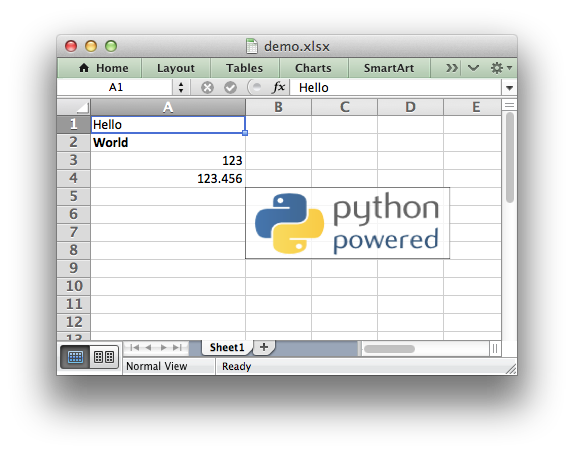
See the full documentation at: https://xlsxwriter.readthedocs.io
Release notes: https://xlsxwriter.readthedocs.io/changes.html
1 maintainer

Metadata
1 maintainer
Release files for xlsxwriter 3.3.4
For a detailed explanation of source distributions (sdists) and built distributions (wheels), please see the package formats documentation.
Source distribution (sdist)
| File | Size | Uploaded | Provenance | Actions |
|---|---|---|---|---|
| xlsxwriter-3.3.4.tar.gz | 239.2 kB | Without provenance | Details for xlsxwriter-3.3.4.tar.gz |
Built distribution (wheel)
| File | Interpreter | ABI | Platform | Actions Reset |
|---|---|---|---|---|
| xlsxwriter-3.3.4-py3-none-any.whl | Python 3 | none | any | Details for xlsxwriter-3.3.4-py3-none-any.whl |
Total release size: 431.4 kB
Release files / xlsxwriter-3.3.4.tar.gz
| Download URL | xlsxwriter-3.3.4.tar.gz |
|---|---|
| Size | 239.2 kB |
| Tags | Source |
|
SHA-256 checksum How to use checksums |
3512f4210622d4040e0f2882e2caf7263a3fd8be876704304314f0e275377fea
|
|
BLAKE2b-256 checksum How to use checksums |
c5a72d344f4a7119f2bd2ef6c672f99af610c5f3e11b024846680d5895cf41f6
|
| Upload date | |
|
Uploaded using Trusted Publishing? What is trusted publishing? |
No |
| Uploaded via |
twine/6.1.0 CPython/3.13.0
|
Release files / xlsxwriter-3.3.4-py3-none-any.whl
| Download URL | xlsxwriter-3.3.4-py3-none-any.whl |
|---|---|
| Size | 192.2 kB |
| Tags | Python 3 |
|
SHA-256 checksum How to use checksums |
da62fecb24fdd0f003c874c86109b9e1245ae89533052745ab85a085eb2b04d7
|
|
BLAKE2b-256 checksum How to use checksums |
a4f442d98147a0e3e2ae905a1c51bd6fcac1e551e4223b35fbf5d9769f59ffb6
|
| Upload date | |
|
Uploaded using Trusted Publishing? What is trusted publishing? |
No |
| Uploaded via |
twine/6.1.0 CPython/3.13.0
|
Security for xlsxwriter 3.3.4
Provenance
Provenance describes where a file came from. On PyPI, provenance is shared via attestations, which provide a verifiable record of the build or publishing details. View details, limitations and caveats.
No provenance found
None of the files in this release were uploaded with provenance metadata.
A note on package security
PyPI is a repository for distributing packages, not a service for auditing them. While third-party security researchers and our staff do their best to detect and remove malicious packages, PyPI cannot guarantee the quality, security or suitability of any given package.
To learn more about protecting yourself from malicious actors, visit our package security documentation.














