
Xmind2Zantao

使用说明
https://github.com/lileixuan/xmind2zantao/blob/main/xmind2zantao_web/static/guide/index.md
部署
安装软件包:
pip install xmind2zantao
- 快速启动web服务
gunicorn xmind2zantao_web.application:app -e ZANTAO_DEFAULT_EXECUTION_TYPE='功能测试' -p application.pid -b 0.0.0.0:8000 -w 4 -D
环境变量:
`ZANTAO_DEFAULT_EXECUTION_TYPE` 如果指定了值,当用例类型为空的时候会只用该值替换。
打开浏览器,输入上面指定IP地址和端口来使用。
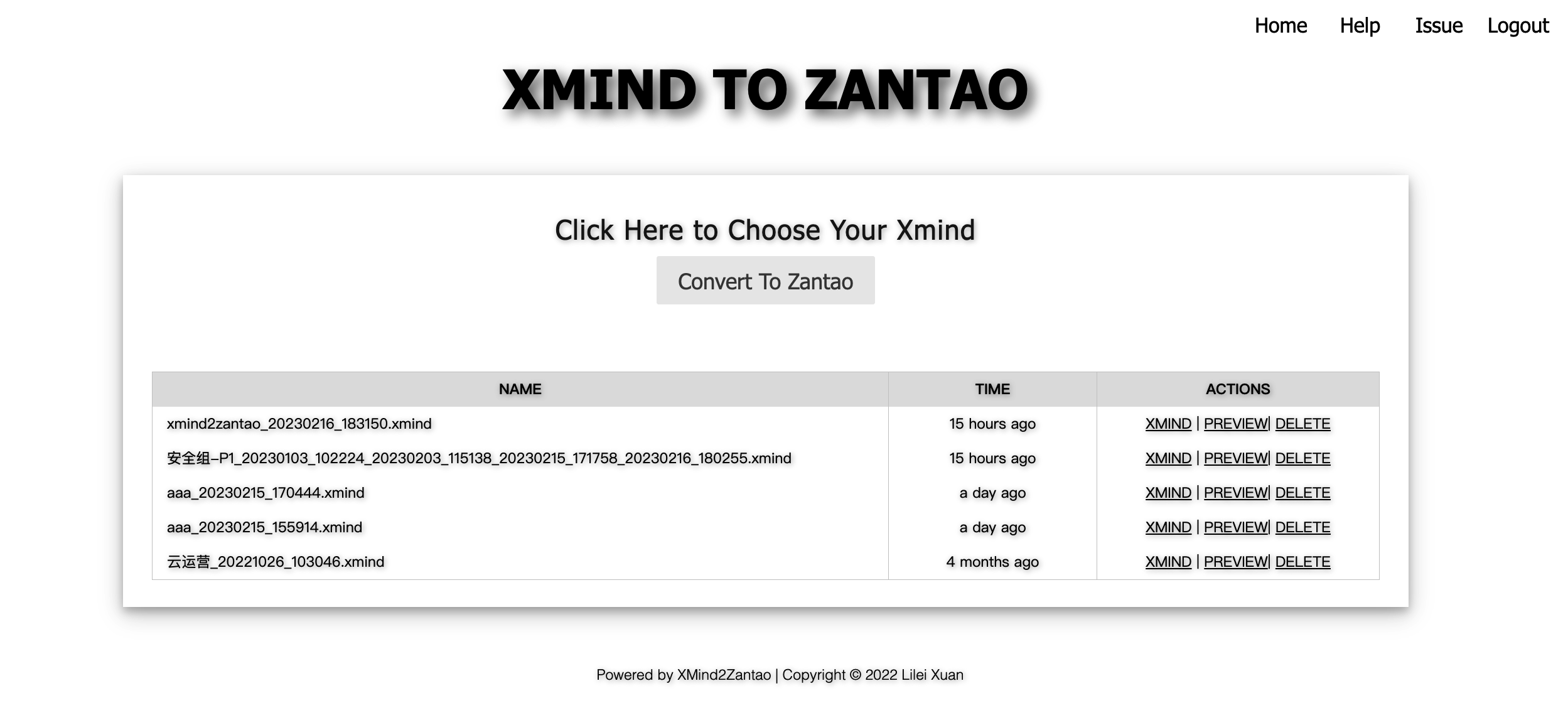
- 启用禅道辅助功能
启用禅道辅助功能后,将会开启登录验证功能。用户可使用禅道账户登录,辅助功能的权限和登录账户一致。
启动服务时指定相应的环境变量即可
gunicorn xmind2zantao_web.application:app -e ZANTAO_DEFAULT_EXECUTION_TYPE='功能测试' -e ZANTAO_BASE_URL='http://127.0.0.1/zentao' -e ZANTAO_PRODUCT_ID=1,3 -p application.pid -b 0.0.0.0:8000 -w 4 -D
需要的环境变量如下:
# 禅道地址
ZANTAO_BASE_URL='http://127.0.0.1/zentao'

# 产品ID列表,逗号分割。如果配置了,将只能看到配置的产品。
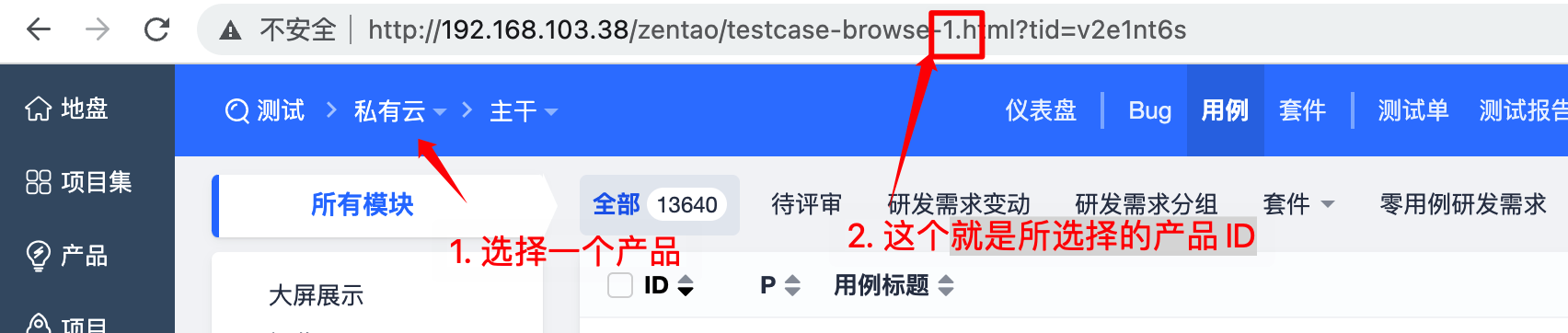
ZANTAO_PRODUCT_ID=1,3
获取产品ID:
感谢
参考:xmind2testlin xmindparser
1 maintainer

Metadata
1 maintainer
Release files for xmind2zantao 2.0.2
For a detailed explanation of source distributions (sdists) and built distributions (wheels), please see the package formats documentation.
Built distribution (wheel)
| File | Interpreter | ABI | Platform | Reset |
|---|---|---|---|---|
| xmind2zantao-2.0.2-py2-none-any.whl | Python 2 | none | any | Details |
Release files / xmind2zantao-2.0.2-py2-none-any.whl
| Download URL | xmind2zantao-2.0.2-py2-none-any.whl |
|---|---|
| Size | 2.4 MB |
| Tags | Python 2 |
|
SHA-256 checksum How to use checksums |
4d715f7f2df1b916f13859ced3aab877361a86312955558332f5edbb3fff5303
|
|
BLAKE2b-256 checksum How to use checksums |
6162dd715d001af13488c4ebbc62a4fb4aeec06f50694bf81ad42e9fb35666aa
|
| Upload date | |
|
Uploaded using Trusted Publishing? What is trusted publishing? |
No |
| Uploaded via |
twine/1.15.0 pkginfo/1.8.3 requests/2.27.1 setuptools/44.1.1 requests-toolbelt/0.10.1 tqdm/4.64.1 CPython/2.7.18
|
Security for xmind2zantao 2.0.2
Provenance
Provenance describes where a file came from. On PyPI, provenance is shared via attestations, which provide a verifiable record of the build or publishing details. View details, limitations and caveats.
No provenance found
None of the files in this release were uploaded with provenance metadata.
A note on package security
PyPI is a repository for distributing packages, not a service for auditing them. While third-party security researchers and our staff do their best to detect and remove malicious packages, PyPI cannot guarantee the quality, security or suitability of any given package.
To learn more about protecting yourself from malicious actors, visit our package security documentation.














