
xpln is a CLI tool that explains terminal commands for you before you run them

Project description
xpln 🛠️
xpln is a python package made available as a CLI tool that explains terminal commands for you to understand what they do before you execute them.
📦Installation
xpln is available on PyPI under the package name xpln2me. It can be installed by running
pip install xpln2me
At this point, xpln should be globally accessible from the terminal!
[!NOTE] On linux, this may not be as straightforward due to restrictions of direct installations of non-Debian-packaged Python packages. It's recommended to use
pipx install xpln2mefor this instead which will automatically create a virtual environment to install the package and creates a symlink in/.local/bin/xplnpointing to the real executable
📌 Usage
Basic Usage
Run xpln on the terminal to begin, or xpln --help to get the available commands
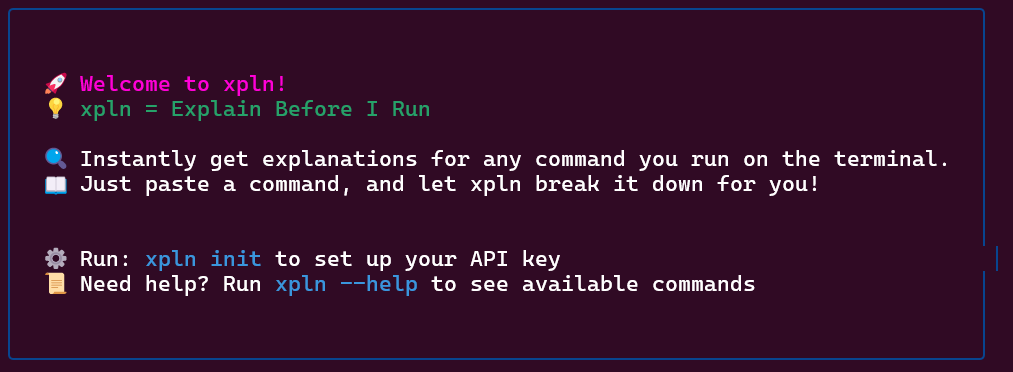
xpln is powered by Google AI Studio and requires an an API Key to initialize.
Once you have an API Key, initialize the CLI by running xpln init and following the instructions.
This key can be updated at any time by running xpln init with the --update / -u option
Alternatively, an API Key can be directly specified by including the --key / -k option
xpln init --key <API KEY>
xpln init --update --key <UPDATED API KEY>
Once initialized, use the this command to get explanations of different commands
xpln this <COMMAND>
Example Usage
There are 2 ways of using xpln:
- Directly pasting commands into
xpln this
xpln this ls -al

- Piping the input into
xpln this
cat script.sh | xpln this

⚙️ Technical Details
Tools Used
- Python 3.12 - Core language
- Poetry - Dependency & package management
- Click/Typer - CLI framework
- GitHub Actions - CI/CD automation
How xpln2me is Packaged
-
Python CLI tools can be packaged as:
- sdist [Source Distribution] - Requires building before installation
- Wheel (.whl) [Built Distribution] - Prebuilt, faster to install
-
This project uses Poetry to build and distribute both formats.
Versioning & Automated Releases
- Uses Semantic Versioning:
MAJOR.MINOR.PATCH - On PR merge, GitHub Actions:
- Bumps the version
This is done by including special indicators in PR titles (commit messages to main)
- #major - bumps the major version
- #minor - bumps the minor version
- Failure to include one of these bumps the patch version
- Creates a Git tag
- Publishes to PyPI the new version
- Bumps the version


Download files
Download the file for your platform. If you're not sure which to choose, learn more about installing packages.
Source Distribution
Built Distribution
Filter files by name, interpreter, ABI, and platform.
If you're not sure about the file name format, learn more about wheel file names.
Copy a direct link to the current filters
File details
Details for the file xpln2me-1.0.1.tar.gz.
File metadata
- Download URL: xpln2me-1.0.1.tar.gz
- Upload date:
- Size: 6.8 kB
- Tags: Source
- Uploaded using Trusted Publishing? No
- Uploaded via: poetry/2.1.1 CPython/3.12.9 Linux/6.8.0-1021-azure
File hashes
| Algorithm | Hash digest | |
|---|---|---|
| SHA256 |
3778de1ba457af0fd6b325cfd9e508f160674ce9436a171b52e862620e9ffd54
|
|
| MD5 |
ece64b27a085a4168de89d53937b8281
|
|
| BLAKE2b-256 |
daa204d406b13b6e15b46c15321e1f1e04537fe28b68006cae67c6433314ca0d
|
File details
Details for the file xpln2me-1.0.1-py3-none-any.whl.
File metadata
- Download URL: xpln2me-1.0.1-py3-none-any.whl
- Upload date:
- Size: 8.9 kB
- Tags: Python 3
- Uploaded using Trusted Publishing? No
- Uploaded via: poetry/2.1.1 CPython/3.12.9 Linux/6.8.0-1021-azure
File hashes
| Algorithm | Hash digest | |
|---|---|---|
| SHA256 |
91f875e69fc77ec108c727bd11a2d7a5e087c1f8bb890eb418593b87488f6a0f
|
|
| MD5 |
db65f79ed3347bb8202ba92b312789f4
|
|
| BLAKE2b-256 |
ed72908ba71744003bddc1ec09efeb59abaffb87b5415fdbb719ffa4ec443c57
|






