

Yakherd
Yakherd - herds the yaks so your agent stops shaving them.
Yakherd installs a strict, repository-centered single source of truth (SSOT) harness for agentic software projects. It gives Architecture, Implementation, Red Team, Temporary Branch, and Governor tasks durable ownership rules before the first product prompt arrives.




Absolute Beginner? Start Here
You do not need to understand "SSOT," Git, Python, or software architecture to start. Yakherd is the project-management and reliability half of vibe coding. It gives a coding agent a disciplined way to plan, build, check, and remember a software project without letting important decisions disappear into old chats.
You provide the other half: your idea, usually written as a master prompt. The master prompt describes what you want the software to do. Yakherd does not invent that idea for you; it gives the agent a safer, more organized working environment in which to build it.
In short:
- Yakherd provides the operating system for the work: roles, plans, decisions, evidence, review, and a durable source of truth.
- Your master prompt provides the product: the problem, users, desired behavior, constraints, and definition of success.
- An agentic coding environment uses both to build the software.
Yakherd installs a START_HERE.md handoff for Codex. One explicit launch
message asks Codex to create all five inspectable role-agent threads under a
non-authoritative coordinator. Red Team runs the bootstrap gate immediately;
Architecture waits for the master prompt; Implementation and Temporary Branch
park; and Governor remains inactive until separately approved. This gives the
user a visible team without violating the single-writer rule.
After that one-time integrity check, governance is proportional. Reversible bounded work goes directly from a brief you confirm to Implementation. Strict Architecture and Red Team gates are reserved for the concrete high-consequence slice being attempted—not imagined future features—and stop after at most two failed reviews.
The coding environment must be able to read and write project files, run shell commands, use Git, and run Python 3.11 or newer. Codex or Claude Code can do this when its execution environment also has Git and Python 3.11 or newer. An ordinary AI web chat without filesystem and shell tools cannot install Yakherd merely from a URL.
Which Coding Agents Work?
| Environment | Yakherd support |
|---|---|
| Codex | Native when the generated repository is opened as the project. Codex loads the installed AGENTS.md. |
| Claude Code | Native after the generated repository is opened as the project and the local import is approved. CLAUDE.md imports the same AGENTS.md; verify both are loaded with /context. |
| Other coding agents | Compatible when the agent can use files, Git, a shell, and Python, and is explicitly told to read AGENTS.md. Automatic instruction loading depends on the tool. |
| Ordinary AI chat | Not sufficient unless the chat has access to the required coding tools and project filesystem. |
The governance files and role prompts are product- and model-neutral.
AGENTS.md is the authority, while CLAUDE.md is only an import adapter; they
do not create two competing copies of the rules. Agent instruction files are
behavioral context, not a security sandbox, and the client must actually load
them before work begins.
Tell Your Agent To Install It
If all you know how to do is talk to your coding agent, that is enough. Use the prompt for your environment.
Codex:
Install Yakherd from https://github.com/gigajeff/Yakherd into a new project repository for me. First verify that this environment has Git and Python 3.11 or newer. Follow Yakherd's README and safety instructions. Do not overwrite an existing project. After installation, open the generated repository as the Codex project and confirm its AGENTS.md is loaded. Then follow START_HERE.md: launch all five Yakherd role agents, keep the current task as their coordinator, run the required bootstrap review, guide me through the GitHub setup checkpoint, and ask me for my idea or master prompt.
Claude Code:
Install Yakherd from https://github.com/gigajeff/Yakherd into a new project repository for me. First verify that this environment has Git and Python 3.11 or newer. Follow Yakherd's README and safety instructions. Do not overwrite an existing project. After installation, open the generated repository as the Claude Code project and start a fresh session there. Confirm that CLAUDE.md contains only the local @AGENTS.md import. If Claude Code asks, approve that import only after verifying it resolves to AGENTS.md inside the generated repository. Use /context to confirm that CLAUDE.md and AGENTS.md are loaded; do not begin product work if they are not. After the required review, ask me for my idea or master prompt.
Another coding agent:
Install Yakherd from https://github.com/gigajeff/Yakherd into a new project repository for me. First verify that this environment has Git and Python 3.11 or newer. Read and follow Yakherd's README, AGENTS.md, and safety instructions. Do not overwrite an existing project. In the generated project, always read AGENTS.md before working and confirm it is in the active context. After installation and the required review, ask me for my idea or master prompt.
The agent can clone this repository, run the installer, and guide you through the next step. In Codex, the generated launcher explicitly requests the five role agents; other environments use the same five role prompts as long-lived sessions. Once Yakherd is installed and its initial review passes, give the Architecture role your master prompt. Together, Yakherd plus a clear master prompt can turn an idea into usable software in Codex, Claude Code, or another capable agentic coding environment.
Yakherd improves how the work is organized and reviewed; it does not guarantee that every generated program is correct or safe. You should still review and test consequential software before relying on it.
Why Yakherd
Long-running agent projects often drift because decisions live in chat, multiple files claim authority, failed experiments remain active, and the human becomes a courier between tasks. Yakherd installs a small governance shell that makes authority, current state, decisions, evidence, and review boundaries explicit.
It is deliberately product-neutral. It does not choose your language, framework, cloud provider, database, architecture, or deployment system.
Quick Start
Install Yakherd and preview a fresh installation without writing anything:
python3 -m pip install yakherd
yakherd init \
  --target ~/dev/my-project \
  --project-name my-project \
  --dry-run
Install into a nonexistent or empty folder:
yakherd init \
  --target ~/dev/my-project \
  --project-name my-project
Then open the generated repository as the Codex project and send:
Follow
START_HERE.mdnow. Launch the five Yakherd role agents, keep this task as their coordinator, ask me for my master prompt when the bootstrap review is ready, and keep reversible first-slice work in bounded mode.
The launcher creates the Red Team agent that follows
docs/prompts/bootstrap_cold_resume_review.md. Only after that review passes
does Architecture preserve and extract the product master prompt. The human
then confirms a bounded brief for direct Implementation or a strict planning
scope; product intake is not automatically sent through Red Team.
On Windows PowerShell, the equivalent commands are:
py -m pip install yakherd
yakherd init `
  --target C:\dev\my-project `
  --project-name my-project `
  --dry-run

yakherd init `
  --target C:\dev\my-project `
  --project-name my-project
To run directly from source instead, clone this repository and replace
yakherd in the examples with python yakherd.py.
See a Cold Resume
The strongest Yakherd claim is recoverability: a new agent should be able to open the generated repository with no implementation chat, reconstruct the project's state from its files, run the required checks, and issue an independent review.
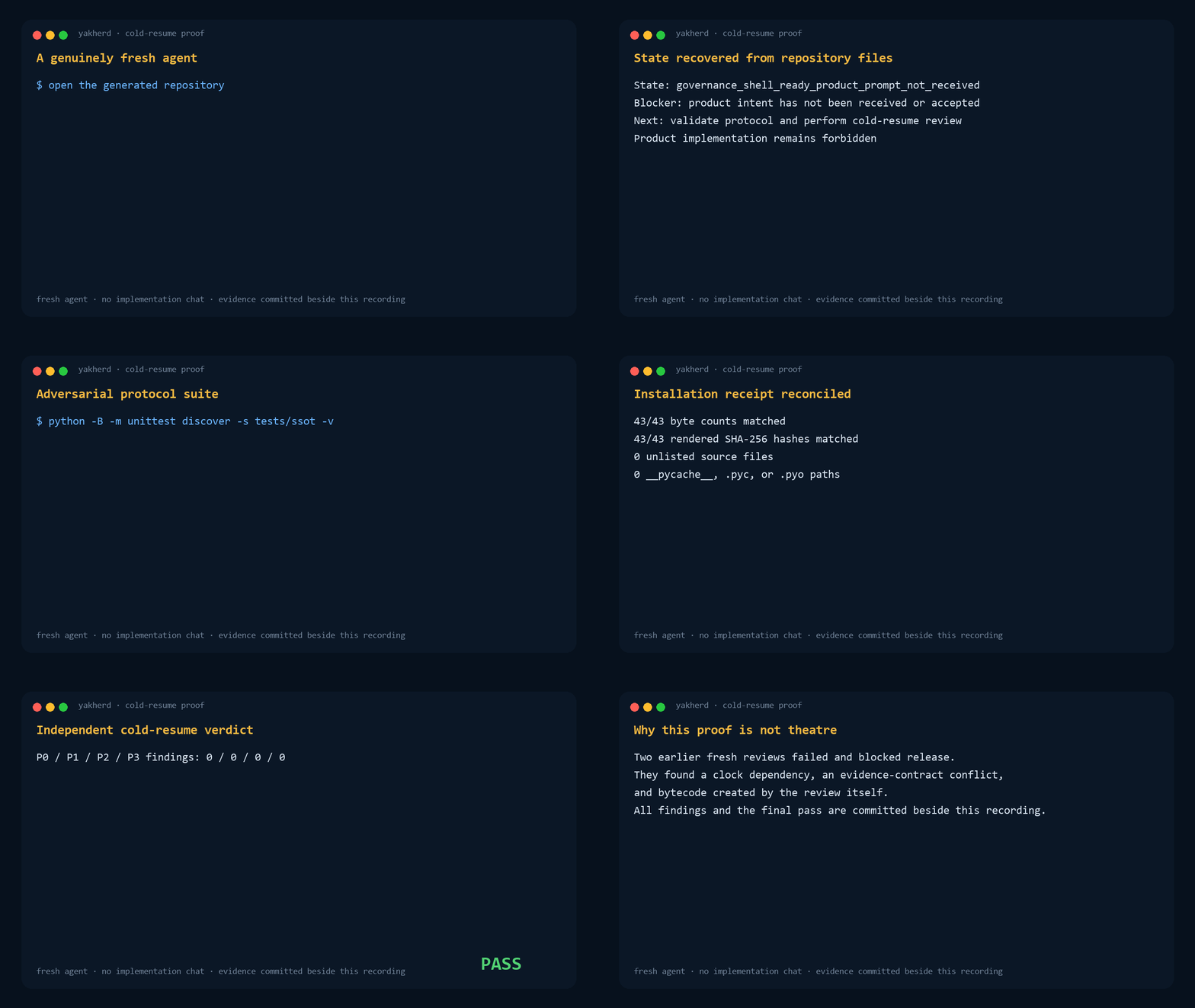
This recording is rendered from a real isolated fresh-agent run. The session source, exact prompt and result, review, and hashes are committed beside it so the result is inspectable rather than a staged terminal animation.
What Gets Installed
SSOT.md: authority map and conflict order.DECISIONS.md: durable decision owner.STATUS.md: bounded current-state index.AGENTS.md: the one authoritative set of repository operating rules.CLAUDE.md: a one-line Claude Code adapter that importsAGENTS.md.START_HERE.md: the beginner handoff and one-message Codex launch.- Architecture, Implementation, Red Team, Temporary Branch, and Governor task prompts.
- A Codex five-role launcher, master-prompt provenance protocol, and an approval-gated GitHub project setup guide.
docs/task_protocol.mdas the generated repository's canonical owner for work modes and the independent-review circuit breaker.- Proportional bounded/strict work modes and a two-review circuit breaker.
- Governance, review, plan, run-record, and status-history directories.
- Standard-library validators and focused tests.
- A hash-bound installation receipt.
- Windows policy
Y-PROC-1: a compact installed instruction backed byyakherd exec, per-task Job Objects, one-heavy-pipeline governance, below-normal heavy-job priority, identity-bound cleanup, status, and dry-run cleanup.
See Usage and Architecture.
Existing Repositories
Retrofit mode is intentionally fail-closed. It requires a separately reviewed JSON plan with an exact allowlist and expected hashes. Do not point fresh mode at an established repository, and do not improvise a retrofit from the command line. See Retrofit Safety.
Windows Local Execution Hygiene
On Windows, run finite local work through the Y-PROC-1 broker. Heavy is the safe default; it preserves the build tool's normal internal worker count while serializing independent top-level heavy pipelines for the current user:
yakherd exec --timeout 900 -- cmake --build build
yakherd process status
yakherd process cleanup --all-owned --dry-run --verify
yakherd process resume --task TASK_ID
Use --light only for finite low-CPU work that is safe to overlap. The broker
rejects known interactive, detached, watcher, daemon, and development-server
forms. Y-PROC-1.1 classifies PID reuse, missing legacy evidence, and conflicting
identity evidence as visible warnings, never as unrelated-work embargoes. Only
a verified live Job member that failed cleanup with concrete hazard evidence is
a blocker. Approved persistent-process leases remain deliberately deferred.
Existing mosaic_colmap, SPLATOMATIC, and CROCHET installations are
partially mitigated. Preserve their temporary process-hygiene instructions;
adopt Y-PROC-1 later through the smallest reviewed, hash-pinned retrofit rather
than refreshing unrelated SSOT content.
Trust Boundary
Yakherd 1.0.0 distributed the exact package that passed the Mosaic-origin V3 independent review. Those historical audits remain provenance for the first release, not a claim that later versions have identical bytes.
For every version, RELEASE.json binds bootstrap.py and MANIFEST.json; the
manifest binds every installed template. Package changes require regenerated
hashes, clean acceptance evidence, and a new independent review before release.
The Git tag and GitHub release then authenticate those reviewed bytes
externally.
The engine remains under packages/jeff_strict_ssot_v1/ because the V1 name
identifies the protocol generation. Package versions within V1 may add
backward-compatible adapters only through the full acceptance and independent
review cycle.
Non-Goals
The Yakherd installer does not:
- run product code or experiments (the separate, explicitly invoked
yakherd execbroker runs only the command the operator supplies); - install product dependencies;
- access project secrets;
- create automations;
- choose technical architecture;
- make Git mutations inside the target repository; or
- replace human approval for consequential decisions.
The generated GitHub guide is executed later by the coding agent only after the user verifies the authenticated account, destination, visibility, exact initial commit, remote, and first push. That guided workflow does not weaken the installer's no-network/no-Git guarantee.
Development
python3 -B -m unittest discover \
  -s packages/jeff_strict_ssot_v1/tests -v

python3 packages/jeff_strict_ssot_v1/tests/run_acceptance.py \
  --package-root packages/jeff_strict_ssot_v1 \
  --output-root .tmp/acceptance \
  --date 2026-07-20
Windows PowerShell:
python -B -m unittest discover `
  -s packages\jeff_strict_ssot_v1\tests -v

python packages\jeff_strict_ssot_v1\tests\run_acceptance.py `
  --package-root packages\jeff_strict_ssot_v1 `
  --output-root .tmp\acceptance `
  --date 2026-07-20
Read CONTRIBUTING.md before changing the audited package.
License
Apache License 2.0. See LICENSE.
1 maintainer

Metadata
1 maintainer
Release files for yakherd 1.3.1
For a detailed explanation of source distributions (sdists) and built distributions (wheels), please see the package formats documentation.
Source distribution (sdist)
| File | Size | Uploaded | |
|---|---|---|---|
| yakherd-1.3.1.tar.gz | 110.8 kB | Details |
Built distribution (wheel)
| File | Interpreter | ABI | Platform | Reset |
|---|---|---|---|---|
| yakherd-1.3.1-py3-none-any.whl | Python 3 | none | any | Details |
Total release size: 230.7 kB
Release files / yakherd-1.3.1.tar.gz
| Download URL | yakherd-1.3.1.tar.gz |
|---|---|
| Size | 110.8 kB |
| Tags | Source |
|
SHA-256 checksum How to use checksums |
7ae21881b3fdb039bf6ca675655c6134ccc2384cba7f3d44df21cf720370f1b6
|
|
BLAKE2b-256 checksum How to use checksums |
b53a2e5a898e132ba6561635f6084a2eb787d4a9ed122831c2d9dacc776cdbe6
|
| Upload date | |
|
Uploaded using Trusted Publishing? What is trusted publishing? |
Yes |
| Uploaded via |
twine/6.1.0 CPython/3.13.13
|
Provenance
Provenance describes where a file came from. On PyPI, provenance is shared via attestations, which provide a verifiable record of the build or publishing details. View details, limitations and caveats.


PyPI Publish Attestation
PyPI verified that this artifact, at this checksum, originated from the publisher listed below.
Signed by GitHub Actions, verified by PyPI on Jul 23, 2026.
Transparency logRelease files / yakherd-1.3.1-py3-none-any.whl
| Download URL | yakherd-1.3.1-py3-none-any.whl |
|---|---|
| Size | 120.0 kB |
| Tags | Python 3 |
|
SHA-256 checksum How to use checksums |
4da0b2b2e9c592ae03704a7826628f36b177a1fbcf127a3fbd1d02281b76a66c
|
|
BLAKE2b-256 checksum How to use checksums |
0f5b2eaca3e5e2e4a4763e0a2080be7a8e23b78c3cf146571f85f8944506b442
|
| Upload date | |
|
Uploaded using Trusted Publishing? What is trusted publishing? |
Yes |
| Uploaded via |
twine/6.1.0 CPython/3.13.13
|
Provenance
Provenance describes where a file came from. On PyPI, provenance is shared via attestations, which provide a verifiable record of the build or publishing details. View details, limitations and caveats.
PyPI Publish Attestation
PyPI verified that this artifact, at this checksum, originated from the publisher listed below.
Signed by GitHub Actions, verified by PyPI on Jul 23, 2026.
Transparency log













