






Introduction
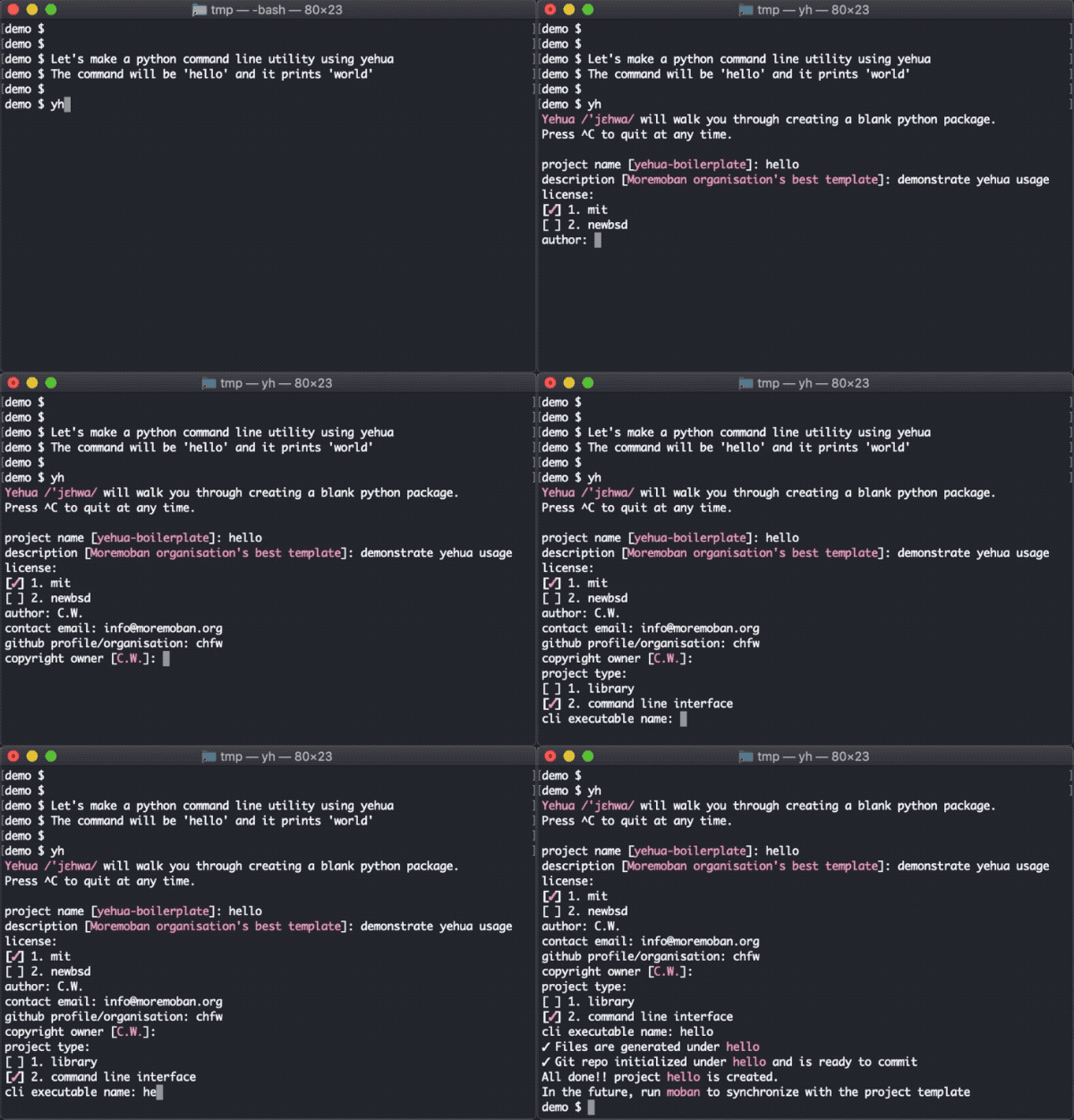
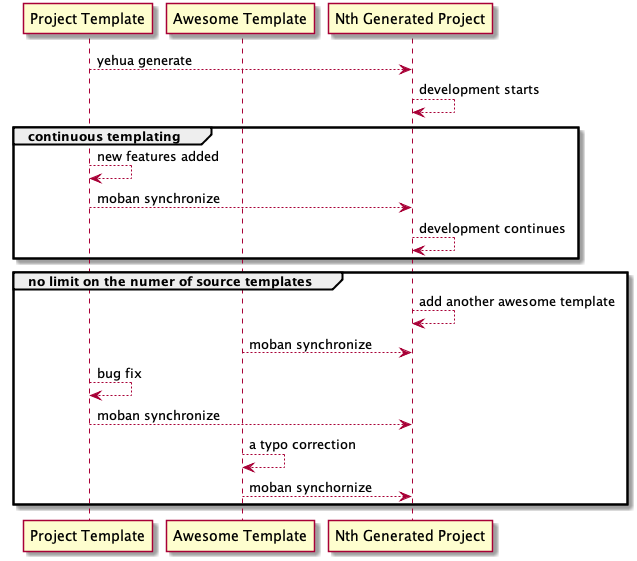
yehua /’jɛhwa/ is yet another a project template tool for an organisation. It creates a project skeleton, S from the default project template, T, of an organisation. moban, the other tool of moremoban organisation, keeps S in synchronisation with T forever. This use case is what we called: continuous templating.
Cookiecutter users
Yes, we now support cookiecutter templates. It has been requested since 2018 Europython. Simply there is tons of cookiecutter templates out there.
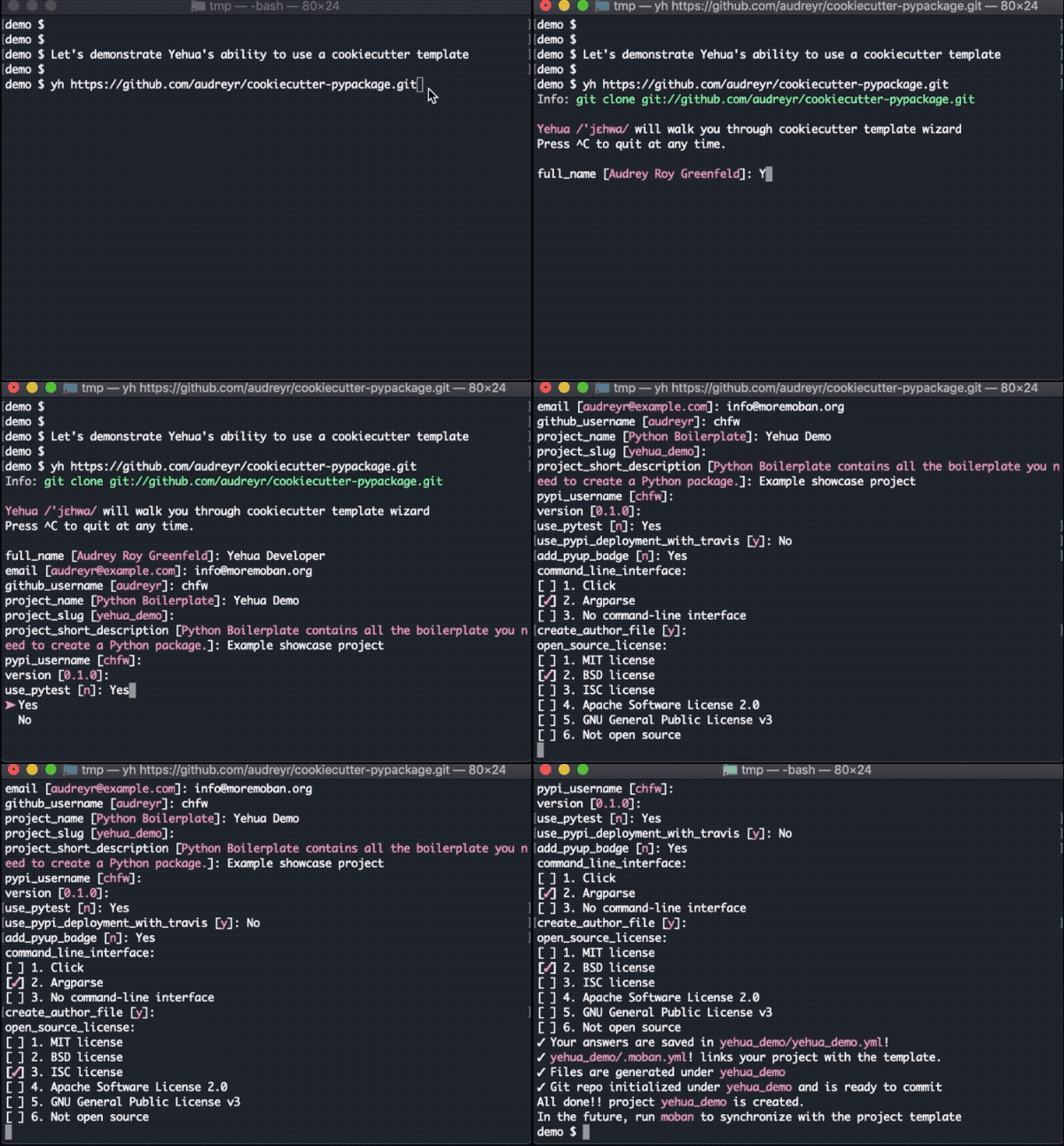
What you do is to replace ‘cookiecutter’ with ‘yh’:
$ pip install yehua[cookiecutter]
$ yh gh:audreyr/cookiecutter-pypackage
And what moremoban promise is, whenever your source template changes, you can synchronize them any time with another moremoban’s command ‘moban’:
$ moban
Yes, you need a separate command, which replaces your effort to synchronize the upstream templates all the time.
What’s different with Yehua
When the scope is a single project, yehua is no different to cookiecutter and PyScaffold. It will create a project skeleton from pypi-mobans, other templates such as cookiecutter templates, yehua mobans.
When the scope is all projects within an organisation, yehua helps tackle information fragmentation problem, because all new projects after its creation, are still in synchronisation with T. For example, removing python 2.7 test in your travis file, can be done either manually by hand or automatically via moban. What’s the difference? The latter is faster and typo-free option. Here is an example.
PyScaffold version 3 has rolled out ‘–update’ option, recognizing the organisational need of continous templating. Why do not yehua join PyScaffold? Well, moremoban organisation started with ‘–update’ at the start so our architecture and vision are closer to that of cookiecutter:
we do not want to limit ourselves in pythonsphere. We wanted to serve all IT projects. In our mind, they are all about text templating.
we split the tool and the templates, serving the previous statement. People can create npm package template and use yehua+moban for continuous templating. Here are a list of examples:
Installation
You can install yehua via pip:
$ pip install yehuaor clone it and install it:
$ git clone https://github.com/moremoban/yehua.git
$ cd yehua
$ python setup.py install
For offline usage, you need to get pypi-mobans-pkg installed:
$ pip install yehua[pypi-mobans]
or:
$ pip install pypi-mobans-pkg
Usage
Simply type in and you are taken care of:
$ yh
It will use pypi-mobans-pkg by default and if it is not installed, it will install latest one. Then pypi-mobans-pkg takes over and will do [these](https://github.com/moremoban/pypi-mobans/blob/dev/yehua.yml) for you:
Consult you on your project static information which can update as many as you want to.
Create the Python package folder structure
Initialize the package as git project
You will simply need to commit it after you will have reviewed the generated files.
Tutorial
Let’s make a python command line utility using yehua. The command will be hello and it prints world.
Step 1 Let’s launch yehua

Step 2 Fill-in the meta data for your project

At the end, yehua generates a folder named ‘hello’, which contains [all necessary files](https://github.com/moremoban/pypi-mobans).
Step 3 Start coding
In above animation, we write up the actual code in hello/main.py
def main():
    print('world')
Why is it enough? yehua generates a command utility python and it has pre-wired to invoke hello.main.main() function. You can find it out in setup.py.
Step 4 Install it
Now all is done. Let’s install it

You can now run hello at your command line.
Step 5 push to github
Suppose you are happy with everything. Please do the following to push it to your github:
$ git commit -am ":sparkle: initial commit"
Then create your project repository in github and do these to push it out:
$ git remote add origin https://github.com/moremoban/hello.git
$ git push origin master
You can find the hello project on github.
Step 7 enable travis
The generated project already has .travis.yml file. What you will need to do is to register with travis.org if you have not done so. And then go to travis and activate your project.
Background
The original problem I was trying to solve is: I would like to place common paragraphs in the documentation of my projects in a central place (pyexcel-mobans), and all projects could reference it dynamically so that when those common paragraphs get updated, the updates can be easily propagated to all relevant projects. The derived problem is: what can I do to a new project? I found myself doing a lot of copy-and-paste a lot, which lead to the creation of “yehua”. Later, John Vandenberg, an active member of coala, suggested extracting the generic sets of pyexcel-mobans to form pypi-mobans, so that a vanilla python package can be created. Why not cookiecutter? Well, I have not heard of it at the time of creation. But it turns out that this project started to pave the way to be the cookiecutter for organisations.
Why to choose “yehua”? Here is the little story behind the choice of name. And this music video would help bridge the cultural gap between you and me.
License
NEW BSD License
It embeds MIT licensed cutie from Hans Schülein. Please refer to LICENSE file for more details
3 contributors
In alphabetical order:
Change log
0.1.4 - 14.09.2020
Updated
#53: parity with cookiecutter: support gh:audreyr/cookiecutter-pypackage
0.1.3 - 13.09.2020
Updated
use pypi-mobans v0.1.0
no longer, yehua has any template in itself.
0.1.2 - 26.08.2020
Fixed
support pypi-mobans v0.0.15.
auto-generation of contributors
github action for moban update and commits
better isort action
0.1.1 - 29.05.2020
Fixed
#62: fix unwanted dependency for yh standalone use
0.1.0 - 19.05.2020
Removed
python 2 support has been dropped
Updated
-v is changed to do moban style verbose(-v, -vv, -vvv), for version, please use -V
Added
0.0.8 - 10-01-2020
Added
#30: ‘yh -h’ or ‘yh –help’ triggers help text
#32: pypi-moban-pkg as installation extras
enable auto github auto publishing
generate mit license
Updated
#35: better error message when the project name has been made a directory already
updated moban dependency to v0.6.0
updated yaml library to ruamel.yaml. PyYAML is out because only one yaml library is wanted in the organisation.
0.0.7 - 6/10/2019
Updated
upgrade yehua to use pypi-mobans-pkg version 0.0.7
generated project will have azure build pipeline, moban command stage in travis and local flake8 check
0.0.6 - 04/15/2019
Updated
upgrade yehua to use pypi-mobans-pkg version 0.0.5
generated project will have four new files: pipfile, lint.sh, changelog.yml and Makefile
0.0.5 - 08/11/2018
added
#6: provide Pipfile for pipenv
0.0.4 - 06/07/2018
Updated
#11: keep up-to-date with pypi-mobans
0.0.3 - 24/02/2018
Added
To add all files to a git repo is being made optional. The action is specified in git-repo-files under post-moban section. This particular need arises when it is used to scaffold other type of projects such as npm.
0.0.2 - 15/10/2017
Added
Automatically inflate project meta data. One yehua command and typing a few questions are required before a complete project scaffolding
Automatically obtain setupmobans repo for previous task.
Automatically initialize package as git project and add all project files for the user to commit
Removed
Built-in template files are off-loaded to setupmobans, which are more frequently updated.
0.0.1 - 02/07/2017
1 maintainer

Metadata
1 maintainer
Release files for yehua 0.1.4
For a detailed explanation of source distributions (sdists) and built distributions (wheels), please see the package formats documentation.
Source distribution (sdist)
| File | Size | Uploaded | Provenance | Actions |
|---|---|---|---|---|
| yehua-0.1.4.tar.gz | 43.5 kB | Without provenance | Details for yehua-0.1.4.tar.gz |
Built distribution (wheel)
| File | Interpreter | ABI | Platform | Actions Reset |
|---|---|---|---|---|
| yehua-0.1.4-py2.py3-none-any.whl | Python 3, Python 2 | none | any | Details for yehua-0.1.4-py2.py3-none-any.whl |
Total release size: 62.3 kB
Release files / yehua-0.1.4.tar.gz
| Download URL | yehua-0.1.4.tar.gz |
|---|---|
| Size | 43.5 kB |
| Tags | Source |
|
SHA-256 checksum How to use checksums |
f3c5fb58784055ce897d49a0989f71deef4cb31d4e90b1426278db0434101a48
|
|
BLAKE2b-256 checksum How to use checksums |
6d1a2af51e2b09bda3baa24c78bf5cf3a6f77054c831bd7f65b995ff54295ca0
|
| Upload date | |
|
Uploaded using Trusted Publishing? What is trusted publishing? |
No |
| Uploaded via |
twine/3.2.0 pkginfo/1.5.0.1 requests/2.24.0 setuptools/47.1.0 requests-toolbelt/0.9.1 tqdm/4.49.0 CPython/3.8.5
|
Release files / yehua-0.1.4-py2.py3-none-any.whl
| Download URL | yehua-0.1.4-py2.py3-none-any.whl |
|---|---|
| Size | 18.8 kB |
| Tags | Python 2 Python 3 |
|
SHA-256 checksum How to use checksums |
2a672ddeaf1ab7866ae8e2ced7455a7ff2fa1c4024fcfb71496b38af0da35369
|
|
BLAKE2b-256 checksum How to use checksums |
2feb94e89c093f414a0d6d6d039437a0a1fb5b578016564f1aa01182d60201e4
|
| Upload date | |
|
Uploaded using Trusted Publishing? What is trusted publishing? |
No |
| Uploaded via |
twine/3.2.0 pkginfo/1.5.0.1 requests/2.24.0 setuptools/47.1.0 requests-toolbelt/0.9.1 tqdm/4.49.0 CPython/3.8.5
|
Security for yehua 0.1.4
Provenance
Provenance describes where a file came from. On PyPI, provenance is shared via attestations, which provide a verifiable record of the build or publishing details. View details, limitations and caveats.
No provenance found
None of the files in this release were uploaded with provenance metadata.
A note on package security
PyPI is a repository for distributing packages, not a service for auditing them. While third-party security researchers and our staff do their best to detect and remove malicious packages, PyPI cannot guarantee the quality, security or suitability of any given package.
To learn more about protecting yourself from malicious actors, visit our package security documentation.














