
Tool to Create,Modify YOLO dataset and much more...

Project description
yolo-splitter
Tool to create,modify YOLO dataset.
Installation
pip install yolosplitter
Uses
from yolosplitter import YoloSplitter

ys = YoloSplitter(imgFormat=['.jpg', '.jpeg', '.png'], labelFormat=['.txt'] )

# If you have yolo-format dataset already on the system
df = ys.from_yolo_dir(input_dir="yolo_dataset",ratio=(0.7,0.2,0.1),return_df=True)

# If you have mixed Images and Labels in the same directory
df = ys.from_mixed_dir(input_dir="mydataset",ratio=(0.7,0.2,0.1),return_df=True)

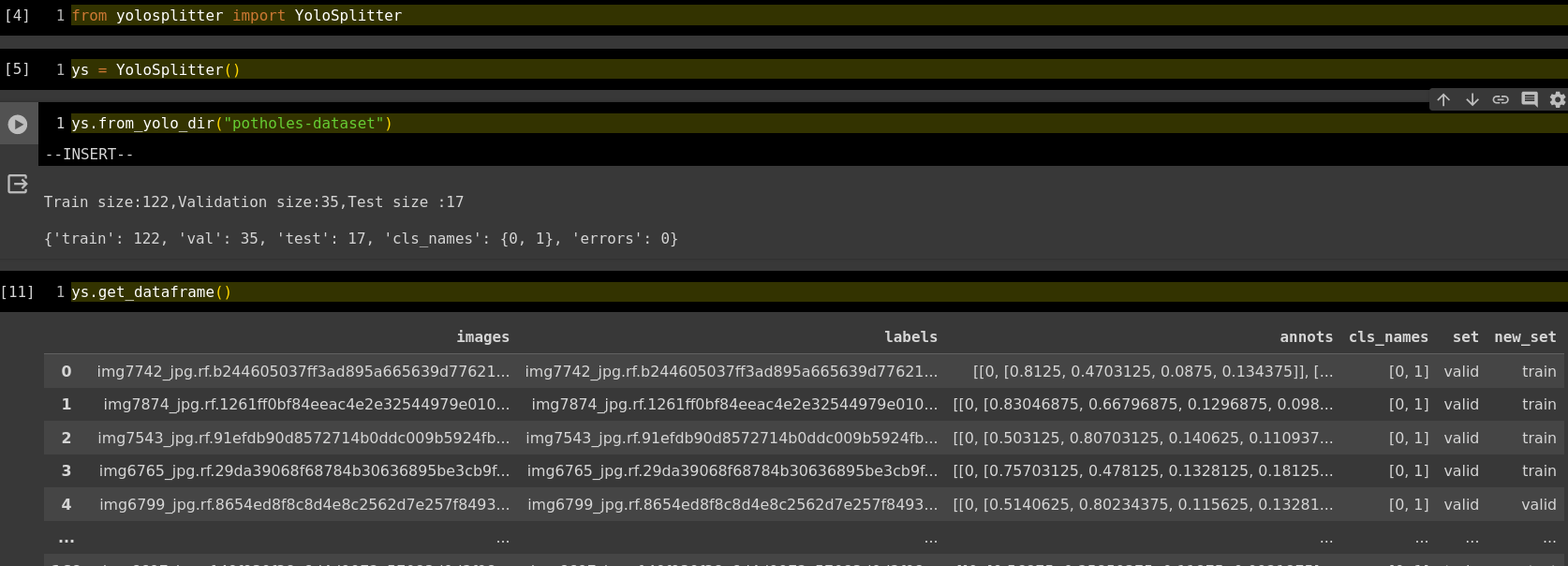
# To see train/test/val split size, total error files, all class names from annotation files
ys.info()

# !!! changed show_dataframe to get_dataframe()
# to see dataframe
ys.get_dataframe()
ys.save_split(output_dir="potholes")
Saving New split in 'potholes' dir
100%|██████████| 118/118 [00:00<00:00, 1352.79it/s]
# Use ys.show_show_errors  to show filename which have errors
ys.show_errors()

# Use ys.show_dataframe to see dataframe created on the dataset
ys.get_dataframe()

# To see train/test/val split size, total error files, all class names from annotation files
ys.info()
Input Directory
MyDataset/
├── 02.png
├── 02.txt
├── 03.png
├── 03.txt
├── 04.png
├── 04.txt
├── 05.png
├── 05.txt
├── 06.png
├── 06.txt
├── 07.png
├── 07.txt
├── 08.png
├── 08.txt
├── 09.png
├── 09.txt
├── 10.png
├── 10.txt
├── 11.png
└── 11.txt
Output Directory
MyDataset-splitted/
├── data.yaml
├── train
│   ├── images
│   │   ├── 03.png
│   │   ├── 04.png
│   │   ├── 05.png
│   │   ├── 07.png
│   │   ├── 08.png
│   │   ├── 09.png
│   │   └── 10.png
│   └── labels
│       ├── 03.txt
│       ├── 04.txt
│       ├── 05.txt
│       ├── 07.txt
│       ├── 08.txt
│       ├── 09.txt
│       └── 10.txt
└── val
    ├── images
    │   ├── 02.png
    │   ├── 06.png
    │   └── 11.png
    └── labels
        ├── 02.txt
        ├── 06.txt
        └── 11.txt
Change Log
Stable
-
2024-08-26 version 5.0.0
- Optimize code and speedup execution. Thanks for incredible work [https://github.com/MarcelloCuoghi]
-
2023-04-25 version 4.9.1
- Fixed. "Having a newline at the end of the file causes an error: ValueError('invalid literal for int() with base 10: ''')". Thanks to [https://github.com/Maxvgrad] for finding bug.
-
2023-01-30 version 4.9
- Fixed Fixes Annotation Parse Error. Thanks to [https://github.com/Xiteed]
-
2023-12-20 version 4.8
- Changed yaml file style
-
2023-12-19 version 4.7
- Fix output dir of
valtovalidthanks to [https://github.com/AndreasFridh] - Added
ys.info()To see train/test/val split size, total error files, all class names from annotation files - Changed
ys.show_dataframetoys.get_dataframe() - small bug fixes
- Fix output dir of
Release history Release notifications | RSS feed


Download files
Download the file for your platform. If you're not sure which to choose, learn more about installing packages.
Source Distribution
yolosplitter-0.5.0.0.tar.gz
(5.2 kB
view details)
Built Distribution
Filter files by name, interpreter, ABI, and platform.
If you're not sure about the file name format, learn more about wheel file names.
Copy a direct link to the current filters
File details
Details for the file yolosplitter-0.5.0.0.tar.gz.
File metadata
- Download URL: yolosplitter-0.5.0.0.tar.gz
- Upload date:
- Size: 5.2 kB
- Tags: Source
- Uploaded using Trusted Publishing? No
- Uploaded via: twine/4.0.2 CPython/3.10.12
File hashes
| Algorithm | Hash digest | |
|---|---|---|
| SHA256 |
ded06850f6dc72f012ba59304a7791c937cd29624e25d767d80cc9f586de120b
|
|
| MD5 |
11e4f4c520fadaf8450aa885b754f229
|
|
| BLAKE2b-256 |
3113c5e86e2e97a175a70aa03120780cdf75e6849a111666cb85c88d57feac9d
|
File details
Details for the file yolosplitter-0.5.0.0-py3-none-any.whl.
File metadata
- Download URL: yolosplitter-0.5.0.0-py3-none-any.whl
- Upload date:
- Size: 5.2 kB
- Tags: Python 3
- Uploaded using Trusted Publishing? No
- Uploaded via: twine/4.0.2 CPython/3.10.12
File hashes
| Algorithm | Hash digest | |
|---|---|---|
| SHA256 |
2a3989cb9e0017ba54efc06ee84d2ff4f2268de42dcd317caba835315c435c17
|
|
| MD5 |
8476719bed127e91654d175175bdbe60
|
|
| BLAKE2b-256 |
22bc7166da446532864ed6f78ccd6872e761fc3deb74b3fe5035dd1fa0cba2cf
|






