
A full-featured YouTube Music TUI client for the terminal

Project description
ytm-player
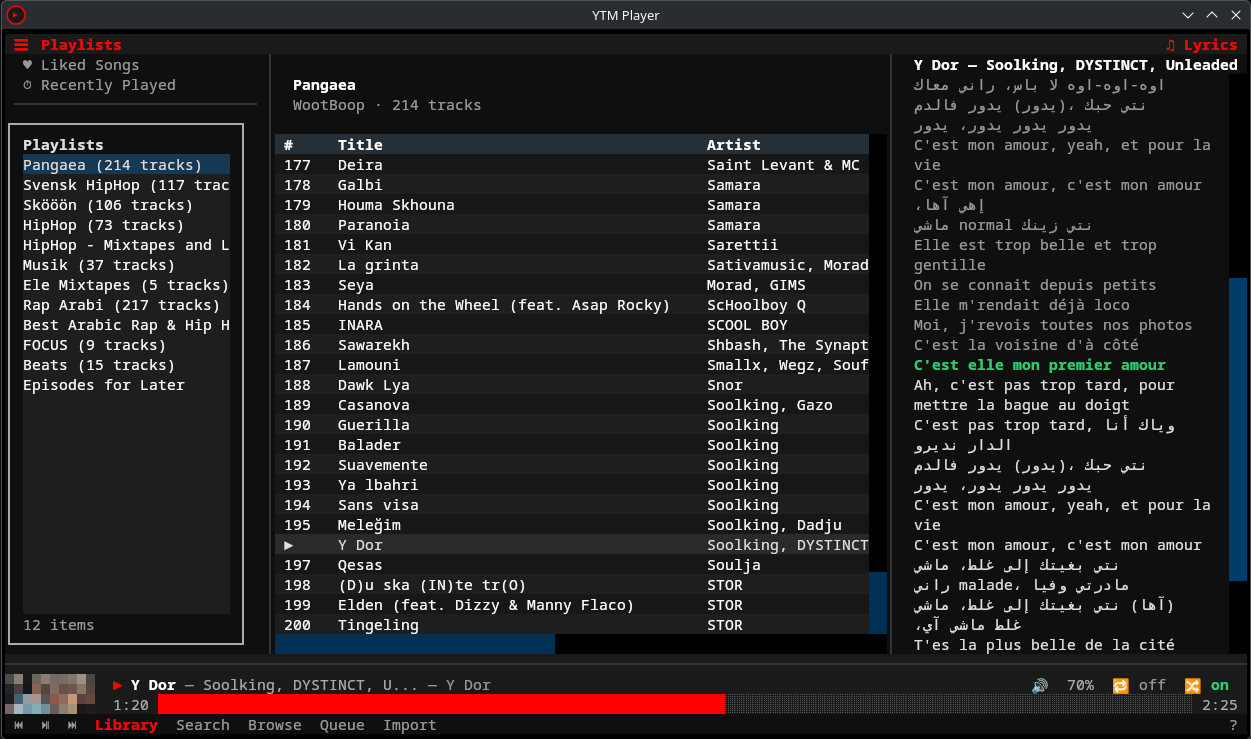
A full-featured YouTube Music player for the terminal. Browse your library, search, queue tracks, and control playback — all from a TUI with vim-style keybindings. Runs on Linux, macOS, and Windows.
Features
- Full playback control — play, pause, seek, volume, shuffle, repeat via mpv with gapless audio
- Persistent sidebars — playlist sidebar (left) visible across all views, synced lyrics sidebar (right) with auto-scroll, both toggleable from header bar
- 8 pages — Library, Search, Browse, Context (album/artist/playlist), Queue, Liked Songs, Recently Played, Help
- Vim-style navigation —
j/kmovement, multi-key sequences (g lfor library,g sfor search), count prefixes (5j) - Predictive search — debounced with 300ms delay, music-first mode with toggle to all results
- Spotify import — import playlists from Spotify via API or URL scraping
- History tracking — play history + search history stored in SQLite with listening stats
- Audio caching — LRU cache (1GB default) for offline-like replay of previously heard tracks
- Offline downloads — right-click any track → "Download for Offline" to save locally
- Discord Rich Presence — show what you're listening to in your Discord status
- Last.fm scrobbling — automatic scrobbling with Now Playing updates
- Album art — colored half-block rendering in the playback bar (requires Pillow)
- MPRIS integration — hardware media keys and desktop player controls via D-Bus
- CLI mode — headless subcommands for scripting (
ytm search,ytm stats,ytm history) - IPC control — control the running TUI from another terminal (
ytm play,ytm pause,ytm next) - Fully configurable — TOML config files for settings, keybindings, and theme
Requirements
- Python 3.12+
- mpv — audio playback backend, must be installed system-wide
- A YouTube Music account (free or Premium)
Installation
1. Install mpv
mpv is required for audio playback. Install it with your system package manager:
# Arch / CachyOS / Manjaro
sudo pacman -S mpv

# Ubuntu / Debian
sudo apt install mpv

# Fedora
sudo dnf install mpv

# NixOS (add to configuration.nix systemPackages)
mpv

# macOS (Homebrew)
brew install mpv

# Windows (Scoop)
scoop install mpv

# Windows (Chocolatey)
choco install mpv
2. Install ytm-player
Arch Linux / CachyOS / EndeavourOS / Manjaro (AUR)
yay -S ytm-player-git
Or with any other AUR helper. Package: ytm-player-git
PyPI (all platforms)
pip install ytm-player
Or with pipx for isolated installs:
pipx install ytm-player
From source
git clone https://github.com/peternaame-boop/ytm-player.git
cd ytm-player
python -m venv .venv
source .venv/bin/activate
pip install -e .
NixOS note
NixOS doesn't expose libmpv.so in standard library paths. Add this to your shell config:
# Fish (~/.config/fish/config.fish)
set -gx LD_LIBRARY_PATH /run/current-system/sw/lib $LD_LIBRARY_PATH
# Bash/Zsh (~/.bashrc or ~/.zshrc)
export LD_LIBRARY_PATH="/run/current-system/sw/lib:$LD_LIBRARY_PATH"
Optional extras
# Spotify playlist import
pip install -e ".[spotify]"

# MPRIS media key support (Linux only, requires D-Bus)
pip install -e ".[mpris]"

# Album art rendering (colored half-block images)
pip install -e ".[images]"

# Discord Rich Presence
pip install -e ".[discord]"

# Last.fm scrobbling
pip install -e ".[lastfm]"

# All optional features
pip install -e ".[spotify,mpris,images,discord,lastfm]"

# Development tools (pytest, ruff)
pip install -e ".[dev]"
3. Authenticate
ytm setup
The setup wizard has two modes:
Automatic (preferred): If [yt_dlp].cookies_file is set, setup first tries that Netscape cookies file (same format as yt-dlp --cookies FILE). If not configured or invalid, it scans installed browsers (Helium, Chrome, Chromium, Brave, Firefox, Edge, Vivaldi, Opera) for YouTube Music cookies.
Manual fallback: If cookie-file + auto-detection fail (e.g. expired cookies, unsupported browser), the wizard walks you through pasting raw request headers:
- Open music.youtube.com in your browser
- Open DevTools (F12) → Network tab
- Refresh the page, filter requests by
/browse - Click a
music.youtube.comrequest - Right-click "Request Headers" → Copy
- Paste into the wizard and press Enter on an empty line
The wizard accepts multiple paste formats (Chrome alternating lines, Firefox Name: Value, terminal escape-separated).
Credentials are stored in ~/.config/ytm-player/headers_auth.json with 0o600 permissions.
⚠️
remote_componentsallows fetching external JS components (npm/GitHub). Enable it only if you trust the source and network path.
Usage
TUI (interactive)
# Launch the player
ytm
CLI (headless)
These work without the TUI running:
# Search YouTube Music
ytm search "daft punk"
ytm search "bohemian rhapsody" --filter songs --json

# Listening stats
ytm stats
ytm stats --json

# Play history
ytm history
ytm history search

# Cache management
ytm cache status
ytm cache clear

# Spotify import
ytm import "https://open.spotify.com/playlist/..."
Playback control (requires TUI running)
Control the running TUI from another terminal via IPC:
ytm play          # Resume playback
ytm pause         # Pause playback
ytm next          # Skip to next track
ytm prev          # Previous track
ytm seek +10      # Seek forward 10 seconds
ytm seek -5       # Seek backward 5 seconds
ytm seek 1:30     # Seek to 1:30

ytm now            # Current track info (JSON)
ytm status         # Player status (JSON)
ytm queue          # Queue contents (JSON)
ytm queue add ID   # Add track by video ID
ytm queue clear    # Clear queue
Keybindings
Keyboard
| Key | Action |
|---|---|
space |
Play/Pause |
n |
Next track |
p |
Previous track |
+ / - |
Volume up/down |
j / k |
Move down/up |
enter |
Select/play |
g l |
Go to Library |
g s |
Go to Search |
g b |
Go to Browse |
z |
Go to Queue |
l |
Toggle lyrics sidebar |
Ctrl+e |
Toggle playlist sidebar |
g y |
Go to Liked Songs |
g r |
Go to Recently Played |
? |
Help (full keybinding reference) |
tab |
Focus next panel |
a |
Track actions menu |
/ |
Filter current list |
Ctrl+r |
Cycle repeat mode |
Ctrl+s |
Toggle shuffle |
backspace |
Go back |
q |
Quit |
Mouse
| Action | Where | Effect |
|---|---|---|
| Click | Progress bar | Seek to position |
| Scroll up/down | Progress bar | Scrub forward/backward (commits after 0.6s pause) |
| Scroll up/down | Volume display | Adjust volume by 5% |
| Click | Repeat button | Cycle repeat mode (off → all → one) |
| Click | Shuffle button | Toggle shuffle on/off |
| Click | Footer buttons | Navigate pages, play/pause, prev/next |
| Right-click | Track row | Open context menu (play, queue, add to playlist, etc.) |
Custom keybindings: edit ~/.config/ytm-player/keymap.toml
Configuration
Config files live in ~/.config/ytm-player/ (respects $XDG_CONFIG_HOME):
| File | Purpose |
|---|---|
config.toml |
General settings, playback, cache, UI |
keymap.toml |
Custom keybinding overrides |
theme.toml |
Color scheme customization |
headers_auth.json |
YouTube Music credentials (auto-generated) |
Open config directory in your editor:
ytm config
Example config.toml
[general]
startup_page = "library"     # library, search, browse

[playback]
audio_quality = "high"       # high, medium, low
default_volume = 80          # 0-100
autoplay = true
seek_step = 5                # seconds per seek

[cache]
enabled = true
max_size_mb = 1024           # 1GB default
prefetch_next = true

[yt_dlp]
cookies_file = ""            # Optional: path to yt-dlp Netscape cookies.txt
remote_components = ""       # Optional: ejs:npm/ejs:github (enables remote component downloads)
js_runtimes = ""             # Optional: bun or bun:/path/to/bun (also node/quickjs forms)

[ui]
album_art = true
progress_style = "block"     # block or line
sidebar_width = 30
col_index = 4                # 0 = auto-fill
col_title = 0                # 0 = auto-fill
col_artist = 30
col_album = 25
col_duration = 8

[notifications]
enabled = true
timeout_seconds = 5

[mpris]
enabled = true

[discord]
enabled = false              # Requires pypresence

[lastfm]
enabled = false              # Requires pylast
api_key = ""
api_secret = ""
session_key = ""
username = ""
Example theme.toml
[colors]
background = "#0f0f0f"
foreground = "#ffffff"
primary = "#ff0000"
secondary = "#aaaaaa"
accent = "#ff4e45"
success = "#2ecc71"
warning = "#f39c12"
error = "#e74c3c"
muted_text = "#999999"
border = "#333333"
selected_item = "#2a2a2a"
progress_filled = "#ff0000"
progress_empty = "#555555"
playback_bar_bg = "#1a1a1a"
Spotify Import
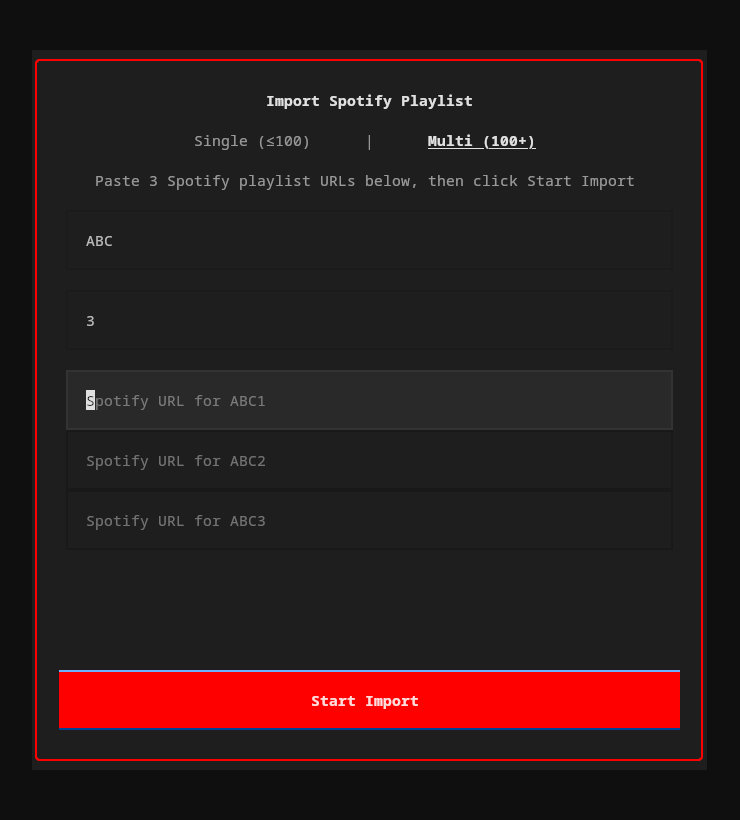
Import your Spotify playlists into YouTube Music — from the TUI or CLI.
How it works
- Extract — Reads track names and artists from the Spotify playlist
- Match — Searches YouTube Music for each track using fuzzy matching (title 60% + artist 40% weighted score)
- Resolve — Tracks scoring 85%+ are auto-matched. Lower scores prompt you to pick from candidates or skip
- Create — Creates a new private playlist on your YouTube Music account with all matched tracks
Two modes
| Mode | Use case | How |
|---|---|---|
| Single (≤100 tracks) | Most playlists | Paste one Spotify URL |
| Multi (100+ tracks) | Large playlists split across parts | Enter a name + number of parts, paste a URL for each |
From the TUI
Click Import in the footer bar (or press the import button). A popup lets you paste URLs, choose single/multi mode, and watch progress in real-time.
From the CLI
ytm import "https://open.spotify.com/playlist/37i9dQZF1DXcBWIGoYBM5M"
Interactive flow: fetches tracks, shows match results, lets you resolve ambiguous/missing tracks, name the playlist, then creates it.
Extraction methods
The importer tries two approaches in order:
- Spotify Web API (full pagination, handles any playlist size) — requires a free Spotify Developer app. On first use, you'll be prompted for your
client_idandclient_secret, which are stored in~/.config/ytm-player/spotify.json - Scraper fallback (no credentials needed, limited to ~100 tracks) — used automatically if API credentials aren't configured
For playlists over 100 tracks, set up the API credentials.
Architecture
src/ytm_player/
├── app.py              # Main Textual application
├── cli.py              # Click CLI entry point
├── ipc.py              # Unix socket IPC for CLI↔TUI communication
├── config/             # Settings, keymap, theme (TOML)
├── services/           # Backend services
│   ├── auth.py         #   Browser cookie auth
│   ├── ytmusic.py      #   YouTube Music API wrapper
│   ├── player.py       #   mpv audio playback
│   ├── stream.py       #   yt-dlp stream URL resolution
│   ├── queue.py        #   Playback queue with shuffle/repeat
│   ├── history.py      #   SQLite play/search history
│   ├── cache.py        #   LRU audio file cache
│   ├── mpris.py        #   D-Bus MPRIS media controls
│   ├── download.py     #   Offline audio downloads
│   ├── discord_rpc.py  #   Discord Rich Presence
│   ├── lastfm.py       #   Last.fm scrobbling
│   └── spotify_import.py  # Spotify playlist import
├── ui/
│   ├── header_bar.py   # Top bar with sidebar toggle buttons
│   ├── playback_bar.py # Persistent bottom bar (track info, progress, controls)
│   ├── theme.py        # Theme system with CSS variable generation
│   ├── sidebars/       # Persistent playlist sidebar (left) and lyrics sidebar (right)
│   ├── pages/          # Library, Search, Browse, Context, Queue, Liked Songs, Recently Played, Help
│   ├── popups/         # Actions menu, playlist picker, Spotify import
│   └── widgets/        # TrackTable, PlaybackProgress, AlbumArt
└── utils/              # Terminal detection, formatting helpers
Stack: Textual (TUI) · ytmusicapi (API) · yt-dlp (streams/downloads) · python-mpv (playback) · aiosqlite (history/cache) · dbus-next (MPRIS) · pypresence (Discord) · pylast (Last.fm)
Troubleshooting
"mpv not found" or playback doesn't start
Ensure mpv is installed and in your $PATH:
mpv --version
If installed but not found, check that the libmpv shared library is available:
# Arch
pacman -Qs mpv

# Ubuntu/Debian — you may need the dev package
sudo apt install libmpv-dev
Authentication fails
- Make sure you're signed in to YouTube Music Premium in your browser
- Try a different browser:
ytm setupauto-detects Chrome, Firefox, Brave, and Edge - If auto-detection fails, use the manual paste method
- Re-run
ytm setupto re-authenticate
No sound / wrong audio device
mpv uses your system's default audio output. To change it, create ~/.config/mpv/mpv.conf:
audio-device=pulse/your-device-name
List available devices with mpv --audio-device=help.
MPRIS / media keys not working
Install the optional MPRIS dependency:
pip install -e ".[mpris]"
Requires D-Bus (standard on most Linux desktops). Verify with:
dbus-send --session --print-reply --dest=org.freedesktop.DBus /org/freedesktop/DBus org.freedesktop.DBus.ListNames
Cache taking too much space
# Check cache size
ytm cache status

# Clear all cached audio
ytm cache clear
Or reduce the limit in config.toml:
[cache]
max_size_mb = 512
License
MIT — see LICENSE.
Changelog
v1.3.0 (2026-03-05)
New
ytm setup --manual— skip browser detection, paste request headers directly (thanks @uhs-robert, #10)ytm setup --browser <name>— extract cookies from a specific browser (chrome, firefox, brave, etc.)- Theme variables
$surfaceand$textnow properly defined — fixes unstyled popups, sidebars, and scrollbars (thanks @ahloiscreamo, #6) - NixOS packaging —
flake.nixwithytm-playerandytm-player-fullpackages, dev shell, and overlay - Free-tier support — tracks without a video ID (Premium-only) are now filtered from playlists/albums/search with an "unavailable tracks hidden" notice, instead of silently failing on click
Bug Fixes
- Fixed MPRIS crash (
SignatureBodyMismatchError) when track metadata contains None values (thanks @markvincze, #9) - Fixed large playlists only loading 200-300 songs — now fetches all tracks via ytmusicapi pagination (thanks @bananarne, #5)
- Fixed search results missing
video_id— songs from search couldn't play (thanks @firedev, PR #4) - Fixed browse/charts page same missing normalization bug
- Fixed macOS
Playerinit crash — hardcodedlibc.so.6replaced with platform-aware detection (thanks @hanandewa5, PR #2) - Fixed auth validation crashing with raw tracebacks on network errors — now shows friendly message with recovery suggestion (thanks @CarterSnich #7, @Tohbuu #11)
- Rewrote auth validation to use
get_account_info()instead of monkey-patching — more reliable across platforms and ytmusicapi versions - Unplayable tracks (no video ID) now auto-skip to the next track instead of stopping playback dead
v1.2.11 (2026-03-03)
New
- yt-dlp configuration support:
cookies.txtauth,remote_components,js_runtimesvia[yt_dlp]config section (thanks @gitiy1, PR #1)
v1.2.10 (2026-03-03)
Bug Fixes
- Fixed RTL text (Arabic/Hebrew) in track table columns — added BiDi isolation (LRI/PDI) so RTL album/artist names don't bleed into adjacent columns
v1.2.9 (2026-03-02)
New
- Published to PyPI — install with
pip install ytm-playerorpipx install ytm-player
Bug Fixes
- Fixed track auto-advance stopping after song ends — three root causes: mpv end-file reason read from wrong event object, event loop reference permanently lost under thread race condition, and
CancelledErrornot caught in track-end handler - Fixed RTL text (Arabic/Hebrew) display — removed manual word-reordering that double-reversed text on terminals with native BiDi support; added Unicode directional isolation to prevent RTL titles from displacing playback bar controls
- Fixed shuffle state corrupting queue after clear, and
jump_to()desyncing the current index when shuffle is on - Fixed column resize triggering sort, and Title column not staying at user-set width
v1.2.4 (2026-02-17)
Bug Fixes
- Fixed intermittent playback stopping mid-queue — consecutive stream failures (stale yt-dlp session, network hiccup) now reset the stream resolver automatically, preventing the queue index from advancing past all remaining tracks
- Fixed playlists appearing empty after prolonged use — YTMusic API client now auto-reinitializes after 3 consecutive failures (handles expired sessions/cookies)
- Fixed misleading "Queue is empty" message when queue has tracks but playback index reached the end — now says "End of queue"
v1.2.3 (2026-02-17)
Bug Fixes
- Fixed MPRIS silently disabled on Python 3.14 —
from __future__ import annotationscaused dbus-next to reject-> Nonereturn types, disabling media keys and desktop player widgets - Fixed RTL lyrics line-wrap reading bottom-to-top — long lines are now pre-wrapped in logical order before reordering, so sentence start is on top
v1.2.2 (2026-02-15)
Bug Fixes
- Fixed play/pause doing nothing after session restore — player had no stream loaded so toggling pause was a no-op; now starts playback from the restored queue position
- Fixed MPRIS play/pause also being a no-op after session restore (same root cause)
- Fixed RTL (Hebrew, Arabic, etc.) lyrics displaying in wrong order — segment-level reordering now renders bidirectional text correctly
- Fixed lyrics sidebar crash from dict-style access on LyricLine objects — switched to attribute access
- Fixed lyrics sidebar unnecessarily reloading when reopened for the same track
Features
- Right-click on playback bar (album art or track info) now opens the track actions popup, matching right-click behavior on track tables
v1.2.1 (2026-02-14)
Features
- Synced (timestamped) lyrics — lyrics highlight and auto-scroll with the song in real time
- Click-to-seek on lyrics — click any synced lyric line to jump to that part of the song
- LRCLIB.net fallback — when YouTube Music doesn't provide synced lyrics, fetches them from LRCLIB.net (no API key needed)
- Lyrics auto-center — current lyric line stays centered in the viewport as the song plays
Bug Fixes
- Fixed crash on song change with both sidebars open — Textual's
LoadingIndicatortimer raced with widget pruning during track transitions - Fixed crash from unhandled exceptions in player event callbacks — sync callbacks dispatched via
call_soon_threadsafenow wrapped in error handlers - Wrapped
notify()and_prefetch_next_track()in_on_track_changewith try/except to prevent crashes during app transitions - Lyrics sidebar always starts closed on launch regardless of previous session state
- Fixed synced lyrics not being requested —
timestamps=Truenow passed to ytmusicapi with automatic fallback to plain text
v1.2.0 (2026-02-14)
Features
- Persistent playlist sidebar (left) — visible across all views, toggleable per-view with state memory (
Ctrl+e) - Persistent lyrics sidebar (right) — synced lyrics with auto-scroll, replaces the old full-page Lyrics view (
lto toggle) - Header bar with toggle buttons for both sidebars
- Pinned navigation items (Liked Songs, Recently Played) in the playlist sidebar
- Per-view sidebar state — sidebar visibility is remembered per page and restored on navigation
- Lyrics sidebar registers player events lazily and skips updates when hidden for performance
Removed
- Lyrics page — replaced entirely by the lyrics sidebar
- Lyrics button from footer bar — use header bar toggle or
lkey instead
v1.1.3 (2026-02-14)
Features
- Click column headers to sort — click any column header (Title, Artist, Album, Duration, #) to sort; click again to reverse
- Drag-to-resize columns — drag column header borders to adjust widths; Title column auto-fills remaining space
- Playlist sort order — requests "recently added" order from YouTube Music API when loading playlists
#column preserves original playlist position and can be clicked to reset sort order
Bug Fixes
- Fixed click-to-sort not working (ColumnKey.value vs str(ColumnKey) mismatch)
- Fixed horizontal scroll position resetting when sorting
- Fixed session restore with shuffle — queue is now populated before enabling shuffle so the saved index points at the correct track
- Fixed
jump_to_real()fallback when track not in shuffle order (was a silent no-op, now inserts into shuffle order) - Fixed crash on Python 3.14 from dbus-next annotation parsing (MPRIS gracefully disables)
- Pinned Textual dependency to
>=7.0,<8.0to protect against internal API breakage
v1.1.2 (2026-02-14)
Features
- Shuffle-aware playlist playback — double-clicking a playlist with shuffle on now starts from a random track instead of always the first
- Table sorting — sort any track list by Title (
s t), Artist (s a), Album (s A), Duration (s d), or reverse (s r) - Session resume — on startup, restores last queue position and shows the track in the footer (without auto-playing)
- Quit action (
q/Ctrl+Q) — clean exit that clears resume state; unclean exits (terminal close/kill) preserve it
Bug Fixes
- Fixed queue position desync when selecting tracks with shuffle enabled (all pages: Library, Context, Liked Songs, Recently Played)
- Fixed search mode toggle showing empty box due to Rich markup interpretation (
[Music]→Music)
v1.1.1 (2026-02-13)
Bug Fixes
- Fixed right-click on track table triggering playback instead of only opening context menu
- Fixed auto-advance bug: songs after the 2nd track would not play due to stale
_end_file_skipcounter - Fixed thread-safe skip counter — check+increment now atomic under lock
- Fixed duplicate end-file events causing track skipping (debounce guard)
- Fixed
player.play()failure leaving stale_current_trackstate - Fixed unhandled exceptions in stream resolution crashing the playback chain
- Fixed
player.play()exceptions silently stopping all playback - Fixed Browse page crash from unawaited async mount operations
- Fixed API error tracebacks polluting TUI with red stderr overlay
- Reset skip counter on mpv crash recovery
- Fixed terminal image protocol detection (
TERM_FEATURESreturning wrong protocol) - Fixed encapsulation break (cache private method called from app)
- Always-visible Lyrics button in footer bar (dimmed when no track playing, active during playback)
- Clicking the active footer page navigates back to the previous page
- Library remembers selected playlist when navigating away and back
- Click outside popups to dismiss — actions menu and Spotify import close when clicking the background
v1.1.0 (2026-02-12)
Features
- Liked Songs page (
g y) — browse and play your liked music - Recently Played page (
g r) — local history from SQLite - Download for offline — right-click any track → "Download for Offline"
- Discord Rich Presence — show what you're listening to (optional,
pip install -e ".[discord]") - Last.fm scrobbling — automatic scrobbling + Now Playing (optional,
pip install -e ".[lastfm]") - Gapless playback enabled by default
- Queue persistence across restarts (saved in session.json)
- Track change notifications wired to
[notifications]config section - New config sections:
[discord],[lastfm],[playback].gapless,[playback].api_timeout - Configurable column widths via
[ui]settings (col_index,col_title,col_artist,col_album,col_duration) - Liked Songs and Recently Played pinned in library sidebar
Security & Stability
- IPC socket security hardening (permissions, command whitelist, input validation)
- File permissions hardened to 0o600 across all config/state files
- Thread safety for queue manager (prevents race conditions)
- mpv crash detection and automatic recovery
- Auth validation distinguishes network errors from invalid credentials
- Disk-full (OSError) handling in cache and history managers
- API timeout handling (15s default, prevents TUI hangs on slow networks)
Performance
- Batch DELETE for cache eviction (replaces per-row deletes)
- Deferred cache-hit commits (every 10 hits instead of every hit)
- Reuse yt-dlp instance across stream resolves (was creating new per call)
- Concurrent Spotify import matching with ThreadPoolExecutor
- Stream URL expiry checks before playback
Testing & CI
- GitHub Actions CI pipeline (ruff lint + pytest with coverage)
- 231 tests covering queue, IPC, stream resolver, cache, history, auth, downloads, Discord RPC, Last.fm, and settings
v1.0.0 (2026-02-07)
- Initial release
- Full TUI with 7 pages (Library, Search, Browse, Context, Lyrics, Queue, Help)
- Vim-style keybindings with multi-key sequences and count prefixes
- Audio playback via mpv with shuffle, repeat, queue management
- Predictive search with music-first mode
- Spotify playlist import (API + scraper)
- Play and search history in SQLite
- Audio cache with LRU eviction (1GB default)
- Album art with colored half-block rendering
- MPRIS D-Bus integration for media key support
- Unix socket IPC for CLI↔TUI control
- CLI subcommands for headless usage
- TOML configuration for settings, keybindings, and theme
Release history Release notifications | RSS feed


Download files
Download the file for your platform. If you're not sure which to choose, learn more about installing packages.
Source Distribution
Built Distribution
Filter files by name, interpreter, ABI, and platform.
If you're not sure about the file name format, learn more about wheel file names.
Copy a direct link to the current filters
File details
Details for the file ytm_player-1.3.0.tar.gz.
File metadata
- Download URL: ytm_player-1.3.0.tar.gz
- Upload date:
- Size: 548.9 kB
- Tags: Source
- Uploaded using Trusted Publishing? No
- Uploaded via: twine/6.2.0 CPython/3.12.12
File hashes
| Algorithm | Hash digest | |
|---|---|---|
| SHA256 |
98d528134edeef595a1c5509d4c390d59b16b93591b8ec0ed71c05f905943267
|
|
| MD5 |
d0884cef67037f086a8de2d3ea3e3823
|
|
| BLAKE2b-256 |
e5efd01f0c5c865d4fe1ea0382175b3a5f805ec6c852f468b54e4a33827a950f
|
File details
Details for the file ytm_player-1.3.0-py3-none-any.whl.
File metadata
- Download URL: ytm_player-1.3.0-py3-none-any.whl
- Upload date:
- Size: 156.8 kB
- Tags: Python 3
- Uploaded using Trusted Publishing? No
- Uploaded via: twine/6.2.0 CPython/3.12.12
File hashes
| Algorithm | Hash digest | |
|---|---|---|
| SHA256 |
64ca58196f9d9bc96633e0d5dffddaa3d1230158a61b46ca89a8d3a2d5329ee1
|
|
| MD5 |
d87f3e0d1a84546f12134d55b4c10627
|
|
| BLAKE2b-256 |
c9ed9ff9d6830fa3493273668d783755443e77578b049360e3253392b4df2e59
|






