
A full-featured YouTube Music TUI client for the terminal

Project description
ytm-player
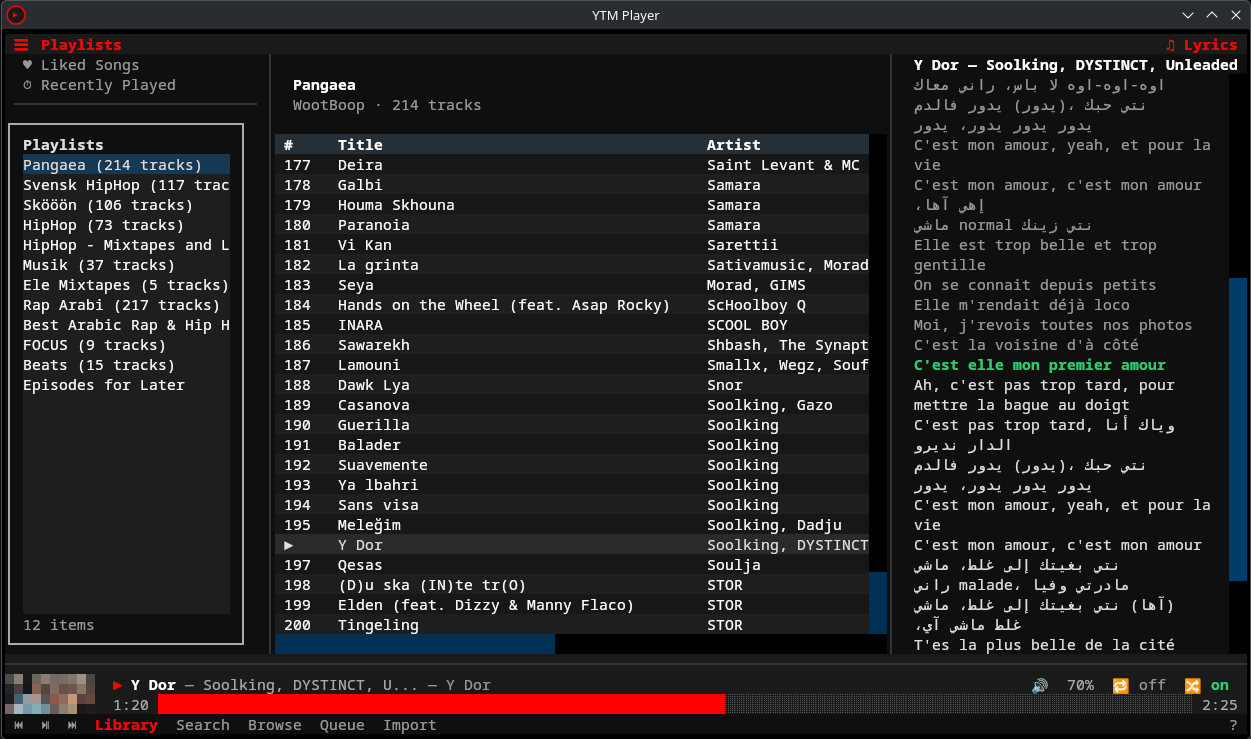
A full-featured YouTube Music player for the terminal. Browse your library, search, queue tracks, and control playback — all from a TUI with vim-style keybindings. Runs on Linux, macOS, and Windows.
Features
- Full playback control — play, pause, seek, volume, shuffle, repeat via mpv with gapless audio and stream prefetching
- Cross-platform — Linux, macOS, and Windows with platform-native integrations on each
- Persistent sidebars — playlist sidebar (left) visible across all views, synced lyrics sidebar (right) with auto-scroll and click-to-seek, both toggleable from header bar
- Synced lyrics — real-time highlighted lyrics with LRCLIB.net fallback, ASCII transliteration toggle (
T) for non-Latin scripts - 8 pages — Library, Search, Browse, Context (album/artist/playlist), Queue, Liked Songs, Recently Played, Help — all with state preservation across navigation
- Vim-style navigation —
j/kmovement, multi-key sequences (g lfor library,g sfor search), count prefixes (5j) - Table sorting — click column headers or use keyboard (
s t/s a/s A/s d/s r), drag-to-resize columns - Predictive search — debounced with 300ms delay, music-first mode with clickable toggle to all results
- Theming — 18 built-in Textual themes (nord, dracula, gruvbox, catppuccin, etc.) via
Ctrl+P, plus custom app-specific color overrides intheme.toml. Theme selection persists across sessions - Session resume — restores queue position, volume, shuffle/repeat state, theme on startup
- Free-tier support — works with free YouTube Music accounts (Premium-only tracks are filtered with notice)
- Multi-account & Brand Account support —
ytm setupauto-detects multiple Google accounts; Brand Accounts configurable viabrand_account_idin config - Spotify import — import playlists from Spotify via API or URL scraping
- History tracking — play history + search history stored in SQLite with listening stats
- Audio caching — LRU cache (1GB default) for offline-like replay of previously heard tracks
- Progressive loading — large playlists (1500+ tracks) load instantly with background fetching
- Offline downloads — right-click any track → "Download for Offline" to save locally
- Discord Rich Presence — show what you're listening to in your Discord status
- Last.fm scrobbling — automatic scrobbling with Now Playing updates
- Album art — colored half-block rendering in the playback bar, toggleable with
Ctrl+A - Media keys — MPRIS/D-Bus on Linux, native Now Playing + Quartz event taps on macOS, pynput on Windows
- CLI mode — headless subcommands for scripting (
ytm search,ytm stats,ytm history,ytm like) - IPC control — control the running TUI from another terminal (
ytm play,ytm pause,ytm next,ytm like) - yt-dlp integration — cookie file auth, configurable
remote_componentsandjs_runtimes - Fully configurable — TOML config files for settings, keybindings, and theme
Requirements
- Python 3.12+
- mpv — audio playback backend, must be installed system-wide
- A YouTube Music account (free or Premium)
Installation
1. Install mpv
mpv is required for audio playback. Install it with your system package manager:
# Arch / CachyOS / Manjaro
sudo pacman -S mpv

# Ubuntu / Debian
sudo apt install mpv

# Fedora
sudo dnf install mpv

# NixOS — handled by the flake (see NixOS section below)

# macOS (Homebrew)
brew install mpv

# Windows — see "Windows Setup" section below for full instructions
scoop install mpv
2. Install ytm-player
Arch Linux / CachyOS / EndeavourOS / Manjaro (AUR)
yay -S ytm-player-git
Or with any other AUR helper. Package: ytm-player-git
Gentoo (GURU)
Enable the repository as read in Project:GURU/Information for End Users then emerge the package:
emerge --ask media-sound/ytm-player
PyPI (Linux / macOS)
pip install ytm-player
Windows
pip install ytm-player
Then run with:
py -m ytm_player
pip installon Windows does not add theytmcommand to PATH. Usepy -m ytm_playerto launch — this always works. Alternatively, install with pipx which handles PATH automatically:pipx install ytm-player
Important: Windows requires extra mpv setup — see Windows Setup below.
From source
git clone https://github.com/peternaame-boop/ytm-player.git
cd ytm-player
python -m venv .venv
source .venv/bin/activate
pip install -e .
NixOS (Flake)
ytm-player provides a flake.nix with two packages, a dev shell, and an overlay.
Try it without installing:
nix run github:peternaame-boop/ytm-player
Add to your system flake (flake.nix):
{
  inputs.ytm-player.url = "github:peternaame-boop/ytm-player";

  outputs = { nixpkgs, ytm-player, ... }: {
    nixosConfigurations.myhost = nixpkgs.lib.nixosSystem {
      modules = [
        {
          nixpkgs.overlays = [ ytm-player.overlays.default ];
          environment.systemPackages = with pkgs; [
            ytm-player          # core (MPRIS + album art included)
            # ytm-player-full   # all features (Discord, Last.fm, Spotify import)
          ];
        }
      ];
    };
  };
}
Or install imperatively with nix profile:
# Core
nix profile install github:peternaame-boop/ytm-player

# All features (Discord, Last.fm, Spotify import, etc.)
nix profile install github:peternaame-boop/ytm-player#ytm-player-full
Dev shell (for contributors):
git clone https://github.com/peternaame-boop/ytm-player.git
cd ytm-player
nix develop  # drops you into a shell with all deps + dev tools
Note: If you install via
pipinstead of the flake, NixOS doesn't exposelibmpv.soin standard library paths. Add to your shell config:# Fish set -gx LD_LIBRARY_PATH /run/current-system/sw/lib $LD_LIBRARY_PATH# Bash/Zsh export LD_LIBRARY_PATH="/run/current-system/sw/lib:$LD_LIBRARY_PATH"The flake handles this automatically — no manual
LD_LIBRARY_PATHneeded.
Optional extras (pip)
# Spotify playlist import
pip install "ytm-player[spotify]"

# MPRIS media key support (Linux only, requires D-Bus)
pip install "ytm-player[mpris]"

# Discord Rich Presence
pip install "ytm-player[discord]"

# Last.fm scrobbling
pip install "ytm-player[lastfm]"

# Lyrics transliteration (non-Latin scripts → ASCII)
pip install "ytm-player[transliteration]"

# All optional features
pip install "ytm-player[spotify,mpris,discord,lastfm,transliteration]"

# Development tools (pytest, ruff)
pip install -e ".[dev]"
Optional extras (AUR)
If you installed via AUR, install optional dependencies with pacman/yay — not pip (pip won't work on Arch due to PEP 668):
# MPRIS media key support (Linux)
sudo pacman -S python-dbus-next

# Last.fm scrobbling
yay -S python-pylast

# Discord Rich Presence
yay -S python-pypresence

# Spotify playlist import
yay -S python-spotipy python-thefuzz
Windows Setup
On Linux and macOS, mpv packages include the shared library that ytm-player needs. On Windows, scoop install mpv (and most other methods) only install the player executable — the libmpv-2.dll library must be downloaded separately.
Steps:
- Install mpv:
scoop install mpv(or download from mpv.io) - Install 7zip if you don't have it:
scoop install 7zip - Download the latest
mpv-dev-x86_64-*.7zfrom shinchiro's mpv builds (the file starting withmpv-dev, not justmpv) - Extract
libmpv-2.dllinto your mpv directory:
# Adjust the filename to match what you downloaded
7z e "$env:TEMP\mpv-dev-x86_64-*.7z" -o"$env:USERPROFILE\scoop\apps\mpv\current" libmpv-2.dll -y
If you installed mpv a different way, place libmpv-2.dll next to mpv.exe or anywhere on your %PATH%.
ytm-player automatically searches common install locations (scoop, chocolatey, Program Files) for the DLL.
3. Authenticate
ytm setup                    # Auto-detect browser cookies
ytm setup --browser firefox  # Target a specific browser
ytm setup --manual           # Skip detection, paste headers directly
Windows: replace ytm with py -m ytm_player.
The setup wizard has three modes:
Automatic (default): If [yt_dlp].cookies_file is set, setup first tries that Netscape cookies file (same format as yt-dlp --cookies FILE). If not configured or invalid, it scans installed browsers (Helium, Chrome, Chromium, Brave, Firefox, Edge, Vivaldi, Opera) for YouTube Music cookies.
Browser-specific (--browser <name>): Extract cookies from a specific browser — useful when auto-detect picks the wrong one. Supports: chrome, firefox, brave, edge, chromium, vivaldi, opera.
Manual (--manual): Skip all browser detection and paste raw request headers directly:
- Open music.youtube.com in your browser
- Open DevTools (F12) → Network tab
- Refresh the page, filter requests by
/browse - Click a
music.youtube.comrequest - Right-click "Request Headers" → Copy
- Paste into the wizard and press Enter on an empty line
The wizard accepts multiple paste formats (Chrome alternating lines, Firefox Name: Value, terminal escape-separated).
Credentials are stored in ~/.config/ytm-player/auth.json with 0o600 permissions.
⚠️
remote_componentsallows fetching external JS components (npm/GitHub). Enable it only if you trust the source and network path.
Usage
TUI (interactive)
ytm                # Linux / macOS
py -m ytm_player   # Windows
CLI (headless)
These work without the TUI running:
# Search YouTube Music
ytm search "daft punk"
ytm search "bohemian rhapsody" --filter songs --json

# Listening stats
ytm stats
ytm stats --json

# Play history
ytm history
ytm history search

# Cache management
ytm cache status
ytm cache clear

# Spotify import
ytm import "https://open.spotify.com/playlist/..."
Playback control (requires TUI running)
Control the running TUI from another terminal via IPC:
ytm play          # Resume playback
ytm pause         # Pause playback
ytm next          # Skip to next track
ytm prev          # Previous track
ytm seek +10      # Seek forward 10 seconds
ytm seek -5       # Seek backward 5 seconds
ytm seek 1:30     # Seek to 1:30

ytm like           # Like current track
ytm dislike        # Dislike current track
ytm unlike         # Remove like/dislike

ytm now            # Current track info (JSON)
ytm status         # Player status (JSON)
ytm queue          # Queue contents (JSON)
ytm queue add ID   # Add track by video ID
ytm queue clear    # Clear queue
Keybindings
Keyboard
| Key | Action |
|---|---|
space |
Play/Pause |
n |
Next track |
p |
Previous track |
+ / - |
Volume up/down |
j / k |
Move down/up |
enter |
Select/play |
g l |
Go to Library |
g s |
Go to Search |
g b |
Go to Browse |
z |
Go to Queue |
g L |
Toggle lyrics sidebar |
Ctrl+e |
Toggle playlist sidebar |
g y |
Go to Liked Songs |
g r |
Go to Recently Played |
? |
Help (full keybinding reference) |
tab |
Focus next panel |
a |
Track actions menu |
/ |
Filter current list |
Ctrl+r |
Cycle repeat mode |
Ctrl+s |
Toggle shuffle |
backspace |
Go back |
s t / s a / s A / s d |
Sort by Title / Artist / Album / Duration |
s r |
Reverse current sort |
T |
Toggle lyrics transliteration (ASCII) |
Ctrl+a |
Toggle album art |
Ctrl+p |
Change theme |
q |
Quit |
Mouse
| Action | Where | Effect |
|---|---|---|
| Click | Progress bar | Seek to position |
| Scroll up/down | Progress bar | Scrub forward/backward (commits after 0.6s pause) |
| Scroll up/down | Volume display | Adjust volume by 5% |
| Click | Repeat button | Cycle repeat mode (off → all → one) |
| Click | Shuffle button | Toggle shuffle on/off |
| Click | Footer buttons | Navigate pages, play/pause, prev/next |
| Right-click | Track row | Open context menu (play, queue, add to playlist, etc.) |
Custom keybindings: edit ~/.config/ytm-player/keymap.toml
Configuration
Config files live in ~/.config/ytm-player/ (respects $XDG_CONFIG_HOME):
| File | Purpose |
|---|---|
config.toml |
General settings, playback, cache, UI |
keymap.toml |
Custom keybinding overrides |
theme.toml |
Color scheme customization |
auth.json |
YouTube Music credentials (auto-generated) |
Open config directory in your editor:
ytm config
Example config.toml
[general]
startup_page = "library"     # library, search, browse
brand_account_id = ""        # YouTube Brand Account ID (21-digit number, find at myaccount.google.com/brandaccounts)

[playback]
audio_quality = "high"       # high, medium, low
default_volume = 80          # 0-100
autoplay = true
seek_step = 5                # seconds per seek

[cache]
enabled = true
max_size_mb = 1024           # 1GB default
prefetch_next = true

[yt_dlp]
cookies_file = ""            # Optional: path to yt-dlp Netscape cookies.txt
remote_components = ""       # Optional: ejs:npm/ejs:github (enables remote component downloads)
js_runtimes = ""             # Optional: bun or bun:/path/to/bun (also node/quickjs forms)

[ui]
album_art = true
progress_style = "block"     # block or line
sidebar_width = 30
col_index = 4                # 0 = auto-fill
col_title = 0                # 0 = auto-fill
col_artist = 30
col_album = 25
col_duration = 8
bidi_mode = "auto"           # auto, reorder, passthrough (RTL text handling)

[notifications]
enabled = true
timeout_seconds = 5

[mpris]
enabled = true

[discord]
enabled = false              # Requires pypresence

[lastfm]
enabled = false              # Requires pylast
api_key = ""
api_secret = ""
session_key = ""
username = ""
Example theme.toml
Base colors (primary, background, etc.) come from the active Textual theme — switch themes with Ctrl+P. The theme.toml file overrides app-specific colors only:
[colors]
playback_bar_bg = "#1a1a1a"
selected_item = "#2a2a2a"
progress_filled = "#ff0000"
progress_empty = "#555555"
lyrics_played = "#999999"
lyrics_current = "#2ecc71"
lyrics_upcoming = "#aaaaaa"
active_tab = "#ffffff"
inactive_tab = "#999999"
Spotify Import
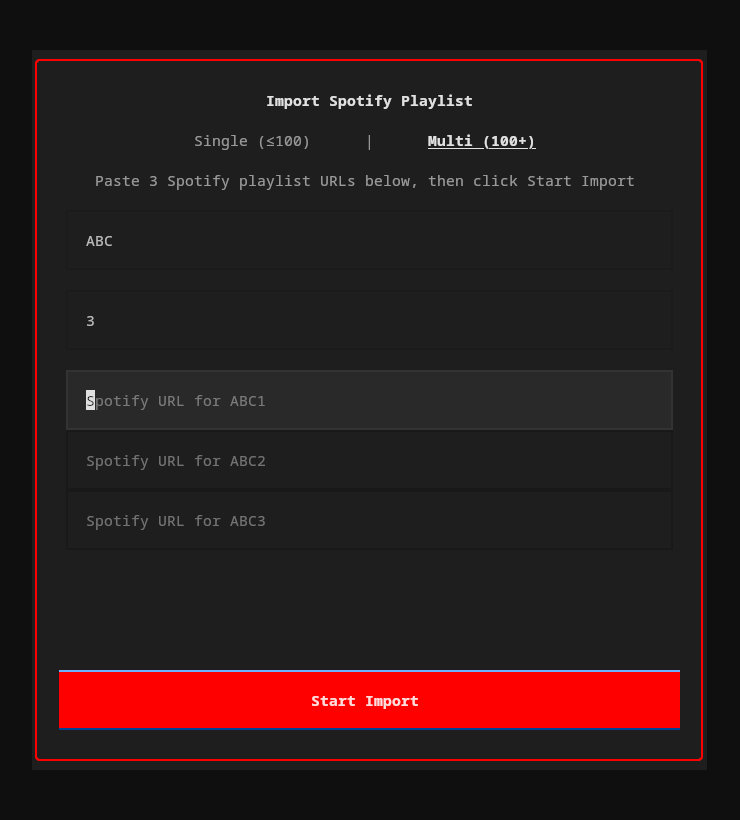
Import your Spotify playlists into YouTube Music — from the TUI or CLI.
How it works
- Extract — Reads track names and artists from the Spotify playlist
- Match — Searches YouTube Music for each track using fuzzy matching (title 60% + artist 40% weighted score)
- Resolve — Tracks scoring 85%+ are auto-matched. Lower scores prompt you to pick from candidates or skip
- Create — Creates a new private playlist on your YouTube Music account with all matched tracks
Two modes
| Mode | Use case | How |
|---|---|---|
| Single (≤100 tracks) | Most playlists | Paste one Spotify URL |
| Multi (100+ tracks) | Large playlists split across parts | Enter a name + number of parts, paste a URL for each |
From the TUI
Click Import in the footer bar (or press the import button). A popup lets you paste URLs, choose single/multi mode, and watch progress in real-time.
From the CLI
ytm import "https://open.spotify.com/playlist/37i9dQZF1DXcBWIGoYBM5M"
Interactive flow: fetches tracks, shows match results, lets you resolve ambiguous/missing tracks, name the playlist, then creates it.
Extraction methods
The importer tries two approaches in order:
- Spotify Web API (full pagination, handles any playlist size) — requires a free Spotify Developer app. On first use, you'll be prompted for your
client_idandclient_secret, which are stored in~/.config/ytm-player/spotify.json - Scraper fallback (no credentials needed, limited to ~100 tracks) — used automatically if API credentials aren't configured
For playlists over 100 tracks, set up the API credentials.
Architecture
src/ytm_player/
├── app/                # Main Textual application (mixin package)
│   ├── _app.py         #   Class def, __init__, compose, lifecycle
│   ├── _playback.py    #   play_track, player events, history, download
│   ├── _keys.py        #   Key handling and action dispatch
│   ├── _sidebar.py     #   Sidebar toggling and playlist sidebar events
│   ├── _navigation.py  #   Page navigation and nav stack
│   ├── _ipc.py         #   IPC command handling for CLI
│   ├── _track_actions.py  # Track selection, actions popup, radio
│   ├── _session.py     #   Session save/restore
│   └── _mpris.py       #   MPRIS/media key callbacks
├── cli.py              # Click CLI entry point
├── ipc.py              # Unix socket IPC for CLI↔TUI communication
├── config/             # Settings, keymap, theme (TOML)
├── services/           # Backend services
│   ├── auth.py         #   Browser cookie auth
│   ├── ytmusic.py      #   YouTube Music API wrapper
│   ├── player.py       #   mpv audio playback
│   ├── stream.py       #   yt-dlp stream URL resolution
│   ├── queue.py        #   Playback queue with shuffle/repeat
│   ├── history.py      #   SQLite play/search history
│   ├── cache.py        #   LRU audio file cache
│   ├── lrclib.py       #   LRCLIB.net synced lyrics fallback
│   ├── mpris.py        #   D-Bus MPRIS media controls (Linux)
│   ├── macos_media.py  #   macOS Now Playing integration
│   ├── macos_eventtap.py  # macOS hardware media key interception
│   ├── mediakeys.py    #   Cross-platform media key service
│   ├── download.py     #   Offline audio downloads
│   ├── discord_rpc.py  #   Discord Rich Presence
│   ├── lastfm.py       #   Last.fm scrobbling
│   ├── yt_dlp_options.py  # yt-dlp config/cookie handling
│   └── spotify_import.py  # Spotify playlist import
├── ui/
│   ├── header_bar.py   # Top bar with sidebar toggle buttons
│   ├── playback_bar.py # Persistent bottom bar (track info, progress, controls)
│   ├── theme.py        # Textual theme integration + app-specific color overrides
│   ├── sidebars/       # Persistent playlist sidebar (left) and lyrics sidebar (right)
│   ├── pages/          # Library, Search, Browse, Context, Queue, Liked Songs, Recently Played, Help
│   ├── popups/         # Actions menu, playlist picker, Spotify import
│   └── widgets/        # TrackTable, PlaybackProgress, AlbumArt
└── utils/              # Terminal detection, formatting, BiDi text, transliteration
Stack: Textual (TUI) · ytmusicapi (API) · yt-dlp (streams/downloads) · python-mpv (playback) · aiosqlite (history/cache) · dbus-next (MPRIS) · pypresence (Discord) · pylast (Last.fm)
Troubleshooting
"mpv not found" or playback doesn't start
Ensure mpv is installed and in your $PATH:
mpv --version
If installed but not found, check that the libmpv shared library is available:
# Arch
pacman -Qs mpv

# Ubuntu/Debian — you may need the dev package
sudo apt install libmpv-dev
Authentication fails
- Make sure you're signed in to YouTube Music (free or Premium) in your browser
- Try a different browser:
ytm setupauto-detects Chrome, Firefox, Brave, and Edge - If auto-detection fails, use the manual paste method
- Re-run
ytm setupto re-authenticate
No sound / wrong audio device
mpv uses your system's default audio output. To change it, create ~/.config/mpv/mpv.conf:
audio-device=pulse/your-device-name
List available devices with mpv --audio-device=help.
macOS media keys open Apple Music instead of ytm-player
- ytm-player now registers with macOS Now Playing when running, so media keys should target it.
- Start playback in
ytmfirst; macOS routes media keys to the active Now Playing app. - Grant Accessibility and Input Monitoring permission to your terminal app (Terminal, Ghostty, iTerm) in System Settings -> Privacy & Security.
- If Apple Music still steals keys, fully quit Music.app and press play/pause once in ytm.
MPRIS / media keys not working
Install the optional MPRIS dependency:
pip install -e ".[mpris]"
Requires D-Bus (standard on most Linux desktops). Verify with:
dbus-send --session --print-reply --dest=org.freedesktop.DBus /org/freedesktop/DBus org.freedesktop.DBus.ListNames
Cache taking too much space
# Check cache size
ytm cache status

# Clear all cached audio
ytm cache clear
Or reduce the limit in config.toml:
[cache]
max_size_mb = 512
Changelog
See CHANGELOG.md for the full release history.
Release history Release notifications | RSS feed


Download files
Download the file for your platform. If you're not sure which to choose, learn more about installing packages.
Source Distribution
Built Distribution
Filter files by name, interpreter, ABI, and platform.
If you're not sure about the file name format, learn more about wheel file names.
Copy a direct link to the current filters
File details
Details for the file ytm_player-1.5.9.tar.gz.
File metadata
- Download URL: ytm_player-1.5.9.tar.gz
- Upload date:
- Size: 730.2 kB
- Tags: Source
- Uploaded using Trusted Publishing? No
- Uploaded via: twine/6.2.0 CPython/3.12.13
File hashes
| Algorithm | Hash digest | |
|---|---|---|
| SHA256 |
05e52fe37d57d25d59d86c9dab0b4afe3e4ecf3910be402ff2dc1a48c7b860d8
|
|
| MD5 |
af9add83639b0c1a1699841f7f1942d8
|
|
| BLAKE2b-256 |
e66c674202c5c8456a7a347414b25eddc0e2ea5e8217cc6330668b2c185e6337
|
File details
Details for the file ytm_player-1.5.9-py3-none-any.whl.
File metadata
- Download URL: ytm_player-1.5.9-py3-none-any.whl
- Upload date:
- Size: 186.1 kB
- Tags: Python 3
- Uploaded using Trusted Publishing? No
- Uploaded via: twine/6.2.0 CPython/3.12.13
File hashes
| Algorithm | Hash digest | |
|---|---|---|
| SHA256 |
95f2f0855c617ddbb26dc2c6b79fa882e7d1635d21397f939af33dee0b8cbcf4
|
|
| MD5 |
e8e7b6776cc9bedf1cc583983357103e
|
|
| BLAKE2b-256 |
9fafc6298d6f59634df47be18397917b5c63f7ed63d1a4cc052012a2c51ca002
|






