
This release is a pre-release and may not be stable for production use.

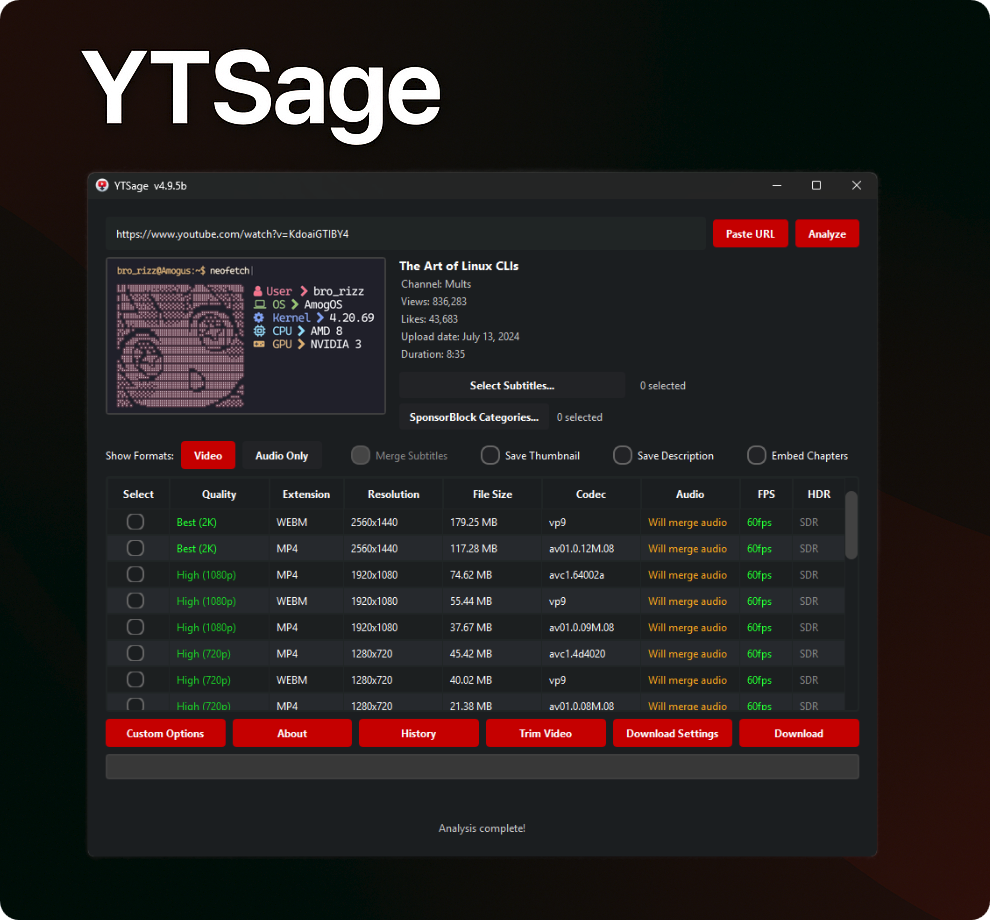









Modern YouTube downloader with a clean PySide6 interface.
Download videos in any quality, extract audio, fetch subtitles, and more.
🌍 README Languages
English: EN | Arabic: AR | German: DE | Spanish: ES | French: FR | Hindi: HI | Indonesian: ID | Italian: IT | Japanese: JA | Korean: KO | Polish: PL | Portuguese: PT | Russian: RU | Turkish: TR | Chinese: ZH | Persian: FA
Installation • Features • Usage • Screenshots • Troubleshooting • Telegram • Sponsor • Contributing
❓ Why YTSage?
YTSage is designed for users who want a simple yet powerful YouTube downloader. Unlike other tools, it offers:
- A modern and clean PySide6 interface
- One-click downloads for video, audio, and subtitles
- Advanced features like SponsorBlock, subtitle merging, and playlist selection
- Optional Generic Mode for sites supported by yt-dlp beyond YouTube
- Cross-platform support and easy installation
✨ Features
| Core Features | Advanced Features | Extra Features |
|---|---|---|
| 🎥 Format Table | 🚫 SponsorBlock Integration | 🎞️ FPS/HDR Display |
| 🎵 Audio Extraction | 📝 Subtitle Selection & Merging | 🔄 Auto Update yt-dlp |
| ✨ Simple UI | 💾 Save Description & Thumbnail | 🛠️ FFmpeg/yt-dlp/Deno Detection |
| 📋 Playlist Support & Selector | 🚀 Speed Limiter | ⚙️ Custom Commands |
| 📑 Chapter Integration | ✂️ Video Section Trimming | 🍪 Login with Cookies |
| 📜 Download History | 🔄 Version Channel Selection | 🌐 Proxy Support |
| 🎚️ Audio Format Conversion | 🎬 Video Format Settings | 🆙 Built-in Updater Tab |
| 🌍 Generic Mode | 🔊 Audio Normalization (EBU R128) | 🌍 Localized in 16 Languages |
| 💾 Playlist Export | ⚙️ Default Quality & Subtitles |
🚀 Installation
📦 Download the App (Easiest Method)
If you just want to use YTSage and don't know what Python is, start here

Simply download the pre-built installer for your operating system:
🪟 Windows
| Format | Description |
|---|---|
 |
Standard Installer (Recommended) - Just double-click to install. |
 |
With FFmpeg Included (Use this if you don't already have FFmpeg). |
 |
Portable version, no installation needed. |
 |
Portable with FFmpeg, zipped. |
🛠️ Installation Steps
- EXE Installer (
.exe): Double-click the file and follow the setup wizard. - Portable Version (
.zip): Extract the archive to your desired location and launchytsage.exe. - FFmpeg Included: Choose versions with FFmpeg included if you don't have FFmpeg installed on your system.
🍎 macOS
⚠️ Note: These installers are natively built for Apple Silicon (M1/M2/M3/M4). If you are using an older Intel Mac, please use the Python installation method below.
| Format | Description |
|---|---|
 |
Disk Image Installer (Recommended) - Open and drag to Applications. |
 |
Zipped Application for Apple Silicon. |
🛠️ Installation Steps
- DMG Installer (
.dmg): Double-click to mount, then dragYTSage.appto your Applications folder. - Application Archive (
.zip): Extract the zip and moveYTSage.appto your Applications folder.
Note: If you encounter an "Application is damaged" error, see the troubleshooting section below.
🐧 Linux
| Format | Description |
|---|---|
 |
Portable AppImage (Recommended) |
 |
Debian Package |
 |
RPM Package |
 |
Flatpak Bundle |
🛠️ Installation Steps
- AppImage (
.AppImage):chmod +x YTSage-*.AppImage ./YTSage-*.AppImage
- DEB (
.deb):sudo dpkg -i ytsage_*.deb sudo apt-get install -f # Fix missing dependencies if needed
- RPM (
.rpm):sudo rpm -i ytsage-*.rpm
- Flatpak: Follow instructions on Flathub or run:
flatpak install flathub io.github.oop7.ytsage
🐍 Install via Python / PyPI
You can also install YTSage via Python (Requires Python 3.11+)
💡 Awesome Feature: If you install via pip on Windows, YTSage will automatically detect and help set up FFmpeg for you (macOS and Linux users can follow our easy FFmpeg Installation Guide)
pip install --pre ytsage
🔄 Update existing installation
pip install --upgrade --pre ytsage
Then launch the application:
ytsage
You can also open YTSage with a video or playlist URL prefilled and analyzed immediately:
ytsage "https://www.youtube.com/watch?v=dQw4w9WgXcQ"
💻 Manual Source Installation (Developer)
Run YTSage directly from the source code.
View manual installation steps
1. Clone the repository
git clone https://github.com/oop7/YTSage.git
cd YTSage
2. Install dependencies
⚡ Using uv
uv pip install .
📦 Or using standard pip
pip install .
3. Run the application
python -m ytsage.main
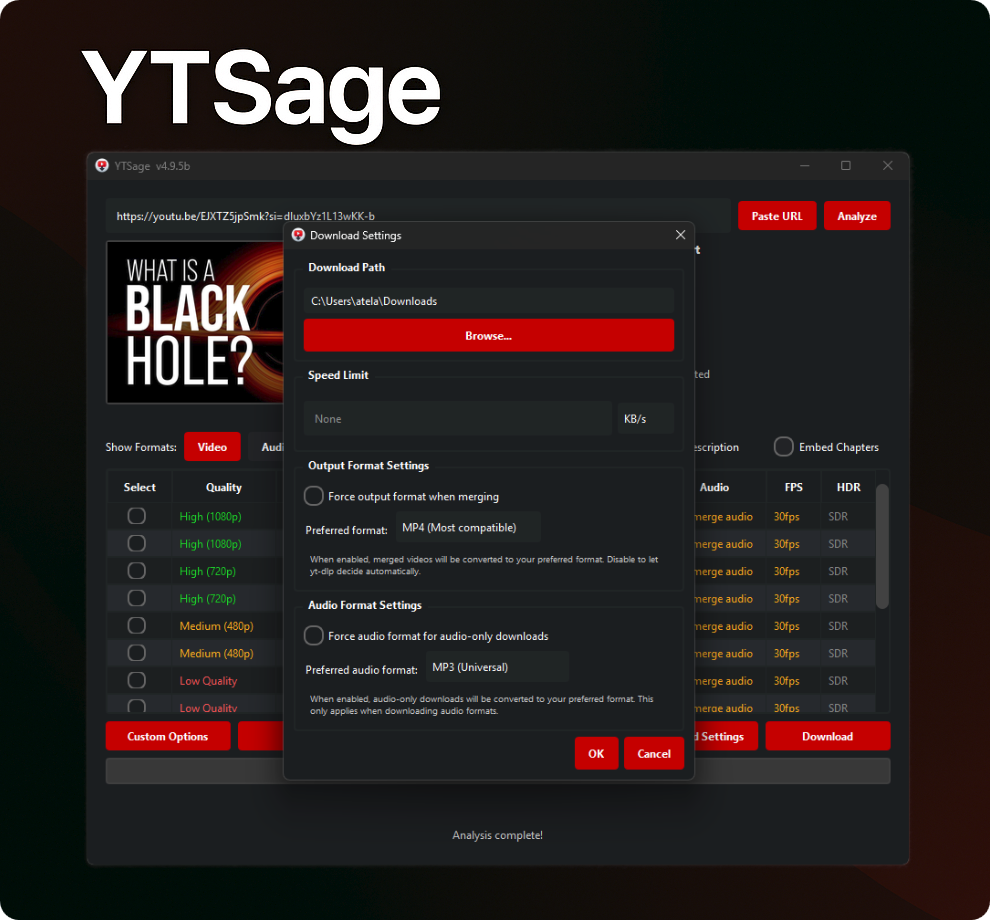
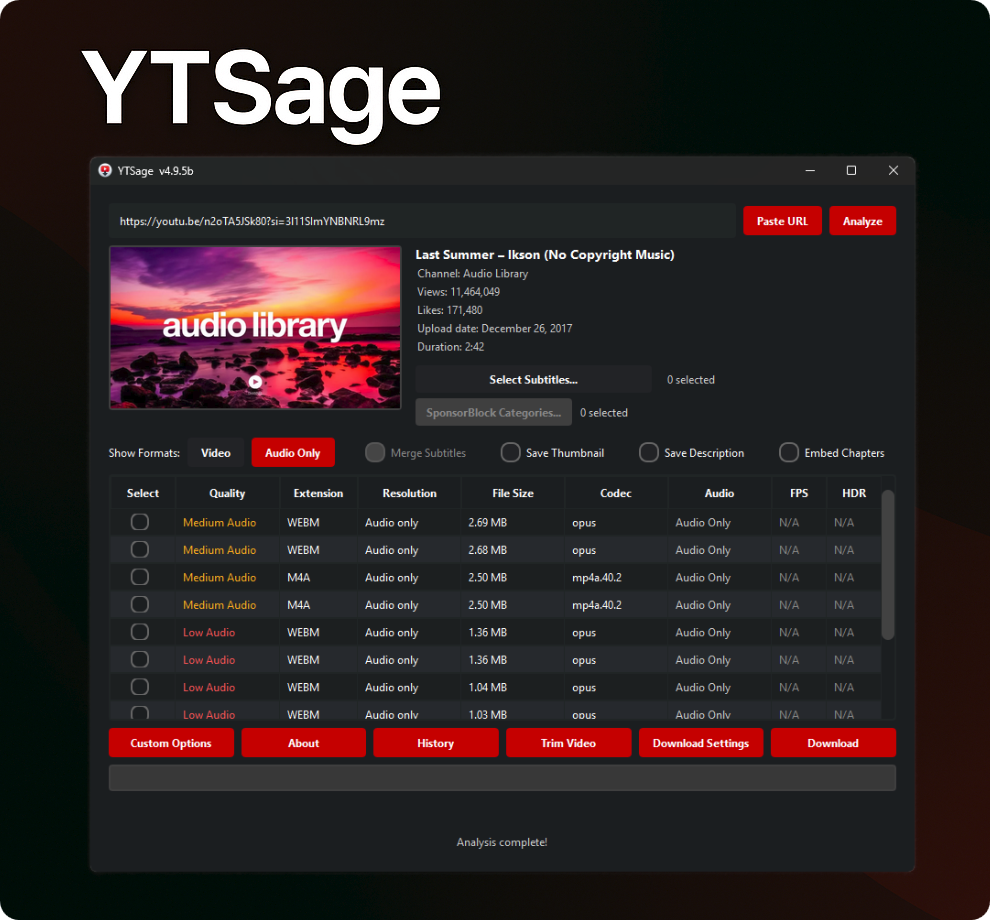
📸 Screenshots
YTSage Demo
 |
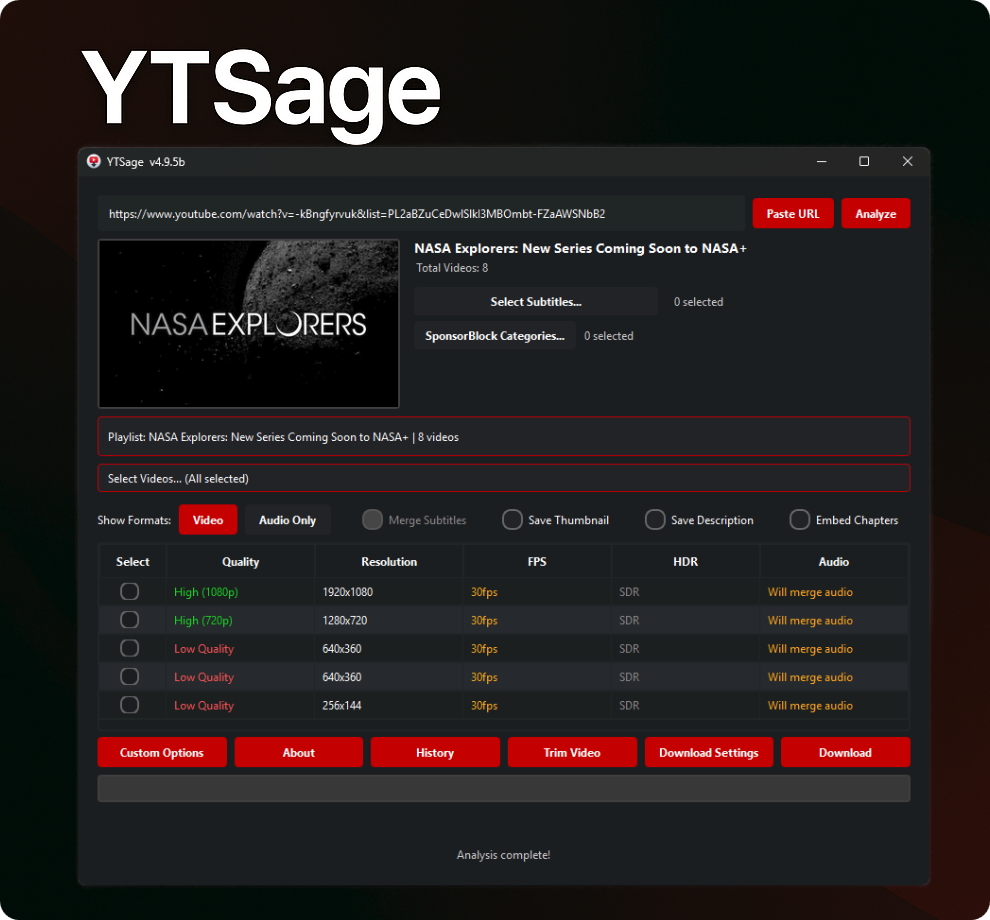 |
| Download Settings | Playlist Download |
 |
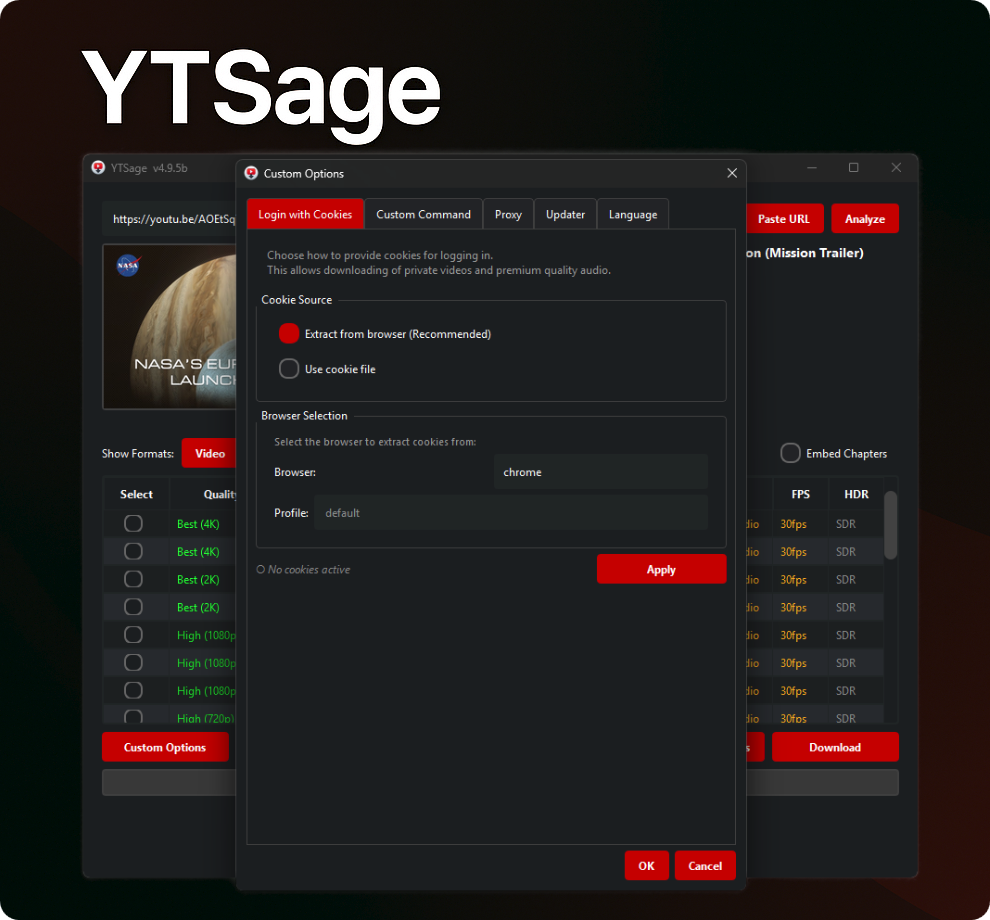 |
| Audio Format | Custom Options |
📖 Usage
🎯 Basic Usage
- Launch YTSage
- Paste YouTube URL (or use "Paste URL" button)
- Click "Analyze"
- Select Format:
Videofor video downloadsAudiofor audio extraction
💡 You can now select and merge multiple audio tracks from the Audio section into a single video. Whether you want to combine a video with multiple language tracks, or merge several audio streams together.
-
Choose Options:
- Enable Subtitles and select language
- Enable Subtitle Merging
- Save Thumbnail
- Remove Sponsored Segments
- Save Description
- Embed Chapters (Chapters, Metadata, Thumbnail)
-
Click "Download"
💡 Default download directory is the user's "Downloads" folder.
📋 Playlist Download
- Paste Playlist URL
- Click "Analyze"
- Select videos from the playlist selector (optional, defaults to all)
- Choose desired format/quality
- Click "Download"
💡 You can export playlist entries as (
.txt,.csv,.m3u, or.json) by clicking on "Save Playlist As" button.
🌍 Generic Mode for Non-YouTube Sites
Use Generic Mode when you want YTSage to accept URLs from sites supported by yt-dlp, such as Dailymotion, CBC Gem, TikTok, and others.
How to use it:
- Open
Download Settings. - Toggle on
Generic Mode. - Paste a supported video or playlist URL that is not from YouTube.
- Click
Analyze. - Choose a format and download as usual.
Notes:
- Generic mode only changes the URL validation inside YTSage. The target site must still be supported by your installed version of yt-dlp.
- Some sites require cookies, login sessions, proxy, or extra yt-dlp arguments depending on the extractor.
- If a site fails, update yt-dlp from the built-in updater tab first before reporting an issue.
🧰 Media & Download Options
- Subtitle Options: Filter languages and embed subtitles into the video file.
- Subtitle Merging: Merge subtitles into the video file for hardcoded/burned-in subtitles.
- Save Description: Save the video description as a text file.
- Save Thumbnail: Save the video thumbnail as an image file.
- Embed: This button allows you to embed chapters, metadata, and thumbnail into the downloaded video file.
- Remove Sponsored Segments: Remove sponsored segments from the video using SponsorBlock.
- Trim Video: Download only specific parts of a video by specifying time ranges in
HH:MM:SSformat.
⚙️ Output & File Settings
- Speed Limiter: Limit download speed, e.g.,
500Kfor 500 KB/s. Available in Download Settings → General → Speed Limit. - Save Download Path: Saves default download directory across sessions. Available in Download Settings → General → Download Path.
- Concurrent Connections: Accelerate downloads using multiple connections/fragments (1 to 20 fragments). Available in Download Settings → General → Concurrent Connections.
- Download History Toggle: Enable or disable saving download history. Available in Download Settings → General → Download History.
- Notification Sounds: Enable or disable completion audio notification. Available in Download Settings → General → Notification Sound.
- Force Output Format: Force video container format (
mp4,webm,mkv). Available in Download Settings → Format → Output Format Settings. - Audio Format Conversion: Convert audio downloads to preferred formats (
AAC,MP3,FLAC,WAV,Opus,M4A,Vorbis, orBest). Available in Download Settings → Format → Audio Format Settings. - Audio Normalization: Normalize volume using EBU R128 standard for audio downloads. Available in Download Settings → Format → Audio Format Settings.
- Default Video Resolution & Subtitles: Auto-select default height (e.g.
1080,720) and preferred subtitle languages (en,es, etc.) plus subtitle container format (srt,vtt,ass,lrc). Available in Download Settings → Format → Default Selection Settings. - Output Filename Format: Customize output naming template using yt-dlp variables (e.g.
%(title)s_%(resolution)s_[%(id)s].%(ext)s). Reset button included. Available in Download Settings → File → Filename Format. - Reset All Settings: Restore every YTSage setting to its default value. Available in Download Settings → Reset All Settings.
🌐 Access & Network
- Login with Cookies: Access private or age-restricted content. Access via Custom Options → Cookies:
- Browser Cookie Extraction (Recommended)
- Direct extraction from installed browsers: Firefox (preferred), Chrome, Edge, Brave, Opera, Vivaldi, etc.
- Includes optional profile selection.
- Cookie File: Load a Netscape format
cookies.txtfile.
- Direct extraction from installed browsers: Firefox (preferred), Chrome, Edge, Brave, Opera, Vivaldi, etc.
- Proxy & Geo-Verification Proxy Support: Configure main proxy server and optional geo-verification proxy (SOCKS4/5 or HTTP/HTTPS) to bypass location restrictions. Access via Custom Options → Proxy.
- Generic Mode: Allow YTSage to process and download from non-YouTube URLs supported by yt-dlp. Toggle in Download Settings → General → Generic Mode.
🛠️ Tools & Maintenance
- Custom Commands: Execute custom
yt-dlparguments directly with live output logging and execution console. Access via Custom Options → Custom Command. - Updater Tab: Comprehensive tool management inside Custom Options → Updater:
- App Updates: Toggle automatic application update checks and enable/disable Beta Releases channel checks.
- yt-dlp Updates & Channel Selection: Check for yt-dlp updates and switch release channels between Stable and Nightly.
- FFmpeg Version Checker: Check local FFmpeg status/version against the latest release with step-by-step setup guides.
- Deno Updater: Check, install, and upgrade the Deno JavaScript runtime required for yt-dlp ETP plugins.
- FFmpeg/yt-dlp/Deno Detection: Automatic detection and status verification of system dependencies visible from the About dialog.
- Download History: Browse, search, filter, and open past download history with thumbnails, original URLs, and local files. Access via the History button on the main toolbar.
🌍 Localization
YTSage supports 16 languages for global accessibility. Select your preferred language in Custom Options → Language.
Supported Languages
| Language | Code | Language | Code |
|---|---|---|---|
| 🇺🇸 English | en |
🇪🇸 Spanish | es |
| 🇸🇦 Arabic | ar |
🇫🇷 French | fr |
| 🇩🇪 German | de |
🇮🇳 Hindi | hi |
| 🇮🇩 Indonesian | id |
🇮🇹 Italian | it |
| 🇯🇵 Japanese | ja |
🇰🇷 Korean | ko |
| 🇵🇱 Polish | pl |
🇧🇷 Portuguese | pt |
| 🇷🇺 Russian | ru |
🇹🇷 Turkish | tr |
| 🇨🇳 Chinese | zh |
🇮🇷 Persian | fa |
README Translations
| Language | File | Language | File |
|---|---|---|---|
| 🇺🇸 English | README.md | 🇪🇸 Spanish | readme-translations/README.es.md |
| 🇸🇦 Arabic | readme-translations/README.ar.md | 🇫🇷 French | readme-translations/README.fr.md |
| 🇩🇪 German | readme-translations/README.de.md | 🇮🇳 Hindi | readme-translations/README.hi.md |
| 🇮🇩 Indonesian | readme-translations/README.id.md | 🇮🇹 Italian | readme-translations/README.it.md |
| 🇯🇵 Japanese | readme-translations/README.ja.md | 🇰🇷 Korean | readme-translations/README.ko.md |
| 🇵🇱 Polish | readme-translations/README.pl.md | 🇧🇷 Portuguese | readme-translations/README.pt.md |
| 🇷🇺 Russian | readme-translations/README.ru.md | 🇹🇷 Turkish | readme-translations/README.tr.md |
| 🇨🇳 Chinese | readme-translations/README.zh.md | 🇮🇷 Persian | readme-translations/README.fa.md |
💡 Want to contribute a translation? Check out the Contributing section to help us add more languages!
🛠️ Troubleshooting
Click to view common issues and solutions
- Format table not appearing: Update yt-dlp to the latest version and switch to nightly yt-dlp.
- Download failed: Check your internet connection and ensure the video is available.
- Specific Download Errors:
- Private Videos: Use cookie authentication to access private content.
- Age-Restricted Content: Log in to your YouTube account to view age-restricted videos.
- Geo-Blocked Videos: Consider using a VPN to bypass regional restrictions.
- Deleted Videos: Video is no longer available on YouTube.
- Live Streams: Live streams cannot be downloaded; wait for the broadcast to end.
- Network Errors: Check your internet connection and try again.
- Invalid URLs: Ensure the URL is correct and from a supported platform.
- Premium Content: Requires a YouTube Premium subscription.
- Copyright Blocks: Content is blocked due to copyright restrictions.
- Video and audio files remain separate after download: This happens when FFmpeg is missing or not detected. YTSage requires FFmpeg to merge high-quality video and audio streams.
- Solution: Ensure FFmpeg is installed and accessible in your system's PATH. For Windows users, the easiest option is to download the
YTSage-v<version>-ffmpeg.exefile, which comes bundled with FFmpeg.
- Solution: Ensure FFmpeg is installed and accessible in your system's PATH. For Windows users, the easiest option is to download the
🛡️ Windows Defender / Antivirus Warning
Some antivirus software may flag .exe files as false positives. This is a known limitation of packaged applications.
Why this happens:
- Antivirus heuristics can mistakenly identify packaged executables as suspicious.
Safe Alternatives:
- ✅ Use pip install:
pip install ytsage(Recommended) - ✅ Build from Source: by following this guide
- ✅ Whitelist the app in your antivirus software.
🍎 macOS: "Application is damaged and cannot be opened"
If you see this error on macOS Sonoma or newer, you need to remove the quarantine attribute.
- Open Terminal (you can find this using Spotlight).
- Type the following command but do not press Enter yet. Make sure to include the space at the end:
xattr -d com.apple.quarantine
- Drag the
YTSage.appfile from your Finder window and drop it directly into the Terminal window. This will automatically paste the correct file path. - Press Enter to run the command.
- Try opening YTSage.app again. It should now launch correctly.
Config Locations (Advanced)
- Windows:
%LOCALAPPDATA%\YTSage - macOS:
~/Library/Application Support/YTSage - Linux:
~/.local/share/YTSage
💖 Sponsor
If YTSage saves you time, please consider sponsoring the project. Sponsoring helps cover development time, testing across all platforms, and future improvements.
- GitHub Sponsors: https://github.com/sponsors/oop7
- Buy Me a Coffee: https://www.buymeacoffee.com/oop7
- Direct bank transfer / SWIFT: Contact me via email at
oop7_support@proton.me

👥 Contributing
Click to expand Contributing Guidelines
We welcome contributions! Here’s how you can help:
- 🍴 Fork the Beta branch
- 🌿 Create your feature branch:
git checkout -b feature/AmazingFeature
- 💾 Commit your changes:
git commit -m 'Add some AmazingFeature'
- 📤 Push to the branch:
git push origin feature/AmazingFeature
- 🔄 Open a Pull Request
🌍 Contributing Translations
- Update the relevant localized README file (e.g.,
readme-translations/README.fr.md) - Keep app strings synced by editing
ytsage/languages/<code>.json - If your language is missing, start from
README.mdand createreadme-translations/README.<code>.md
📂 Project Structure
YTSage - Project Structure
This document describes the organized folder structure of YTSage.
📁 Project Structure
YTSage/
├── 📁 .github/                   # GitHub configuration
│   ├── 📁 ISSUE_TEMPLATE/         # Issue templates
│   │   └── 🐛-bug-report.md       # Bug report template
│   ├─── 📁 workflows/            # GitHub Actions workflows
│   │   ├── build-linux.yml        # Linux build workflow
│   │   ├── build-macos.yml        # macOS build workflow
│   │   │── build-windows.yml      # Windows build workflow
|   |   └── release-all.yml        # Release master workflow
|   |   └── star-history.yml       # Star history workflow
│   └── 📄 CI_CD_README.md        # CI/CD documentation
├──  📁 branding/                 # Branding assets (Screenshots, SVGs)
│   ├── 📁 icons/                 # App icons
│   ├── 📁 screenshots/           # Documentation screenshots
│   └── 📁 svg/                   # SVG assets
├── 📄 LICENSE                    # License file
├── 📄 pyproject.toml             # Project metadata and dependencies
├── 📄 README.md                  # Project documentation
├── 📄 requirements.txt           # Python dependencies (dev)
└── 📁 ytsage/                    # Source package
    ├── 📁 assets/                # Runtime assets
    │   ├── 📁 Icon/              # App icons
    │   └── 📁 sound/             # Sound files
    ├── 📁 languages/             # Localization files
    │   ├── 📄 ar.json            # Arabic translation
    │   ├── 📄 de.json            # German translation
    │   ├── 📄 en.json            # English translation
    │   └── ...                   # Other languages
    ├── 📁 core/                  # Core business logic
    │   ├── 📄 __init__.py        # Core package init
    │   ├── 📄 ytsage_deno.py     # Deno integration
    │   ├── 📄 ytsage_downloader.py # Download functionality
    │   ├── 📄 ytsage_ffmpeg.py   # FFmpeg integration
    │   ├── 📄 ytsage_utils.py    # Utility functions
    │   └── 📄 ytsage_yt_dlp.py   # yt-dlp integration
    ├── 📁 gui/                   # UI components
    │   ├── 📄 __init__.py        # GUI package init
    │   ├── 📄 ytsage_gui_main.py # Main app window
    │   └── 📁 ytsage_gui_dialogs/ # Dialog classes
    ├── 📁 utils/                 # Utility modules
    │   ├── 📄 __init__.py        # Utils package init
    │   ├── 📄 ytsage_config_manager.py # Config management
    │   └── 📄 ytsage_logger.py   # Logging utilities
    ├── 📄 __init__.py            # Package entry point
    └── 📄 main.py                # Main execution script
⭐️ Star History

📜 License
This project is licensed under the MIT License - see the LICENSE file for details.
🙏 Acknowledgments
A big thanks to everyone who contributed to this project by opening an issue to suggest an improvement or report a bug
Special thanks to @bastik-1001 and @dj23me for being the first and major donors supporting this project ❤️
| Core Components | |
|---|---|
| yt-dlp | Download Engine |
| FFmpeg | Media Processing |
| Deno | Runtime for yt-dlp plugins |
| Libraries & Frameworks | |
| PySide6 | GUI Framework |
| Pillow | Image Processing |
| requests | HTTP Requests |
| packaging | Version/Package Management |
| markdown | Markdown Rendering |
| loguru | Logging |
| Assets & Contributors | |
| @bastik-1001 | First & Major Donor Support |
| New Notification 09 by Universfield | Notification Sound |
| viru185 | Code Contributor |
⚠️ Disclaimer
This tool is for personal use only. Please respect YouTube's Terms of Service and content creator rights.
Made with ❤️ by oop7
1 maintainer

Metadata
1 maintainer
Release files for ytsage 5.5.6b1
For a detailed explanation of source distributions (sdists) and built distributions (wheels), please see the package formats documentation.
Source distribution (sdist)
| File | Size | Uploaded | |
|---|---|---|---|
| ytsage-5.5.6b1.tar.gz | 492.6 kB | Details |
Built distribution (wheel)
| File | Interpreter | ABI | Platform | Reset |
|---|---|---|---|---|
| ytsage-5.5.6b1-py3-none-any.whl | Python 3 | none | any | Details |
Total release size: 870.2 kB
Release files / ytsage-5.5.6b1.tar.gz
| Download URL | ytsage-5.5.6b1.tar.gz |
|---|---|
| Size | 492.6 kB |
| Tags | Source |
|
SHA-256 checksum How to use checksums |
35c68839c5a09c28eea022b3f35b84ded5a4889ab453a7f39739be3400f992e5
|
|
BLAKE2b-256 checksum How to use checksums |
fc430a9859e22b10cb43af32ba5c6511824406b3e5cd7e9fe8fb980acaf54b8c
|
| Upload date | |
|
Uploaded using Trusted Publishing? What is trusted publishing? |
No |
| Uploaded via |
twine/6.2.0 CPython/3.14.6
|
Release files / ytsage-5.5.6b1-py3-none-any.whl
| Download URL | ytsage-5.5.6b1-py3-none-any.whl |
|---|---|
| Size | 377.6 kB |
| Tags | Python 3 |
|
SHA-256 checksum How to use checksums |
6d5aa5d75d51b292f1c4917af94cf4b59c7a5bc5f5fedbcf172fa98a0dd88f06
|
|
BLAKE2b-256 checksum How to use checksums |
cede67cc59fc220617502712db2766e1c1053186a11027cca8527887585c5fb8
|
| Upload date | |
|
Uploaded using Trusted Publishing? What is trusted publishing? |
No |
| Uploaded via |
twine/6.2.0 CPython/3.14.6
|














