
Z-Rad







Extract quantitative features from medical images with a desktop interface or Python API.
CT, PET, MR, MG, US, and RTDOSE · DICOM and NIfTI · Windows, macOS, and Linux
Developed by the Department of Radiation Oncology at University Hospital Zurich
Full IBSI I preprocessing and feature coverage · All IBSI II filters
Download · Documentation · Python quickstart · Examples · Validation
From images to a feature table

| Capability | What you can do |
|---|---|
| Inspect images | View images and ROI masks together in the desktop viewer. |
| Prepare images | Convert DICOM to NIfTI and apply all IBSI I preprocessing operations, including image and mask interpolation, resegmentation, and intensity discretization. |
| Filter images | Apply all IBSI II filters, including mean, LoG, Laws, Gabor, separable wavelets, Simoncelli, and Riesz transforms. |
| Extract features | Calculate all IBSI I radiomic features across morphology, local intensity, intensity statistics, histograms, intensity-volume histograms, and texture, with applicable 2D, 2.5D, and 3D aggregation options. |
| Process cohorts | Run preprocessing, filtering, and feature extraction across case folders through the GUI or Python batch APIs. |
| Export results | Collect feature dictionaries in Python or export batch radiomics results to CSV. |
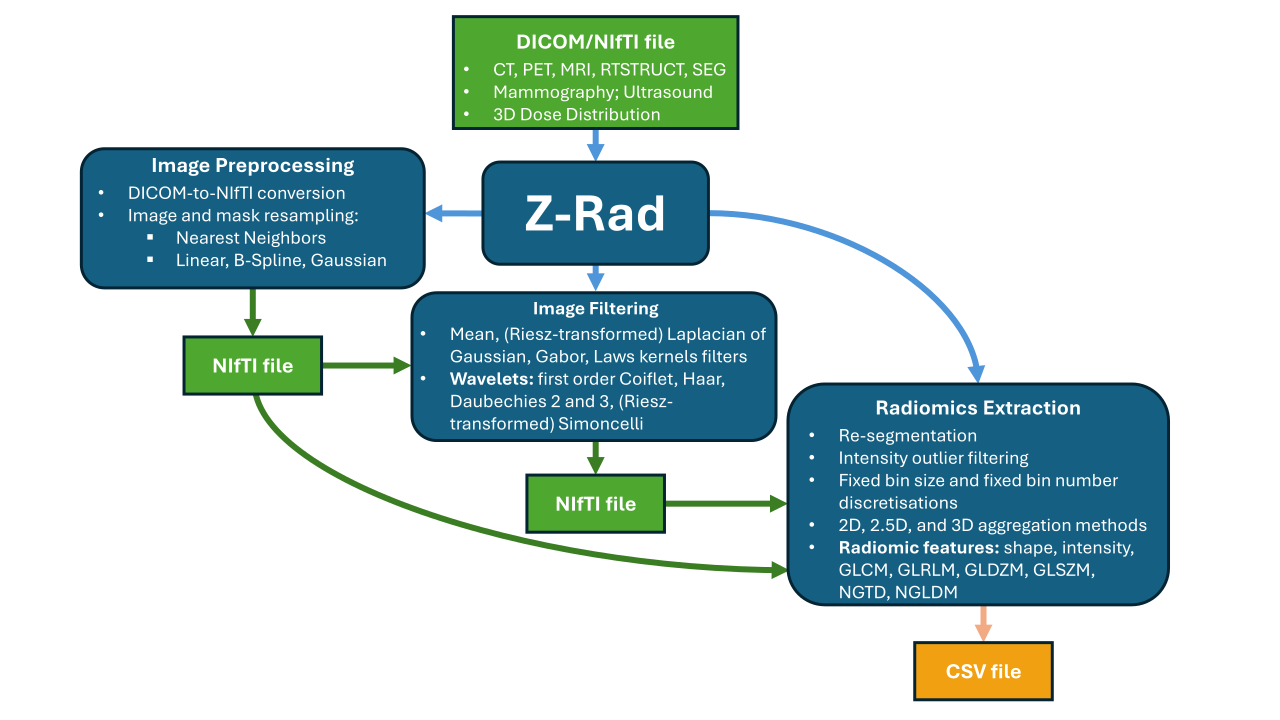
Use preprocessing, filtering, and feature extraction independently or combine them into a complete workflow.
Supported images and masks
| Data format | Data type | Supported types and notes |
|---|---|---|
| DICOM | Image | CT, MR, PET (PT), mammography (MG), ultrasound (US), and RTDOSE. |
| DICOM | Mask | RTSTRUCT contours and BINARY DICOM SEG objects; select ROIs by structure name or segment label. |
| NIfTI | Image | Scalar image volumes with spatial geometry. |
| NIfTI | Mask | One binary ROI mask per file, paired with its reference image. |
Use scalar image volumes with masks on the same physical voxel grid. See the data-format and folder-layout guide for input restrictions, case organization, and structure selection.
Get started
Desktop application
-
Open Z-Rad releases and choose a release.
-
Download the asset for your platform:
Platform Release asset Launch Windows z-rad-<release-tag>-windows.exeRun the executable. Apple Silicon macOS z-rad-<release-tag>-macos-arm64.zipExtract the archive and open Z-Rad.app. -
Follow the GUI quickstart to select your input data, configure processing, and run your first analysis.
The macOS app is currently unsigned and unnotarized, so Gatekeeper may show a warning. For Linux, Intel Macs, or the current source version, follow Run from source to install and launch the GUI.
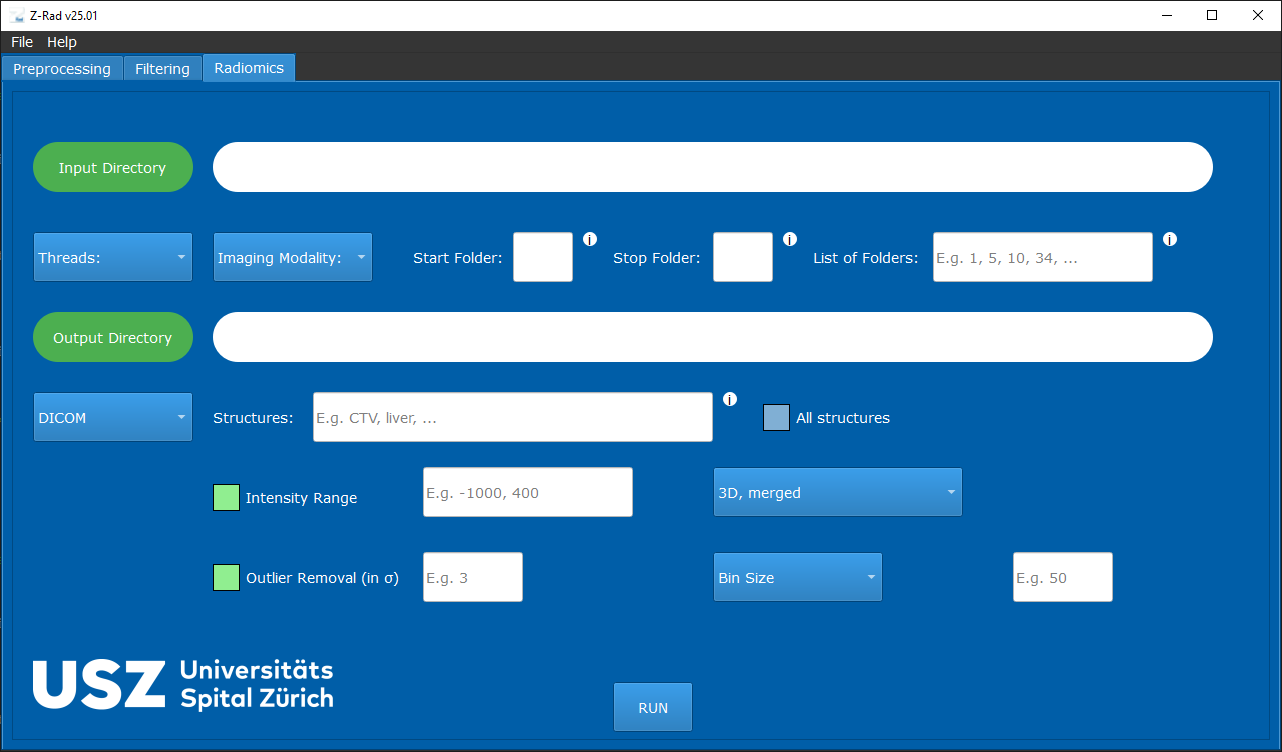
Run the workflow interactively through the graphical user interface or automate it with the Python API.
Python quickstart
Requires Python 3.11 or newer. Install the published package:
python -m pip install z-rad
The example below requires your own NIfTI image and binary ROI mask on the same physical voxel grid. Replace the two paths with your files. It extracts intensity statistics without resampling or filtering:
from zrad.image import Image
from zrad.preprocessing import IntensityMaskBuilder, RoiData
from zrad.radiomics import Radiomics

image = Image.from_nifti("path/to/image.nii.gz")
mask = Image.from_nifti_mask("path/to/mask.nii.gz", reference=image)
roi = IntensityMaskBuilder().apply(RoiData(image=image, morphological_mask=mask))
features = Radiomics().extract_features(roi_data=roi, families=["intensity_statistics"])
print(features["stat_mean"])
The result is a dictionary of feature names and values. To try a complete example with supplied data and an expected result, follow the bundled phantom example.
In the Python single-ROI API, texture and intensity-volume histogram (IVH) features require additional preparation; see the full Python workflow.
IBSI validation
Automated benchmarks compare Z-Rad results against published reference data from the Image Biomarker Standardisation Initiative (IBSI):
- IBSI I: digital-phantom features and CT configurations A–E, including preprocessing diagnostics.
- IBSI II: digital-phantom filter response maps and features from filtered CT images.
- IBSI-SUV: SUV conversion checks using valid and intentionally invalid digital reference objects.
Implementation coverage describes available operations; benchmark agreement applies to the tested configurations and features. See IBSI coverage and limitations for the scope, comparison rules, and unavailable references, and execution reports and reproduction to inspect results for a particular revision.
Contribute and get in touch
Found a bug or have a feature request? Open an issue. To contribute code or documentation, start with CONTRIBUTING.md.
For questions or research collaborations, contact zrad@usz.ch.
1 maintainer

Release files for z-rad 26.9.0
For a detailed explanation of source distributions (sdists) and built distributions (wheels), please see the package formats documentation.
Source distribution (sdist)
| File | Size | Uploaded | |
|---|---|---|---|
| z_rad-26.9.0.tar.gz | 173.3 kB | Details |
Built distribution (wheel)
| File | Interpreter | ABI | Platform | Reset |
|---|---|---|---|---|
| z_rad-26.9.0-py3-none-any.whl | Python 3 | none | any | Details |
Total release size: 334.7 kB
Release files / z_rad-26.9.0.tar.gz
| Download URL | z_rad-26.9.0.tar.gz |
|---|---|
| Size | 173.3 kB |
| Tags | Source |
|
SHA-256 checksum How to use checksums |
46c0b0a3065ad5ada6057264177dfd846820cfdee0b2a09452a39d336f516c20
|
|
BLAKE2b-256 checksum How to use checksums |
f9b663ee9e3a972b21698d9ed6a37b45a0dfbdc9912fdb9c8841382e1aa67625
|
| Upload date | |
|
Uploaded using Trusted Publishing? What is trusted publishing? |
No |
| Uploaded via |
twine/7.0.0 CPython/3.12.14
|
Release files / z_rad-26.9.0-py3-none-any.whl
| Download URL | z_rad-26.9.0-py3-none-any.whl |
|---|---|
| Size | 161.4 kB |
| Tags | Python 3 |
|
SHA-256 checksum How to use checksums |
eda3149bb088921239c632142949b7a69bc879a392d086724ca09239b8e7a15d
|
|
BLAKE2b-256 checksum How to use checksums |
32dff68162b153df1a2c81329c3e6bc19207570654ccafba6e46808d636fe48f
|
| Upload date | |
|
Uploaded using Trusted Publishing? What is trusted publishing? |
No |
| Uploaded via |
twine/7.0.0 CPython/3.12.14
|














