
Z-Rad is a radiomic feature extraction software with GUI and API.

Project description
Z-RAD






Radiomics is the high-throughput extraction of quantitative features from medical images, revolutionizing personalized medicine and enhancing clinical decision-making. Despite its potential, radiomics faces several challenges, including the need for programming skills and lack of standardization.
Z-Rad (Zurich Radiomics), developed by the Radiation Oncology Department at the University Hospital Zurich, addresses these issues by offering a user-friendly, IBSI-compliant, and open-source solution for radiomics analysis.
Z-Rad Features
User-Friendly Interface
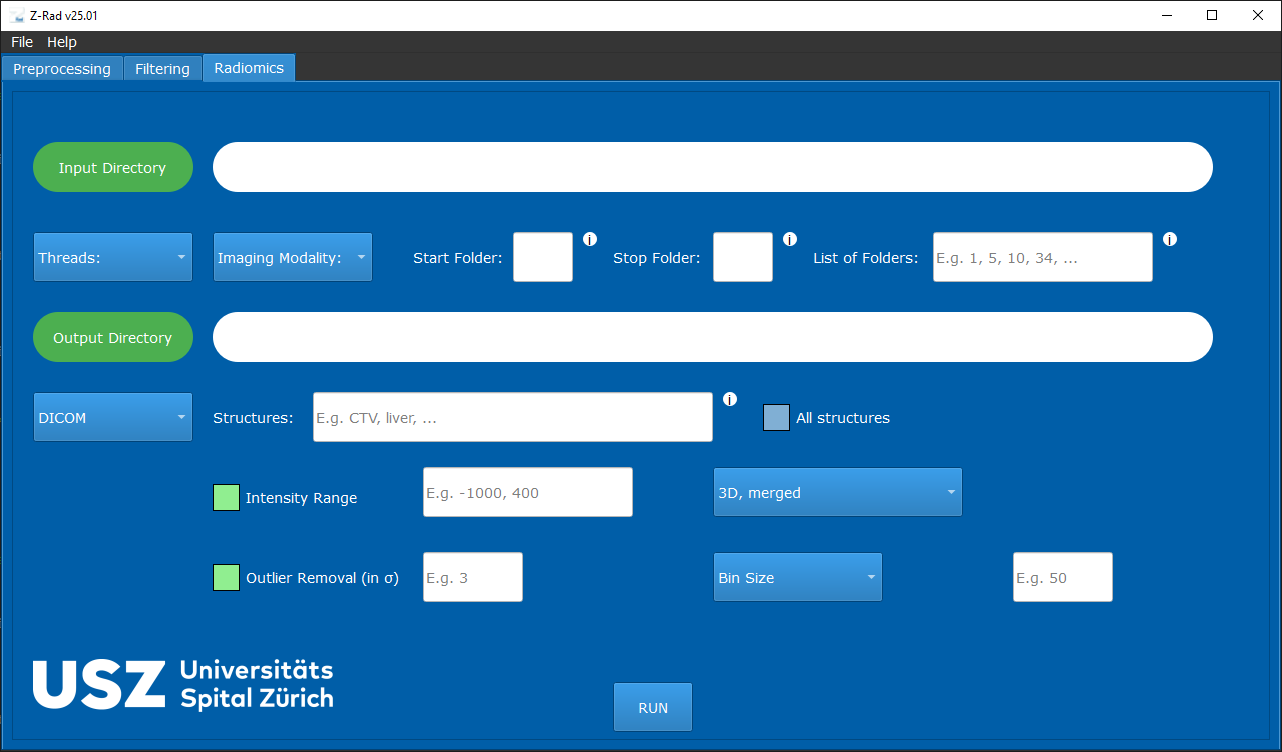
- Graphical User Interface (GUI): Designed for medical professionals with no programming skills.
- Application Programming Interface (API): Allows researchers to customize, automate, and extend Z-Rad functionalities using Python.
Compatibility
- Medical Data Formats: Supports CT, PET, and MR imaging modalities in both DICOM and NIfTI formats.
- Operating Systems: Windows, macOS, and Linux.
Standard Compliance
- IBSI Compliance: Adheres to IBSI I and IBSI II standards for reproducible and comparable radiomics features.
Software Architecture and Design
Backend
- Programming Language: Python.
- Dependencies:
- Joblib
- NumPy
- OpenCV
- Pandas
- PyDicom
- PyQt5
- PyWavelets
- Scikit-image
- SciPy
- SimpleITK
Radiomics Extraction Pathways
Graphical User Interface (GUI) and Application Programming Interface (API)
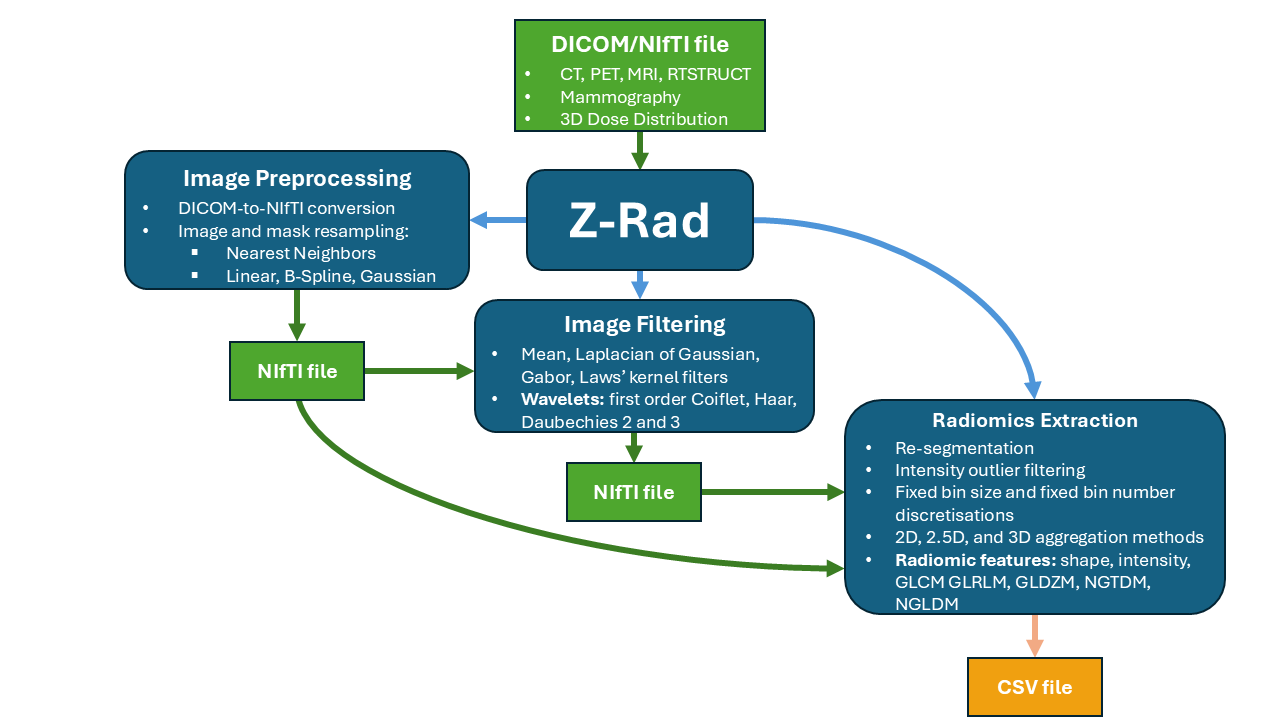
Both GUI and API are structured into three primary classes: Resampling, Filtering, and Radiomics:
Resampling
Z-Rad supports image resampling alone, alongside regions of interest (ROI) masks, or converting DICOM files to NIfTI images and masks without resampling. Resampling can be performed in 3D or 2D (axial slice-wise), with nearest neighbors, linear, B-spline, and Gaussian strategies.
Filtering
This tab requires users to define the desired filter settings. The current version of Z-Rad supports mean, Laplace of Gaussian, Laws kernels, and wavelet (Daubechies 2, Daubechies 3, first-order Coiflet, and Haar) filters.
Radiomics Feature Extraction
Parameters for radiomics feature extraction include the intensity re-segmentation (e.g., HU for CT or SUV for PET within ROIs) and intensity outlier filtering, discretisation strategies, and a variety of radiomics feature aggregation methods covering 2D, 2.5D, and 3D options. Radiomic features include shape, intensity, grey level co-occurrence matrix (GLCM), grey level run length matrix (GLRLM), grey level distance zone matrix (GLDZM), neighbouring gray tone difference matrix (NGTDM), and neighbouring gray level dependance matrix (NGLDM) features families.
Error and Warning Handling
- GUI: Uses info, warning, and error pop-up messages for immediate feedback.
- API: Records processes in log files for comprehensive documentation.
Installation and Get Started
Windows executable file:
The simplest way to run Z-Rad on Windows is to start the versioned z-rad-<release-tag>.exe attached to every Z-Rad release.
Windows, Linux, and macOS
For users familiar with Python programming language, we recommend Python 3.11 or newer:
- Download the Z-Rad repository
- Open the terminal and navigate to the project directory
- Install Z-Rad from the source checkout by typing in the terminal:
pip install -e .
- Run the
main.pyfile:
python main.py
API
pip install z-rad
License
Z-Rad is an open-source project licensed under the MIT License.
Contact
For any questions or feedback, please contact us at zrad@usz.ch.
Release history Release notifications | RSS feed


Download files
Download the file for your platform. If you're not sure which to choose, learn more about installing packages.
Source Distribution
Built Distribution
Filter files by name, interpreter, ABI, and platform.
If you're not sure about the file name format, learn more about wheel file names.
Copy a direct link to the current filters
File details
Details for the file z_rad-26.6.0.tar.gz.
File metadata
- Download URL: z_rad-26.6.0.tar.gz
- Upload date:
- Size: 117.6 kB
- Tags: Source
- Uploaded using Trusted Publishing? No
- Uploaded via: twine/6.2.0 CPython/3.12.13
File hashes
| Algorithm | Hash digest | |
|---|---|---|
| SHA256 |
f9e36b2ba07f7eb1a7508a2427a898fac2e0eb2d0ae4f392abcb3ab416d18390
|
|
| MD5 |
ec4dda5fe2dda89018fa9a30d0211d3f
|
|
| BLAKE2b-256 |
a1fafacf7002405192523e532de20ecb0e21d0d09a84c4637496e7a2e1b7ca2f
|
File details
Details for the file z_rad-26.6.0-py3-none-any.whl.
File metadata
- Download URL: z_rad-26.6.0-py3-none-any.whl
- Upload date:
- Size: 129.5 kB
- Tags: Python 3
- Uploaded using Trusted Publishing? No
- Uploaded via: twine/6.2.0 CPython/3.12.13
File hashes
| Algorithm | Hash digest | |
|---|---|---|
| SHA256 |
4d84ef223a79186bbbf600bef46fd9dc9f29584015053081460b122f4446dce6
|
|
| MD5 |
94585202da49c8d5ee7d054ecc5637d6
|
|
| BLAKE2b-256 |
be3bb042dda6498cf38bc72436cac06cbf4079fadda569975584e6bdcfe3a55e
|






