
Zeer






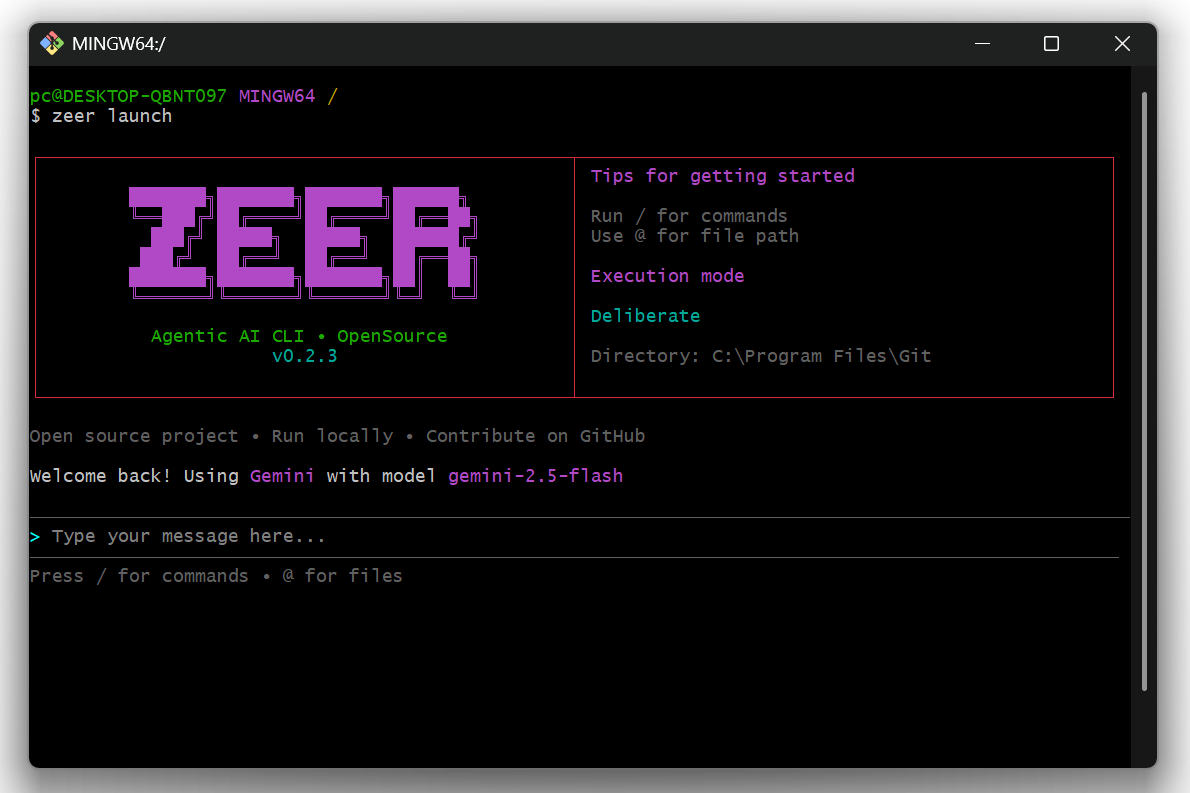
Zeer is an OpenSource agentic AI CLI that connects to multiple providers (OpenAI, Gemini, Claude, Ollama) with tool-calling capabilities, an extensible skills system, and a clean box-style UI.
Think of it as Claude Code for the terminal, provider-agnostic and developer-friendly.
🎯 Why Zeer?
Tools like Claude Code, Kiro, and Cursor are powerful but come with limitations:
- Subscription Required – Monthly fees for access
- Fixed Models – Locked into specific AI providers
- Closed Source – Limited customization options
Zeer is different:
- ✅ Use Your Own API Keys – Pay only for what you use, no subscriptions
- ✅ Multi-Provider Support – Switch between OpenAI, Gemini, Claude, Ollama, or add your own
- ✅ Local AI Support – Run models locally with Ollama (no API key required)
- ✅ 100% Open Source – Customize, extend, and contribute freely
- ✅ Extensible Skills System – Create custom agent behaviors without code changes
- ✅ Background Process Management – Start and manage dev servers in the background
- ✅ Terminal-First – Lightweight, fast, and integrates with your workflow
Note: Zeer is currently in beta. We appreciate your contributions and feedback as we continue to improve. This project will always remain open source.
🚀 Get Started
Start using Zeer quickly with the following installation options.
For Users (PyPI)
pip install zeer
For Developers (Local / Editable)
# Clone the repository
git clone https://github.com/muhdaliyan/zeer.git
cd zeer

# Install dependencies
pip install -r requirements.txt

# Install in editable mode
pip install -e .

# Run Zeer
zeer
Any code changes will reflect immediately without reinstalling.
🎯 Quick Start
CLI Mode
zeer
- Select your AI provider
- Enter your API key
- Choose a model
- Start chatting and using AI tools
Telegram Bot Mode 🆕
Run your zeer assistant as a Telegram bot!
Option 1: Quick Setup via CLI (Recommended)
zeer
> /setup
# Select Telegram, enter bot token, start bot!
Option 2: Manual Setup
pip install python-telegram-bot python-dotenv
cp .env.example .env
# Edit .env with your tokens
python start_telegram_bot.py
See SETUP_COMMAND_GUIDE.md for the /setup command guide, TELEGRAM_QUICKSTART.md for the 5-minute manual setup, or TELEGRAM_SETUP.md for detailed instructions.
💻 Usage Examples
# AI automatically executes tasks
> create a PDF report about machine learning
> list all Python files in this directory
> set up a new React project structure
> read and summarize config.json

# Start dev servers in background
> start a React dev server on port 3000
> run the Flask app in the background

# Commands
/skills    # View available skills
/tools     # View available tools
/processes # View running background processes
/clear     # Clear conversation
/providers # Switch provider
/models    # Switch model
🤖 AI Providers
Zeer supports multiple AI providers:
Cloud Providers (API Key Required)
- OpenAI – GPT-4, GPT-3.5, and more
- Gemini – Google's AI models (including image generation with Nano Banana)
- Claude – Anthropic's Claude models
- Ollama Cloud – Cloud-hosted Ollama models
Local Provider (No API Key)
- Ollama Local – Run AI models entirely on your machine
- No internet required
- No API costs
- Full privacy
- See OLLAMA_SETUP.md for setup guide
🎨 Image Generation Support
Zeer supports image generation with Gemini's Nano Banana models:
- Generated images are automatically saved to
generated_images/folder - Images are displayed in the CLI with file path and size info
- Supports PNG, JPEG, and other formats
- See GENERATED_IMAGES_INFO.md for details
# Example: Generate an image
> can you make an image of a sports car
# Image saved to: generated_images/image_20260301_143022_1.png
🚀 Ollama Quick Start
Want to run AI locally without API keys?
- Install Ollama from ollama.ai
- Pull a model:
ollama pull llama3.2 - Start Zeer:
zeer - Select "Ollama" provider
- Press Enter (skip API key for local)
- Choose your model and start chatting
See OLLAMA_SETUP.md for detailed setup instructions.
🔄 Background Process Management
Zeer can start and manage development servers in the background:
# AI automatically detects and manages servers
> start a Next.js dev server
> run the Django development server
> start the Express API on port 8080

# View running processes
/processes

# AI can stop processes when needed
> stop the React dev server
Features:
- Automatic URL detection
- Output monitoring
- Clean process termination
- Multiple concurrent servers
🔧 Built-in Skills
- pdf-builder – Generate PDF documents with reportlab
- code-helper – Project setup & code organization
- file-operations – File system operations
- text-processing – Text manipulation & analysis
- frontend-designer – Frontend development assistance
✨ Creating Custom Skills
- Create
skills/your-skill/SKILL.md:
---
name: your-skill
description: What this skill does and when to use it
allowed-tools: create_file read_file run_code
---

## Goal
Your skill's purpose

## Procedure
Step-by-step instructions for the AI

## Examples
Usage examples
- Restart Zeer – skills are auto-discovered.
See SKILLS_IMPLEMENTATION.md for advanced details.
🏗️ Architecture
zeer/
├── src/
│   ├── providers/          # AI provider implementations
│   ├── tools.py            # Tool registry & execution
│   ├── skills_manager.py   # Skills loading & validation
│   └── chat_session.py     # Context management
└── skills/                 # Modular agent skills
    ├── backend-developer/
    │   ├── SKILL.md        # Skill definition
    │   ├── scripts/        # Executable Python scripts
    |   |   └── script.py
    │   └── references/     # Additional documentation
    ├── code-helper/
    │   └── SKILL.md
    ├── file-operations/
    │   └── SKILL.md
    └── ...
🔄 Tool Calling Flow
- User sends a message
- AI decides to use tools
- Tools execute (file ops, code, etc.)
- Results fed back to AI
- AI responds with final answer
📜 Skills System
- Metadata Loading: Only names/descriptions loaded initially
- On-Demand Activation: Full skill content loaded when referenced
- Scripts Support: Skills can include executable Python scripts
- References: Additional documentation files
- Validation: Automatic format checking on load
⚙️ Requirements
- Python 3.8+
- API key for at least one cloud provider (OpenAI, Gemini, or Claude)
- OR Ollama installed for local AI (no API key needed)
🤝 Contributing
Contributions are welcome! Follow these steps:
Development Setup
git clone https://github.com/muhdaliyan/zeer.git
cd zeer
pip install -r requirements.txt
pip install -e .
Making Changes
- Fork the repository
- Create a feature branch (
git checkout -b feature/amazing-feature) - Make your changes
- Test locally with
zeer - Commit your changes (
git commit -m 'Add amazing feature') - Push (
git push origin feature/amazing-feature) - Open a Pull Request
Adding Custom Tools
Edit src/tools.py and add to the registry in create_default_registry().
Adding Custom Skills
Create a new folder in skills/ with a SKILL.md following the agentskills.io specification.
📜 License
MIT
🔗 Links
1 maintainer

Metadata
1 maintainer
Release files for zeer 0.3.0
For a detailed explanation of source distributions (sdists) and built distributions (wheels), please see the package formats documentation.
Source distribution (sdist)
| File | Size | Uploaded | |
|---|---|---|---|
| zeer-0.3.0.tar.gz | 135.1 kB | Details |
Built distribution (wheel)
| File | Interpreter | ABI | Platform | Reset |
|---|---|---|---|---|
| zeer-0.3.0-py3-none-any.whl | Python 3 | none | any | Details |
Total release size: 291.6 kB
Release files / zeer-0.3.0.tar.gz
| Download URL | zeer-0.3.0.tar.gz |
|---|---|
| Size | 135.1 kB |
| Tags | Source |
|
SHA-256 checksum How to use checksums |
4bfa828a02b2046c6d4bc31865635258f4381bdf9272ae2dd8f29b04ec8522eb
|
|
BLAKE2b-256 checksum How to use checksums |
7bfc9ef65959d052c91c2a64c4a00318885b2cd39f2a4bad965b6a17df766921
|
| Upload date | |
|
Uploaded using Trusted Publishing? What is trusted publishing? |
No |
| Uploaded via |
twine/6.2.0 CPython/3.12.0
|
Release files / zeer-0.3.0-py3-none-any.whl
| Download URL | zeer-0.3.0-py3-none-any.whl |
|---|---|
| Size | 156.5 kB |
| Tags | Python 3 |
|
SHA-256 checksum How to use checksums |
4705861f0abf3d5f79dcd58ceecc6818bd1a900eb8ff1020e041623c1ed2bff8
|
|
BLAKE2b-256 checksum How to use checksums |
dfd7ba0dfbd512900473278c8bd3dd0ab9565fa3edfac137446ba5a054597744
|
| Upload date | |
|
Uploaded using Trusted Publishing? What is trusted publishing? |
No |
| Uploaded via |
twine/6.2.0 CPython/3.12.0
|














