
Agentic AI CLI with tool calling and extensible skills system

Project description
Zeer






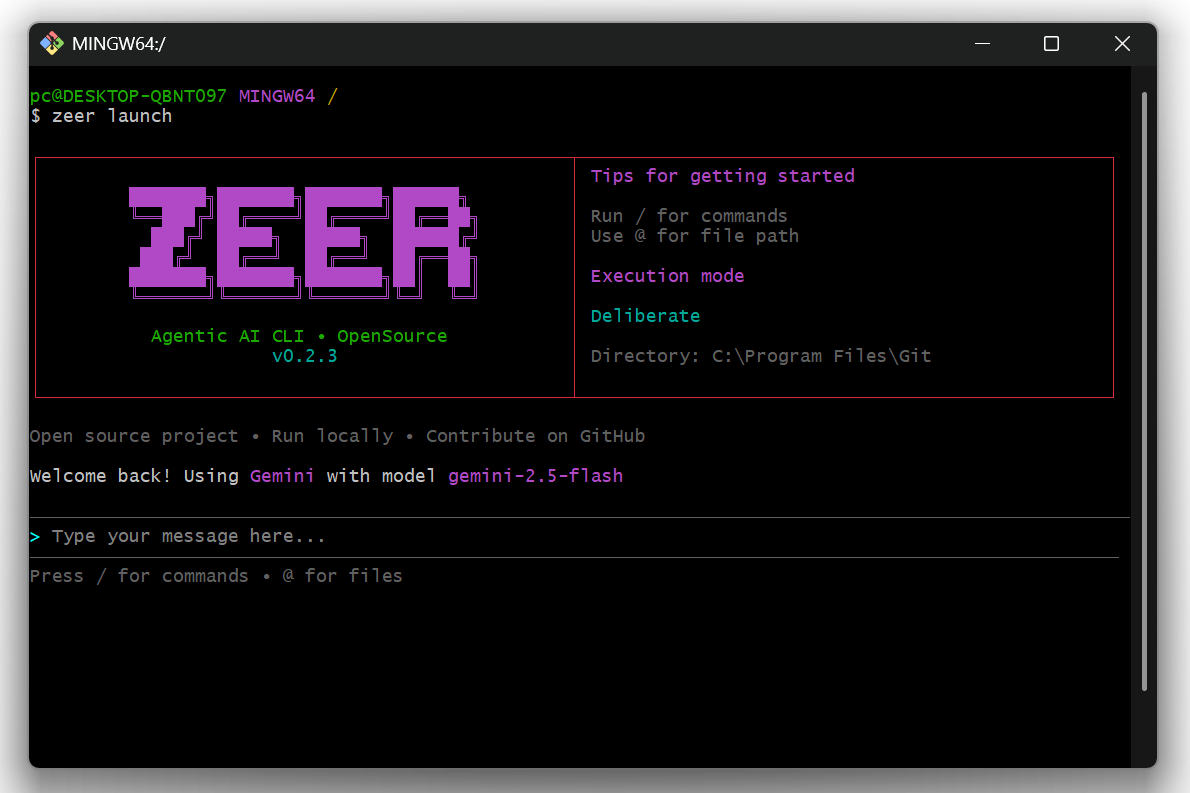
Zeer is an OpenSource agentic AI CLI that connects to multiple providers (OpenAI, Gemini, Claude, Ollama) with tool-calling capabilities and an extensible skills system.
Think of it as Claude Code for the terminal, provider-agnostic and developer-friendly.
🎯 Why Zeer?
Tools like Claude Code, Kiro, and Cursor are powerful but come with limitations:
- Subscription Required – Monthly fees for access
- Fixed Models – Locked into specific AI providers
- Closed Source – Limited customization options
Zeer is different:
- ✅ Use Your Own API Keys – Pay only for what you use, no subscriptions
- ✅ Multi-Provider Support – Switch between OpenAI, Gemini, Claude, Ollama, or add your own
- ✅ Local AI Support – Run models locally with Ollama (no API key required)
- ✅ 100% Open Source – Customize, extend, and contribute freely
- ✅ Extensible Skills System – Create custom agent behaviors without code changes
- ✅ Background Process Management – Start and manage dev servers in the background
- ✅ Terminal-First – Lightweight, fast, and integrates with your workflow
Note: Zeer is currently in beta. We appreciate your contributions and feedback as we continue to improve. This project will always remain open source.
🚀 Get Started
Start using Zeer quickly with the following installation options.
For Users (PyPI)
pip install zeer
For Developers (Local / Editable)
# Clone the repository
git clone https://github.com/muhdaliyan/zeer.git
cd zeer

# Install dependencies
pip install -r requirements.txt

# Install in editable mode
pip install -e .

# Run Zeer
zeer
Any code changes will reflect immediately without reinstalling.
🎯 Quick Start
zeer
- Select your AI provider
- Enter your API key
- Choose a model
- Start chatting and using AI tools
💻 Usage Examples
# AI automatically executes tasks
> create a PDF report about machine learning
> list all Python files in this directory
> set up a new React project structure
> read and summarize config.json

# Start dev servers in background
> start a React dev server on port 3000
> run the Flask app in the background

# Commands
/skills    # View available skills
/tools     # View available tools
/processes # View running background processes
/clear     # Clear conversation
/providers # Switch provider
/models    # Switch model
🤖 AI Providers
Zeer supports multiple AI providers:
Cloud Providers (API Key Required)
- OpenAI – GPT-4, GPT-3.5, and more
- Gemini – Google's AI models
- Claude – Anthropic's Claude models
- Ollama Cloud – Cloud-hosted Ollama models
Local Provider (No API Key)
- Ollama Local – Run AI models entirely on your machine
- No internet required
- No API costs
- Full privacy
- See OLLAMA_SETUP.md for setup guide
🚀 Ollama Quick Start
Want to run AI locally without API keys?
- Install Ollama from ollama.ai
- Pull a model:
ollama pull llama3.2 - Start Zeer:
zeer - Select "Ollama" provider
- Press Enter (skip API key for local)
- Choose your model and start chatting
See OLLAMA_SETUP.md for detailed setup instructions.
🔄 Background Process Management
Zeer can start and manage development servers in the background:
# AI automatically detects and manages servers
> start a Next.js dev server
> run the Django development server
> start the Express API on port 8080

# View running processes
/processes

# AI can stop processes when needed
> stop the React dev server
Features:
- Automatic URL detection
- Output monitoring
- Clean process termination
- Multiple concurrent servers
🔧 Built-in Skills
- pdf-builder – Generate PDF documents with reportlab
- code-helper – Project setup & code organization
- file-operations – File system operations
- text-processing – Text manipulation & analysis
- frontend-designer – Frontend development assistance
✨ Creating Custom Skills
- Create
skills/your-skill/SKILL.md:
---
name: your-skill
description: What this skill does and when to use it
allowed-tools: create_file read_file run_code
---

## Goal
Your skill's purpose

## Procedure
Step-by-step instructions for the AI

## Examples
Usage examples
- Restart Zeer – skills are auto-discovered.
See SKILLS_IMPLEMENTATION.md for advanced details.
🏗️ Architecture
zeer/
├── src/
│   ├── providers/          # AI provider implementations
│   ├── tools.py            # Tool registry & execution
│   ├── skills_manager.py   # Skills loading & validation
│   └── chat_session.py     # Context management
└── skills/                 # Modular agent skills
    ├── backend-developer/
    │   ├── SKILL.md        # Skill definition
    │   ├── scripts/        # Executable Python scripts
    |   |   └── script.py
    │   └── references/     # Additional documentation
    ├── code-helper/
    │   └── SKILL.md
    ├── file-operations/
    │   └── SKILL.md
    └── ...
🔄 Tool Calling Flow
- User sends a message
- AI decides to use tools
- Tools execute (file ops, code, etc.)
- Results fed back to AI
- AI responds with final answer
📜 Skills System
- Metadata Loading: Only names/descriptions loaded initially
- On-Demand Activation: Full skill content loaded when referenced
- Scripts Support: Skills can include executable Python scripts
- References: Additional documentation files
- Validation: Automatic format checking on load
⚙️ Requirements
- Python 3.8+
- API key for at least one cloud provider (OpenAI, Gemini, or Claude)
- OR Ollama installed for local AI (no API key needed)
🤝 Contributing
Contributions are welcome! Follow these steps:
Development Setup
git clone https://github.com/muhdaliyan/zeer.git
cd zeer
pip install -r requirements.txt
pip install -e .
Making Changes
- Fork the repository
- Create a feature branch (
git checkout -b feature/amazing-feature) - Make your changes
- Test locally with
zeer - Commit your changes (
git commit -m 'Add amazing feature') - Push (
git push origin feature/amazing-feature) - Open a Pull Request
Adding Custom Tools
Edit src/tools.py and add to the registry in create_default_registry().
Adding Custom Skills
Create a new folder in skills/ with a SKILL.md following the agentskills.io specification.
📜 License
MIT
🔗 Links
Release history Release notifications | RSS feed


Download files
Download the file for your platform. If you're not sure which to choose, learn more about installing packages.
Source Distribution
Built Distribution
Filter files by name, interpreter, ABI, and platform.
If you're not sure about the file name format, learn more about wheel file names.
Copy a direct link to the current filters
File details
Details for the file zeer-0.2.3.tar.gz.
File metadata
- Download URL: zeer-0.2.3.tar.gz
- Upload date:
- Size: 107.3 kB
- Tags: Source
- Uploaded using Trusted Publishing? No
- Uploaded via: twine/6.2.0 CPython/3.12.0
File hashes
| Algorithm | Hash digest | |
|---|---|---|
| SHA256 |
fe1b015d57ee2e5e0f5359c0ce47c2371fa42c244e39658fde992a834acd3fc3
|
|
| MD5 |
26c53e6178844413e1c8babb50d94301
|
|
| BLAKE2b-256 |
816b8041e4fe90f2a50b002134c69f48390d8f68fcd7f48636237e65ff6e8c21
|
File details
Details for the file zeer-0.2.3-py3-none-any.whl.
File metadata
- Download URL: zeer-0.2.3-py3-none-any.whl
- Upload date:
- Size: 123.8 kB
- Tags: Python 3
- Uploaded using Trusted Publishing? No
- Uploaded via: twine/6.2.0 CPython/3.12.0
File hashes
| Algorithm | Hash digest | |
|---|---|---|
| SHA256 |
42bbb2e6fc6d22cb66ea9466fcb062a5414d049eb9ed6d541d7a4b23d835ea21
|
|
| MD5 |
93b5bcae21c435e8e119c174979b2ede
|
|
| BLAKE2b-256 |
0d679bcda2e14486cdc2d0ad048afaeb31874c7b66e5ac7cd0fb5f85b9df4489
|






