
zenit
Scaffold Python projects without lock-in. Add what you need. Remove cleanly.




Zenit is a CLI tool that scaffolds Python projects from declarative templates and addons. It generates production-ready code - FastAPI apps, database layers, Docker configs, CI pipelines - then gets out of the way. Everything it adds can be removed cleanly. Delete .zenit.toml and the project keeps working exactly the same.
Demos
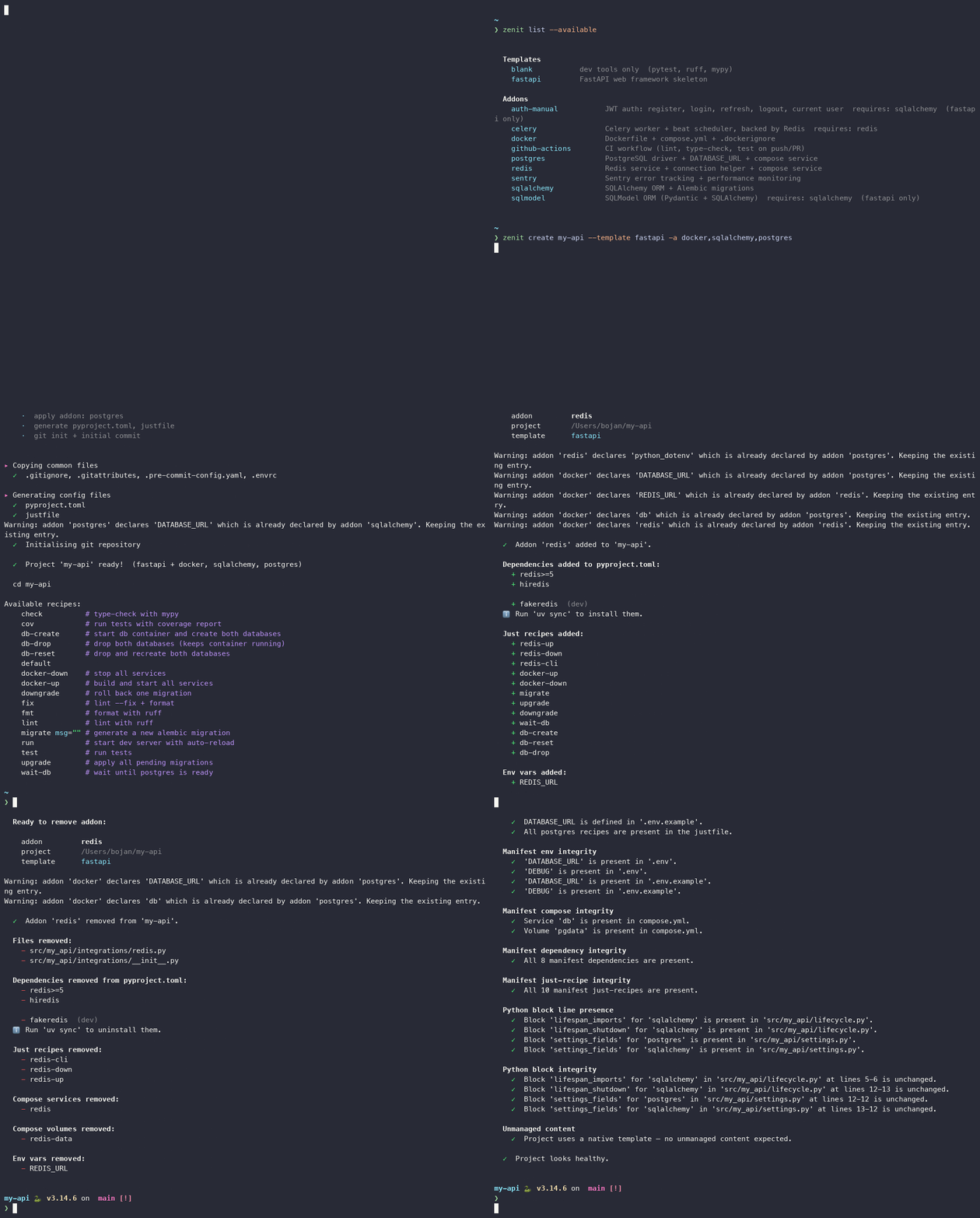
Create a project non-interactively, then add and remove addons later:
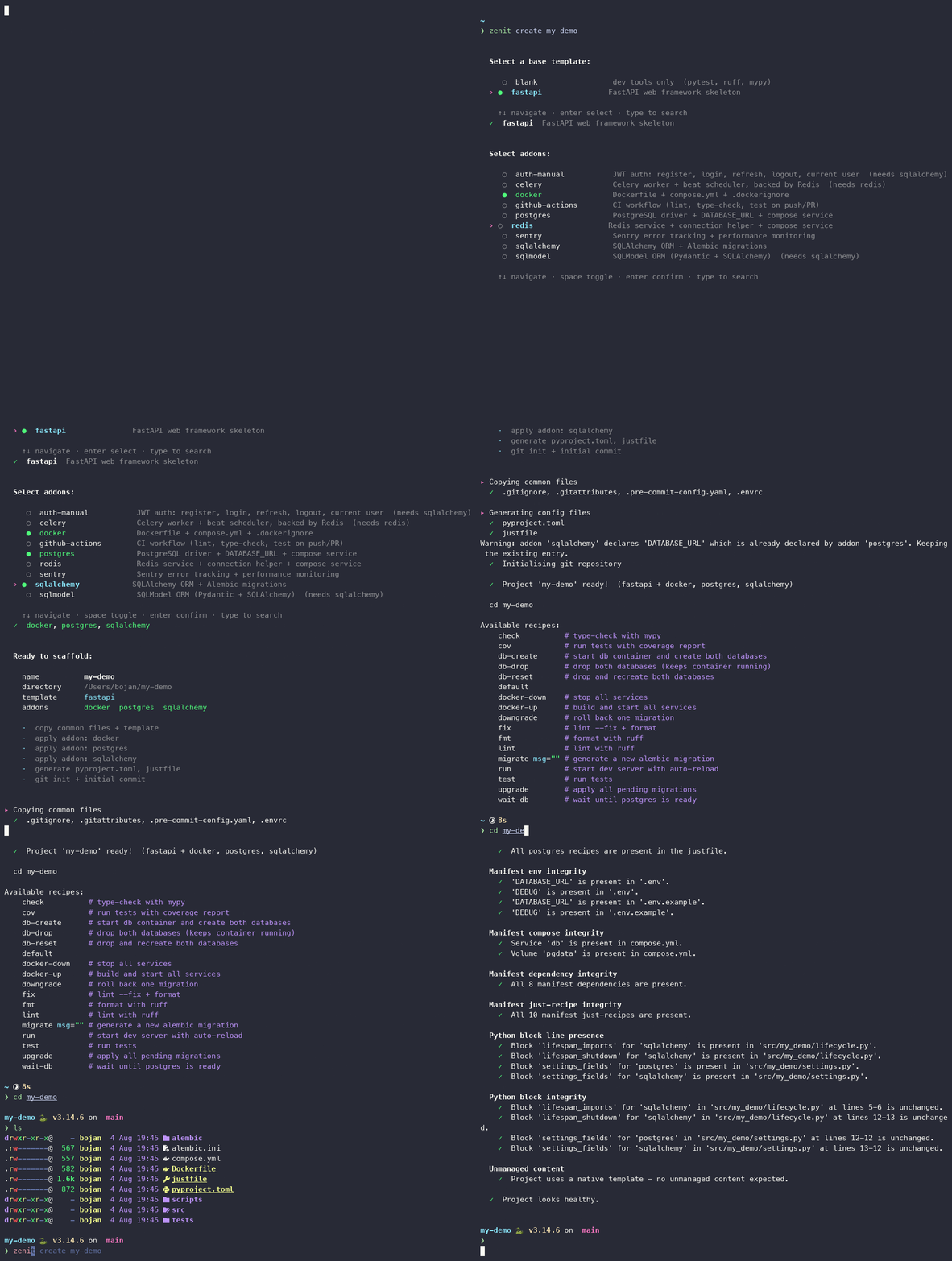
The interactive selector - template first, then addons:
Quick Start
# Install
uv tool install zenit

# Create a project
zenit create my-api

# Add capabilities later
zenit add redis
zenit add auth-manual
Documentation
Full documentation is available at bojankonjevic.github.io/zenit/docs.
- Getting Started - install, create, and run in under five minutes
- Architecture - how the manifest, libcst injection, and declarative addons work
- Commands -
create,add,remove,doctor,list,config,graph,migrate - Templates -
blankandfastapi - Addons - Docker, Redis, Celery, auth, Sentry, GitHub Actions, SQLAlchemy, PostgreSQL, SQLModel
- Contributing - coding standards, tests, and how to submit changes
Studio
Explore templates, browse addons, inspect their files and dependencies, and build commands visually - all in your browser.
bojankonjevic.github.io/zenit/studio/
Why Zenit?
- No lock-in - generated projects have zero runtime dependency on Zenit
- Clean removal -
zenit remove <addon>undoes every file, injection, and dependency - Declarative addons - addons describe what they add, not arbitrary scripts
- Structural injection - libcst-based code injection that survives formatting
- Fingerprint tracking - every injected block is hashed so removal is exact
- Copier migration -
zenit migrateimports any Copier template into a Zenit-managed project - Dependency graph -
zenit graphrenders addon dependencies in the terminal or as DOT/JSON
License
1 maintainer

Metadata
1 maintainer
Release files for zenit 1.1.1
For a detailed explanation of source distributions (sdists) and built distributions (wheels), please see the package formats documentation.
Source distribution (sdist)
| File | Size | Uploaded | Provenance | Actions |
|---|---|---|---|---|
| zenit-1.1.1.tar.gz | 245.0 kB | Without provenance | Details for zenit-1.1.1.tar.gz |
Built distribution (wheel)
| File | Interpreter | ABI | Platform | Actions Reset |
|---|---|---|---|---|
| zenit-1.1.1-py3-none-any.whl | Python 3 | none | any | Details for zenit-1.1.1-py3-none-any.whl |
Total release size: 568.3 kB
Release files / zenit-1.1.1.tar.gz
| Download URL | zenit-1.1.1.tar.gz |
|---|---|
| Size | 245.0 kB |
| Tags | Source |
|
SHA-256 checksum How to use checksums |
15438c00b3b65a5cd5049830921189410434c4bc3e3da2fe1fa4991cfa6d29b1
|
|
BLAKE2b-256 checksum How to use checksums |
031525c6a788f14977b6932bdcfdc344789050f54fc488a9424a3288faa7f9d1
|
| Upload date | |
|
Uploaded using Trusted Publishing? What is trusted publishing? |
No |
| Uploaded via |
uv/0.12.0 {"installer":{"name":"uv","version":"0.12.0","subcommand":["publish"]},"python":null,"implementation":{"name":null,"version":null},"distro":{"name":"macOS","version":null,"id":null,"libc":null},"system":{"name":null,"release":null},"cpu":null,"openssl_version":null,"setuptools_version":null,"rustc_version":null,"ci":null}
|
Release files / zenit-1.1.1-py3-none-any.whl
| Download URL | zenit-1.1.1-py3-none-any.whl |
|---|---|
| Size | 323.3 kB |
| Tags | Python 3 |
|
SHA-256 checksum How to use checksums |
7dc8f3d7af924f17565343e3aa4e70c9f713bf455720e6d1fcabee4ddd85e273
|
|
BLAKE2b-256 checksum How to use checksums |
5d60dbf5907c8187cdfae5a51d971427b4cadddce2d336d8e437f8e68b81ca85
|
| Upload date | |
|
Uploaded using Trusted Publishing? What is trusted publishing? |
No |
| Uploaded via |
uv/0.12.0 {"installer":{"name":"uv","version":"0.12.0","subcommand":["publish"]},"python":null,"implementation":{"name":null,"version":null},"distro":{"name":"macOS","version":null,"id":null,"libc":null},"system":{"name":null,"release":null},"cpu":null,"openssl_version":null,"setuptools_version":null,"rustc_version":null,"ci":null}
|
Security for zenit 1.1.1
Provenance
Provenance describes where a file came from. On PyPI, provenance is shared via attestations, which provide a verifiable record of the build or publishing details. View details, limitations and caveats.
No provenance found
None of the files in this release were uploaded with provenance metadata.
A note on package security
PyPI is a repository for distributing packages, not a service for auditing them. While third-party security researchers and our staff do their best to detect and remove malicious packages, PyPI cannot guarantee the quality, security or suitability of any given package.
To learn more about protecting yourself from malicious actors, visit our package security documentation.














