
zenit
Scaffold Python projects without lock-in. Add what you need. Remove cleanly.




Zenit is a CLI that scaffolds Python projects from declarative templates and addons, then keeps managing them over time. Generate a FastAPI app, add Redis later with one command, remove it just as cleanly. Generated code has zero runtime dependency on Zenit. Delete .zenit.toml and the project keeps working exactly the same.
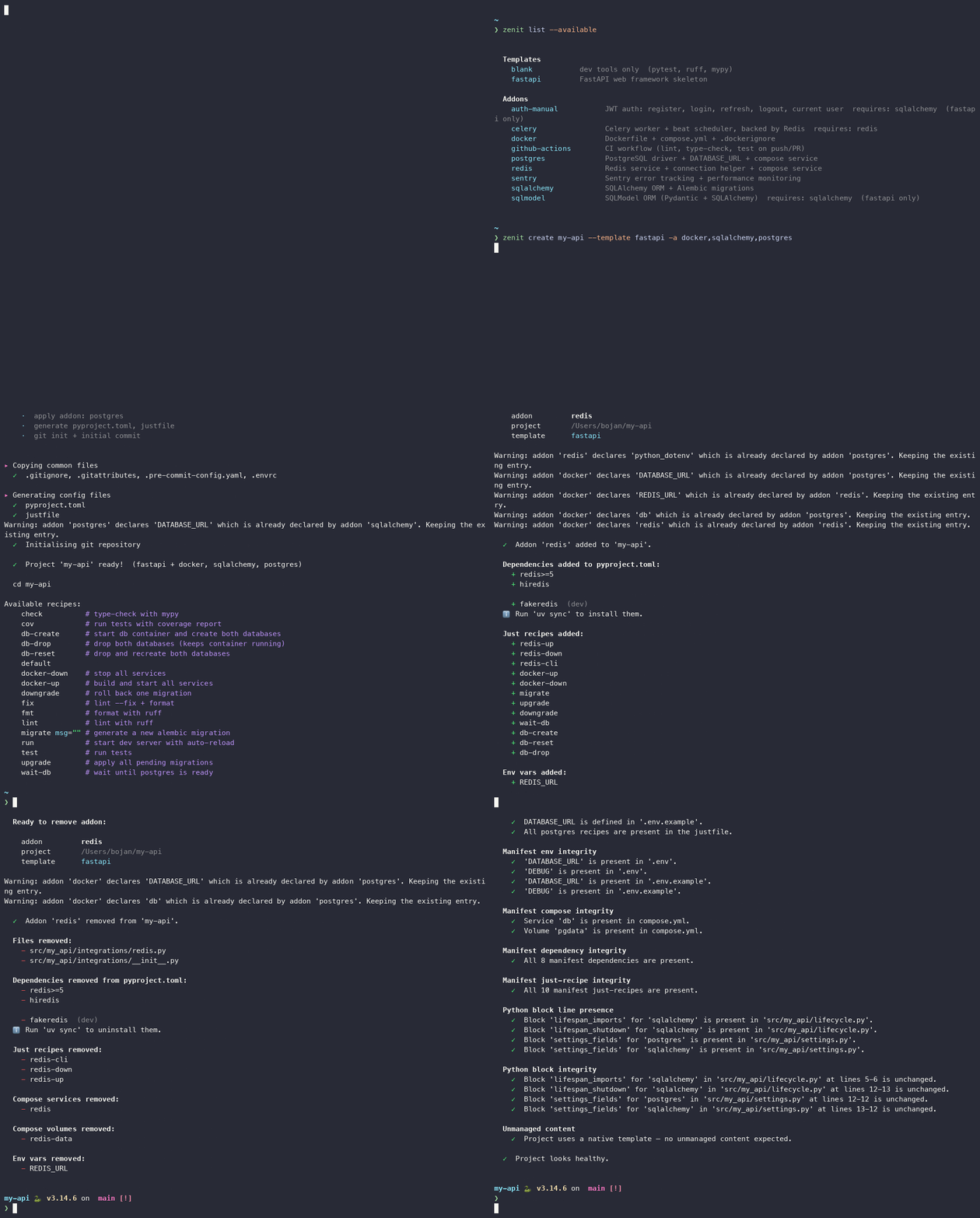
Quick Start
# Install
uv tool install zenit

# Create a project
zenit create my-api

# Add capabilities later
zenit add redis
zenit add auth-manual

# Change your mind cleanly
zenit remove redis

# Check project health
zenit doctor
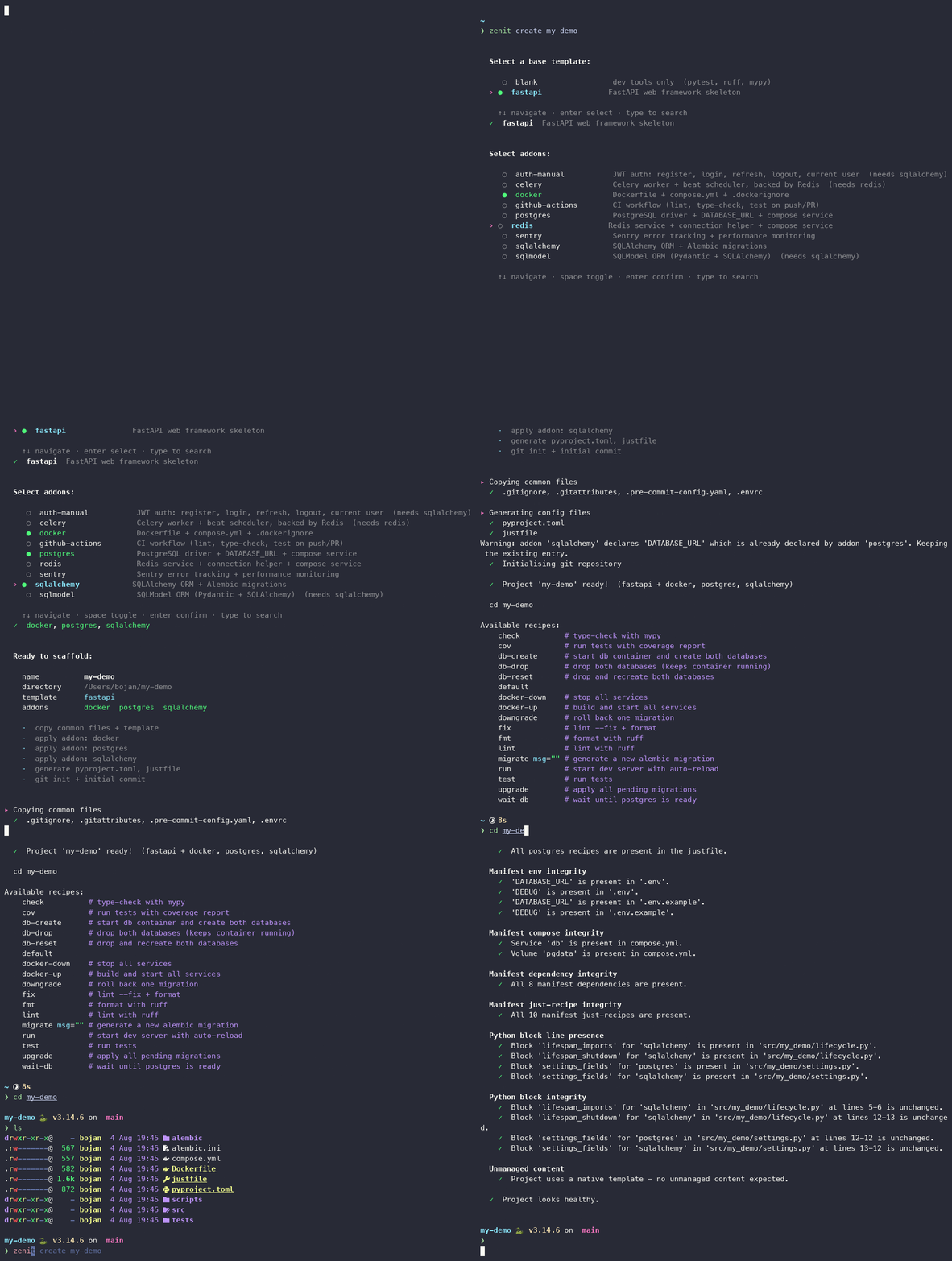
Prefer prompts? zenit create my-api walks you through template and addon selection interactively:
Features
| Feature | What it means |
|---|---|
| No lock-in | Generated projects never import Zenit; deleting .zenit.toml leaves working code |
| Clean removal | zenit remove <addon> undoes every file, injection, and dependency |
| Declarative addons | Addons describe what they add, never run install scripts |
| Structural injection | libcst based code edits that survive formatting and comments |
| Fingerprint tracking | Every injected block is hashed so removal finds exactly that block |
| Atomic writes | Multi file applies land together or roll back, never half applied |
| Dry run everywhere | Preview every change before it touches disk |
| Dependency graph | zenit graph renders addon dependencies in the terminal or as DOT/JSON |
| Per addon health checks | zenit doctor verifies each addon is intact |
| Copier migration | zenit migrate imports any Copier template into a Zenit managed project |
Templates and addons
Two templates: blank (minimal package) and fastapi (app with SQLAlchemy and Alembic). Nine addons layer on top, at creation time or later with zenit add:
| Addon | Adds | Requires |
|---|---|---|
docker |
Dockerfile, compose.yml, .dockerignore | |
postgres |
PostgreSQL driver, DATABASE_URL, compose service | |
redis |
Redis service, connection helper, compose service | |
sqlalchemy |
SQLAlchemy ORM, Alembic migrations | |
sqlmodel |
SQLModel ORM (Pydantic plus SQLAlchemy) | sqlalchemy |
auth-manual |
JWT auth: register, login, refresh, logout, current user | sqlalchemy |
celery |
Celery worker plus beat scheduler, backed by Redis | redis |
sentry |
Sentry error tracking plus performance monitoring | |
github-actions |
CI workflow (lint, type check, test on push and PR) |
Dependency conflicts are resolved with topological sort before anything is written.
How it works
template files + addon manifests
        |
        v
  manifest (.zenit.toml)      records what owns every block
        |
        v
  handlers                    python (libcst) / toml / yaml / env / justfile
        |
        v
  your project files          plain code, no Zenit imports
Three mechanisms, each tracked separately in .zenit.toml:
- File writes. Jinja renders the file, the manifest stores path plus content hash. On removal the file is deleted only if the hash still matches. If you edited it, Zenit warns first.
- Dependency edits.
pyproject.tomlis edited with tomlkit, preserving formatting and comments. Each package is tagged with its owning addon and removed with it. - Code injection. The Python handler parses with libcst, finds the anchor structurally (settings field, lifespan hook, router list), splices in the block, and stores a fingerprint. Removal runs four stages in order: exact fingerprint match, normalized match, locator relocation if you moved the code, fuzzy match at 0.85 as last resort.
Zenit vs Cookiecutter vs Copier
| Cookiecutter | Copier | Zenit | |
|---|---|---|---|
| Scaffold a project | Yes | Yes | Yes |
Manage it afterward (add / remove) |
No | Partial (update and re-migrate) | Yes |
| Remove one capability cleanly | No | No (manual) | Yes, fingerprint based |
| Structural code edits (AST, not regex) | No | No | Yes, libcst |
| Failed apply rolls back | No | No | Yes, batch snapshots |
| Declarative, script free addons | n/a | No (tasks run code) | Yes |
Cookiecutter renders once and walks away. Copier adds updates on top of that model. Zenit treats scaffolding as day one of project management: everything it adds stays removable.
Studio
Browse templates, inspect addons with their files and dependencies, and build commands visually in the browser: bojankonjevic.github.io/zenit/studio/
Example output
A FastAPI project generated by v1.1.2 with Docker, SQLAlchemy, Postgres, and Redis:
zenit create demo-api --template fastapi -a docker,sqlalchemy,postgres,redis
Documentation
Full docs at bojankonjevic.github.io/zenit/docs:
- Getting Started - install, create, and run in under five minutes
- Architecture - manifest, libcst injection, and rollback
- Commands -
create,add,remove,doctor,list,config,graph,migrate - Templates -
blankandfastapi - Addons - all nine, plus how to write your own
- Contributing - standards, tests, and PR process
Status
Published on PyPI at v1.1.2. Strict mypy, ruff clean, 1,300+ tests green in CI on Ubuntu and Windows across Python 3.12 to 3.14. See CHANGELOG.
License
1 maintainer

Metadata
1 maintainer
Release files for zenit 1.1.2
For a detailed explanation of source distributions (sdists) and built distributions (wheels), please see the package formats documentation.
Source distribution (sdist)
| File | Size | Uploaded | Provenance | Actions |
|---|---|---|---|---|
| zenit-1.1.2.tar.gz | 250.9 kB | Without provenance | Details for zenit-1.1.2.tar.gz |
Built distribution (wheel)
| File | Interpreter | ABI | Platform | Actions Reset |
|---|---|---|---|---|
| zenit-1.1.2-py3-none-any.whl | Python 3 | none | any | Details for zenit-1.1.2-py3-none-any.whl |
Total release size: 577.0 kB
Release files / zenit-1.1.2.tar.gz
| Download URL | zenit-1.1.2.tar.gz |
|---|---|
| Size | 250.9 kB |
| Tags | Source |
|
SHA-256 checksum How to use checksums |
5e84c8c48ed0ceaaf5b02ea080c5a6418a89f11cff7ed54426d208d4a56e08f9
|
|
BLAKE2b-256 checksum How to use checksums |
d22329b54a84a57a0617cb8980685bab27e390f261a905ebba880fec3de6308b
|
| Upload date | |
|
Uploaded using Trusted Publishing? What is trusted publishing? |
No |
| Uploaded via |
uv/0.12.5 {"installer":{"name":"uv","version":"0.12.5","subcommand":["publish"]},"python":null,"implementation":{"name":null,"version":null},"distro":{"name":"macOS","version":null,"id":null,"libc":null},"system":{"name":null,"release":null},"cpu":null,"openssl_version":null,"setuptools_version":null,"rustc_version":null,"ci":null}
|
Release files / zenit-1.1.2-py3-none-any.whl
| Download URL | zenit-1.1.2-py3-none-any.whl |
|---|---|
| Size | 326.1 kB |
| Tags | Python 3 |
|
SHA-256 checksum How to use checksums |
8dcd89dd2c310b64835918f6eb695af076e8bbd7bc15a57d8324f08071808a37
|
|
BLAKE2b-256 checksum How to use checksums |
a9e74ddd4099cf3a38d979635a72456b8700a4056b9af0947c1f99ebfc5b86fd
|
| Upload date | |
|
Uploaded using Trusted Publishing? What is trusted publishing? |
No |
| Uploaded via |
uv/0.12.5 {"installer":{"name":"uv","version":"0.12.5","subcommand":["publish"]},"python":null,"implementation":{"name":null,"version":null},"distro":{"name":"macOS","version":null,"id":null,"libc":null},"system":{"name":null,"release":null},"cpu":null,"openssl_version":null,"setuptools_version":null,"rustc_version":null,"ci":null}
|
Security for zenit 1.1.2
Provenance
Provenance describes where a file came from. On PyPI, provenance is shared via attestations, which provide a verifiable record of the build or publishing details. View details, limitations and caveats.
No provenance found
None of the files in this release were uploaded with provenance metadata.
A note on package security
PyPI is a repository for distributing packages, not a service for auditing them. While third-party security researchers and our staff do their best to detect and remove malicious packages, PyPI cannot guarantee the quality, security or suitability of any given package.
To learn more about protecting yourself from malicious actors, visit our package security documentation.














