

Zero setup. Zero config. Local LLMs on any hardware.




What is ZeroLLM?
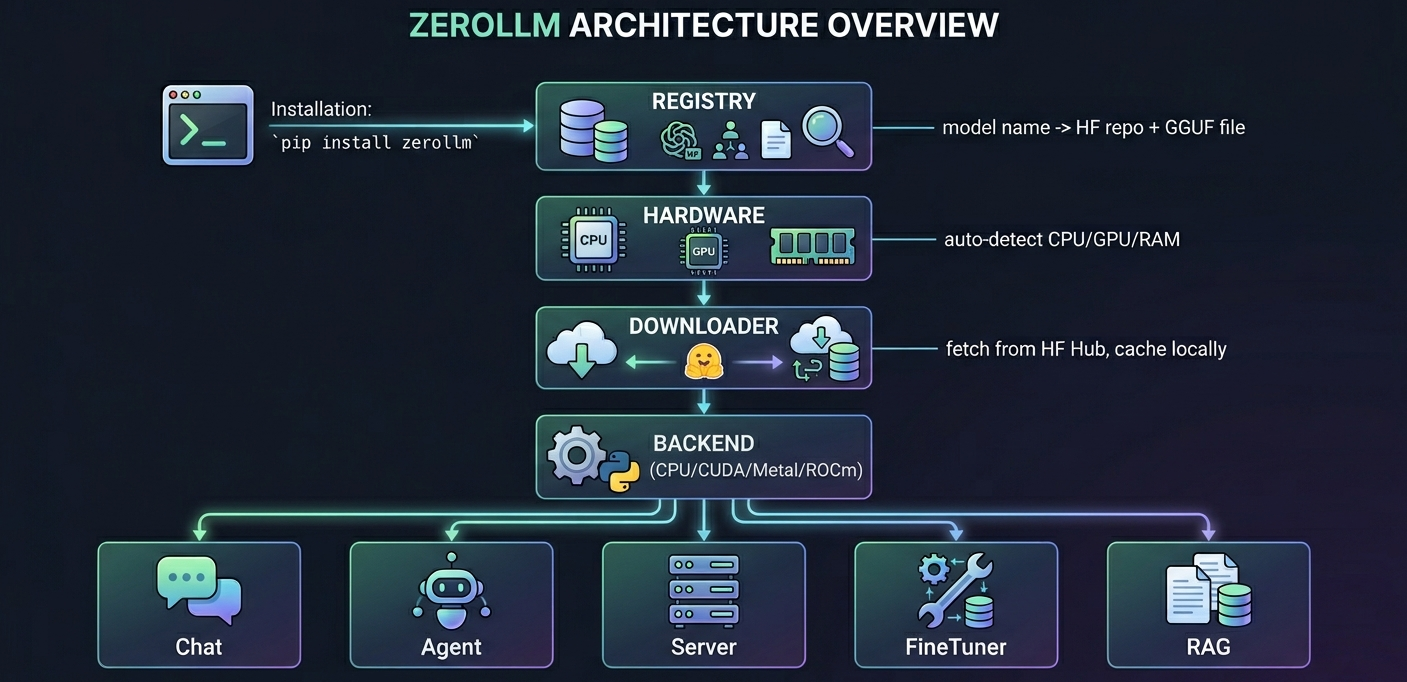
One pip install. Auto-detects your hardware. Downloads the right model. You're chatting in 3 lines of Python.
from zerollm import Chat

bot = Chat("Qwen/Qwen3.5-4B")
print(bot.ask("What is the capital of France?"))
That's it. No config files, no model format headaches, no GPU drivers to manage.
Install
pip install zerollm-kit
Quick Start
Chat
from zerollm import Chat

bot = Chat("Qwen/Qwen3.5-4B")

# Ask
print(bot.ask("Explain quantum computing in one sentence"))

# Stream
for token in bot.stream("Write a haiku about code"):
    print(token, end="", flush=True)

# System prompt — give the bot a personality
bot = Chat("Qwen/Qwen3.5-4B", system_prompt="You are a pirate. Speak like one.")
print(bot.ask("What is the capital of France?"))
Multi-Turn Chat with Memory
from zerollm import Chat

bot = Chat("Qwen/Qwen3.5-4B", memory=True)

bot.ask("My name is Nilesh")
bot.ask("I work on AI projects")
print(bot.ask("What is my name and what do I do?"))
# Remembers: Nilesh, works on AI projects

# Memory auto-summarizes old turns when history gets long
# Persistent memory survives restarts (stored in SQLite)
Agent with Tools
from zerollm import Agent

# Pass instruction prompt to the agent
agent = Agent(
    "Qwen/Qwen3.5-4B",
    system_prompt="You are a helpful assistant. Always be concise.",
)

@agent.tool
def get_weather(city: str) -> str:
    """Get weather for a city."""
    return f"22°C and sunny in {city}"

print(agent.ask("What's the weather in Auckland?"))
Agent with ReAct Reasoning
# ReAct: Thought → Action → Observation → Answer
agent = Agent("Qwen/Qwen3.5-4B", react=True)

@agent.tool
def calculate(expression: str) -> str:
    return str(eval(expression))

agent.ask("What is 15% of 230?")  # thinks step-by-step before answering
Agent Guardrails
agent = Agent("Qwen/Qwen3.5-4B")

@agent.before_ask
def block_injection(prompt: str) -> str | None:
    if "ignore previous" in prompt.lower():
        return "Blocked: potential prompt injection."
    return None

@agent.after_ask
def clean_output(response: str) -> str:
    return response.replace("sensitive_data", "***")
Human-in-the-Loop
# Safe tools run automatically
@agent.tool
def search(query: str) -> str:
    return f"Results for: {query}"

# Dangerous tools ask for confirmation first
@agent.tool(confirm=True)
def delete_file(path: str) -> str:
    """Prompts: 'Confirm: Call delete_file({"path": "..."})? [y/N]'"""
    os.remove(path)
    return f"Deleted {path}"
Sub-Agents with Shared Context
from zerollm import Agent, SharedContext

ctx = SharedContext()

# Each sub-agent gets its own instruction prompt
researcher = Agent(
    "Qwen/Qwen3.5-4B",
    name="researcher",
    context=ctx,
    system_prompt="You are a research assistant. Find accurate information.",
)

writer = Agent(
    "Qwen/Qwen3.5-4B",
    name="writer",
    context=ctx,
    system_prompt="You are a skilled writer. Write clear, engaging content.",
)

@researcher.tool
def search(query: str) -> str:
    return f"Results for: {query}"

main = Agent(
    "Qwen/Qwen3.5-4B",
    context=ctx,
    system_prompt="You are a project manager. Delegate research and writing tasks.",
)
main.add_agent("researcher", researcher, "Research any topic")
main.add_agent("writer", writer, "Write content")

# Multi-turn — agent remembers previous conversation
main.ask("Research AI trends and write a summary")
main.ask("Now make it shorter")  # remembers the previous output
Serve as API
from zerollm import Server

Server("Qwen/Qwen3.5-4B", port=8080).serve()
OpenAI-compatible. Works with any client that speaks the OpenAI API.
Fine-Tune
from zerollm import FineTuner

tuner = FineTuner("Qwen/Qwen3.5-4B")
tuner.train("my_data.csv", epochs=3)
tuner.save("my-bot")
Then use your fine-tuned model:
from zerollm import Chat, Server

Chat("my-bot").ask("Hello!")        # chat with it
Server("my-bot", port=8080).serve() # or serve it
RAG
from zerollm import RAG

rag = RAG("Qwen/Qwen3.5-4B")
rag.add("docs.pdf")
print(rag.ask("What is the refund policy?"))
With cross-encoder reranking for better results:
rag = RAG("Qwen/Qwen3.5-4B", rerank=True)
Conversation-aware — follow-up questions just work:
rag.chat("What is the refund policy?")
rag.chat("How long do I have?")  # auto-rewrites using chat history
Connect RAG to an Agent:
agent = Agent("Qwen/Qwen3.5-4B")
agent.add_rag(rag, "Search company documents")
agent.ask("What does our policy say about returns?")
Powered by SQLite + sqlite-vec hybrid search. No external database needed.
CLI
zerollm chat Qwen/Qwen3.5-4B    # interactive chat
zerollm serve Qwen/Qwen3.5-4B   # start API server
zerollm list                     # show downloaded models
zerollm doctor                   # diagnose setup
zerollm download Qwen/Qwen3.5-4B  # pre-download a model
Supported Hardware
| Platform | Acceleration | Auto-detected |
|---|---|---|
| Any CPU | PyTorch | Yes |
| NVIDIA GPU | CUDA | Yes |
| Apple Silicon | MPS | Yes |
| AMD GPU | ROCm | Yes |
Models
Works with any model from HuggingFace. Just pass the HF repo name:
Chat("Qwen/Qwen3.5-4B")                            # any HF model
Chat("microsoft/Phi-3-mini-4k-instruct")            # another model
Chat("deepseek-ai/DeepSeek-R1-Distill-Qwen-1.5B")  # reasoning model
Chat("/path/to/local-model/")                        # local model directory
Chat("my-finetuned-bot")                             # fine-tuned model
Run zerollm list to see downloaded models, or zerollm doctor to check your setup.
Architecture
Note
ZeroLLM is in early alpha. Things will break, APIs may change, and not every HuggingFace model will work perfectly. That's expected — we're iterating fast.
HuggingFace login: ZeroLLM downloads models from HuggingFace Hub. Public models work without login, but you may see rate limit warnings. For faster downloads, log in once:
pip install huggingface_hub
huggingface-cli login
Or set a token:
export HF_TOKEN="hf_..."(get one here)Feedback welcome. If you hit an issue or have ideas, open an issue. Your feedback shapes what this becomes.
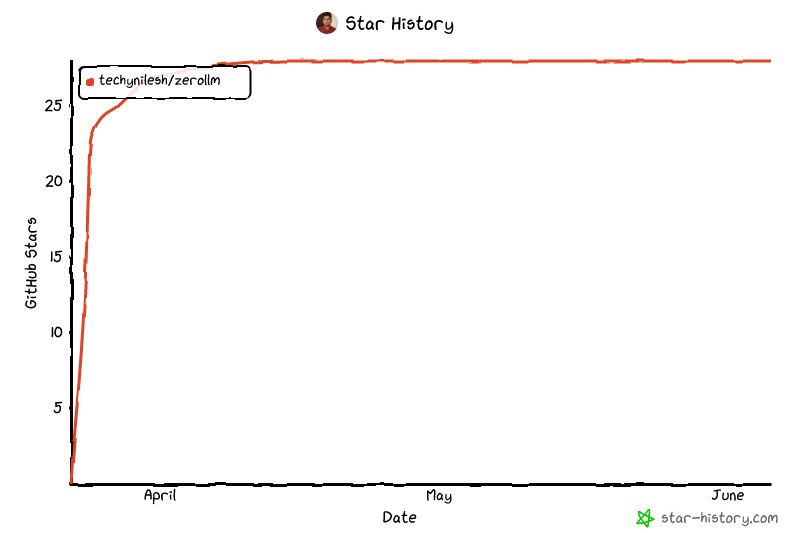
Star History
License
Core Contributor
1 maintainer

Download files
Download the file for your platform. If you're not sure which to choose, learn more about installing packages.
Source Distribution
Built Distribution
Filter files by name, interpreter, ABI, and platform.
If you're not sure about the file name format, learn more about wheel file names.
Copy a direct link to the current filters
File details
Details for the file zerollm_kit-0.1.8.tar.gz.
File metadata
- Download URL: zerollm_kit-0.1.8.tar.gz
- Upload date:
- Size: 1.7 MB
- Tags: Source
- Uploaded using Trusted Publishing? No
- Uploaded via:
uv/0.9.26 {"installer":{"name":"uv","version":"0.9.26","subcommand":["publish"]},"python":null,"implementation":{"name":null,"version":null},"distro":{"name":"macOS","version":null,"id":null,"libc":null},"system":{"name":null,"release":null},"cpu":null,"openssl_version":null,"setuptools_version":null,"rustc_version":null,"ci":null}
File hashes
| Algorithm | Hash digest | |
|---|---|---|
| SHA256 |
0df2a000efc83be122cee56bfc5189173c955ea0920f199ebf927a7241e40940
|
|
| MD5 |
70a69ff61531d0ba4b8a1b0787fc60c7
|
|
| BLAKE2b-256 |
948761d5c3bd8566736c5b7d6699bf273ff8feb2f9276ff5c1ad6b75b66b5913
|
File details
Details for the file zerollm_kit-0.1.8-py3-none-any.whl.
File metadata
- Download URL: zerollm_kit-0.1.8-py3-none-any.whl
- Upload date:
- Size: 40.8 kB
- Tags: Python 3
- Uploaded using Trusted Publishing? No
- Uploaded via:
uv/0.9.26 {"installer":{"name":"uv","version":"0.9.26","subcommand":["publish"]},"python":null,"implementation":{"name":null,"version":null},"distro":{"name":"macOS","version":null,"id":null,"libc":null},"system":{"name":null,"release":null},"cpu":null,"openssl_version":null,"setuptools_version":null,"rustc_version":null,"ci":null}
File hashes
| Algorithm | Hash digest | |
|---|---|---|
| SHA256 |
aab4ebfa82b78c0e4237903753fd950c0899ff34b044e13961632970c9f5aebf
|
|
| MD5 |
662ad56f68478a34e05864b907b48c3f
|
|
| BLAKE2b-256 |
ff81537948279fc387a705c333867cd3ada51ef36b07d348d9f86326e18e4141
|














