
Zero setup, zero config — the easiest Python API for local LLMs on any hardware

Project description

Zero setup. Zero config. Local LLMs on any hardware.




What is ZeroLLM?
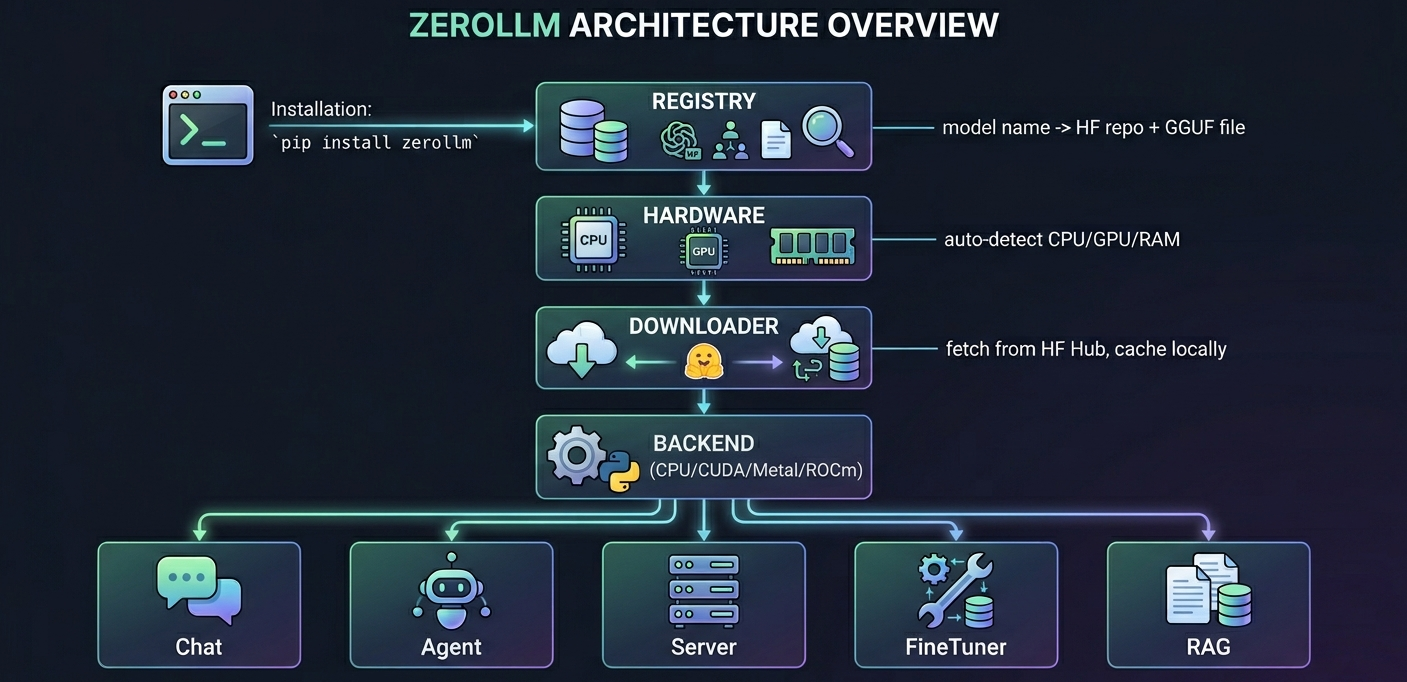
One pip install. Auto-detects your hardware. Downloads the right model. You're chatting in 3 lines of Python.
from zerollm import Chat

bot = Chat("Qwen/Qwen3-0.6B")
print(bot.ask("What is the capital of France?"))
That's it. No config files, no model format headaches, no GPU drivers to manage.
Install
pip install zerollm-kit
Quick Start
Chat
from zerollm import Chat

bot = Chat("Qwen/Qwen3-0.6B")

# Ask
print(bot.ask("Explain quantum computing in one sentence"))

# Stream
for token in bot.stream("Write a haiku about code"):
    print(token, end="", flush=True)

# Interactive REPL
bot.chat()
Agent with Tools
from zerollm import Agent

agent = Agent("Qwen/Qwen3-0.6B")

@agent.tool
def get_weather(city: str) -> str:
    """Get weather for a city."""
    return f"22°C and sunny in {city}"

print(agent.ask("What's the weather in Auckland?"))
Sub-Agents
researcher = Agent("Qwen/Qwen3-1.7B", name="researcher")

@researcher.tool
def search(query: str) -> str:
    return f"Results for: {query}"

main = Agent("Qwen/Qwen3-0.6B")
main.add_agent("researcher", researcher, "Research any topic")

main.ask("Research the latest AI trends")
Serve as API
from zerollm import Server

Server("Qwen/Qwen3-0.6B", port=8080).serve()
OpenAI-compatible. Works with any client that speaks the OpenAI API.
Fine-Tune
from zerollm import FineTuner

tuner = FineTuner("Qwen/Qwen3-0.6B")
tuner.train("my_data.csv", epochs=3)
tuner.save("my-bot")
Then serve your fine-tuned model:
from zerollm import Chat, Server

Chat("my-bot").ask("Hello!")        # chat with it
Server("my-bot", port=8080).serve() # or serve it
RAG
from zerollm import RAG

rag = RAG("Qwen/Qwen3-0.6B")
rag.add("docs.pdf")
print(rag.ask("What is the refund policy?"))
Powered by SQLite + sqlite-vec. No external database needed.
CLI
zerollm recommend                                          # best model for your hardware
zerollm chat Qwen/Qwen3-0.6B          # interactive chat
zerollm serve Qwen/Qwen3-0.6B         # start API server
zerollm list                                               # all available models
zerollm doctor                                             # diagnose setup
Supported Hardware
| Platform | Acceleration | Auto-detected |
|---|---|---|
| Any CPU | llama.cpp | Yes |
| NVIDIA GPU | CUDA | Yes |
| Apple Silicon | Metal | Yes |
| AMD GPU | ROCm | Yes |
| Raspberry Pi | CPU | Yes |
Models
Works with any GGUF model from Hugging Face. Pass the full HF model name or a local .gguf file:
Chat("Qwen/Qwen3-0.6B")  # from registry
Chat("/path/to/any-model.gguf")                # local file
Chat("my-finetuned-bot")                       # your fine-tuned model
Run zerollm list to see curated models, or zerollm recommend to find the best one for your hardware.
Architecture
License
Core Contributor
Release history Release notifications | RSS feed


Download files
Download the file for your platform. If you're not sure which to choose, learn more about installing packages.
Source Distribution
Built Distribution
Filter files by name, interpreter, ABI, and platform.
If you're not sure about the file name format, learn more about wheel file names.
Copy a direct link to the current filters
File details
Details for the file zerollm_kit-0.1.3.tar.gz.
File metadata
- Download URL: zerollm_kit-0.1.3.tar.gz
- Upload date:
- Size: 1.4 MB
- Tags: Source
- Uploaded using Trusted Publishing? No
- Uploaded via: uv/0.9.26 {"installer":{"name":"uv","version":"0.9.26","subcommand":["publish"]},"python":null,"implementation":{"name":null,"version":null},"distro":{"name":"macOS","version":null,"id":null,"libc":null},"system":{"name":null,"release":null},"cpu":null,"openssl_version":null,"setuptools_version":null,"rustc_version":null,"ci":null}
File hashes
| Algorithm | Hash digest | |
|---|---|---|
| SHA256 |
fc7b53ecc0fdefa20d7e14957db47c2a062091af9669010a8d03254940c71b26
|
|
| MD5 |
24b01e1d129486ac07589d439e273375
|
|
| BLAKE2b-256 |
c38b9e80f6ad23e2f9e19b735369964e39fa7eafd6100ddc81dfef0451ff7a8b
|
File details
Details for the file zerollm_kit-0.1.3-py3-none-any.whl.
File metadata
- Download URL: zerollm_kit-0.1.3-py3-none-any.whl
- Upload date:
- Size: 33.2 kB
- Tags: Python 3
- Uploaded using Trusted Publishing? No
- Uploaded via: uv/0.9.26 {"installer":{"name":"uv","version":"0.9.26","subcommand":["publish"]},"python":null,"implementation":{"name":null,"version":null},"distro":{"name":"macOS","version":null,"id":null,"libc":null},"system":{"name":null,"release":null},"cpu":null,"openssl_version":null,"setuptools_version":null,"rustc_version":null,"ci":null}
File hashes
| Algorithm | Hash digest | |
|---|---|---|
| SHA256 |
0a90aad1d12dbe949d47cfceb85dbd19b987389413f99f5cff507b65051cc4bd
|
|
| MD5 |
b8a2f39ee43b409522c23ac616d20ed1
|
|
| BLAKE2b-256 |
4ea4849fce974a2c7686695305e640aeb3621d4a0812390f0ecc75ad933ffed9
|






