
ZMK Keymap Generator

Project description
ZKeymap (WIP)
Python DSL for ZMK Keymaps definitions and files generation.
This tool can generate keymaps, transoforms and layouts in json and svg formats.
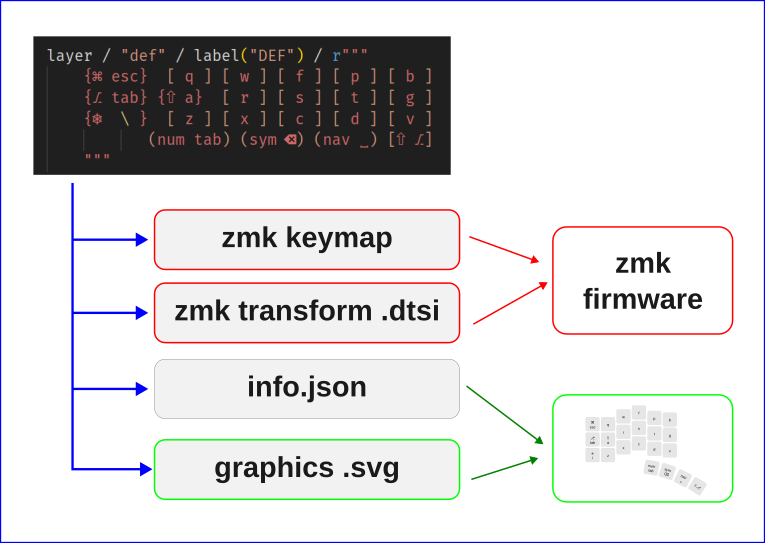
Motivation
While I still prefer text-based layout definitions over graphical editors, devicetree syntax seems overly complicated. As a result, I created this small language to enable easy and pleasant keymap definitions for ZMK, eliminating the need for graphical editors.
Big Note
You can use unicode chars directly as aliases, it looks good and works well but it is totally optional. All aliases are user defined or can be overridden by the user.
Usage
1. Install zkeymap
pip install zkeymap
2. Add a python file to your config directory, for example mykeymap.py
3. Write your keymap in zkeymap language, here is an example mykeymap.py:
# Import zkeymap language artifacts
from zkeymap import (
    alias,
    layer,
    label,
    build_keymap,
    build_transform,
    layout,
    rc,
    keys,     # Import base key definitions
    keys_la,  # Import Language specific keys (Latam)
)

# Define physical layout: left: 6x3+4 right 6x3+4
#--------------------------------------|-----------------------------
layout / [rc,   rc,   rc,  rc, rc, rc,     rc, rc, rc, rc, rc, rc]
layout / [rc,   rc,   rc,  rc, rc, rc,     rc, rc, rc, rc, rc, rc]
layout / [rc,   rc,   rc,  rc, rc, rc,     rc, rc, rc, rc, rc, rc]
layout / [None, None, rc,  rc, rc, rc,     rc, rc, rc, rc]

# Linux unicode composers
uc = keys.UnicodeLinux

# User defined aliases
alias / "cw" /  "&caps_word"
alias / "zw"/ "LC(LA(DOWN))" # Desktop Zoom out (Linux Mint)
alias / "∴" / uc("∴", "∴", name="t3p") # Exotic Unicode char

# Layers -----------------

layer / "def" / label("DEF") / r"""
    {⌘ esc}  [ q ] [ w ] [ f ] [ p ] [ b ]      [ j ] [ l ] [ u ] [ y ] [ acut ]    [ñ]
    {⎇ tab} {⇧ a}  [ r ] [ s ] [ t ] [ g ]      [ m ] [ n ] [ e ] [ i ] {⇧ o}      <cw>
    {⎈  \ }  [ z ] [ x ] [ c ] [ d ] [ v ]      [ k ] [ h ] [ , ] [ . ] [ ; ]     [ ⏎ ]
           (num tab) (sym ⌫) (nav ␣) [⇧ ⎇]      [r⎇] (nav ␣) (sym ⌫) (adj del)
    """

layer / "num" / label("NUM") / r"""
    _____   [ * ] [ 7 ] [ 8 ] [ 9 ] [ / ]      [ / ] [ 7 ] [ 8 ] [ 9 ] [ * ] [ ∴ ]
    [ , ]   [ 0 ] [ 4 ] [ 5 ] [ 6 ] [ - ]      [ - ] [ 4 ] [ 5 ] [ 6 ] [ 0 ] [ , ]
    [ zw ]  [ . ] [ 1 ] [ 2 ] [ 3 ] [ + ]      [ + ] [ 1 ] [ 2 ] [ 3 ] [ . ] _____
                  _____ _____ _____ _____      _____ _____ _____ _____
    """

layer / "sym" / label("SYM1") / r"""
    [ | ]    [ ! ] [ " ] [ # ] [ $ ] [ % ]      [ & ] [ / ] [ [ ] [ \] ] [ = ] [ ? ]
    [ grv ]  [ * ] [ ' ] [ : ] [ _ ] [ - ]      [ - ] [ ( ] [ ) ] [ {  ] [ } ] _____
    [ diae ] [ @ ] [ ~ ] [ ^ ] [ = ] [ + ]      [ + ] [ ' ] [ < ] [ >  ] [ \ ] _____
                   (adj) _____ _____ _____      _____ _____ (num~) _____
    """

layer / "nav" / label("NAV") / r"""
    _____ [ f1 ] [ f2 ] [ f3 ] [ f4 ] [ f5  ]     _____     [ pgup ] [  ↑  ] [ pgdn ] [  f10 ] [ f11 ]
    _____ [ ⇧  ] [ '  ] [ :  ] [ _  ] [ -   ]     [  home ] [   ←  ] [  ↓  ] [   →  ] [  end ] [ f12 ]
    _____ [ f6 ] [ f7 ] [ f8 ] [ f9 ] [ f10 ]     [ ⎈ home] [ ⎈ ←  ]  xxxxx  [ ⎈ →  ] [⎈ end ]  _____
                      _____ _____ _____ _____     _____ _____ _____ _____
    """

layer / "adj" / label("ADJ") / r"""
    <⚙>    _____     _____   _____ _____ _____      _____ _____ _____ _____ _____ <⚙>
    <ᛒclr> <ᛒ0>      <ᛒ1>    <ᛒ2>  <ᛒ3>  <ᛒ4>       <ᛒ4>  <ᛒ3>  <ᛒ2>  <ᛒ1>  <ᛒ0>  <ᛒclr>
    _____  [ nlck ]  <usb/ᛒ> _____ _____ _____      _____ _____ _____ _____ _____ _____
                     _____   _____ _____ _____      _____ _____ _____ _____
    """

# Generate files -------

build_keymap("marz44w_inc.keymap")
build_transform("marz44w_transform_inc.dtsi")
build_layout_json("marz44w_layout.json")
build_layout_svg("marz44w_layout.svg")
4. Generate your devicetree files:
python3 mykeymap.py
That will generate four files as per the example:
| File | Content | Format |
|---|---|---|
| marz44w_inc.keymap | Keymap, macros, dances, encoders | devicetree |
| marz44w_transform_inc.dtsi | zmk,matrix-transform | devicetree |
| marz44w_layout.json | physical layout | QMK info.json |
| marz44w_layout.svg | Graphical layout | svg |
5. Then in your zmk keymap file remove the keymap node and include the generated file example:
#include <behaviors.dtsi>
#include <dt-bindings/zmk/keys.h>
#include <dt-bindings/zmk/bt.h>
#include <dt-bindings/zmk/ext_power.h>
#include <dt-bindings/zmk/outputs.h>
< { quick_tap_ms = <220>; };
&mt { quick_tap_ms = <220>; };
// +------------------------------------+
// | Include the generated keymap here: |
// +------------------------------------+
#include "marz44w_inc.keymap"
6. If you also generate the transform file (optional), then import it into your dtsi. Example:
#include <dt-bindings/zmk/matrix_transform.h>

/ {

    chosen {
        zmk,kscan = &kscan0;
        zmk,matrix_transform = &default_transform;
    };

    // +------------------------------------+
    // | Include the generated keymap here: |
    // +------------------------------------+
    #include "marz44w_transform_inc.dtsi"

    kscan0: kscan {
        compatible = "zmk,kscan-gpio-matrix";
        label = "KSCAN";

        diode-direction = "col2row";
        wakeup-source;

        row-gpios
            = <&pro_micro 4 (GPIO_ACTIVE_HIGH | GPIO_PULL_DOWN)>
            , <&pro_micro 5 (GPIO_ACTIVE_HIGH | GPIO_PULL_DOWN)>
            , <&pro_micro 6 (GPIO_ACTIVE_HIGH | GPIO_PULL_DOWN)>
            , <&pro_micro 7 (GPIO_ACTIVE_HIGH | GPIO_PULL_DOWN)>
            ;

    };


};
Commit and push your changes as usual to built the firmware.
Basic language rules
Everything is based around aliases, you define an alias mapping any char (even unicode chars) to ZML Keys or macros or whatever.
Depending on how you decorate the alias, it will be translated into a specific behavior (<, &mo, &to, &kp, etc...)
Aliases definitions
To define an alias just express it like this:
alias / "alias" / "translation"
Example: define symbol ⌘ as an alias of LGUI:
alias / "⌘" / "LGUI"
Then you can use ⌘ in the keymap as [ ⌘ ] it will be translated to &kp LGUI
Key press (&kp, &sk)
Square brackets syntax [ alias ].
Example:
Where a is an alias and X is the alias resolution
| syntax | compiles to | Notes |
|---|---|---|
| [ a ] | &kp X | Simple case |
| [ shift a ] | &kp LS(X) | With shift mods |
| [ ⎈ a ] | &kp LC(X) | With Ctrl mods |
| [ r⇧ ⎈ a ] | &kp RS(LC(X)) | With RShift+LCtrl mods |
For a sticky key variation, just add ~ at the end and
&kp will be changed to &sk
| syntax | compiles to | Notes |
|---|---|---|
| [ lshift ~] | &sk LSHIFT | One shot/sticky Shift |
Mod-Tap behavior (&mt)
Curly brackets syntax { mod alias }.
Example:
Where a is an alias and X is the alias resolution.
| syntax | compiles to | Notes |
|---|---|---|
| { shift a } | &mt LSHIFT X | hold=lshift, tap=X |
| { ⎈ a } | &mt LCTRL X | hold=lctrl, tap=X |
| { r⇧ a } | &mt RSHIFT X | hold=rshift, tap=X |
Layer based behaviors (<, &mo, &sl, &to, &tog)
Parenthesis syntax ( layer alias ).
Example:
Where LAY is a layer, a is an alias and X is the alias resolution.
| syntax | compiles to | Notes |
|---|---|---|
| ( LAY ) | &mo LAY | momentary layer |
| ( LAY a ) | < LAY X | layer tap LAY and X |
| ( LAY ~ ) | < LAY TILDE | layer tap LAY and ~ |
| ( LAY~ ) | &sl LAY | sticky layer LAY. See the difference with previous |
| ( LAY! ) | &to LAY | absolute layer LAY |
| ( LAY/ ) | &tog LAY | toggle layer LAY |
Raw ZMK stuff
Triangle brackets syntax < whatever >.
Content inside < and > is resolved to raw ZMK code,
if it can be resolved to an alias it will be resolved if not
it will be copied verbatim to the output.
Example:
Where a is an alias and X is the alias resolution.
| syntax | compiles to | Notes |
|---|---|---|
| X | Simple alias resolution | |
| << 1 A> | < 1 A | raw zmk code |
| <&caps_word> | &caps_word | raw zmk code |
| <&kp LCTRL> | &kp LCTRL | raw zmk code |
Macros
Definitions of macros is done using aliases:
alias / "hello" / Macro("[h] [e] [l] [l] [o]")
Then it can be used in a layer:
layer / "def" / r""" <hello> """
Unicode
A special case for Unicode macros allows to define lower and upper variations:
alias / "á" / uc("á", "Á", "Aa")

layer / "def" / r""" [ á ] """
In this case [ á ] will be translated to á on tap and to Á on Shift tap.
Status
This project is quite new and experimental, testers and contributors are welcome.
Key areas of contribution:
- Documentation
- Aliases for different languages/layouts.
- Unit tests
- Reporting bugs
Common Unicode chars for keyboards
| LEFT | RIGHT | UNICODE | DESCRIPTION |
|---|---|---|---|
| ⌘ | r⌘ | u2318 | GUI/Command |
| ⎈ | r⎈ | u2388 | Ctrl |
| ⇧ | r⇧ | u21E7 | Shift |
| ⎇ | r⎇ | u2387 | Alt |
| ⏎ | u23CE | Enter | |
| ␣ | u2423 | Space | |
| ⌫ | u232b | Backspace | |
| ← | u2190 | Arrow Left | |
| ↑ | u2191 | Arrow Up | |
| → | u2192 | Arrow Right | |
| ↓ | u2193 | Arrow Down | |
| ᛒ | u16D2 | Bluetooth | |
| ⇪ | u21EA | CapsLock | |
| 🄰 | u1F130 | CapsLock | |
| ⎙ | u2399 | PrintScreen | |
| ⇄ | u21C4 | Tab | |
| ↖ | u2196 | Home | |
| ↘ | u2198 | End | |
| ⇞ | u21DE | PgUp | |
| ⇟ | u21DF | PgDn | |
| ↶ | u21B6 | Undo | |
| ↷ | u21B7 | Redo | |
| ✂ | u2702 | Cut | |
| ⿻ | u2FFb | Copy | |
| ⧉ | u29c9 | Paste | |
| ⚙ | u2699 | Bootloader |
Release history Release notifications | RSS feed


Download files
Download the file for your platform. If you're not sure which to choose, learn more about installing packages.
Source Distribution
Built Distribution
Filter files by name, interpreter, ABI, and platform.
If you're not sure about the file name format, learn more about wheel file names.
Copy a direct link to the current filters
File details
Details for the file zkeymap-0.1.3.tar.gz.
File metadata
- Download URL: zkeymap-0.1.3.tar.gz
- Upload date:
- Size: 120.3 kB
- Tags: Source
- Uploaded using Trusted Publishing? No
- Uploaded via: uv/0.6.6
File hashes
| Algorithm | Hash digest | |
|---|---|---|
| SHA256 |
17889c278a14956429e9a3b94a23ebddbfb8bafe60c1a77c0bf0e8d7978e5162
|
|
| MD5 |
59adc616dd725dc904edf8cf9c14dfc2
|
|
| BLAKE2b-256 |
a7a7ade7cb59f87c1e725c6f1e953da9542ba6caad0650dd4ec4138704eda232
|
File details
Details for the file zkeymap-0.1.3-py3-none-any.whl.
File metadata
- Download URL: zkeymap-0.1.3-py3-none-any.whl
- Upload date:
- Size: 27.7 kB
- Tags: Python 3
- Uploaded using Trusted Publishing? No
- Uploaded via: uv/0.6.6
File hashes
| Algorithm | Hash digest | |
|---|---|---|
| SHA256 |
d92e137bfcb627750692ea466bf02f7e87a726ec276007ece2d1ea5476f971f1
|
|
| MD5 |
a1c6cf13941a49c35ebd091b0060bf47
|
|
| BLAKE2b-256 |
ca50b8b387d19e64a216acbbdae1dac9c18dc1eebfeedaf48a11dba70552c2a3
|






