

Zohencel-AI





World's First 'Text to ML Model' Chat Application
Zohencel-AI World's first 'Text to ML model' support library. Also comes with an analysis chart bot that plots graphs from your data through queries and a completely customizable AI voice assistant.
This is where the search ends!
HOME PAGE & DOCUMENTATION
What is new?
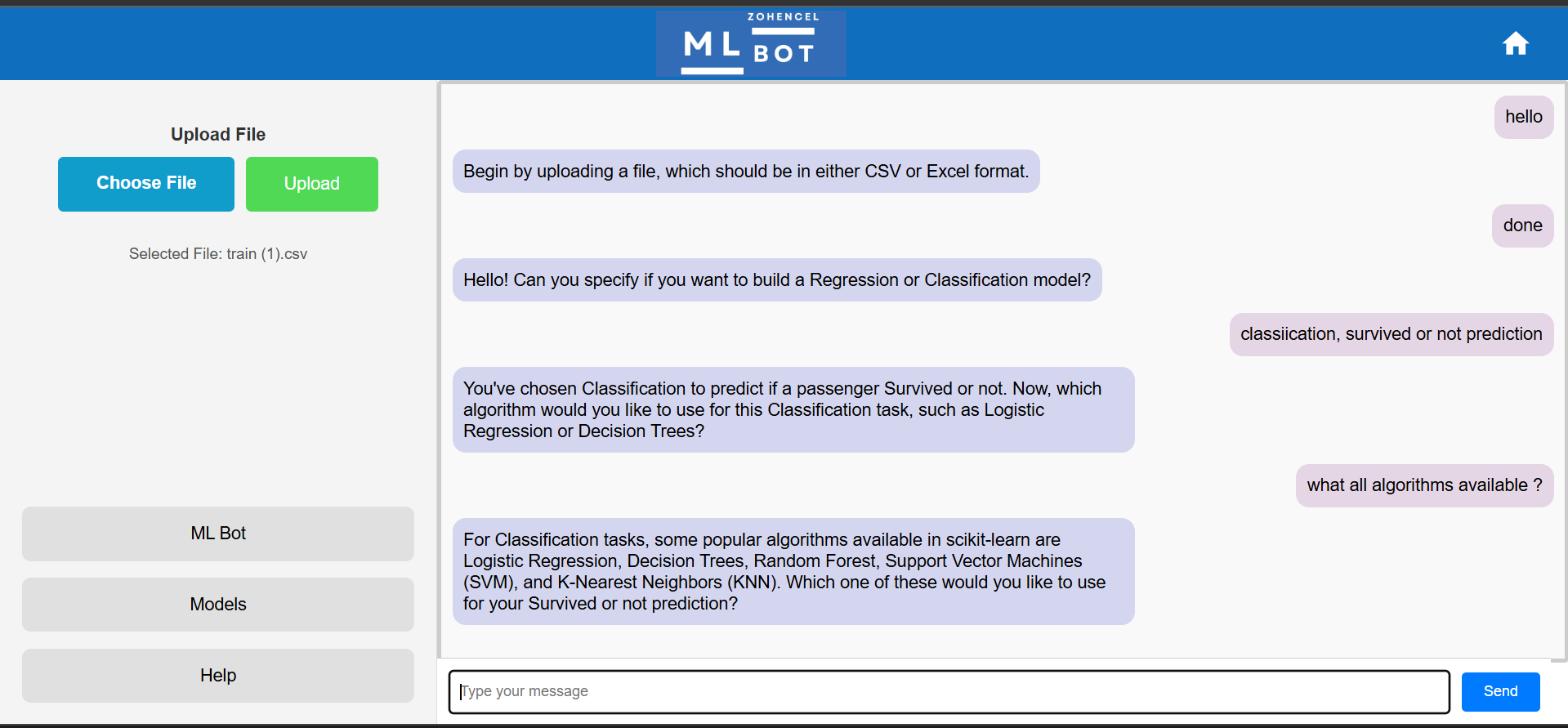
- ML Bot:Zohencel AI ML Bot is a revolutionary tool designed to make building machine learning models as simple as having a conversation. With the ML Bot, even beginners can easily create, train, and deploy machine learning models. The bot not only guides you through the process but also automates all necessary steps to ensure a seamless experience.No worries! ML Bot will interact with you to understand exactly what model you want to build, even if you're a complete beginner. That's not all. Every next step is a surprise!! The bot performs all the necessary statistical analysis, creates a machine learning pipeline, and executes it seamlessly. If this is not revolutionary, then what is? I wish you will wonder, if these features are available in the community edition, what awaits you in the prime edition!
- Get your key now : https://console.groq.com/keys
Key Feature
- ML Bot : A chat bot simplify the ML model development and usage.
- Voice Assistant Tools: Voice assistant in single import.
- Data Analysis: Data analytics tool to visualize and query data in natural language.
Installation
To install zohencel-ai, use the following pip command:
pip install zohencel-ai
1) Zohencel AI - ML Bot (Community Edition)
from zohencel_ai.mlbot.bot import ZohencelmlBot
bot = ZohencelmlBot()
bot.run()
Features
- Interactive Model Creation:
- ML Bot interacts with you to understand your requirements.
- Provides guidance even if you're new to machine learning.
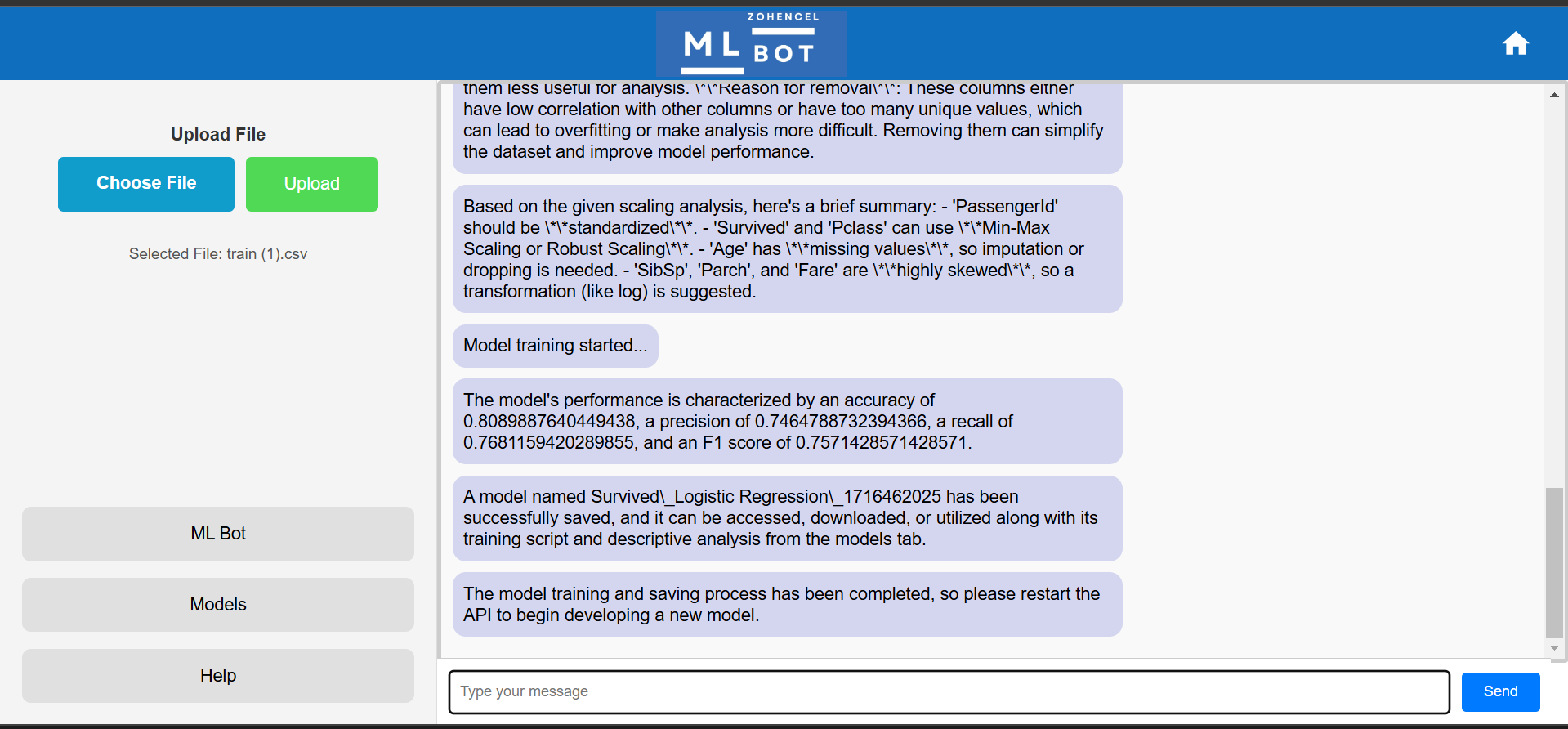
- Automated Statistical Analysis:
- Performs statistical and descriptive analysis of your data.
- Suggests the best practices for model training.
- ML Training Pipeline:
- Automatically creates and executes a machine learning pipeline.
- Handles all necessary data transformations for model training.
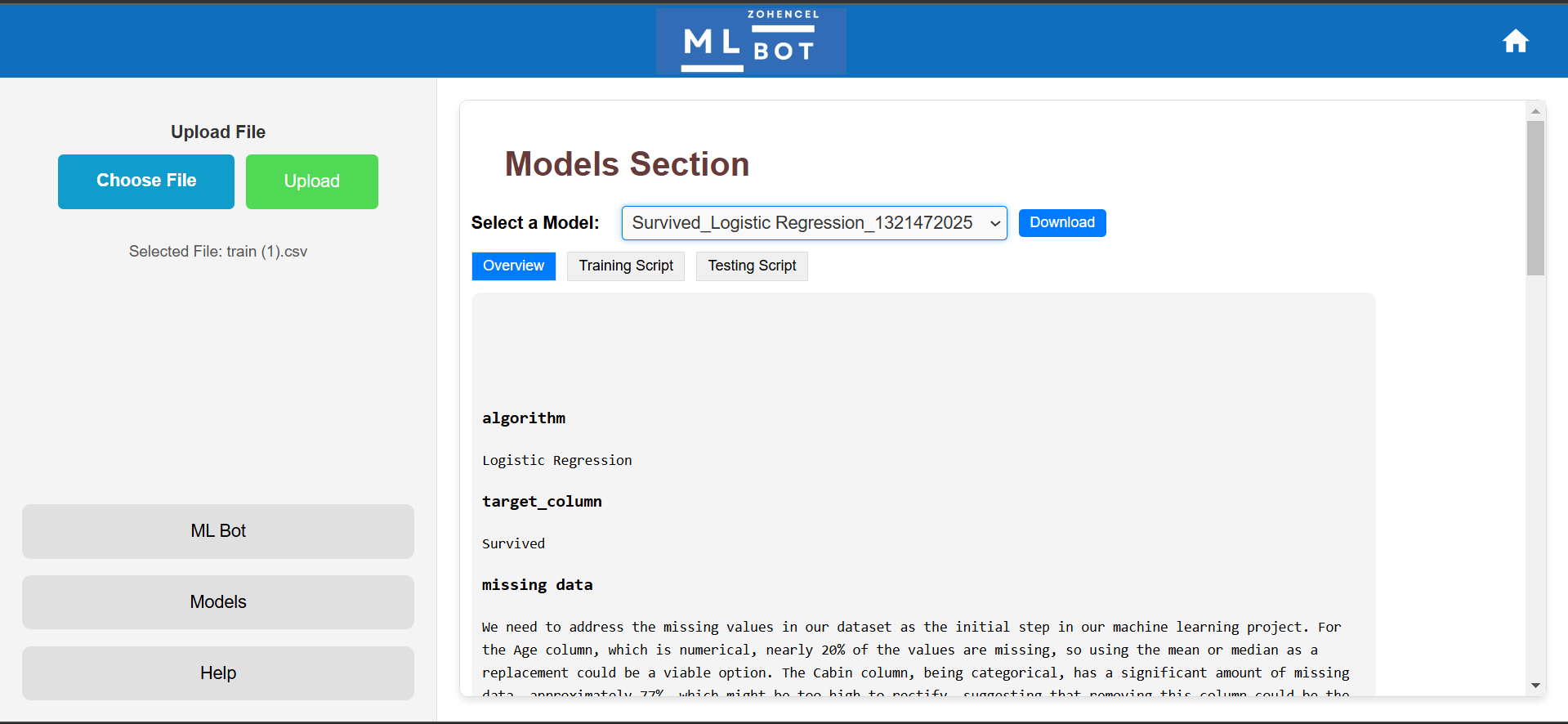
- Model and Script Generation:
- Saves the trained model as a
.pklfile. - Generates training and testing scripts, along with descriptive analysis.
- Provides accuracy metrics and an overview of the trained model.
- Saves the trained model as a
- Downloadable Files:
- Models and associated files can be downloaded anytime from the Models tab.
- Statistical analysis and script content are easily accessible and copiable.
- Portability:
- The generated training data and scripts can be used in other environments.
- The pickle file is ready for API development with the included test script.
Limitations
-
Community Edition:
- Supports only regression and classification problems.
- Works exclusively with scikit-learn algorithms.
- Operates as a local API accessed via the ML Bot Portal.
- Limited by data size and training time.
-
Prime Edition:
- Offers advanced features, including custom training logic and access to a wider range of algorithms.
- Provides enhanced integration capabilities and overcomes limitations of the community edition.
2) AI Voice Assistant
The VoiceAssistant in Zohencel-AI provides a customizable, voice-enabled assistant that listens to user input, processes it, and responds with spoken text. Designed to be adaptable, the assistants attributes—such as name, tone, purpose, and voice type—can be tailored to fit a wide range of use cases, making it suitable for personalized or business-focused applications.
Key Customizations
- Assistant Name: Set a unique name for the assistant, making interactions feel more personalized and relatable.
- User Name: Personalize responses by specifying the user’s name, enhancing engagement.
- Tone and Duty: Define the assistant’s tone and duty with an optional description. For example, set it as a "helpful and friendly guide" or an "informative support assistant" to adjust the assistant's personality.
- Voice Type: Choose between a ‘male’ or ‘female’ voice to best suit the assistant's character and user preferences.
Usage Example
Here's how to configure these options when creating and running your assistant:
from zohencel_ai import VoiceAssistant

# Initialize the VoiceAssistant
assistant = VoiceAssistant()

# Run the assistant with custom settings
assistant.run(
    voice='female',                # Voice type: 'female' or 'male'
    assistant_name='Zohencel',     # Assistant's name
    user_name='Alex',              # User's name for personalized responses
    description='I am here as your friendly and reliable AI guide.'  # Assistant's tone and purpose
)
- all the parameters are optional and you can just run it by calling assistant.run()
3) Chart Bot
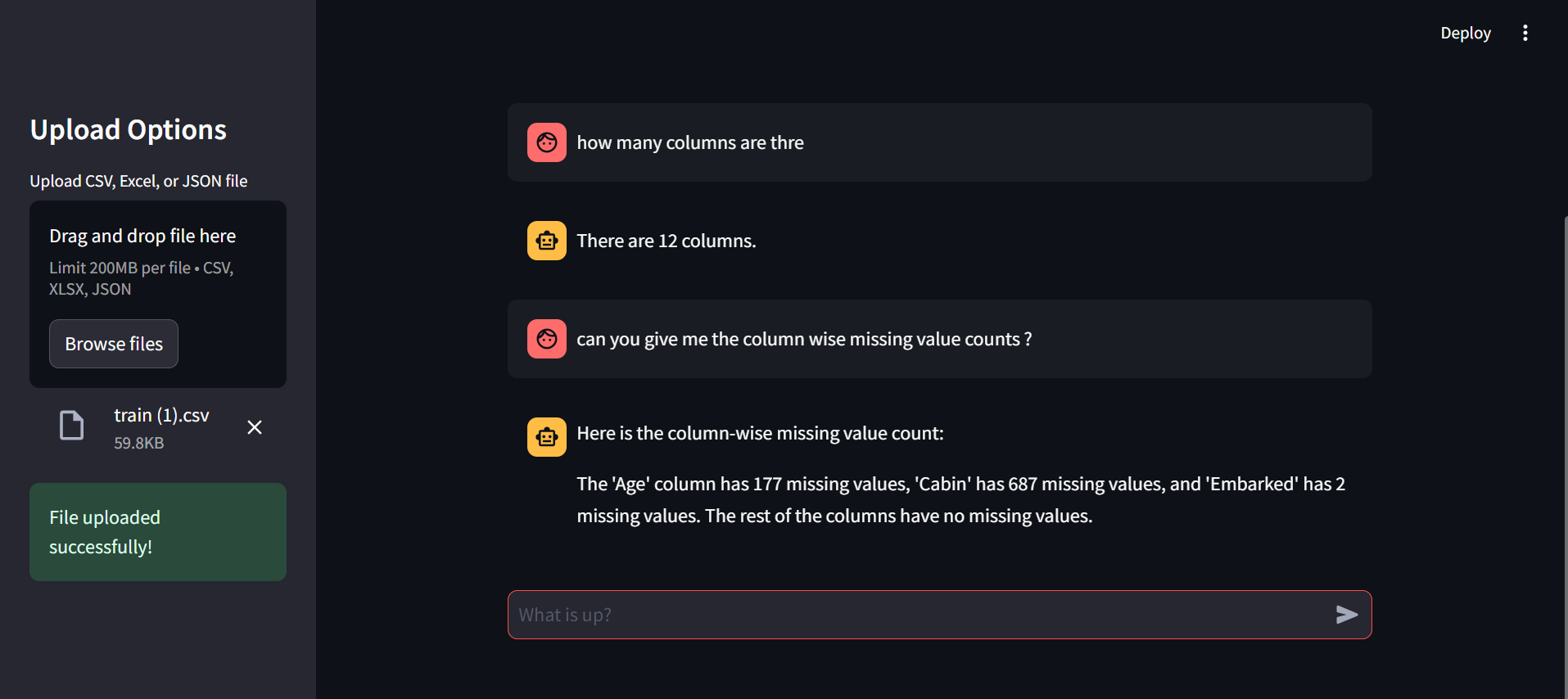
Chart Bot is your ultimate data companion! Whether you're a beginner or a seasoned professional, this intelligent tool simplifies the process of understanding, querying, and visualizing your data. Designed with accessibility and functionality in mind, Chart Bot empowers users to harness the full potential of their data without the steep learning curve of advanced libraries like Matplotlib and Seaborn.
Start using Chart Bot with just a few lines of code:
from zohencel_ai.analysis import Analysischartbot

bot = Analysischartbot()
bot.run()
Key Features
- Effortless Data Exploration: Understand your dataset with simple queries—no coding expertise required!
- Intelligent Visualizations: Generate beautiful, insightful charts and graphs for machine learning processes like Exploratory Data Analysis (EDA).
- Beginner-Friendly: Ideal for users unfamiliar with visualization tools like Matplotlib or Seaborn.
- Preprocessing Made Easy: Simplify common ML preprocessing tasks, such as:
- Feature engineering
- Missing value treatment
- Distribution analysis
- Seamless Workflow: Save time and effort by streamlining the data understanding process before diving into modeling.
🔧 How It Works
- Upload Your Data: Provide your dataset in a compatible format (CSV, Excel, etc.).
- Query the Data: Use intuitive commands to filter, analyze, and understand your data.
- Visualize: Create stunning charts and graphs to uncover trends and distributions.
- Preprocess: Execute essential ML preprocessing tasks with built-in tools.
- Limitations: Memory context is not available in the current version, it will be in the upcoming version.So provide the query in full contetxt.
📸 Sample Images
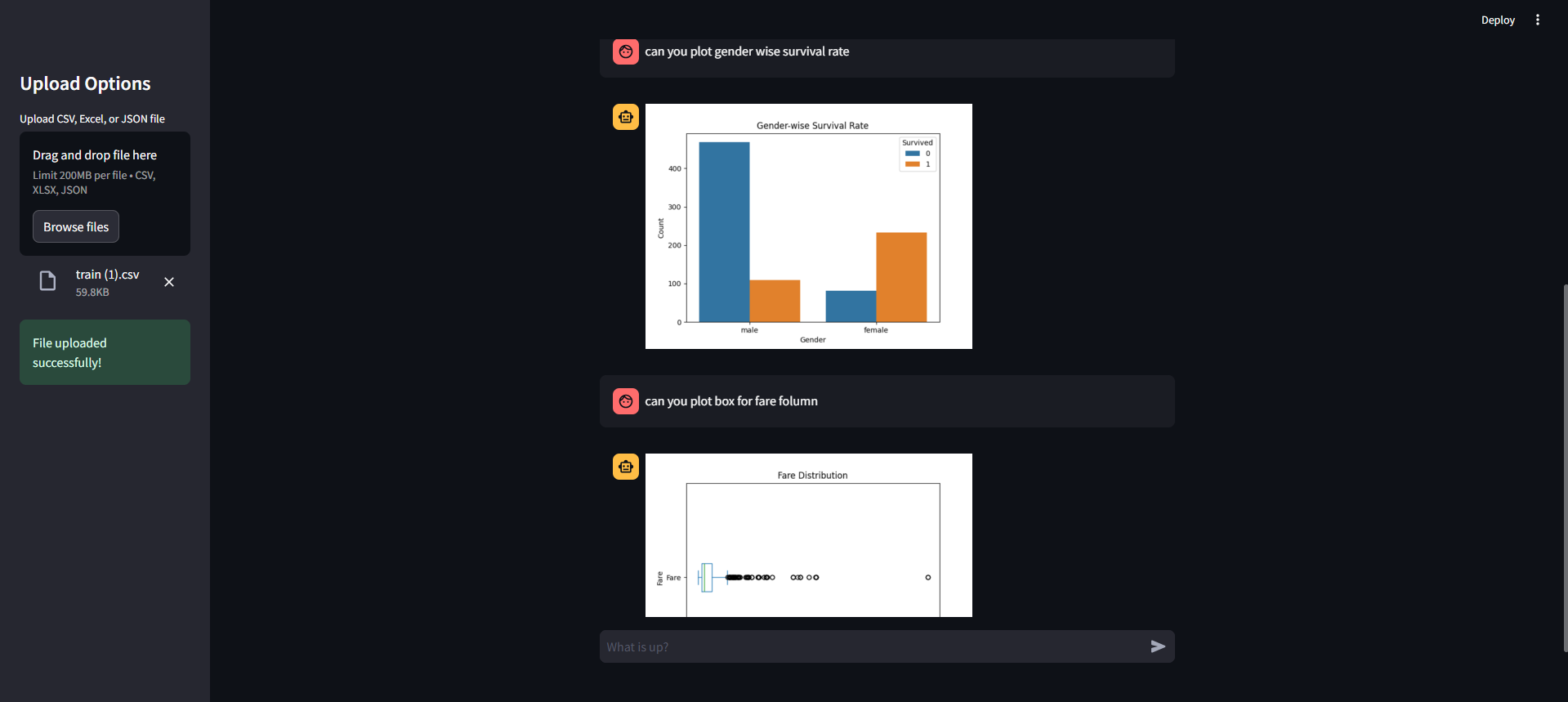
Here are some demo images showcasing the functionality of Chart Bot using Titanic dataset:
-
Sample 1:
-
Sample 2:
Author
Vishnu K
A passionate AI/ML developer with a strong zeal for innovation and learning. I believe in exploring new technologies and enhancing my knowledge every day. My journey revolves around creating impactful solutions through the power of AI and Machine Learning.
Feel free to connect with me!
1 maintainer

Metadata
1 maintainer
Release files for zohencel-ai 0.5.1
For a detailed explanation of source distributions (sdists) and built distributions (wheels), please see the package formats documentation.
Source distribution (sdist)
| File | Size | Uploaded | |
|---|---|---|---|
| zohencel_ai-0.5.1.tar.gz | 94.9 kB | Details |
Built distribution (wheel)
| File | Interpreter | ABI | Platform | Reset |
|---|---|---|---|---|
| zohencel_ai-0.5.1-py3-none-any.whl | Python 3 | none | any | Details |
Total release size: 190.1 kB
Release files / zohencel_ai-0.5.1.tar.gz
| Download URL | zohencel_ai-0.5.1.tar.gz |
|---|---|
| Size | 94.9 kB |
| Tags | Source |
|
SHA-256 checksum How to use checksums |
ef536d8d49f9f0a5fcd688db5f67fb515839b3b43370b78cf1ab1c7195acce61
|
|
BLAKE2b-256 checksum How to use checksums |
496c4245e693bd4647055f2937e6cf32cefe121d8e875404534981b242636592
|
| Upload date | |
|
Uploaded using Trusted Publishing? What is trusted publishing? |
No |
| Uploaded via |
twine/6.2.0 CPython/3.13.5
|
Release files / zohencel_ai-0.5.1-py3-none-any.whl
| Download URL | zohencel_ai-0.5.1-py3-none-any.whl |
|---|---|
| Size | 95.2 kB |
| Tags | Python 3 |
|
SHA-256 checksum How to use checksums |
8f471147cbf66b375d413f613b31705daa0c70d6905e7139f97d2da291bb0899
|
|
BLAKE2b-256 checksum How to use checksums |
7f2632aaab803b8a96fc6e011aa758fb2f1b3d323d72061a14268b89800c11dc
|
| Upload date | |
|
Uploaded using Trusted Publishing? What is trusted publishing? |
No |
| Uploaded via |
twine/6.2.0 CPython/3.13.5
|














