
A Python package for voice assistant, chatbot development, and analysis tools

Project description
Zohencel-AI




Zohencel-AI is a Python library designed to simplify the development of voice assistants, chatbots, and analytical tools. With built-in modules and functions, zohencel-ai provides an easy-to-use interface for building advanced AI solutions without the complexity.
This is where the search ends!
What is new?
- Added Groq api key as optional parameter:user can use their on api key to avoid rate limits. We still have the inbuilt api key if user doesn't have one. But the package have been using by more developers now, so there is a chance it may cross the token limit defined by groq.
- Get your key now : https://console.groq.com/keys
Key Features
- Voice Assistant Tools: Voice assistant in single import.
- Data Analysis: Data analytics tool to visualize and query data in natural language.
Installation
To install zohencel-ai, use the following pip command:
pip install zohencel-ai
AI Voice Assistant
The VoiceAssistant in Zohencel-AI provides a customizable, voice-enabled assistant that listens to user input, processes it, and responds with spoken text. Designed to be adaptable, the assistants attributes—such as name, tone, purpose, and voice type—can be tailored to fit a wide range of use cases, making it suitable for personalized or business-focused applications.
Key Customizations
- Assistant Name: Set a unique name for the assistant, making interactions feel more personalized and relatable.
- User Name: Personalize responses by specifying the user’s name, enhancing engagement.
- Tone and Duty: Define the assistant’s tone and duty with an optional description. For example, set it as a "helpful and friendly guide" or an "informative support assistant" to adjust the assistant's personality.
- Voice Type: Choose between a ‘male’ or ‘female’ voice to best suit the assistant's character and user preferences.
Usage Example
Here's how to configure these options when creating and running your assistant:
from zohencel_ai import VoiceAssistant

# Initialize the VoiceAssistant
assistant = VoiceAssistant()

# Run the assistant with custom settings
assistant.run(
    voice='female',                # Voice type: 'female' or 'male'
    assistant_name='Zohencel',     # Assistant's name
    user_name='Alex',              # User's name for personalized responses
    description='I am here as your friendly and reliable AI guide.'  # Assistant's tone and purpose
)
- all the parameters are optional and you can just run it by calling assistant.run()
Chart Bot
Chart Bot is your ultimate data companion! Whether you're a beginner or a seasoned professional, this intelligent tool simplifies the process of understanding, querying, and visualizing your data. Designed with accessibility and functionality in mind, Chart Bot empowers users to harness the full potential of their data without the steep learning curve of advanced libraries like Matplotlib and Seaborn.
Start using Chart Bot with just a few lines of code:
from zohencel_ai.analysis import Analysischartbot

bot = Analysischartbot()
bot.run()
Key Features
- Effortless Data Exploration: Understand your dataset with simple queries—no coding expertise required!
- Intelligent Visualizations: Generate beautiful, insightful charts and graphs for machine learning processes like Exploratory Data Analysis (EDA).
- Beginner-Friendly: Ideal for users unfamiliar with visualization tools like Matplotlib or Seaborn.
- Preprocessing Made Easy: Simplify common ML preprocessing tasks, such as:
- Feature engineering
- Missing value treatment
- Distribution analysis
- Seamless Workflow: Save time and effort by streamlining the data understanding process before diving into modeling.
🔧 How It Works
- Upload Your Data: Provide your dataset in a compatible format (CSV, Excel, etc.).
- Query the Data: Use intuitive commands to filter, analyze, and understand your data.
- Visualize: Create stunning charts and graphs to uncover trends and distributions.
- Preprocess: Execute essential ML preprocessing tasks with built-in tools.
- Limitations: Memory context is not available in the current version, it will be in the upcoming version.So provide the query in full contetxt.
📸 Sample Images
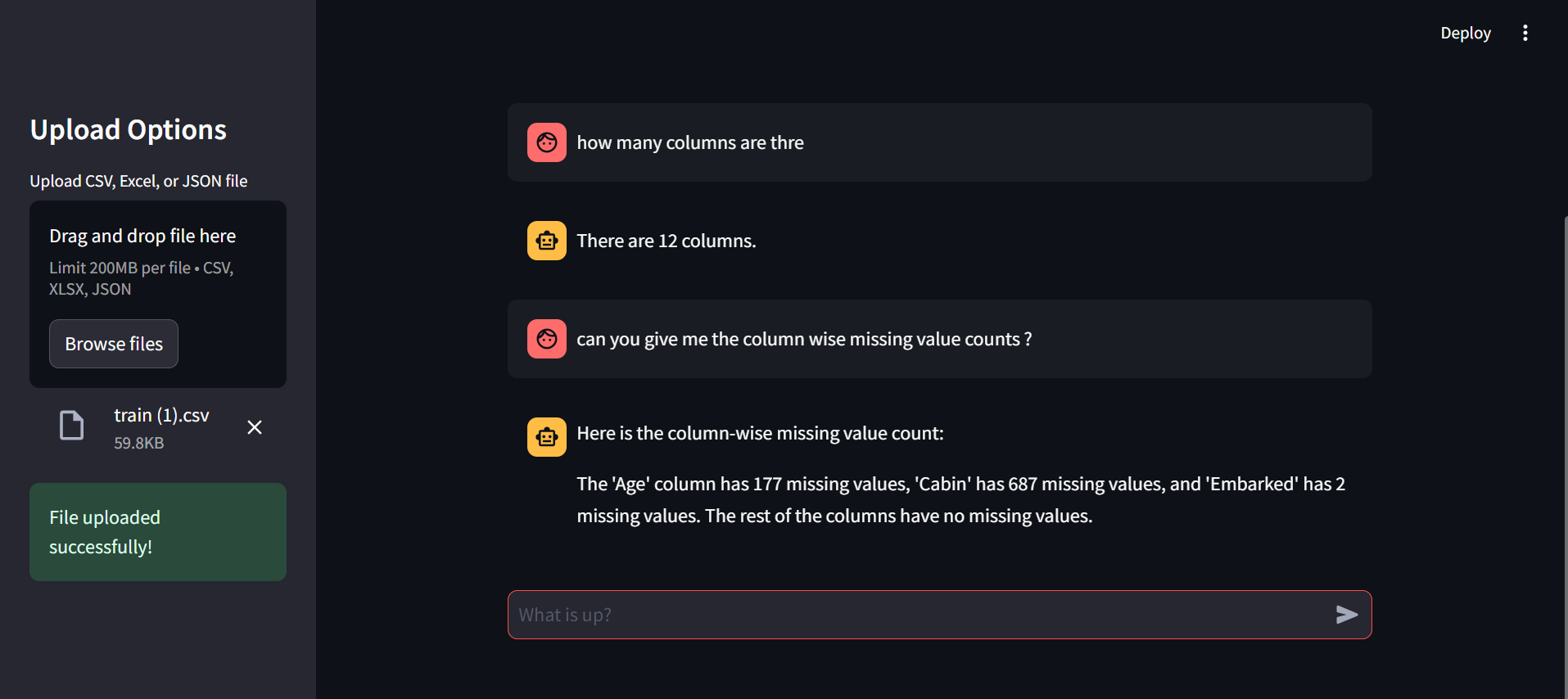
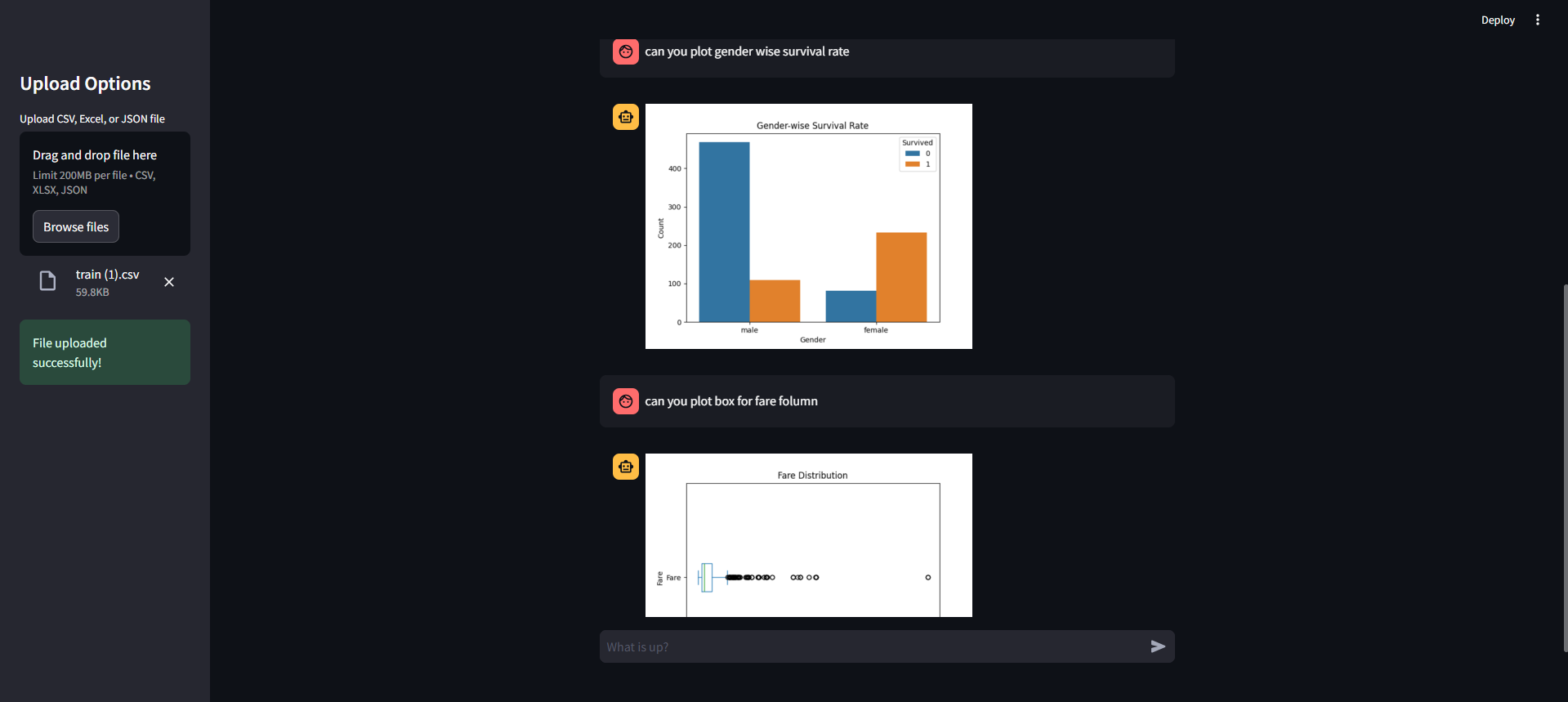
Here are some demo images showcasing the functionality of Chart Bot using Titanic dataset:
-
Sample 1:
-
Sample 2:
Upcoming Features
I'm excited to introduce ML Bot, an intelligent assistant that will help you train and test machine learning models end-to-end, all through simple queries.
- End-to-End ML Workflow: From data preprocessing to model testing, perform everything using easy-to-understand queries.
- Train Models: Automatically train machine learning models by simply instructing the bot.
- Model Testing: Test and evaluate models with built-in performance metrics and visualizations.
- Query-Based Interaction: No coding required—just query the bot for tasks like training a model, evaluating performance, and preprocessing data.
Stay tuned as we release this powerful tool to make machine learning workflows seamless and accessible to everyone!
Author
Vishnu K
A passionate AI/ML developer with a strong zeal for innovation and learning. I believe in exploring new technologies and enhancing my knowledge every day. My journey revolves around creating impactful solutions through the power of AI and Machine Learning.
Feel free to connect with me!
Release history Release notifications | RSS feed


Download files
Download the file for your platform. If you're not sure which to choose, learn more about installing packages.
Source Distribution
Built Distribution
Filter files by name, interpreter, ABI, and platform.
If you're not sure about the file name format, learn more about wheel file names.
Copy a direct link to the current filters
File details
Details for the file zohencel_ai-0.2.6.tar.gz.
File metadata
- Download URL: zohencel_ai-0.2.6.tar.gz
- Upload date:
- Size: 14.9 kB
- Tags: Source
- Uploaded using Trusted Publishing? No
- Uploaded via: twine/5.1.1 CPython/3.11.4
File hashes
| Algorithm | Hash digest | |
|---|---|---|
| SHA256 |
40f2ffc7c4d0143420915f83fc6c4ca6a43d4352d137e92c23b773243056a776
|
|
| MD5 |
ef66cca1e4555917251a111a48c38e5a
|
|
| BLAKE2b-256 |
49862420f08e6937980a0678a05a2228ebb47f8cd95ecb1f78a156adb0e3ebfe
|
File details
Details for the file zohencel_ai-0.2.6-py3-none-any.whl.
File metadata
- Download URL: zohencel_ai-0.2.6-py3-none-any.whl
- Upload date:
- Size: 13.5 kB
- Tags: Python 3
- Uploaded using Trusted Publishing? No
- Uploaded via: twine/5.1.1 CPython/3.11.4
File hashes
| Algorithm | Hash digest | |
|---|---|---|
| SHA256 |
a4fd19ea819e95abb7ca0e958187b3c5564cf3f383c2fa32261af64ceeb13944
|
|
| MD5 |
b96cb68c94116a153e82b9617ca549bf
|
|
| BLAKE2b-256 |
a0f54b2d72fc3eeff19eef9b193fda875b1055a2665041ad6493a0ea59ab102b
|






