
Transparent, drop-in compression for Python's pickle — smaller files, same API
Verified details
These details have been verified by PyPIProject links
GitHub Statistics
Maintainers

Project description
zpickle





Transparent, drop-in compression for Python's pickle — smaller files, same API.
zpickle adds high-performance compression to your serialized Python objects using multiple state-of-the-art algorithms without changing how you work with pickle.
# Replace this:
import pickle

# With this:
import zpickle as pickle

# Everything else stays the same!
Features
- Drop-in replacement for the standard
picklemodule - Transparent compression — everything happens automatically
- Multiple algorithms — choose
zstd,brotli,zlib,lzma,bzip2, orlz4(powered bycompress_utils) - Configure once, use everywhere — set global defaults for your entire app
- Smaller data — 2-10× smaller serialized data (depending on content and algorithm)
- Backward compatible — automatically reads both compressed and regular pickle data
- Complete API compatibility — all pickle functions work as expected
Installation
pip install zpickle
Quick Start
Basic Usage
import zpickle as pickle

# Serializing works exactly like pickle
data = {"complex": ["nested", {"data": "structure"}], "with": "lots of repetition"}
serialized = pickle.dumps(data)  # Automatically compressed!

# Deserializing works the same way
restored = pickle.loads(serialized)  # Automatically decompressed!

# File operations work too
with open("data.zpkl", "wb") as f:
    pickle.dump(data, f)

with open("data.zpkl", "rb") as f:
    restored = pickle.load(f)
Custom Configuration
import zpickle

# Configure global settings
zpickle.configure(algorithm='brotli', level=9)  # Higher compression

# Or configure for a single operation
data = [1, 2, 3] * 1000
compressed = zpickle.dumps(data, algorithm='zstd', level=6)
Performance
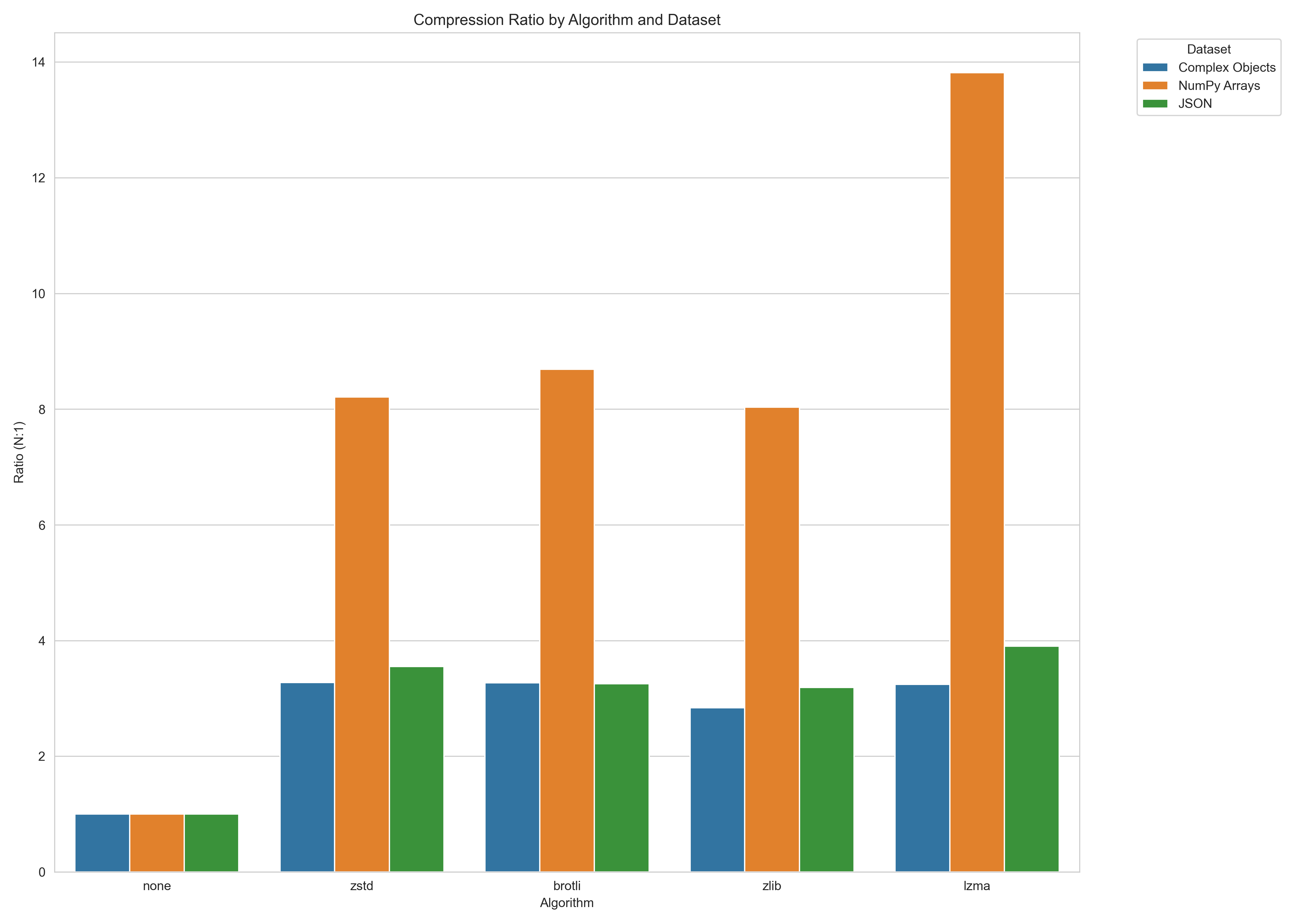
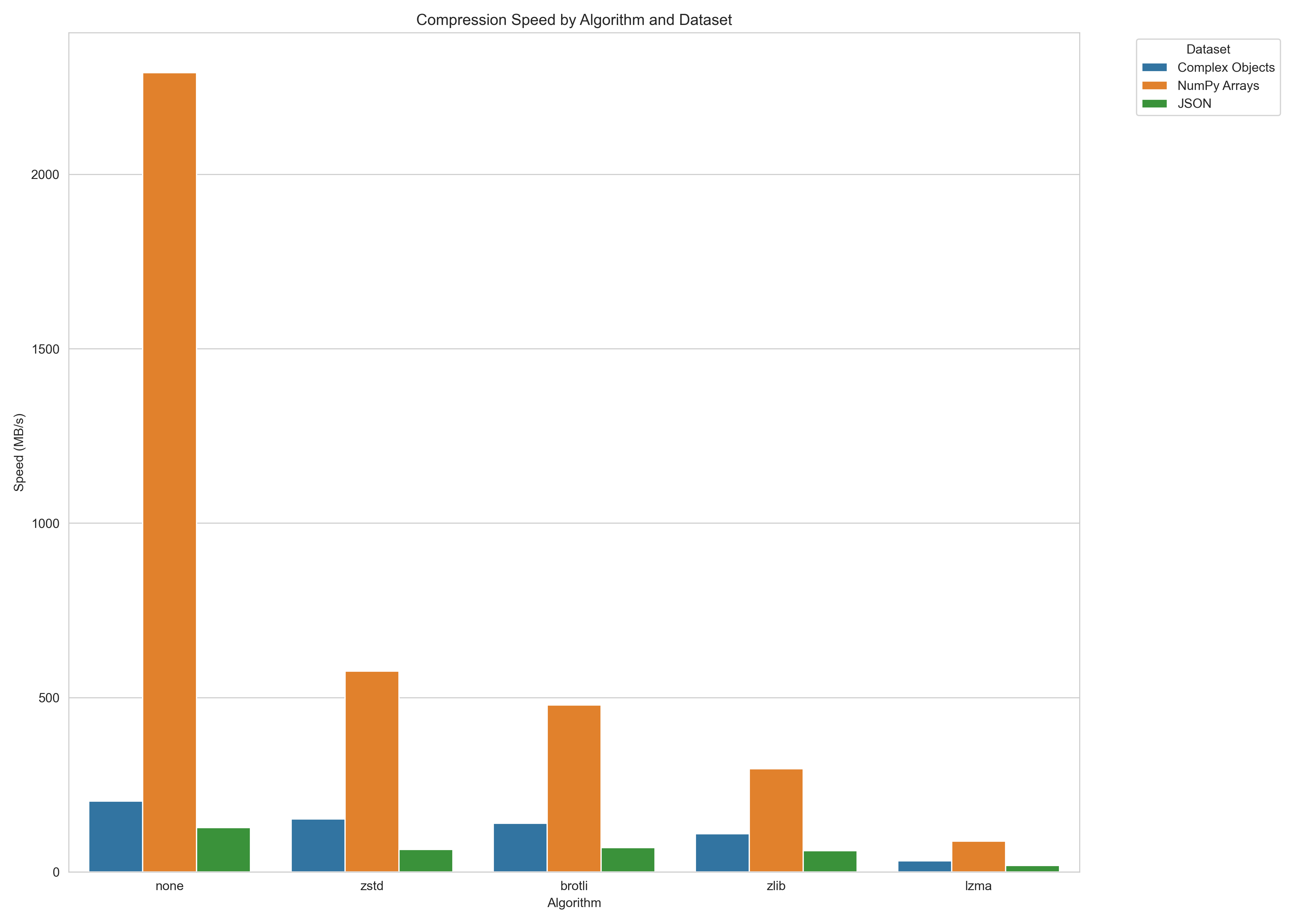
Each algorithm is benchmarked at compress-utils level 3 (zpickle's default) on two datasets (complex Python objects, JSON).
Compression ratios versus standard pickle (higher is better):
Serialization speed (MB/s, higher is better):
Note: Performance varies by data characteristics. Run benchmarks on your specific data for accurate results.
To run your own benchmarks, you can use:
python -m benchmarks.benchmark
How It Works
zpickle applies compression with minimal overhead:
- Objects are first serialized using standard pickle
- The pickle data is compressed using the selected algorithm
- A small header (8 bytes) is added to identify the format and algorithm
- When deserializing,
zpickleauto-detects the format and decompresses if needed
API Reference
zpickle maintains complete API compatibility with the standard pickle module:
Core Functions
dumps(obj, protocol=None, ..., algorithm=None, level=None)- Serialize and compress objectloads(data, ...)- Deserialize and decompress objectdump(obj, file, protocol=None, ..., algorithm=None, level=None)- Serialize to fileload(file, ...)- Deserialize from file
Configuration
configure(algorithm=None, level=None, min_size=None)- Set global defaultsget_config()- Get current configuration
Classes
Pickler(file, ...)- Subclass of pickle.Pickler with compressionUnpickler(file, ...)- Subclass of pickle.Unpickler with decompression
Alternatives
- Standard
pickle: No compression, but native to Python compressed_pickle: Similar concept, but less configurablejoblib: More focused on large NumPy arrays and parallel processingmsgpack,protobuf: Different serialization formats (not pickle-compatible)
License
MIT © Nicolas Dupont — Read more >
Links
- GitHub Repository
- PyPI Package
- Issue Tracker
- compress-utils - The underlying compression library
Project details
Verified details
These details have been verified by PyPIProject links
GitHub Statistics
Maintainers


Download files
Download the file for your platform. If you're not sure which to choose, learn more about installing packages.
Source Distribution
Built Distribution
Filter files by name, interpreter, ABI, and platform.
If you're not sure about the file name format, learn more about wheel file names.
Copy a direct link to the current filters
File details
Details for the file zpickle-1.3.0.tar.gz.
File metadata
- Download URL: zpickle-1.3.0.tar.gz
- Upload date:
- Size: 744.7 kB
- Tags: Source
- Uploaded using Trusted Publishing? Yes
- Uploaded via: twine/6.1.0 CPython/3.13.12
File hashes
| Algorithm | Hash digest | |
|---|---|---|
| SHA256 |
1afbe3ea8113ddb33cf07337792586d4e9c4b864023baa37942d1872d63bab08
|
|
| MD5 |
02fa4d84befedbe3aba507f8e02e98da
|
|
| BLAKE2b-256 |
1cfcec2898cd29685c5cbdfba38dfbd18750c14fae9b4dc5f49891283b36550e
|
Provenance
The following attestation bundles were made for zpickle-1.3.0.tar.gz:
Publisher:
test_and_package_wheel.yml on dupontcyborg/zpickle
-
Statement:
-
Statement type:
https://in-toto.io/Statement/v1 -
Predicate type:
https://docs.pypi.org/attestations/publish/v1 -
Subject name:
zpickle-1.3.0.tar.gz -
Subject digest:
1afbe3ea8113ddb33cf07337792586d4e9c4b864023baa37942d1872d63bab08 - Sigstore transparency entry: 1575644154
- Sigstore integration time:
-
Permalink:
dupontcyborg/zpickle@869e28d885f12f3e841c36134ab62ecc568a9109 -
Branch / Tag:
refs/tags/v1.3.0 - Owner: https://github.com/dupontcyborg
-
Access:
public
-
Token Issuer:
https://token.actions.githubusercontent.com -
Runner Environment:
github-hosted -
Publication workflow:
test_and_package_wheel.yml@869e28d885f12f3e841c36134ab62ecc568a9109 -
Trigger Event:
push
-
Statement type:
File details
Details for the file zpickle-1.3.0-py3-none-any.whl.
File metadata
- Download URL: zpickle-1.3.0-py3-none-any.whl
- Upload date:
- Size: 14.2 kB
- Tags: Python 3
- Uploaded using Trusted Publishing? Yes
- Uploaded via: twine/6.1.0 CPython/3.13.12
File hashes
| Algorithm | Hash digest | |
|---|---|---|
| SHA256 |
31fe978d3a51b703d6b91d19931f55b3353a004ef4b07346f340ac1cf8753607
|
|
| MD5 |
0c1eb185944da97d9b6ed7128a4330b7
|
|
| BLAKE2b-256 |
66340b03060e096f62f2596d379ea58d9c04f0f504e7bbeb1e848d054f557379
|
Provenance
The following attestation bundles were made for zpickle-1.3.0-py3-none-any.whl:
Publisher:
test_and_package_wheel.yml on dupontcyborg/zpickle
-
Statement:
-
Statement type:
https://in-toto.io/Statement/v1 -
Predicate type:
https://docs.pypi.org/attestations/publish/v1 -
Subject name:
zpickle-1.3.0-py3-none-any.whl -
Subject digest:
31fe978d3a51b703d6b91d19931f55b3353a004ef4b07346f340ac1cf8753607 - Sigstore transparency entry: 1575644181
- Sigstore integration time:
-
Permalink:
dupontcyborg/zpickle@869e28d885f12f3e841c36134ab62ecc568a9109 -
Branch / Tag:
refs/tags/v1.3.0 - Owner: https://github.com/dupontcyborg
-
Access:
public
-
Token Issuer:
https://token.actions.githubusercontent.com -
Runner Environment:
github-hosted -
Publication workflow:
test_and_package_wheel.yml@869e28d885f12f3e841c36134ab62ecc568a9109 -
Trigger Event:
push
-
Statement type:






