

🤖 Zrb: A Coding Agent With a Build System Inside
Zrb is a terminal coding agent you can wire into a build pipeline.
The agent part you already know: zrb llm chat is a full coding session in your terminal.
The other half is why Zrb exists. A skill can tell an agent to run the tests before deploying; a DAG makes it impossible not to. Zrb ships both — same file, same language, one pip install.
Contribution Guidelines | Report an Issue
📑 Table of Contents
- 🏁 Getting Started
- 🔥 Why Zrb?
- 🖥️ Try the Web UI
- 🧩 Program Your AI Agent
- ⚙️ Installation & Configuration
- 🤝 CI/CD Integration
- 🗺️ Documentation Directory
- 🎥 Demo Video
- 💖 Support Zrb
- 🎉 Fun Fact
1. Start where you'd start with any coding agent
pip install zrb
export OPENAI_API_KEY="your-key-here"   # or Anthropic, Gemini, Ollama, OpenRouter, ...

zrb llm chat
That's a full agent session: it reads and writes files, runs commands behind a permission gate, searches the web, and remembers the conversation across restarts. If you already have .claude/skills/ or CLAUDE.md in the repo, it picks them up.
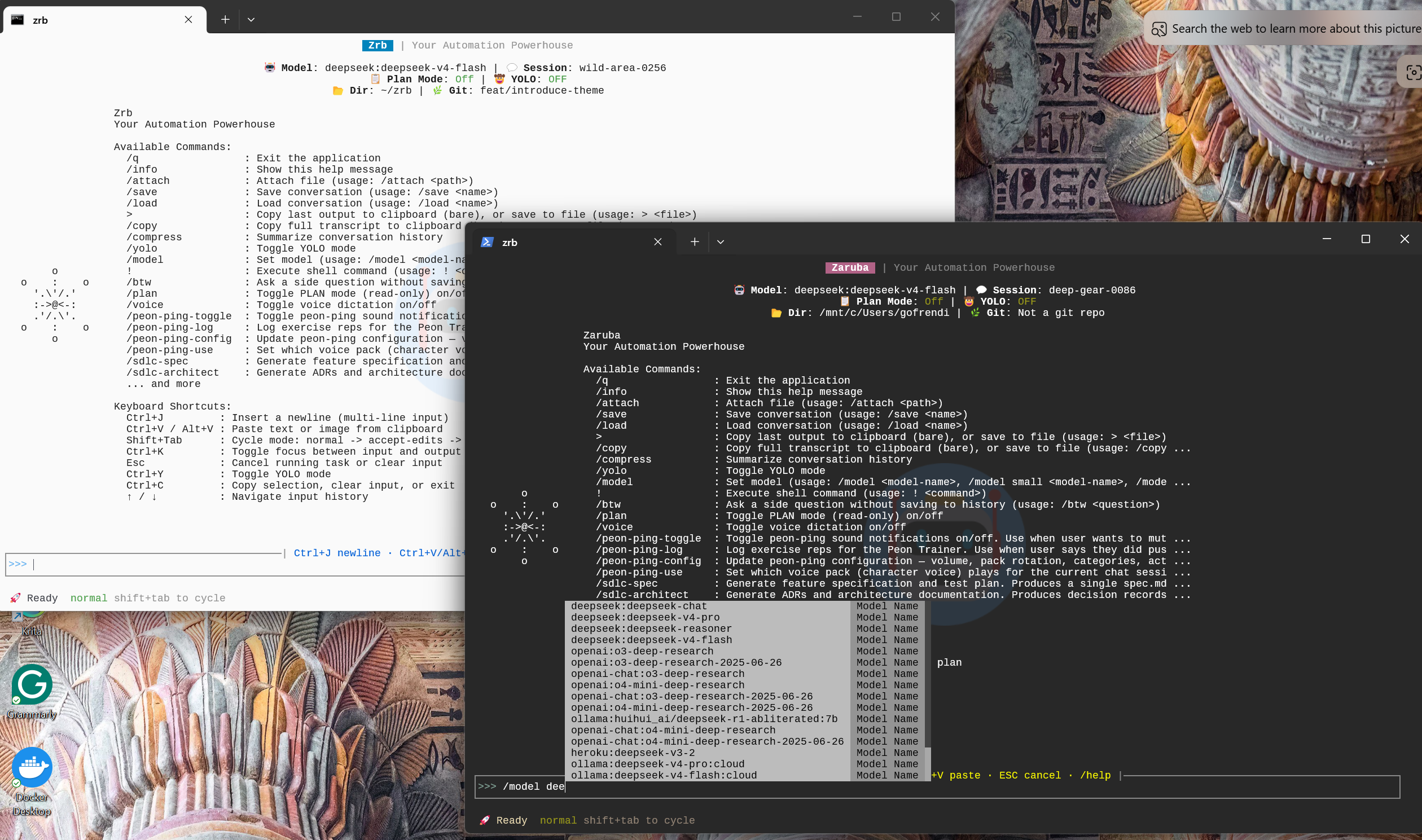
For most days, this is the whole product. Stop reading here if that's what you came for.
No API key yet? The task runner works without one. Installation → Verify has a one-task
zrb_init.py(zrb hello) that runs a plain shell command.
2. Then you hit the thing prompting can't fix
You write a skill: "always run the tests before deploying." It works. Usually.
Then one run the model decides the tests are unrelated to the change. Another run it runs them, misreads a green summary under a red failure, and deploys anyway. A third run it deploys to staging because the prompt didn't say which environment. Nothing crashed — the agent did what it thought you meant, and you find out on Monday.
The problem isn't prompt quality. It's that a skill is advice, and some steps need to be a guarantee. So write those as a graph instead:
# zrb_init.py
from zrb import cli, CmdTask, LLMTask

write_fix = LLMTask(
    name="write-fix",
    message="Read the failing test output and fix the bug in src/.",
)
run_tests = CmdTask(name="run-tests", cmd="pytest -x")
deploy = CmdTask(name="deploy", cmd="./deploy.sh production")

cli.add_task(deploy)

write_fix >> run_tests >> deploy   # the agent proposes; the pipeline decides
Save it as zrb_init.py in the directory you run zrb from, or in any parent of it: zrb loads every zrb_init.py on the path from the filesystem root down to the current directory, outermost first, so a repo-root file serves every subdirectory.
zrb deploy
run-tests is not a suggestion the model can reason its way around. It is an edge in a graph. If pytest exits non-zero, deploy never starts, and zrb deploy exits with pytest's own exit code — which is what your CI actually branches on.
This is the part no amount of prompt engineering reaches, and it's why the agent lives inside an automation framework instead of the other way around:
- The agent is one node, not the administrator. Its answer flows downstream through XCom and gets checked by the next step.
- Readiness is a loop, not a request.
HttpCheck/TcpCheckwait for a service to actually come up. "Wait until it's ready" is not a prompt-able behavior. - Failure is a number. Tasks exit with the underlying command's code, so CI can tell a lint failure from a deploy failure.
- Scheduled and triggered runs have no one to ask. At 3am there is nobody to approve a tool call, so the boundaries have to be structural.
3. And sometimes you just want the one command
No session, no pipeline, no config:
zrb please "find every file over 100MB in this repo"
find . -type f -size +100M
📋 Copied to clipboard
It runs on the small model, answers in a couple of seconds, and puts the result on your clipboard instead of running it. Same install, same API key, none of the ceremony.
4. A fuller example: let the agent draw your codebase
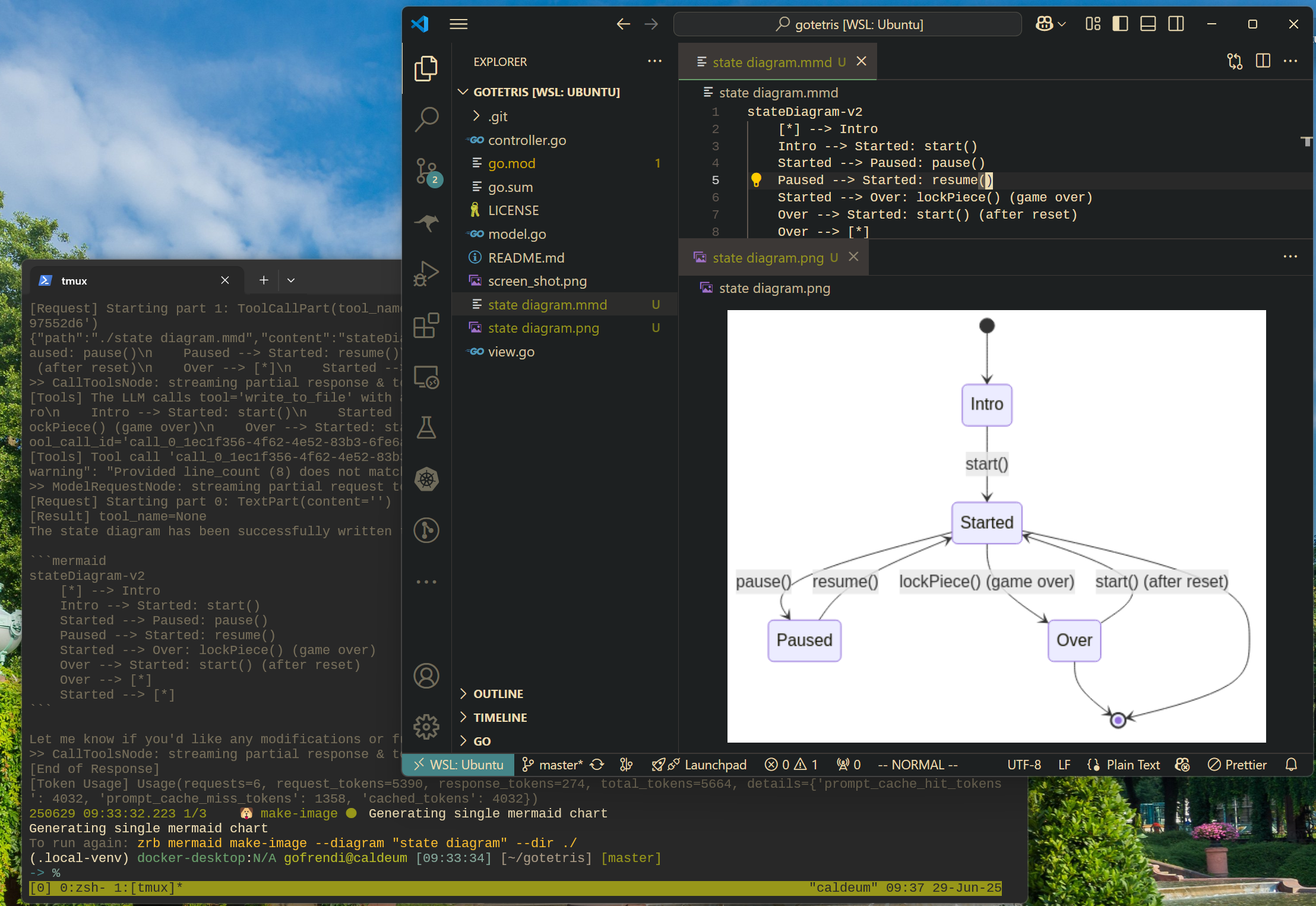
Same shape as section 2, with a real payoff: an LLMTask reads your source and writes a Mermaid diagram, then a CmdTask renders it to PNG. The agent does the part that needs judgment; the shell does the part that needs to be exact.
Prerequisites
- An LLM API key, set as in section 1 (
export OPENAI_API_KEY="your-key-here"; OpenAI is the default provider). - Mermaid CLI, which renders Mermaid scripts to images:
npm install -g @mermaid-js/mermaid-cli
Define the pipeline
Add the following to your existing zrb_init.py file (or create a new one if you prefer to keep examples separate):
# zrb_init.py (continued)
from zrb import cli, LLMTask, CmdTask, StrInput, Group, Tpl
from zrb.llm.tool.code import analyze_code
from zrb.llm.tool.file import write_file

# Create a group for Mermaid-related tasks
mermaid_group = cli.add_group(
    Group(
        name="mermaid",
        description="🧜 Mermaid diagram related tasks",
    )
)

# Task 1: Generate a Mermaid script from your source code using an LLM
make_mermaid_script = mermaid_group.add_task(
    LLMTask(
        name="make-script",
        description="Create a mermaid diagram from source code in the current directory",
        input=[
            StrInput(name="dir", default="./"),
            StrInput(name="diagram", default="state-diagram"),
        ],
        message=Tpl(
            "Read all necessary files in {ctx.input.dir}, "
            "make a {ctx.input.diagram} in mermaid format. "
            "Write the script into `{ctx.input.dir}/{ctx.input.diagram}.mmd`"
        ),
        tools=[analyze_code, write_file],
    )
)

# Task 2: Convert the Mermaid script into a PNG image using CmdTask
make_mermaid_image = mermaid_group.add_task(
    CmdTask(
        name="make-image",
        description="Create a PNG from a mermaid script",
        input=[
            StrInput(name="dir", default="./"),
            StrInput(name="diagram", default="state-diagram"),
        ],
        cmd=Tpl("mmdc -i '{ctx.input.diagram}.mmd' -o '{ctx.input.diagram}.png'"),
        cwd=Tpl("{ctx.input.dir}"),
    )
)

# Set up the dependency: the image task runs after the script is created
make_mermaid_script >> make_mermaid_image
Run it
From any project with source code:
git clone https://github.com/someuser/my-python-project.git
cd my-python-project
zrb mermaid make-image
Zrb asks for the directory and diagram name; press Enter to accept the defaults (./ and state-diagram). The agent analyzes your code and writes the Mermaid script, then mmdc renders it to a PNG.
🔥 Why Zrb?
- 🤖 A coding agent you program in Python. Tools, hooks, prompts, permission policies and history processors are plain Python in your
zrb_init.py— not a config format, not a separate SDK. - 🔒 Determinism where it matters. Put the model between deterministic steps and keep approvals, sandboxing and ordering under your control instead of the model's judgment.
- 🐍 Pure Python, no DSL. Tasks are objects;
>>is the dependency operator. - 💻 Terminal, web UI, or CI. The same task definition runs in all three.
- 🧩 Bring your Claude Code assets. Skills, hooks and MCP servers work as-is.
- 🌍 Open source, and white-labelable into your own branded CLI.
🖥️ Try the Web UI
zrb server start
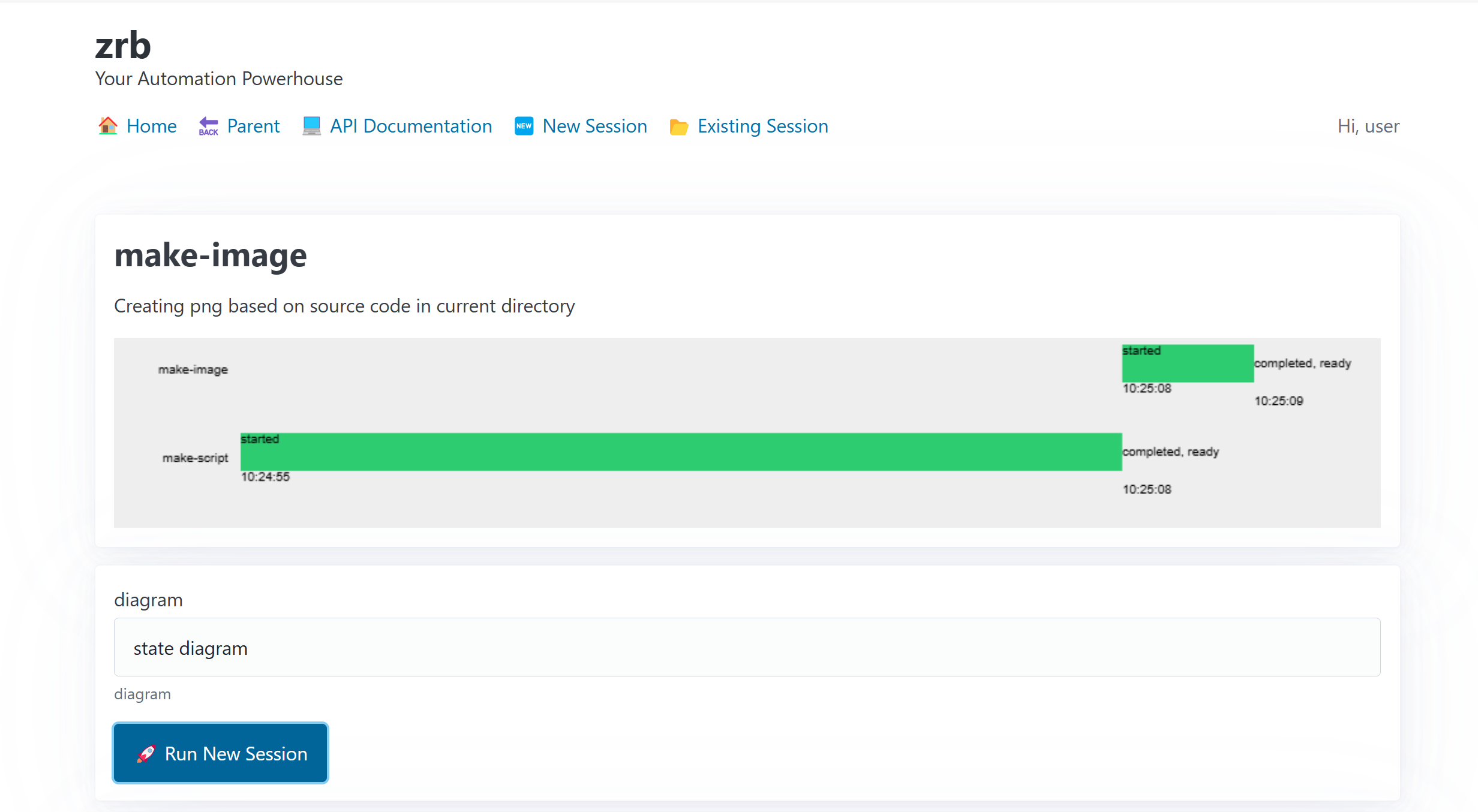
Open http://localhost:21213. The server binds to 127.0.0.1 by default, so the UI is reachable only from the local machine. Full details: Web UI Guide.
Safety boundary: Zrb's web UI can start and control automation tasks, so it is not intended to be exposed publicly without deliberate hardening. If you set
ZRB_WEB_HTTP_HOSTto a non-loopback address, enable authentication and replace the documented default admin password and secret key with unique values. The server refuses to start on a non-loopback bind without authentication or with the default credentials; see the Web UI Guide before using a shared or public bind.
🧩 Program Your AI Agent
zrb llm chat works out of the box — but the moment you need it to do something specific, you don't reach for a config file or a separate SDK. You write Python, in the same file where you define the rest of your automation.
Every part of the agent is a value you can supply or a callable you can register:
| You want to… | You write a… |
|---|---|
| Give the agent abilities | custom tool — a plain Python function it can call in-process |
| React to what it does | lifecycle hook — fires on tool calls, prompts, session start/end |
| Gate dangerous actions | permission policy / async approval channel |
| Inject live context into the prompt | dynamic prompt section — a lambda ctx: ... evaluated per request |
| Keep long conversations affordable | history processor — prune, redact, or summarize the message history |
| Route by cost or task | a model callable — pick the model per request |
Example: a custom tool the agent calls in-process
from zrb import cli, LLMChatTask

# A normal Python function becomes a tool — typed args + docstring are the spec.
async def get_open_incidents(team: str) -> str:
    """Return the current open incidents for a given team."""
    return my_oncall_db.query(team)  # your code, running in-process

chat = LLMChatTask(name="ops-chat", tools=[get_open_incidents])
cli.add_task(chat)
The part nothing else does: the agent is a pipeline node
Because an LLMTask is just a Zrb task, you can wire it between deterministic steps. Its answer flows downstream through XCom, and your tools can call straight into your codebase:
fetch_ticket >> triage_with_llm >> route_to_team
👉 Full walkthrough and every hook in one place: Programming the Agent. Runnable example: examples/agent-in-pipeline.
⚙️ Installation & Configuration
- Installation Guide:
pip, theinstall.shscript, Docker images, and Android (Termux/Proot). - Environment Variables & Overrides: every general environment variable.
- LLM Configuration: LLM provider, token budgets, and agent behavior, one page per feature.
🤝 CI/CD Integration
See the CI/CD Integration Guide for examples with GitHub Actions, GitLab CI, and Bitbucket Pipelines.
🗺️ Documentation Directory
📚 The full documentation index lists every page, grouped by what you came to do.
| You are… | Start with |
|---|---|
| New to zrb | Installation → your first task → your first LLM chat |
| Here for the agent | LLM docs index → Programming the Agent → Permission Policy |
| Writing pipelines | Tasks & Execution Lifecycle → CLI and Groups → Inputs |
| Configuring zrb | Environment Variables, LLM Configuration |
| Contributing | Contributing → Architecture → ADRs |
Prefer copy-pasting a working example? See examples/. Release history is in the Changelog.
🎥 Demo Video
Watch a video demonstration of Zrb in action:
💖 Support Zrb
If you find Zrb valuable, please consider showing your support:

🎉 Fun Fact
Did you know? Zrb is named after Zaruba, a powerful, sentient Madou Ring that acts as a guide and support tool in the Garo universe.
Madou Ring Zaruba (魔導輪ザルバ, Madōrin Zaruba) is a Madougu which supports bearers of the Garo Armor. (Garo Wiki | Fandom)

1 maintainer

Metadata
1 maintainer
Release files for zrb 3.16.1
For a detailed explanation of source distributions (sdists) and built distributions (wheels), please see the package formats documentation.
Source distribution (sdist)
| File | Size | Uploaded | |
|---|---|---|---|
| zrb-3.16.1.tar.gz | 2.3 MB | Details |
Built distribution (wheel)
| File | Interpreter | ABI | Platform | Reset |
|---|---|---|---|---|
| zrb-3.16.1-py3-none-any.whl | Python 3 | none | any | Details |
Total release size: 5.0 MB
Release files / zrb-3.16.1.tar.gz
| Download URL | zrb-3.16.1.tar.gz |
|---|---|
| Size | 2.3 MB |
| Tags | Source |
|
SHA-256 checksum How to use checksums |
b6b0231b57784ccdb1d293be139bbf5c66817143c083b49aed2fbc3f1fbc6059
|
|
BLAKE2b-256 checksum How to use checksums |
3b4e8e1dcda5fa32c9040536683f1226c146e955e5413501243ebd8103dd7a46
|
| Upload date | |
|
Uploaded using Trusted Publishing? What is trusted publishing? |
No |
| Uploaded via |
poetry/2.3.3 CPython/3.14.0 Linux/5.15.153.1-microsoft-standard-WSL2+
|
Release files / zrb-3.16.1-py3-none-any.whl
| Download URL | zrb-3.16.1-py3-none-any.whl |
|---|---|
| Size | 2.6 MB |
| Tags | Python 3 |
|
SHA-256 checksum How to use checksums |
c6a8ae8a5fc51b16f7abfe3995a1442b7e14e42d08442e376751a6a3f366b023
|
|
BLAKE2b-256 checksum How to use checksums |
70f4b5595871c3b56c8ec2e28de3d73d719c06aa4a468f1c54785a8c3b2447c9
|
| Upload date | |
|
Uploaded using Trusted Publishing? What is trusted publishing? |
No |
| Uploaded via |
poetry/2.3.3 CPython/3.14.0 Linux/5.15.153.1-microsoft-standard-WSL2+
|














