
Transparent desktop sky viewer with stars, planets, eclipses, and optional real-time satellite cloud overlay.

Project description
zstarview
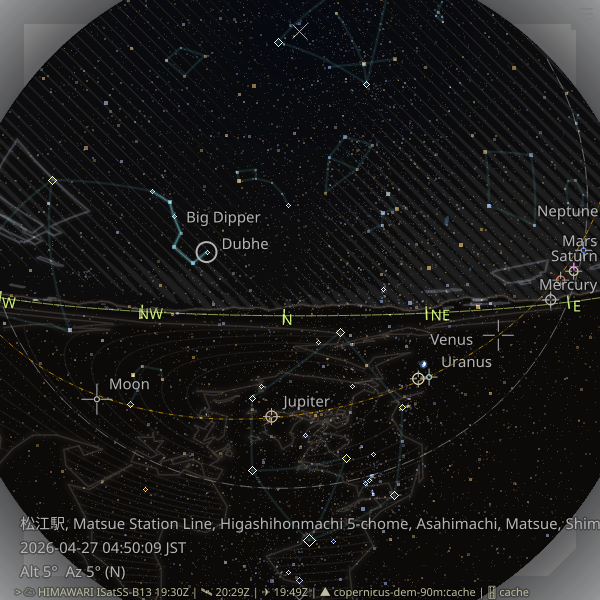
Transparent desktop sky viewer with stars, planets, eclipses, optional real-time satellite cloud overlay, and optional terrain horizon overlay.
Install
Recommended:
pipx install zstarview
Or with pip:
pip install zstarview
Quick Start
zstarview [options] [city]
Examples:
zstarview Tokyo
zstarview "35.68;139.76"
zstarview -Z E -A 25 Tokyo
Highlights
- Real-time rendering of bright stars, planets, celestial equator, and ecliptic.
- Optional deep-sky object (DSO) overlays.
- Optional asterism overlays (line patterns, not IAU constellation boundaries).
- Real-time cloud overlays from Himawari/GOES (can be disabled with
-c 0). - Optional terrain horizon overlay from Copernicus DEM (can be disabled with
--terrain-horizon-opacity 0). - Hover interactions for object labels and contextual overlays.
Useful Options
-V,--vmag-limit: star magnitude limit.--datetime "YYYY-MM-DD HH[:MM[:SS]] [TZ]": absolute sky time.--show-dso-initial true|false: DSO visibility at startup.--show-asterisms-initial true|false: asterism visibility at startup.-c,--cloud-opacity: cloud overlay opacity (0disables clouds).--terrain-horizon-opacity: terrain horizon opacity (0disables DEM download and terrain rendering).
Notes
- On first launch, ephemeris data may be downloaded once and cached.
- Terrain horizon rendering downloads Copernicus DEM tiles on first use and then reuses the local cache.
- If cloud fetching is slow or unavailable, use
-c 0for offline-friendly star/planet viewing.
Links
- Homepage: https://github.com/tos-kamiya/zstarview
- Documentation: https://github.com/tos-kamiya/zstarview#readme
- Issues: https://github.com/tos-kamiya/zstarview/issues
Release history Release notifications | RSS feed


Download files
Download the file for your platform. If you're not sure which to choose, learn more about installing packages.
Source Distribution
zstarview-0.24.4.tar.gz
(43.4 MB
view details)
Built Distribution
Filter files by name, interpreter, ABI, and platform.
If you're not sure about the file name format, learn more about wheel file names.
Copy a direct link to the current filters
File details
Details for the file zstarview-0.24.4.tar.gz.
File metadata
- Download URL: zstarview-0.24.4.tar.gz
- Upload date:
- Size: 43.4 MB
- Tags: Source
- Uploaded using Trusted Publishing? No
- Uploaded via: Hatch/1.16.5 cpython/3.12.3 HTTPX/0.28.1
File hashes
| Algorithm | Hash digest | |
|---|---|---|
| SHA256 |
59aea59bd401ab8716966d689187768f6a860876be4dde1ce019cd9782daabf9
|
|
| MD5 |
8e50719a40663e0cb46d0e8b223e1f9c
|
|
| BLAKE2b-256 |
c47ef715882e8945b78359e49e38ff6596ed9407221fcad9665b74f4c3c209df
|
File details
Details for the file zstarview-0.24.4-py3-none-any.whl.
File metadata
- Download URL: zstarview-0.24.4-py3-none-any.whl
- Upload date:
- Size: 42.4 MB
- Tags: Python 3
- Uploaded using Trusted Publishing? No
- Uploaded via: Hatch/1.16.5 cpython/3.12.3 HTTPX/0.28.1
File hashes
| Algorithm | Hash digest | |
|---|---|---|
| SHA256 |
3ef1c9cca298a67a1d9cd49cf67620decfa22b96a8a2ff0336bcd01ff89d376b
|
|
| MD5 |
aa03979836499295e3c3c9a25416bc94
|
|
| BLAKE2b-256 |
f77918ac5c24fa91ae4a77b5c6951eb46c8fcd115f7d0599c35bb69fb668f502
|






