
English | 中文

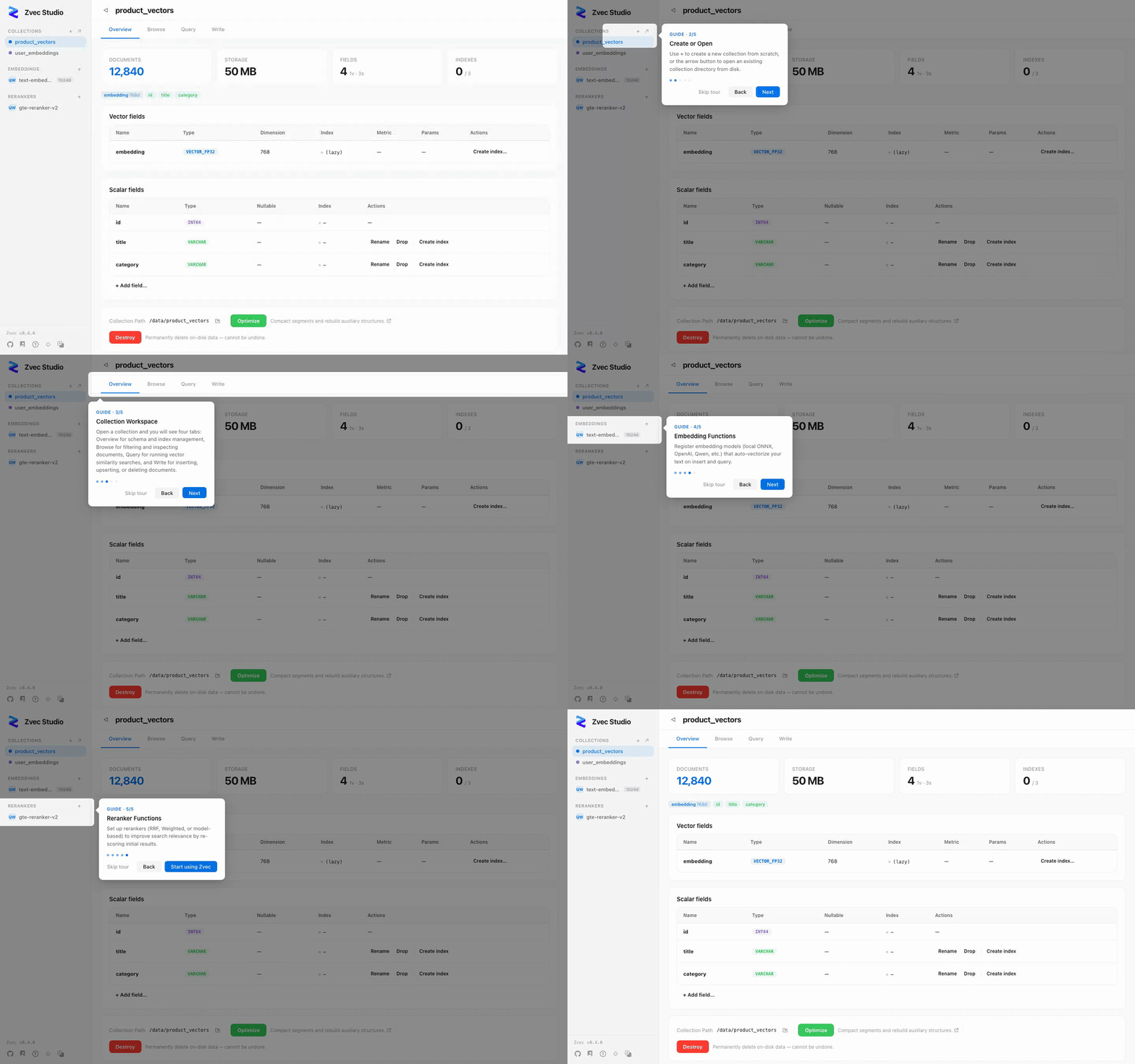
Visual management tool for the Zvec embedded vector database
Browse data, test queries, and manage schemas — without writing code.




📦 Installation
Option 1: pip (recommended for developers)
Requires Python 3.10 – 3.14.
pip install zvec-studio
zvec-studio
Opens http://127.0.0.1:7860 in your browser.
Need embedding & reranking? Install with the
[ai]extra to enable built-in embedding & reranking functions:pip install zvec-studio[ai]
Option 2: Desktop download (experimental)
Grab the installer for your platform from GitHub Releases:
| Platform | Architectures | Installer |
|---|---|---|
| macOS | Apple Silicon (arm64) | .dmg |
| Linux | x86_64, arm64 | .deb / .AppImage |
| Windows | x86_64 | .msi / .exe |
Double-click to run — no Python needed.
Option 3: From source
git clone https://github.com/zvec-ai/zvec-studio.git
cd zvec-studio
make install    # install Node deps + backend uv environment
make dev        # starts backend + frontend dev servers
Need embedding & reranking?
make installdoes NOT install AI runtime dependencies (sentence-transformers,dashscope, etc.) to keep CI fast. Runmake install.aiinstead if you want to use built-in functions likelocal-dense,bm25, ordashscope.
Prerequisites: Node.js ≥ 20, pnpm ≥ 9, Python ≥ 3.10, uv, Rust (desktop only). See Contributing for the full dev setup guide.
⚡ Quick Start
- Create a collection — Collections → Create. Define vector and scalar fields.
- Insert data — Paste JSON documents in the Write tab.
- Vector search — Paste a query vector in the Query tab, set TopK, hit Search.
- AI search — Register an embedding model, then search by typing text directly.
Full walkthrough → Getting Started
📖 Documentation
| Getting Started | 10-minute walkthrough from install to first search |
| Architecture | Request flow, module map, code index |
| API Reference | REST endpoints, request/response formats, error codes |
| Testing | Test strategy, self-verification loop, performance baselines |
| Packaging | PyInstaller + Tauri cross-platform packaging |
| Contributing | Dev setup, code style, commit workflow |
🗺️ Roadmap
| Version | Focus |
|---|---|
| v0.1.x (current) | Collection CRUD, schema evolution, document ops, vector search, AI extension, i18n, desktop app |
| v0.2.x | Data import/export, virtual scrolling, batch operations, advanced search |
| v0.3.x | Vector visualization (UMAP/t-SNE), clustering, AI Agent, SDK code generation |
| v0.4.x | VS Code extension, API Playground, webhooks & notifications |
🤝 Contributing
Contributions welcome! See CONTRIBUTING.md for details.
make dev        # Start dev servers
make verify     # Lint + typecheck + tests
📄 License
1 maintainer

Metadata
1 maintainer
Release files for zvec-studio 0.1.15
For a detailed explanation of source distributions (sdists) and built distributions (wheels), please see the package formats documentation.
Built distribution (wheel)
| File | Interpreter | ABI | Platform | Reset |
|---|---|---|---|---|
| zvec_studio-0.1.15-py3-none-any.whl | Python 3 | none | any | Details |
Release files / zvec_studio-0.1.15-py3-none-any.whl
| Download URL | zvec_studio-0.1.15-py3-none-any.whl |
|---|---|
| Size | 259.6 kB |
| Tags | Python 3 |
|
SHA-256 checksum How to use checksums |
2d0ec8043bee80d65c57957140d0ab2f2c3f2e71b14f81bb268577fed66f6092
|
|
BLAKE2b-256 checksum How to use checksums |
862e5562522cff8479e2b0ad440a3ab93f01a06b2d766eebec1cfdd7079d91a9
|
| Upload date | |
|
Uploaded using Trusted Publishing? What is trusted publishing? |
No |
| Uploaded via |
twine/7.0.0 CPython/3.10.20
|
Security for zvec-studio 0.1.15
Provenance
Provenance describes where a file came from. On PyPI, provenance is shared via attestations, which provide a verifiable record of the build or publishing details. View details, limitations and caveats.
No provenance found
None of the files in this release were uploaded with provenance metadata.
A note on package security
PyPI is a repository for distributing packages, not a service for auditing them. While third-party security researchers and our staff do their best to detect and remove malicious packages, PyPI cannot guarantee the quality, security or suitability of any given package.
To learn more about protecting yourself from malicious actors, visit our package security documentation.














