
🔥Flet-Easy









Flet-Easy is a package built as an add-on for Flet, designed for beginners what it does is to make Flet easier when building your apps, with a tidier and simpler code.
Features
- Easy to use (hence the name).
- Facilitates
fletevent handling. - Simple page routing (There are three ways) for whichever one suits you best. (
Docs) - App construction with numerous pages and custom flet configurations for desktop, mobile and web sites.
- Provides a better construction of your code, which can be scalable and easy to read (it adapts to your preferences, there are no limitations).
- Dynamic routing, customization in the routes for greater accuracy in sending data. (
Docs) - Routing protection (
Docs) - Custom Page 404 (
Docs) - Controlled data sharing between pages. (
Docs) - Asynchronous support.
- Middleware Support (in the app in general and in each of the pages). (
Docs) - JWT support for authentication sessions in the data parameter. (useful to control the time of sessions) (
Docs) - Working with other applications. (
Docs) - CLI to create app structure
FletEasy(fs init) (Docs) - Easy integration of
on_keyboard_eventin each of the pages. (Docs) - Use the percentage of the page width and height of the page with
on_resize. (Docs) ResponsiveControlsycontrol to make the app responsive, useful for desktop applications. (Docs)- Soporta Application Packaging para su distribución. (view)
📌Flet events it handles
on_route_change: Dynamic routingon_view_popon_keyboard_eventon_resizeon_error
💻 Ways to install
Ways to install
Install Flet-Easy Complete
[!NOTE] If you use the
fscli, it is important to havegitinstalled.
Installs all the dependencies to use, you can use all the functionalities provided by FletEasy
pip install flet-easy[all]
Install clean Flet-Easy
Requires installation of Flet >= 0.25.
pip install flet[all]
If you do not use: CLI-to-create-app
pip install flet-easy
Install FletEasy if you need to use Basic-JWT
pip install flet-easy[JWT]
💻Update
pip install flet-easy[all] --upgrade
🔥Flet-Easy app example
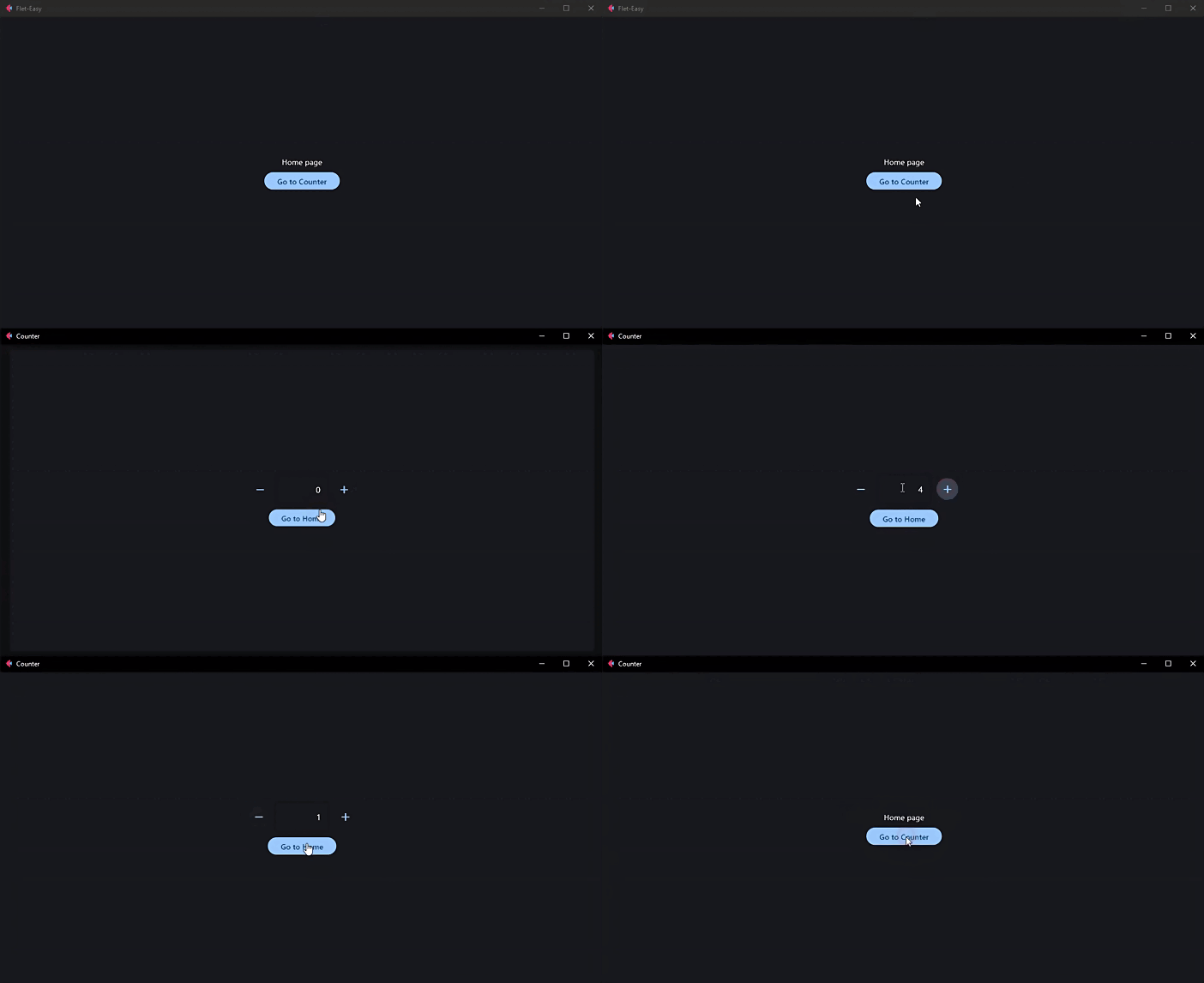
Here is an example of an application with 2 pages, "Home" and "Counter":
import flet as ft
import flet_easy as fs

app = fs.FletEasy(route_init="/flet-easy")

# We add a page
@app.page(route="/flet-easy", title="Flet-Easy")
def index_page(data: fs.Datasy):
    return ft.View(
        controls=[
            ft.Text("Home page"),
            ft.FilledButton("Go to Counter", on_click=data.go("/counter")),
        ],
        vertical_alignment="center",
        horizontal_alignment="center",
    )

# We add a second page
@app.page(route="/counter", title="Counter")
def counter_page(data: fs.Datasy):
    page = data.page

    txt_number = ft.TextField(value="0", text_align="right", width=100)

    def minus_click(e):
        txt_number.value = str(int(txt_number.value) - 1)
        page.update()

    def plus_click(e):
        txt_number.value = str(int(txt_number.value) + 1)
        page.update()

    return ft.View(
        controls=[
            ft.Row(
                [
                    ft.IconButton(ft.Icons.REMOVE, on_click=minus_click),
                    txt_number,
                    ft.IconButton(ft.Icons.ADD, on_click=plus_click),
                ],
                alignment="center",
            ),
            ft.FilledButton("Go to Home", on_click=data.go("/flet-easy")),
        ],
        vertical_alignment="center",
        horizontal_alignment="center",
    )

# We run the application
app.run()
🎬 Demo
🚀 How to use Flet-Easy?
[!IMPORTANT] 📑Documentation: https://daxexs.github.io/flet-easy/0.2.0/
👀 Code examples
🔎 Contribute to this project
Read the CONTRIBUTING.md file
🧾 License
1 maintainer

Metadata
1 maintainer
Release files for flet-easy 0.2.9
For a detailed explanation of source distributions (sdists) and built distributions (wheels), please see the package formats documentation.
Source distribution (sdist)
| File | Size | Uploaded | Provenance | |
|---|---|---|---|---|
| flet_easy-0.2.9.tar.gz | 12.9 MB | Without provenance | Details |
Built distribution (wheel)
| File | Interpreter | ABI | Platform | Reset |
|---|---|---|---|---|
| flet_easy-0.2.9-py3-none-any.whl | Python 3 | none | any | Details |
Total release size: 12.9 MB
Release files / flet_easy-0.2.9.tar.gz
| Download URL | flet_easy-0.2.9.tar.gz |
|---|---|
| Size | 12.9 MB |
| Tags | Source |
|
SHA-256 checksum How to use checksums |
83a914770c26be4f3c0b45769189727f7592535609b2e7a137ea361920a99269
|
|
BLAKE2b-256 checksum How to use checksums |
0c34b71a41f8da3c3f95c695864ca93bb8411fe8f472c72c093614aa033b5caf
|
| Upload date | |
|
Uploaded using Trusted Publishing? What is trusted publishing? |
No |
| Uploaded via |
uv/0.5.24
|
Release files / flet_easy-0.2.9-py3-none-any.whl
| Download URL | flet_easy-0.2.9-py3-none-any.whl |
|---|---|
| Size | 30.9 kB |
| Tags | Python 3 |
|
SHA-256 checksum How to use checksums |
539b14ef9216d955a154c91410fc5415ad2bf0acce976d82960b62ec34904aa5
|
|
BLAKE2b-256 checksum How to use checksums |
f442bf7d0c4524184dd093439439ad4e4a26b860d85dac7d9dc80d86250d7220
|
| Upload date | |
|
Uploaded using Trusted Publishing? What is trusted publishing? |
No |
| Uploaded via |
uv/0.5.24
|
Security for flet-easy 0.2.9
Provenance
Provenance describes where a file came from. On PyPI, provenance is shared via attestations, which provide a verifiable record of the build or publishing details. View details, limitations and caveats.
No provenance found
None of the files in this release were uploaded with provenance metadata.
A note on package security
PyPI is a repository for distributing packages, not a service for auditing them. While third-party security researchers and our staff do their best to detect and remove malicious packages, PyPI cannot guarantee the quality, security or suitability of any given package.
To learn more about protecting yourself from malicious actors, visit our package security documentation.














