
Slice Android style 9-patch images, resize and preview them interactively.
See https://developer.android.com/tools/help/draw9patch.html for a 9-patch description.

Installation
If you want to use the interactive viewer read the additional installation notes under "Interactive viewer".
$ pip install ninepatch
Python usage
from ninepatch import Ninepatch
ninepatch = Ninepatch('ninepatch_bubble.9.png')
print(ninepatch.content_area)  # content_area(left=23, top=20, right=27, bottom=59)

# render the image to a specific size
scaled_image = ninepatch.render(500, 400) # creates a new PIL image

# render the image so it's content area fits (width, height)
image_fit = ninepatch.render_fit(300, 200)

# render the image so it wraps another PIL image
image_to_wrap = Image.open('image_to_wrap.png')
wrapped_image = ninepatch.render_wrap(image_to_wrap)
Command line usage
Your image must be a PNG image with a transparent background. The scale and fill guide color must be 100% opaque black.
Scale and open image in a viewer (PIL image.show()):
$ ninepatch render ninepatch_bubble.9.png 300 300
Save the scaled image to a new file:
$ ninepatch render ninepatch_bubble.9.png 300 300 scaled.png

Render an image so it's content area fits a given width and height
$ ninepatch fit ninepatch_bubble.9.png 150 150 fit.png

Render an image to include another image
$ ninepatch wrap ninepatch_bubble.9.png image_to_wrap.png wrapped.png
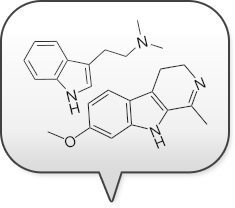
Slice the 9patch into tiles:
$ ninepatch slice ninepatch_bubble.9.png ./outputdir
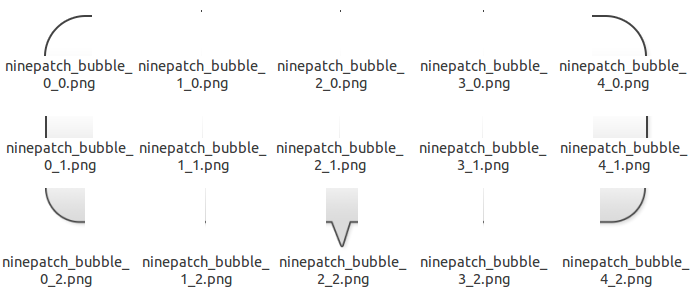
Slice the 9patch and return a JSON reprensentation of the slicing data:
$ ninepatch info ninepatch_bubble.9.png
{
    "marks": {
        "fill": {
            "x": [
                23,
                231
            ],
            "y": [
                20,
                82
            ]
        },
        "scale": {
            "x": [
                [
                    49,
                    49
                ],
                [
                    89,
                    196
                ]
            ],
            "y": [
                [
                    42,
                    63
                ]
            ]
        }
    },
    "size": [
        258,
        141
    ]
}
Interactive viewer
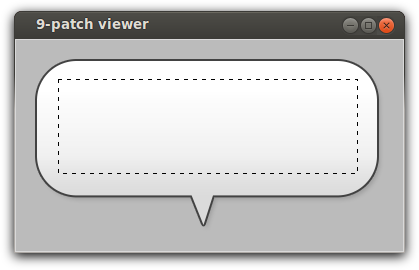
Interactively resize and preview an image in a Tkinter viewer:
$ ninepatch_viewer ninepatch_bubble.9.png

or just:

$ ninepatch_viewer

without arguments to see the demo image
If you want to use the viewer then python-pil.imagetk has to be installed.
On Ubuntu do:
$ sudo apt-get install python-pil.imagetk
If you want to install into a virtualenv, pip needs the following packages to compile PIL with Tkinter support:
$ sudo apt-get install python-tk tk8.6-dev
(You can trigger a recompile of PIL with: "pip install -I ninepatch")
Changelog
0.2.0
: - allow 0-size tiles, now works with pillow >=10.0.0
0.1.22
: - fixed error that prevented the ninepatch_viewer to work
0.1.21
: - fixed bug in wrap()
0.1.20
: - new commands fit and wrap courtesy of Nicolas Laurance
0.1.19
: - fixed error in caching
0.1.18
: - optional caching for slice() and render()
0.1.17
: - new method export_slices() - changed command line parameters (render/slice)
...
1 maintainer

Metadata
1 maintainer
Release files for ninepatch 0.2.0
For a detailed explanation of source distributions (sdists) and built distributions (wheels), please see the package formats documentation.
Built distribution (wheel)
| File | Interpreter | ABI | Platform | Actions Reset |
|---|---|---|---|---|
| ninepatch-0.2.0-py3-none-any.whl | Python 3 | none | any | Details for ninepatch-0.2.0-py3-none-any.whl |
Release files / ninepatch-0.2.0-py3-none-any.whl
| Download URL | ninepatch-0.2.0-py3-none-any.whl |
|---|---|
| Size | 9.1 kB |
| Tags | Python 3 |
|
SHA-256 checksum How to use checksums |
41f6a54de9d2efb0ed77a32e7e1336f790694579d052278bdff87f525c427102
|
|
BLAKE2b-256 checksum How to use checksums |
2b7badcfd12ab1b94a8573c259e6cf4dcd6416c955125f1cfcd92eb29cc0042b
|
| Upload date | |
|
Uploaded using Trusted Publishing? What is trusted publishing? |
No |
| Uploaded via |
twine/4.0.2 CPython/3.10.12
|
Security for ninepatch 0.2.0
Provenance
Provenance describes where a file came from. On PyPI, provenance is shared via attestations, which provide a verifiable record of the build or publishing details. View details, limitations and caveats.
No provenance found
None of the files in this release were uploaded with provenance metadata.
A note on package security
PyPI is a repository for distributing packages, not a service for auditing them. While third-party security researchers and our staff do their best to detect and remove malicious packages, PyPI cannot guarantee the quality, security or suitability of any given package.
To learn more about protecting yourself from malicious actors, visit our package security documentation.














