
Pyveplot
A nice way of visualizing complex networks are Hiveplots.
This library uses svgwrite to programmatically create images like the one bellow, a visualization of a Barabasi-Albert network, in which nodes are categorized by degree into high, medium and low.
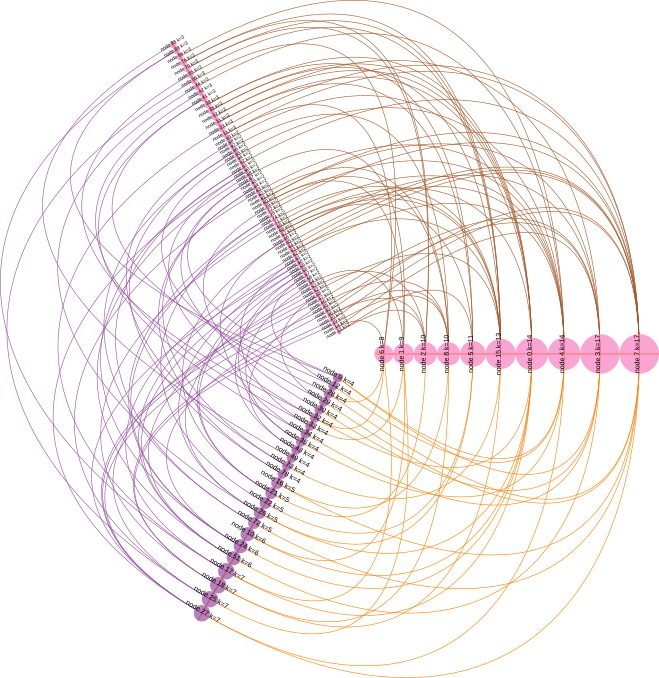
Here's the code that generated the figure:
    from pyveplot import Hiveplot, Axis, Node
    import networkx as nx
    import random

    c = ['#e41a1c', '#377eb8', '#4daf4a',
         '#984ea3', '#ff7f00', '#ffff33',
         '#a65628', '#f781bf', '#999999',]

    # create hiveplot object
    h = Hiveplot()

    # create three axes, spaced at 120 degrees from each other
    h.axes = [Axis(start=20, angle=0,
                   stroke=random.choice(c), stroke_width=1.1),
              Axis(start=20, angle=120,
                   stroke=random.choice(c), stroke_width=1.1),
              Axis(start=20, angle=120 + 120,
                   stroke=random.choice(c), stroke_width=1.1)
              ]

    # create a random Barabasi-Albert network
    g = nx.barabasi_albert_graph(100, 2)

    # sort nodes by degree
    k = list(nx.degree(g))
    k.sort(key=lambda tup: tup[1])

    # categorize them as high, medium and low degree
    hi_deg = [v[0] for v in k if v[1] > 7]
    md_deg = [v[0] for v in k if v[1] > 3 and v[1] <= 7]
    lo_deg = [v[0] for v in k if v[1] <= 3]

    # place these nodes into our three axes
    for axis, nodes in zip(h.axes,
                           [hi_deg, md_deg, lo_deg]):
        circle_color = random.choice(c)
        for v in nodes:
            # create node object
            node = Node(radius=g.degree(v),
                        label="node %s k=%s" % (v, g.degree(v)))
            # add it to axis
            axis.add_node(v, node)
            # once it has x, y coordinates, add a circle
            node.add_circle(fill=circle_color, stroke=circle_color,
                            stroke_width=0.1, fill_opacity=0.7)
            if axis.angle < 180:
                orientation = -1
                scale = 0.6
            else:
                orientation = 1
                scale = 0.35
            # also add a label
            node.add_label("node %s k=%s" % (v, g.degree(v)),
                           angle=axis.angle + 90 * orientation,
                           scale=scale)

    # iterate through axes, from left to right
    for n in range(-1, len(h.axes) - 1):
        curve_color = random.choice(c)
        # draw curves between nodes connected by edges in network
        h.connect_axes(h.axes[n],
                       h.axes[n+1],
                       g.edges,
                       stroke_width=0.5,
                       stroke=curve_color)

    # save output
    h.save('ba_hiveplot.svg')
Installation
Install library::
$ pip install pyveplot
2 maintainers


Metadata
2 maintainers
Release files for pyveplot 1.0.2
For a detailed explanation of source distributions (sdists) and built distributions (wheels), please see the package formats documentation.
Source distribution (sdist)
| File | Size | Uploaded | Provenance | |
|---|---|---|---|---|
| pyveplot-1.0.2.tar.gz | 5.0 kB | Without provenance | Details |
Built distribution (wheel)
| File | Interpreter | ABI | Platform | Reset |
|---|---|---|---|---|
| pyveplot-1.0.2-py3-none-any.whl | Python 3 | none | any | Details |
Total release size: 22.4 kB
Release files / pyveplot-1.0.2.tar.gz
| Download URL | pyveplot-1.0.2.tar.gz |
|---|---|
| Size | 5.0 kB |
| Tags | Source |
|
SHA-256 checksum How to use checksums |
3b60cb3703cb327615a69e192d96256808dfb5682e4e2f75b20f248661381a0c
|
|
BLAKE2b-256 checksum How to use checksums |
89163c2d67f0f3c1c8ebffca391ab60091cbf7486511d99b732b69db25df41c6
|
| Upload date | |
|
Uploaded using Trusted Publishing? What is trusted publishing? |
No |
| Uploaded via |
twine/3.1.1 pkginfo/1.5.0.1 requests/2.22.0 setuptools/42.0.2 requests-toolbelt/0.9.1 tqdm/4.40.2 CPython/3.6.9
|
Release files / pyveplot-1.0.2-py3-none-any.whl
| Download URL | pyveplot-1.0.2-py3-none-any.whl |
|---|---|
| Size | 17.4 kB |
| Tags | Python 3 |
|
SHA-256 checksum How to use checksums |
2c75ca289422ed296807d596107a29e1a91781c916a11d9167046dac7a7c023a
|
|
BLAKE2b-256 checksum How to use checksums |
cbb9b387c86fb6e8eed08ed9c83dc3a2200f1840838c911f1bfb229e7eafff3b
|
| Upload date | |
|
Uploaded using Trusted Publishing? What is trusted publishing? |
No |
| Uploaded via |
twine/3.1.1 pkginfo/1.5.0.1 requests/2.22.0 setuptools/42.0.2 requests-toolbelt/0.9.1 tqdm/4.40.2 CPython/3.6.9
|
Security for pyveplot 1.0.2
Provenance
Provenance describes where a file came from. On PyPI, provenance is shared via attestations, which provide a verifiable record of the build or publishing details. View details, limitations and caveats.
No provenance found
None of the files in this release were uploaded with provenance metadata.
A note on package security
PyPI is a repository for distributing packages, not a service for auditing them. While third-party security researchers and our staff do their best to detect and remove malicious packages, PyPI cannot guarantee the quality, security or suitability of any given package.
To learn more about protecting yourself from malicious actors, visit our package security documentation.














